
.svg)

Year End Accounting Checklist: Step-by-Step Guide

Ask questions, get summaries, or uncover key takeaways from this article.
Blog Summary / Key Takeaways
- A year-end close works best when review starts before year-end.
- Reconcile the Balance Sheet first using consistent reconciliation procedures. Then review the P&L.
- Require support links and reviewer sign-off for every Balance Sheet account.
- Use a week-by-week year end close timeline to reduce last-minute work.
- Standardize an accounting checklist template across entities or clients.
- Use gates. Do not publish “final” statements until balances make sense.
What This Checklist Is (And Who It’s For)
This is a practical accounting year end checklist for teams that close in QuickBooks Online or Xero, built on strong monthly close procedures. It also fits accounting and bookkeeping firms that run multiple closes across many clients or entities.
You will get three things:
- A step-by-step year end accounting checklist with review built in
- A week-by-week year end close timeline you can assign and track
- A reusable year end accounting checklist template you can copy into a sheet or workflow tool
Year-end close breaks when review comes last. For example, a controller publishes “final” financials. Then a reviewer finds unreconciled clearing accounts and misclassified expenses. The team reopens the period and reworks entries. That cycle wastes days.
This year end checklist for accounting avoids that by designing the close around review outcomes, not task completion.
What Is a Year End Accounting Checklist?
A year-end accounting checklist is a structured list of reconciliations, adjusting entries, review steps, and reporting tasks used to finalize the books and produce reliable year-end financial statements. It also defines required support so the work stays tax- and audit-ready.
Primary outcomes:
- Clean cutoff for revenue and expenses
- Reconciled Balance Sheet with clear support
- A documented close process you can repeat next year
Year End Accounting Checklist vs. Year-End Close Checklist (Are They Different?)
A year end accounting checklist focuses on tasks, validations, and the support package. A year end close checklist (or year end closing checklist) focuses on the sequence to finalize, lock, and report.
Most teams blend both. They reconcile and adjust while they move toward locking the period. The difference still matters. “Closed” does not mean “reviewed.”
What Is the Year End Close Process? (High-Level Stages)
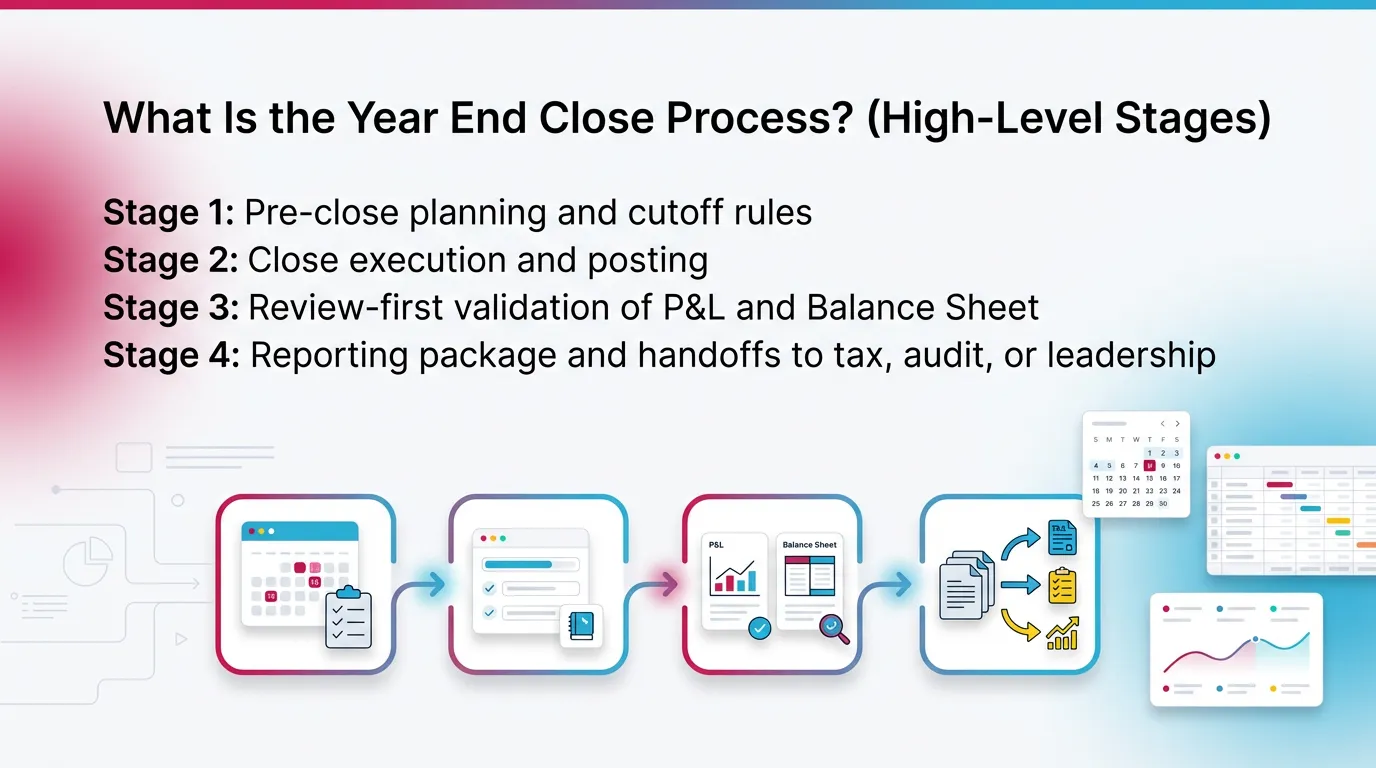
The year end close process usually follows four stages:
- Stage 1: Pre-close planning and cutoff rules
- Stage 2: Close execution and posting
- Stage 3: Review-first validation of P&L and Balance Sheet
- Stage 4: Reporting package and handoffs to tax, audit, or leadership
When teams compress Stage 3, problems surface after reporting. Therefore the fix requires reopen, reclass, and rerun.
Year End Close Timeline (Week-by-Week Close Plan)
.webp)
Goal: turn “December chaos” into a controlled, reviewable close. This year end close timeline assumes a calendar year-end. Adjust weeks for fiscal year-ends.
6–8 Weeks Before Year-End: Pre-Close Readiness
- Confirm close calendar, owners, and SLAs
- Update recurring schedules
- depreciation
- payroll accrual logic
- prepaids and amortization
- Verify data feeds and connections
- bank and credit card feeds
- POS and merchant processors
- payroll tools
- bill pay and expense tools
- Identify high-risk areas
- revenue cutoff
- inventory cutoff
- deferred revenue
- debt covenants and reporting needs
Practical tip from the field: set a “last day to request new GL accounts.”
Late COA changes break mapping and trend review.
3–4 Weeks Before Year End: Cutoff Preparation + Evidence Collection
- Lock policies
- revenue recognition rules
- expense cutoff rules
- capitalization thresholds
- Start collecting support early
- loan statements and amort schedules
- lease schedules and approvals
- fixed asset roll-forward
- sales tax filings and portal reports
- payroll filings and quarterly returns
- merchant statements and chargeback logs
- Run a preliminary flux review
- compare YTD vs prior year
- flag spikes and reversals
- find miscoded expenses now
This early review reduces “surprise” adjusting entries in January.
Final Week of the Year: Cutoff Execution
- Communicate cutoff dates
- AP invoice submission deadline
- employee expense deadlines
- AR cutoff rules and shipment dates
- Confirm pending large activity
- customer credits and refunds
- write-offs and disputes
- large vendor bills not received
- Document known estimates
- bonus and commission accrual inputs
- legal or warranty reserves if used
- inventory adjustments in process
Write down the estimate owner and source. That note saves time later.
Week 1 After Year End: Close the Books (Core Close)
- Post standard close entries
- accruals and deferrals
- depreciation
- amortization
- Reconcile cash and high-volume clearing accounts first
- Prepare first-pass financials for review
- Balance Sheet
- Profit & Loss
- Trial Balance
Cash-first works because many other issues flow through cash.
Week 2 After Year End: Review + Corrections + Final Reporting Package
- Perform account-level Balance Sheet tie-outs
- Resolve review findings and post corrections
- Lock and publish final financials
- Deliver the year-end package
- tax preparer
- leadership
- finance partners
Step-by-Step Year End Accounting Tasks (The Complete Checklist)
Organize your year end accounting tasks by what must be true at year-end (and align recurring work with a month-end close checklist). Do not organize by who likes which tasks. Truth beats preference at year-end.
1) Close Prep: Confirm Scope, Rules, and Access
- Confirm scope
- entities and business units
- classes and locations (QBO)
- tracking categories (Xero)
- departments and cost centers
- multi-currency settings
- intercompany expectations
- Review chart of accounts changes during the year
- confirm mapping and rollups
- confirm consistent naming
- Confirm posting controls
- who can post journals
- who approves entries
- who can lock periods
If you run multiple clients, write scope in the close kickoff note.
That prevents “we thought you handled Entity B” failures.
2) Books Hygiene: Clean Up the Ledger Before You Reconcile
- Review duplicates
- duplicate vendor bills
- duplicate bank feed matches
- Clear uncategorized activity
- Uncategorized Expense
- Ask My Accountant
- Triage suspense and clearing accounts
- “to be coded” accounts
- undeposited funds issues
- payment processor clearing
- Standardize vendor and customer names
- helps 1099 preparation
- reduces duplicate records
Garbage in still creates garbage out at year-end. Clean first.
3) Reconciliations (Balance Sheet-First)
Cash and Bank Reconciliations
- Reconcile every bank account to the statement using bank reconciliation best practices.
- Review uncleared items
- stale checks
- old deposits in transit
- Validate transfers
- no double-counted withdrawals
- no missing matching entry
Use the bank statement date, not the download date.
That protects your cutoff.
Credit Cards and Expense Platforms
- Reconcile credit cards to statements
- Validate employee reimbursements
- match reports to liabilities
- confirm reimbursements paid
- Review expense tool clearing accounts
- missing receipts workflows
- pending approvals that never posted
Accounts Receivable (AR)
- Review AR aging
- disputes and short pays
- old credits sitting open
- unapplied cash
- Confirm cutoff
- invoiced vs delivered/performed
- returns and refunds timing
- Evaluate allowance policy if used
- document method
- document any change from prior year
If you run QBO or Xero, export AR aging to PDF for the support pack.
Accounts Payable (AP)
- Review AP aging
- old bills and duplicates
- missing vendor credits
- Confirm cutoff
- bills received but not entered
- recurring bills posted twice
- Accrue missing invoices
- utilities
- contractors
- professional fees
A strong AP cutoff reduces January “surprise” expenses.
Payroll and Payroll Liabilities
- Tie payroll clearing and liabilities to payroll reports
- Confirm year-end payroll accrual
- final pay period that crosses year-end
- Validate benefits and PTO accruals if tracked
Use payroll provider reports as your source of truth.
For example, use ADP, Gusto, or Paychex liability reports.
Do not rely on GL alone.
Inventory (If Applicable)
- Confirm count method and cutoff
- receiving cutoff
- shipping cutoff
- Reconcile inventory subledger to GL
- Review adjustments
- shrinkage
- write-downs
- obsolete reserve inputs
If you use perpetual inventory in an external tool, tie that report to GL.
Document the exact report date and filters.
Fixed Assets + Depreciation
- Update additions and disposals
- Reconcile fixed asset roll-forward to GL
- Post depreciation
- Confirm capitalization thresholds
If your CPA asks, you should answer two questions fast:
“What did you buy?” and “Where is it in the GL?”
Debt, Leases, and Interest
- Reconcile loan balances to lender statements
- Post interest accruals and amortization
- Confirm lease schedules and support
Lease accounting rules can get complex.
Even small teams should keep clean schedules and approvals.
Taxes Payable (Sales Tax, VAT/GST, Property Tax)
- Reconcile tax payable accounts to filings
- Confirm filing periods align with GL cutoff
- Save filing confirmations and payment proof
Sales tax rules change often by state. Keep portal evidence.
State guidance varies, so use your state DOR site when needed.
4) Accruals, Deferrals, and Adjusting Entries (With Controls)
- Record accrued expenses and other accrual adjustments.
- utilities
- contractors
- SaaS and subscriptions
- professional fees
- Record prepaids and amortization
- insurance
- annual software
- retainers
- Record deferred revenue or revenue recognition adjustments
- Record bonus and commission accruals if applicable
Common year-end adjusting entries:
- payroll accrual
- utilities accrual
- prepaid amortization
- depreciation
- interest accrual
- deferred revenue adjustment
Control tip: require a preparer note and a reviewer note for every JE.
Also attach the support or link it in your close tool.
5) P&L Review: Reasonableness + Flux Analysis
- Compare current year vs prior year
- monthly trend
- full-year totals
- Identify anomalies
- margin swings
- unusual spikes
- reversals
- negative expense balances
- Validate key expense categories
- contractors
- advertising
- travel
- software
- repairs and maintenance
A practical example:
If Software expense rises 40% but headcount stays flat, review vendors.
You may find duplicate subscriptions or misclassified tools.
For analytics context, you can benchmark using industry data.
6) Balance Sheet Review: “Prove Every Balance”
Every Balance Sheet account needs proof. That proof must be easy to find.
This rule turns a close into a process instead of a memory test.
Each Balance Sheet account must have:
- Reconciliation method
- statement match
- tie-out to subledger
- roll-forward schedule
- Support location
- link to statement or report
- file path naming that stays consistent
- Reviewer sign-off
- who reviewed
- when they reviewed
- what they flagged
Also validate:
- equity activity
- retained earnings roll-forward
- any unusual owner distributions or contributions
If you support multiple entities, require the same tie-out format.
Consistency speeds review.
7) Intercompany and Multi-Entity (If Applicable)
- Confirm intercompany balances net to zero across entities
- Validate elimination entries and allocation logic
- Document allocation basis
- headcount
- revenue
- square footage
- usage metrics
Write down the basis and keep it unchanged during the year when possible.
If you change it, document why and when.
8) Financial Statements and Reporting Package
Finalize core statements:
- Balance Sheet
- Profit & Loss
- Cash Flow statement if used or required
Add management schedules when needed:
- budget vs actual
- department or class reporting
- KPI schedules used for decisions
Minimum reporting exports most teams need at year-end:
- trial balance
- general ledger detail
- AR aging
- AP aging
9) Year-End Lock, Close, and Backup
- Lock the accounting period in your system
- Export final reports
- final financials
- trial balance
- GL detail
- Archive the support set
- confirm every tie-out links to evidence
- confirm reviewer sign-offs exist
Locking matters. It prevents “helpful” late edits.
Those edits break your tie-outs and your tax package.
Year End Financial Close Checklist (Condensed “One-Page” Version)
.webp)
- Reconcile all cash, credit cards, and clearing accounts.
- Reconcile AR and AP and resolve unapplied or duplicate items.
- Post accruals, deferrals, depreciation, and other adjusting entries.
- Perform a P&L flux review and Balance Sheet tie-outs.
- Finalize statements and the year-end support package.
- Lock the period and archive reports and documentation.
This one-page year end financial close checklist works best as a gate list.
Do not move to the next step until the prior step looks right.
Year End Accounting Checklist Template
Use this year end accounting checklist template as a spreadsheet.
It also works as an intake format for a close workflow system.
Template Fields
- Task / Account
- Category (Reconcile, Adjust, Review, Report, Archive)
- Owner
- Reviewer/Approver
- Due date (supports the year end close timeline)
- Status
- Support link
- Notes / exceptions
Template Rows
- Cash and bank reconciliations
- AR and AP
- Payroll liabilities
- Prepaids and accruals
- Fixed assets and depreciation
- Debt, leases, and interest
- Taxes payable
- P&L flux review
- Balance Sheet tie-out
- Reporting package
- Period lock and archive
Best Practices for a Predictable Year-End Close (What Consistently Works)
Build the Close Around Review, Not Tasks
Start review earlier (see close process best practices). Do not wait for “final numbers.”
Run pre-close flux checks in November or early December.
Define “review complete” at the account level. For example:
- tie-out exists
- support links work
- variance explanations exist
- reviewer sign-off recorded
Standardize Support and Tie-Outs
Use one support location and one naming convention, especially if you’re automating your financial close.
For example: Client_Entity/FY2025/12 YE Close/Bank/AccountName.pdf
Use tie-out formats that survive staff turnover.
A tie-out should answer: what, why, and where.
Use Gates: Nothing Moves Forward Until the Accounts Make Sense
Use gates to reduce rework. For example:
- “Cash reconciled” before “final P&L review”
- “All Balance Sheet accounts supported” before “publish final financials”
- “Intercompany nets to zero” before “close sign-off”
Gates protect reviewers. They also protect your team’s time.
Design for Repeatability Across Clients/Entities
Use one standard end of year accounting checklist.
Then add controlled variations by industry or size.
Also set clear ownership and approval paths.
Do not bottleneck review on one senior person.
Common Year End Close Mistakes (And the Failure Modes They Create)
- Reconciling only bank accounts
- Failure mode: hidden mispostings sit in clearing accounts
- Leaving suspense or unmapped accounts for “later”
- Failure mode: last-minute reclasses break trends and review
- No documented cutoff rules
- Failure mode: revenue and expense timing errors
- Review happens after reporting drafts
- Failure mode: “final” becomes multiple rounds
- No audit trail for support
- Failure mode: painful tax questions and lost credibility
I see one pattern often in multi-client firms.
A preparer finishes tasks. A partner reviews too late.
Then the team scrambles to fix 20 small items at once.
A review-first close prevents that pileup.
How Xenett Helps Teams Operationalize a Review-First Year-End Close
Xenett helps teams run a review-first year-end close across many entities. It works as an operational layer over your close. It does not act as an audit tool and it does not provide audit services.
Close Task and Checklist Management (Without Making Workflow the Point)
Xenett turns your year end accounting checklist template into structured work. It ties tasks to outcomes and owners. It also keeps recurring year end accounting tasks consistent across clients or entities.
You can standardize your close list once. Then reuse it with control.
This helps when you manage 10, 30, or 100 closes at once.
Review and Approval Workflows Grounded in Account-Level Findings
Xenett supports account-level P&L and Balance Sheet review.
Reviewers do not need to scan blindly.
Teams can surface anomalies and gaps earlier, such as:
- missing reconciliations
- unexplained variances
- incomplete support links
- entries posted after review starts
Approvals connect to “this account makes sense.”
They do not connect to “task checked.”
Visibility Into Close Status and Bottlenecks
Xenett gives leaders a clear view of close status.
It also shows what truly blocks close.
For example, you can spot that close delays come from:
- one unreconciled payroll liability account
- a stuck AR cleanup item
- an intercompany mismatch
That visibility helps you reassign work fast.
FAQ: Year End Accounting Checklist
What Is the End of the Year Accounting Checklist?
A year-end accounting checklist is a structured list of reconciliations, adjusting entries, review steps, and reporting tasks used to finalize the books and produce reliable year-end financial statements. It also defines what support you must retain.
What Should Be Done Before Year-End Close?
Reconcile key Balance Sheet accounts, confirm cutoff rules, collect support documents, and run a preliminary P&L and Balance Sheet review. These steps catch issues before final entries and reduce rework.
What Are the Most Important Year End Accounting Tasks?
Cash reconciliations, AR and AP cleanup, payroll liability tie-outs, accruals and deferrals, fixed asset updates, Balance Sheet tie-outs, and a final P&L flux review. These tasks protect accuracy and cutoff.
What Is a Realistic Year End Close Timeline?
Most teams start prep 6–8 weeks before year-end, execute cutoff in the final week, close in week 1 after year-end, and complete review and final reporting in week 2. Complex entities may need longer.
What Reports Should You Run at Year End?
Run a Balance Sheet, Profit & Loss, Trial Balance, and General Ledger detail. Also run AR aging and AP aging. Add bank reconciliation reports and payroll liability reports as needed.
How Do You Make a Year End Close Checklist Repeatable Across Multiple Clients?
Use a standardized checklist template, define account-level review standards, require support links for each reconciliation, and require reviewer sign-off gates before final reporting. Track work in one place to avoid missed steps.
Summary Checklist
Prep → Reconcile → Adjust → Review → Report → Lock/Archive
Minimum viable year-end close:
- cash and credit cards reconciled
- AR and AP cleaned up
- key accruals posted
- basic P&L and Balance Sheet review completed
- statements exported and period locked
Full year-end package:
- all Balance Sheet accounts tied out with support
- documented cutoff and estimate log
- intercompany and allocations documented
- management schedules included
- complete archive with reviewer sign-offs
If you want fewer surprises, start with review. Then enforce gates.
Use the year end close checklist to control sequence.
Use the accounting year end checklist to prove the numbers.
Conclusion
Copy the year end accounting checklist template into your close today. Then map it to your owners and dates by establishing your close timeline. If you manage many entities or clients, consider running the process in a tool like Xenett so review, support, and sign-off stay consistent year after year, while reducing your close cycle time.


.jpg)

