.svg)

Faster Month-End Close: 12 Proven Ways to Close the Books Faster

Ask questions, get summaries, or uncover key takeaways from this article.
Blog Summary / Key Takeaways
- Faster closes come from early issue detection, not more effort on day 6.
- A 5 day month end close fits many teams. A 3 day month end close needs tight inputs.
- Standardize cutoffs, review rules, and evidence. Then track findings to closure.
- Month end close optimization works best when review drives the work.
- Tools like Xenett help teams manage review, tasks, and visibility in one place.
What This Guide Covers
You want to shorten month end close without losing control. You also want fewer surprises and less rework.
This guide fits:
- Accounting teams and firms with QBO or Xero.
- Controllers and managers who own timelines and quality.
- Firms managing many clients with similar close steps.
You will get:
- Clear benchmarks for close speed.
- A practical framework to reduce month end close time.
- A 10-step playbook that shows how to close the books faster.
- Checklists you can copy and paste.
- Common failure points and fixes.
- Automation ideas that improve month end close efficiency.
What Is a Month-End Close (And What “Faster” Actually Means)?
Month-End Close
Month-end close means you make the ledger review-ready as part of the broader month-end close process. You reconcile key accounts, post needed entries, and complete review so reporting can start with confidence.
It includes adjustments, tie-outs, and review sign-off. It ends when your numbers hold up under scrutiny.
Faster Month-End Close (Not Just “Finishing Sooner”)
A Faster Month-End Close means you hit a predictable finish date with fewer late corrections. You keep review standards consistent, therefore you avoid “final-final” versions.
Speed comes from early detection. It does not come from skipping controls.
What’s Included vs. Not Included in “Close Time”
Included in close time:
- Subledger cutoffs and completeness checks.
- Reconciliations and tie-outs.
- Accruals and recurring entries.
- Review and approvals.
- Variance explanations and package readiness.
Not always included:
- Board decks and narrative reporting.
- External reporting timelines.
- Audit fieldwork and PBC support.
Benchmarks: What’s a Good Close Time (3-Day vs. 5-Day vs. 10-Day)?
What Drives Close Speed (Most Teams Underestimate This)
Most teams focus on close-week effort. However, speed depends on what happens before day 0.
Three drivers matter most:
- Upstream readiness. Cutoffs work only when people follow them.
- Account-level review quality. Early review finds issues before they spread.
- Standardization. Repeatable steps produce repeatable outcomes.
In practice, the fastest teams do less on close week. They do more before it.
Set a Realistic Target Close Time
A 5 day month end close works for many teams. It balances speed and control. It also leaves time for clean review and variance notes.
A 3 day month end close becomes realistic when:
- Source systems post on time, every time.
- Coding rules handle most volume.
- You review by exception, not by scanning everything.
- You avoid heavy manual journals at month-end.
A 3-day close becomes risky when:
- You still chase missing bills on day 3.
- One person holds all approvals.
- You post many late accruals after review.
If that describes you, aim for 5 days first. Then tighten upstream steps.
The Root Cause of Slow Closes: Late Discovery, Not Lack of Effort
The “Close Bottleneck Map” (Where Time Actually Goes)
Most time loss comes from waiting and rework. Teams often “work hard” but still finish late.
Bottlenecks usually sit here:
- Intake delays for statements, bills, and payroll reports.
- Reconciliation backlogs on key balance sheet accounts—look for ways to streamline your reconciliation process.
- Adjustment clusters near the end of the close.
- Review congestion while everyone waits on one reviewer.
- Rework loops when changes create new variances.
Common Patterns That Inflate Close Time
These patterns keep showing up across teams and firms.
- “Reconciled” but not reviewed. The tie-out exists. The logic does not.
- Flux explanations start after numbers look “done.” That creates late changes.
- Exceptions live in someone’s head. Then they disappear or repeat.
A practical example from firm work:
A team reconciled cash quickly every month. They still closed in 10 days.
The issue sat in revenue cutoffs and merchant deposits. Review happened late.
When cash review moved to day 1, the team found deposit timing issues early.
Close moved from day 10 to day 6 in two months. Accuracy improved.
Speed followed review timing, not overtime.
Month-End Close Optimization Framework: The 5 Levers That Consistently Shorten Close Time
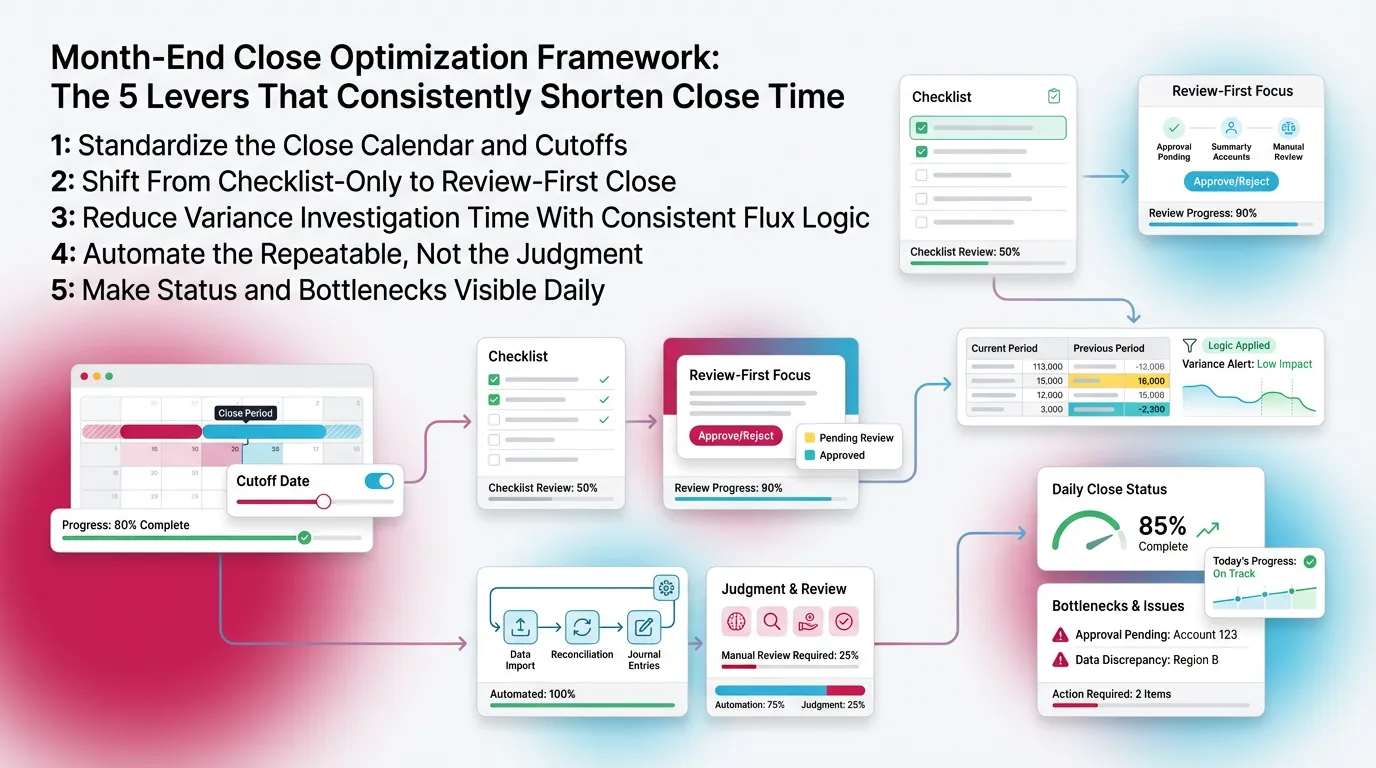
You shorten close time by pulling five levers. Each lever reduces surprises. Each lever protects accuracy.
Lever 1: Standardize the Close Calendar and Cutoffs
Start with the calendar. Then enforce cutoffs.
Do this:
- Define AP cutoff. Define late invoice handling.
- Define AR cutoff. Define cash application timing.
- Define payroll cutoff. Confirm files and dates.
- Define revenue inputs and approval timing.
Add a “close readiness” gate before day 0:
- Confirm bank feeds and statements.
- Confirm payroll reports.
- Confirm large vendor invoices.
- Confirm key operational data.
When you gate inputs, you speed up month end close work later.
Lever 2: Shift From Checklist-Only to Review-First Close
Run review early. Do not wait until tasks finish.
Define “review complete” at the account level:
- Balance sheet accounts reconcile and make sense.
- P&L accounts tie to drivers and follow expected patterns.
- Variances follow the same threshold rules every month.
Review-first helps because it finds issues while changes stay small.
It also prevents the “we will explain it later” problem.
Lever 3: Reduce Variance Investigation Time With Consistent Flux Logic
Variance work eats time when logic changes by reviewer. Fix that.
Set thresholds:
- Use tighter thresholds for cash and revenue accounts.
- Use higher thresholds for small expense categories.
- Define percent and dollar triggers, not feelings.
Standardize the narrative:
- What changed.
- Why it changed.
- Whether it repeats next month.
- What you checked to confirm it.
When you standardize flux logic, you shorten month end close time fast.
Lever 4: Automate the Repeatable, Not the Judgment
Automate repeatable steps by automating repetitive accounting tasks. Keep judgment under human review.
Automate:
- Recurring journals with templates.
- Standard mapping and coding rules.
- Data pulls for merchant payouts and payroll.
- Reconciliation templates and evidence capture.
Keep judgment:
- Accrual reasonableness.
- Unusual transactions.
- Revenue cutoff decisions.
- Material classifications and reallocations.
Automation helps most when it reduces noise. Then review moves faster.
Lever 5: Make Status and Bottlenecks Visible Daily (Not at Day 6)
Track status daily. Do not wait for the close call on day 6.
You need visibility into:
- What finished.
- What remains blocked.
- What review found.
- Who owns each fix.
Avoid managing close in DMs and side emails. Those hide blockers.
Visibility supports real month end close optimization.
Step-by-Step: How to Close the Books Faster (A Practical 10-Step Close Playbook)
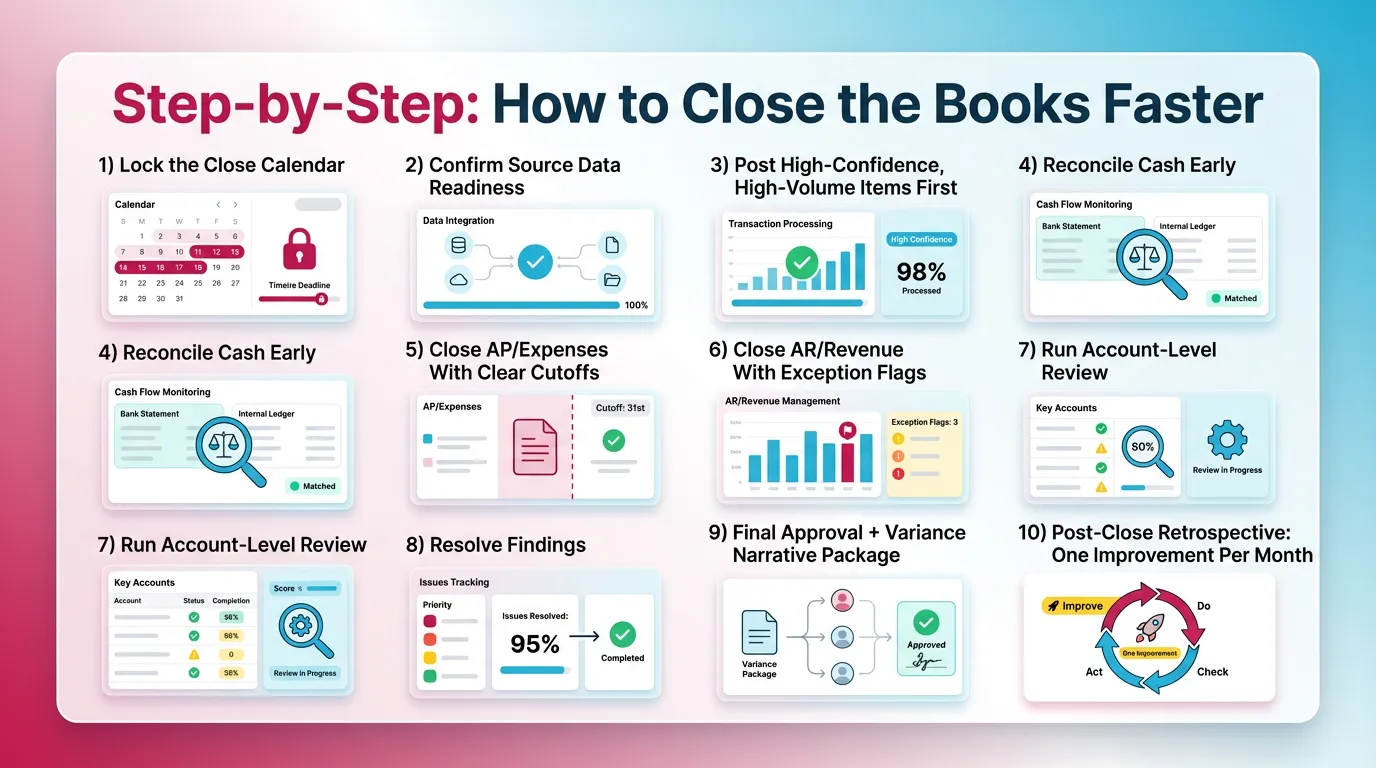
1) Lock the Close Calendar (Owners, Deadlines, Inputs)
A locked calendar makes close predictable. It also prevents last-minute debate.
Include:
- Task owners and backup owners.
- Input due dates by function.
- Escalation path when inputs run late.
Write deadlines in business days. Tie them to day 0.
2) Confirm Source Data Readiness (Before You Touch the GL)
Confirm inputs first. Then touch the GL.
Check:
- Bank feeds and statements.
- Payroll reports and liability detail.
- Bill capture and vendor statements.
- Merchant and payout reports.
If you skip this, you invite rework. Rework kills speed.
3) Post High-Confidence, High-Volume Items First
Post what you trust first. That reduces noise.
Examples:
- Recurring expenses with stable coding.
- Standard payroll entries.
- Depreciation from a fixed asset schedule.
When you post stable volume first, review can focus on exceptions.
4) Reconcile Cash Early (Then Use It to Catch Downstream Issues)
Reconcile cash on day 1 if possible. Cash shows problems fast.
Cash reconciliation catches:
- Missing deposits and payout timing gaps.
- Duplicate bill payments.
- Unrecorded fees and chargebacks.
- Transfers posted to the wrong period.
Treat cash as the integrity signal. Use it to guide what to check next.
5) Close AP/Expenses With Clear Cutoffs
Define how you handle late invoices. Then follow the policy.
Do this:
- Run an AP completeness check.
- Review large vendor activity and missing statements.
- Post accruals using the same support every month for managing accruals accurately.
Set evidence expectations:
- Vendor statement, PO receipt, or service confirmation.
- Clear accrual reversal logic next month.
Cutoffs speed the close because they prevent endless intake.
6) Close AR/Revenue With Exception Flags
Close AR and revenue by exception. Do not scan everything.
Flag these items:
- Unapplied cash and unusual deposits.
- Credit memos that spike at month-end.
- Aging anomalies and negative receivables.
- Cutoff items near month-end.
If you use QBO or Xero, export AR aging and sort by:
- New credits.
- Big swings.
- Old balances.
Exceptions tell you where to dig.
7) Run Account-Level Review (P&L + Balance Sheet)
Run review at the account level. Answer: “Does this make sense?”
For balance sheet:
- Reconcile and review support.
- Check aging and old reconciling items.
- Watch for unusual debit balances.
For P&L:
- Apply flux thresholds.
- Tie major accounts to drivers.
- Spot misclassifications and duplicates.
This step drives a faster month end close because it finds issues early.
8) Resolve Findings (Don’t “Move On” With Open Issues)
Resolve findings before you move forward. Open items multiply.
Use a simple rule:
- Every fix must tie to a documented finding.
- Every finding needs an owner and due date.
This prevents silent adjustments. It also improves auditability.
9) Final Approval + Variance Narrative Package
Approval should finish fast because review already happened.
Standardize:
- Who signs off on balance sheet.
- Who signs off on P&L.
- Who signs off on key estimates.
Use a consistent variance format:
- Top drivers.
- One-time items.
- Follow-ups needed next month.
10) Post-Close Retrospective: One Improvement Per Month
Pick one fix each month. Then make it stick.
Track:
- Top three recurring findings.
- Accounts that always run late.
- Inputs that always arrive after cutoff.
Remove one root cause per month. Close speed improves steadily.
Month-End Close Checklist
Core Close Checklist (Control + Speed Balanced)
Use this structured close checklist to balance speed and accuracy.
- Cash and key bank accounts reconciled + reviewed.
- AR reconciled to subledger or aging tie-out + exceptions resolved.
- AP completeness assessed + accruals posted per policy.
- Payroll reconciled + liabilities verified.
- Deferred and accrued revenue checks completed, when applicable.
- Intercompany cleared, when applicable.
- Fixed assets rollforward and depreciation reviewed.
- Balance sheet review done for unusual balances and aged items.
- P&L review done with flux thresholds and explanations.
- Final sign-off recorded with evidence trail.
“Day -3 to Day +5” Micro-Checklist (For a 5-Day Close)
A 5 day month end close works best when you shift work left.
Day -3 to Day -1:
- Confirm statement availability and bank feed health.
- Request missing vendor statements.
- Confirm payroll calendar and reports.
- Pre-book recurring entries where allowed.
Day 0 to Day 2:
- Post high-volume items.
- Reconcile cash.
- Start balance sheet recs with stable support.
Day 3 to Day 4:
- Run account-level review.
- Resolve findings and rerun impacted reports.
- Draft variance narratives.
Day 5:
- Final approvals.
- Package readiness check.
- Track improvements for next month.
Reduce Month-End Close Time by Eliminating Rework (The Highest-ROI Area)
Why Rework Happens
Rework happens when you discover issues late. It also happens when review standards change by reviewer.
Main causes:
- Findings appear after “final” reports circulate.
- Review expectations stay unclear.
- Support lives in email, not with the account.
- Ownership stays fuzzy for key accounts.
Rework creates new variances. Then you explain them twice.
The “Find → Fix → Verify” Loop
Use one loop every month. It keeps the close clean.
- Find: run the same review checks for each account.
- Fix: assign an owner and due date for each issue.
- Verify: confirm the fix resolves the original issue.
Verification matters. Without it, issues repeat and close stays slow.
Rework Triggers and Preventive Controls
Month-End Close Efficiency: Automation Ideas That Actually Help
Automation Candidates (High Impact, Low Risk)
Automate repeatable work first. That gives you faster wins.
Good candidates:
- Bank rules and standardized mapping.
- Recurring journals with controlled templates.
- Reconciliation templates with saved support.
- Exception-based reporting that highlights material change only.
If you use QBO or Xero, start with rules and recurring entries.
Those typically remove the most manual clicks.
What Not to Automate Blindly
Do not automate judgment without guardrails.
Avoid blind automation for:
- Accrual reasonableness decisions.
- Complex revenue and COGS timing.
- Material reclasses without review sign-off.
Automation should reduce work. It should not reduce accountability.
“Automation Readiness” Questions
Ask three questions before you automate anything:
- Is the input consistent?
- Is the decision rule stable?
- Is there a verification step?
Best Practices for a Faster, More Predictable Close (see best practices for closing the books)
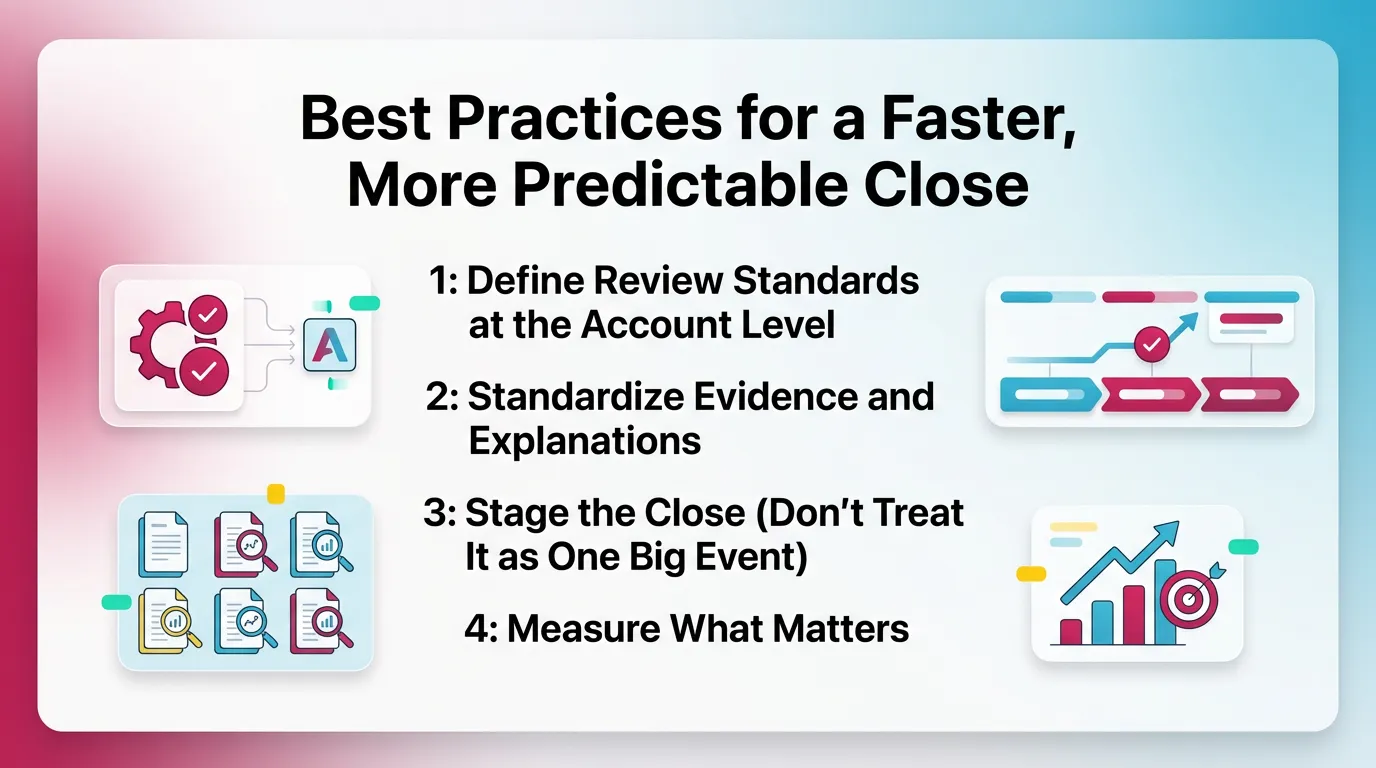
Best Practice 1: Define Review Standards at the Account Level
Define “normal” per account. Put it in writing.
For example:
- Cash should reconcile to the bank with dated support.
- Clearing accounts should net to zero or explain the balance.
- Payroll liabilities should tie to payroll reports.
Standards reduce reviewer debate. Debate slows the close.
Best Practice 2: Standardize Evidence and Explanations
Standardize where support lives and how people explain change.
Do this:
- Use one storage location and naming convention.
- Use the same variance template each month.
- Record sign-off in the same place every time.
Consistency supports speed. It also supports trust.
Best Practice 3: Stage the Close (Don’t Treat It as One Big Event)
Staging prevents day 4 pileups.
Use three stages:
- Pre-close. Get inputs and pre-book stable entries.
- Soft close. Reconcile and review early accounts.
- Hard close. Finish exceptions, approvals, and package readiness.
Staging is simple. It works.
Best Practice 4: Measure What Matters (KPIs That Improve Close Speed)
Track KPIs that change behavior.
Useful KPIs:
- Close cycle time from day 0 to sign-off.
- Percent of tasks done by target day.
- Number of review findings per close, trending over time.
- Rework rate, measured by post-review adjustments.
- Aging of open balance sheet items.
Common Mistakes That Slow Down Month-End Close Optimization
These mistakes block month end close optimization even in strong teams.
- You optimize task completion and ignore review quality.
- You run variance analysis after approvals, not during review.
- You allow undocumented exceptions to carry month to month.
- You rely on one expert reviewer to save the close.
- You chase a 3 day month end close without upstream discipline.
Fixing these mistakes often cuts days without adding headcount.
How Xenett Helps Teams Operationalize a Faster, Review-First Month-End Close
Xenett supports modern close execution in QBO and Xero environments. It acts as an operational layer for review, tasks, and visibility. It does not provide audit services and it is not an audit tool.
Review-First Structure That Reduces Late-Stage Surprises
Xenett supports account-level P&L and Balance Sheet review. Teams can flag anomalies, missing entries, reconciliation gaps, and unexpected flux early.
This helps you shift from “finish tasks then review” to “review drives the work.”
That shift often does more to reduce month end close time than automation.
Close Task and Checklist Management (Built Around Findings)
Xenett helps convert review findings into trackable close tasks. Each task can have an owner, due date, and context.
Teams can standardize recurring close checklists by entity. They can still keep exceptions visible, therefore nothing hides in email.
Review and Approval Workflows That Don’t Depend on Heroics
Xenett helps route accounts and findings for review in a consistent order. Teams can stage approvals by account group or risk level.
It also captures who reviewed what and when. It records what changed after.
That reduces last-minute confusion and re-approvals.
Visibility Into Close Status and Bottlenecks
Xenett helps you see close status daily. You can see which accounts stay open due to unresolved findings, not just “tasks pending.”
This visibility helps you spot recurring bottlenecks. For example, you can see:
- Accounts that always run late.
- Clients with repeat exceptions.
- Reviewers who carry too many approvals.
That supports ongoing month end close efficiency gains.
FAQ: Faster Month-End Close
How can I speed up month-end close?
Standardize cutoffs and inputs. Reconcile high-signal accounts early, especially cash. Run account-level review to find exceptions. Track findings to resolution with clear owners.
What is a realistic target: 3-day close or 5-day close?
A 5-day close fits many teams with disciplined cutoffs and standardized reviews. A 3-day close usually needs integrated data, few manual adjustments, and exception-based review.
What are the most common month-end close bottlenecks?
Late source documents, reconciliation backlogs, approval congestion, and rework after review. These issues slow close more than effort or staffing.
How do I reduce month-end close time without sacrificing accuracy?
Move review earlier. Define account-level standards and thresholds. Require every adjustment to tie to a documented finding. Faster closes come from fewer surprises, not fewer controls.
What should I automate first to shorten month-end close?
Start with repeatable work. Use bank rules, recurring journals, reconciliation templates, and exception-based reporting. Keep judgment decisions under reviewer control.
What are examples of month-end closing activities?
Common activities include collecting source data, posting recurring entries and accruals, reconciling cash and balance sheet accounts, running P&L and balance sheet review, resolving exceptions, and completing approvals.
What KPIs improve month-end close efficiency?
Track close cycle time, on-time completion rate, review findings per close, rework rate, and aging of unresolved balance sheet items. These KPIs drive better behavior.
Conclusion
You can build a Faster Month-End Close without trading away accuracy. Standardize inputs and cutoffs with financial close management strategies. Move review earlier. Track findings through fix and verification. Then remove one root cause each month.
If you want to operationalize this approach, document your review standards and run a review-first close next cycle. Then compare rework volume and cycle time to close the books efficiently each period. That simple test usually shows where you can shorten month end close fast.