.svg)

Year End Close: Process, Timeline & Best Practices

Ask questions, get summaries, or uncover key takeaways from this article.
Blog Summary / Key Takeaways
- A clean year end accounting close means reviewed financials with support. Not just a locked period.
- Start with the Balance Sheet. Reconcile first. Then review what the rec implies.
- Use clear cutoff rules. Most year-end issues come from timing and missing accruals.
- Treat the QuickBooks “close the books” feature as access control. Do it after review.
- Make the year end closing checklist evidence-based. Every entry needs support and sign-off.
- Use consistent review standards across entities and clients. It reduces rework next year.
What A “Clean” Year End Close Actually Means
Year-end close feels harder than month-end for a simple reason. The volume increases and the tolerance for loose ends drops. Cutoffs matter more. Taxes and lenders care. Auditors ask follow-ups. Owners want answers fast.
Month-end lets you carry small issues forward. Year-end does not. One stale reconciling item can turn into a full clean-up project. One misclassified expense can change taxable income.
A clean year-end close means one thing. You deliver final, reviewed financials with a defensible audit trail. You can explain balances. You can show support. You can point to approvals.
This guide fits two audiences:
- In-house accounting teams that run a year end financial close.
- Accounting and bookkeeping firms that manage many client year ends at once.
What Is the Year End Close?
Year End Close Definition
Year-end close is the structured process to finalize the general ledger for a fiscal year. You complete all transactions, reconciliations, and adjustments. Then you produce approved financial statements.
What “Closed” Means in Practice
“Closed” needs a practical definition. Use this standard.
You close the year when you can prove:
- All subledgers tie out to the GL. AR, AP, and payroll matter most.
- Balance Sheet reconciliations are complete and reviewed.
- Required year end closing entries are posted with support.
- Financial statements get produced and approved.
- Evidence gets stored in a consistent place.
A real close includes review. It does not stop at completion.
Fiscal Year End vs Calendar Year End (Common Confusion)
Fiscal year end is the last day of your reporting year. It can fall on any date you choose. For example, June 30 or September 30.
Calendar year end always means December 31.
Timing affects:
- When you run your year end close timeline.
- When tax work starts.
- When banks or investors expect reporting.
For tax timing, confirm rules with your tax advisor. Entity type matters.
Year End Close vs Month-End Close: Key Differences (And Why It Matters)
Year-end close adds depth and scrutiny. It forces decisions you may skip at month-end.
Expect extra focus on:
- Cutoff accuracy for revenue and expenses.
- Accrual completeness.
- Classification cleanup. Departments and classes matter more.
- One-time events. Bonuses, impairments, and write-offs.
- Policies. Depreciation methods and capitalization rules.
Year-end also carries higher risk. Review often happens last. Therefore, teams discover issues late. That delay compresses the schedule and increases errors.
The Year-End Close Process: A Step-by-Step Framework
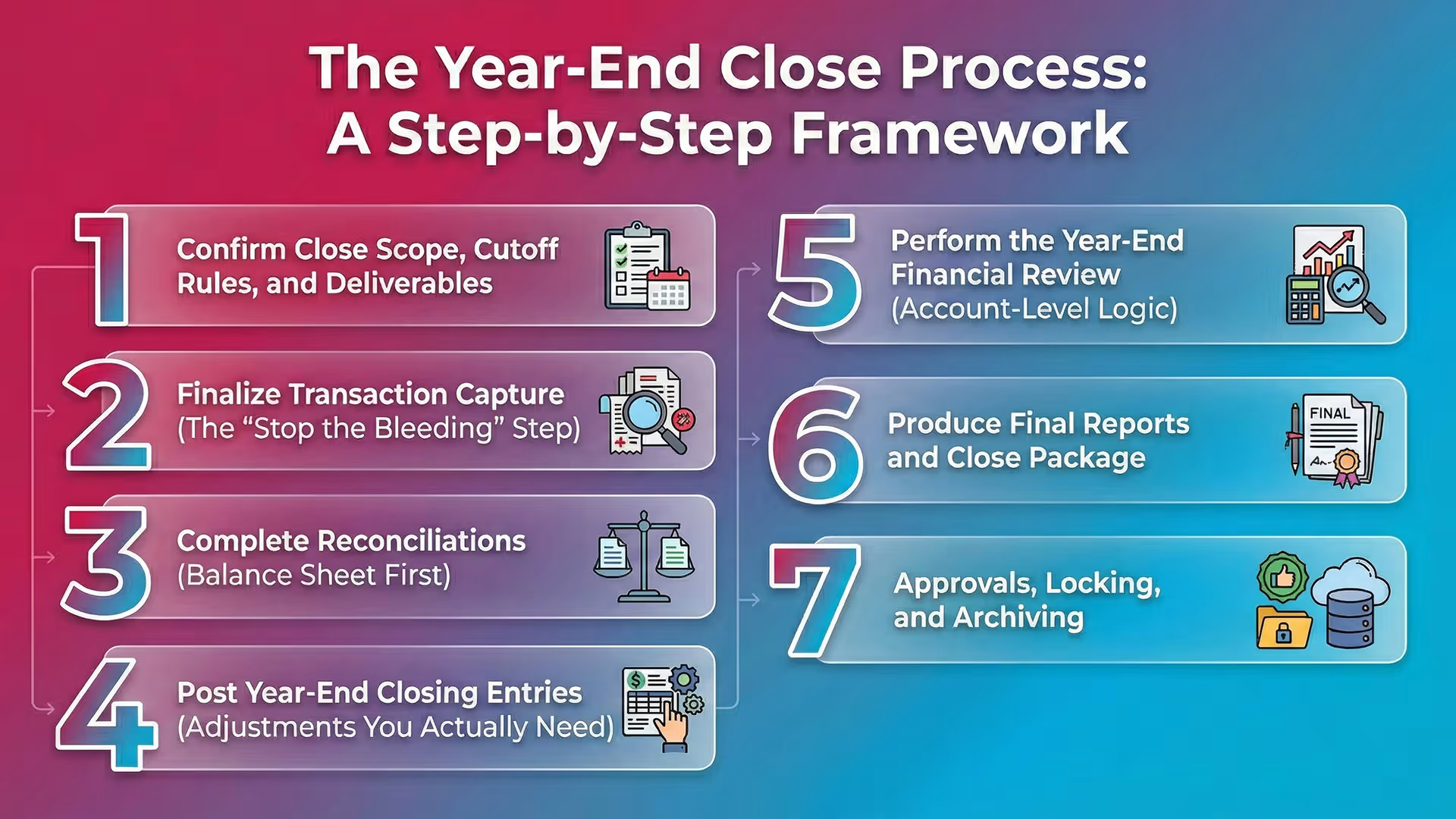
This year end close process works in most environments. It scales from a small QBO file to a multi-entity firm workflow.
Step 1: Confirm Close Scope, Cutoff Rules, and Deliverables
Confirm the rules and outputs first. It prevents rework later.
Do this at the start:
- Lock the reporting period dates.
- Define cutoff policy in plain language.
- Shipping terms for product revenue.
- Service delivery dates for service revenue.
- Bill receipt rules for AP.
- Confirm deliverables and owners.
- Financial statements.
- Tax package.
- Management reporting and KPIs.
- Supporting schedules.
Practical example from firm work:
If one client uses “invoice date” for revenue and another uses “service date,” your review will miss cutoffs. Document the rule. Enforce it.
Step 2: Finalize Transaction Capture (The “Stop the Bleeding” Step)
Stop new surprises. Make sure all activity lands in the books.
Confirm these items post through year-end:
- Customer invoices and credit memos.
- Vendor bills and vendor credits.
- Expenses and reimbursements.
- Payroll journals and benefits.
- Merchant deposits and fees.
- Bill.com sync items, if used.
- Bank feed items that still sit in “For Review.”
Late items usually hide in connectors. Therefore, check each system’s last sync date.
Step 3: Complete Reconciliations (Balance Sheet First)
Reconcile the Balance Sheet first. It creates a clean base for the P&L review.
Required year end close procedures often include:
- Bank and credit cards.
- AR and AP subledger ties to the GL.
- Loans and notes payable.
- Equity accounts.
- Intercompany accounts, if applicable.
- Sales tax payable and payroll liabilities.
During the rec, focus on:
- Unexplained variances.
- Stale reconciling items.
- Duplicate or uncleared transactions.
- Old undeposited funds.
- Old vendor credits or unapplied cash.
A completed reconciliation means little without review. Ask why old items still exist. Then decide what to do.
Step 4: Post Year-End Closing Entries (Adjustments You Actually Need)
Post year end closing entries after you reconcile. Reconciliations often reveal missing accruals and misposts.
Common year end closing entries include:
- Accrued expenses. Payroll, bonuses, interest, and professional fees.
- Prepaid amortization. Insurance and annual software.
- Depreciation and amortization.
- Inventory adjustments and COGS true-ups.
- Revenue recognition adjustments, where applicable.
- Bad debt and allowance entries, if used.
Set documentation expectations:
- A support schedule with inputs and math.
- Source reports and dates.
- Preparer name and reviewer sign-off.
- Clear memo that explains the logic.
If you manage multiple clients, standardize support. Use one template per entry type.
Step 5: Perform the Year-End Financial Review (Account-Level Logic)
Review at the account level. It catches what checklists miss.
Start with these tests:
- Scan for unexpected flux. Compare current year to prior year.
- Spot out-of-pattern activity. For example, large misc expenses in December.
- Find misclassifications. Repairs vs capex. COGS vs opex.
- Flag negative balances that should not be negative.
- Negative AR.
- Negative inventory.
- Negative sales tax payable.
- Clear suspense and clearing accounts. They should trend to zero.
Output: a list of review findings. Resolve them before you call it final.
Practical insight from close reviews:
Most “mystery variances” come from two places. Duplicate bank feed entries and payroll liability misposts. Catch them early and you cut days off close.
Step 6: Produce Final Reports and Close Package
Create a close package that stands on its own. Assume someone will ask questions months later.
Core reports:
- Balance Sheet.
- Profit & Loss.
- Statement of Cash Flows, if required.
Supporting schedules often include:
- Bank rec summaries.
- AR aging and AP aging.
- Fixed asset rollforward, if applicable.
- Loan schedules with interest detail.
- Sales tax and payroll liability ties.
Optional management reporting:
- Department or class views.
- Budget vs actual.
- KPI summaries.
Step 7: Approvals, Locking, and Archiving
Get approvals before you lock anything.
Use a simple approval workflow:
- Preparer confirms completion and support.
- Reviewer validates rec logic, flux items, and entries.
- Controller or partner signs off on final package.
Then lock access:
- Close the year in the system or lock the period.
- Restrict edits unless an approved change request exists.
Archive the evidence:
- Reconciliations.
- Schedules.
- Journal entry support.
- Final PDFs of financial statements.
- Notes on key judgments and cutoffs.
This step protects you later. It reduces “why did this change” debates.
Year-End Close Timeline: What To Do and When (Practical Windows)
A Simple Year-End Close Timeline
Factors That Extend a Year-End Close
These items stretch the year end close timeline most often:
- Inventory counts that happen late.
- Payroll lag and benefit true-ups.
- Multi-entity consolidation needs.
- Missing documentation for large transactions.
- Late client responses in firm workflows.
If you run many closes at once, build buffers. Assume some clients respond late. Plan reviewer time during week two.
Year-End Close Procedures by Area (So Nothing Falls Through)
Cash & Banking Procedures
Cash errors create the most noise. Fix them early.
Year end close procedures for cash:
- Reconcile every bank and credit card through year-end.
- Validate deposits in transit and outstanding checks.
- Look for fraud signals and duplicates.
- Same amount posted twice.
- Multiple payments to the same vendor on the same day.
- Review undeposited funds. Clear old items.
If you use bank feeds, confirm you did not add and match the same item. That issue shows up constantly in QBO files.
AR Procedures
AR drives revenue and cash timing. It also drives cutoff risk.
Do these AR steps:
- Clean up the aging. Write off dead items with approval.
- Fix unapplied cash and credits.
- Validate credit memo timing and reason.
- Test revenue cutoff near year-end.
- Compare shipping or service dates to invoice dates.
- Compare shipping or service dates to invoice dates.
AP Procedures
AP controls completeness of expenses and liabilities.
Do these AP steps:
- Sweep for unrecorded liabilities.
- Search for bills after year-end that relate to the prior year.
- Review vendor statements, when available.
- Confirm accrued expenses cover known gaps.
- Review large changes in accrued liabilities accounts.
A simple method works well. Pull January spend by vendor. Then ask what belongs in December.
Payroll & Taxes Procedures
Payroll and tax balances must tie out. They also attract scrutiny.
Do these steps:
- Reconcile payroll liabilities to payroll reports.
- Tie out sales tax payable to filings or reports.
- Confirm benefit accruals and employer taxes.
- Align 1099 and W-2 prep inputs, where relevant.
For sales tax basics and state rules, use a primary source.
Fixed Assets / Leases Procedures (If Applicable)
Fixed assets and leases drive large non-cash entries.
Do these steps:
- Post depreciation. Tie to the fixed asset schedule.
- Reclass repairs vs capex as needed.
- Tie lease schedules to the GL, if you track them.
- Confirm disposals and impairments, if applicable.
If you use a fixed asset tool, confirm the posting dates. Many teams post depreciation monthly but forget the last month.
Year-End Close Checklist
Use this year end close checklist as your base. Then add client or entity specifics. This structure also works as a year end closing checklist for firms.
Pre-Close Checklist (Before Year-End)
- Confirm fiscal year end date and reporting requirements
- Reconcile all bank/credit card accounts through most recent month
- Clear suspense/clearing accounts monthly
- Validate recurring journal entries and automation rules
- Confirm revenue/expense cutoff policy
Close Checklist (Immediately After Year-End)
- Ensure all bills/invoices/expenses/payroll are posted
- Complete bank/credit card reconciliations through year-end
- Tie AR/AP to the general ledger
- Post accruals, prepaid amortization, depreciation
- Review Balance Sheet account-by-account
Post-Close Checklist (Finalization)
- Run final financial statements and confirm comparatives
- Resolve review findings (flux, anomalies, misclassifications)
- Obtain internal approvals/sign-off
- Lock/close the year in the accounting system
- Archive reconciliations, JE support, final reports
Common Mistakes During the Year-End Closing Process (And How to Avoid Them)
These mistakes show up in almost every year end closing process. Fix them and your close gets faster and cleaner.
- Treating year-end as “a bigger month-end.”
- Fix: add a real review stage with flux and logic checks.
- Reconciliations done, but not reviewed.
- Fix: require explanations for old reconciling items. Assign owners.
- Posting year end closing entries without support.
- Fix: standardize support templates. Require reviewer sign-off.
- Rushing to lock books before resolving anomalies.
- Fix: lock only after you resolve findings or document exceptions.
- Letting one-off accounts accumulate.
- Fix: review suspense, undeposited funds, and clearing accounts monthly.
One real-world example:
A firm closed a client year with a clean bank reconciliation. However, the client used “undeposited funds” for months. Revenue looked inflated. The fix took two days. A monthly review would have caught it in ten minutes.
How to Close Books in QuickBooks Online (QBO): Practical Steps
These steps answer the long-tail need: how to close books in QuickBooks Online. Use them after you finish reconciliations, adjustments, and review.
Before You Close the Year in QBO
Close only after you confirm the numbers.
Do this first:
- Confirm all transactions are entered.
- Complete all reconciliations through year-end.
- Run core reports on accrual basis:
- Profit & Loss
- Balance Sheet
- General Ledger detail for targeted accounts
- Identify needed adjustments and post supported JEs.
Also confirm your reporting settings. For example, cash vs accrual and class tracking. Otherwise, comparatives will not match.
How to Close the Books in QuickBooks Online
QBO closes books by restricting changes up to a closing date.
Steps in QBO:
- Go to Settings (gear icon).
- Select Account and settings.
- Go to Advanced.
- Find Accounting.
- Turn on Close the books.
- Set the Closing date.
- Add a password, if you want controlled edits.
- Save.
- Document who approved the close and the date.
Decide how strict you need to be:
- Prevent changes entirely for most users.
- Allow changes with password for a controller role.
What Is a QuickBooks Closing Entry? (And What QBO Actually Does)
A quickbooks closing entry often means two different things. Clarify it with your team.
Traditional “closing entries” mean you close net income into equity.
Many systems do this conceptually at reporting time.
QBO’s “close the books” feature does something else. It restricts edits.
It acts as access control.
Best practice: treat QBO close as protection. Do not treat it as proof the year end financial close is correct. Review and evidence create correctness.
Best Practices for a Reliable Year-End Financial Close
Build the Process Around Review, Not Checklists
Checklists confirm you did tasks. Review confirms the numbers make sense.
To improve quality:
- Define what “reviewed” means for each major account.
- Use consistent flux thresholds. For example, investigate swings over X%.
- Require explanations in writing. Keep them with the close package.
Reconcile Early, Then Review What the Reconciliation Implies
A bank rec complete does not mean a bank rec correct.
Require these habits:
- Investigate old outstanding checks.
- Validate deposits in transit with bank activity.
- Confirm bank fees and merchant fees post in the right period.
Therefore, start reconciliations before year-end. It reduces cleanup.
Use a Consistent Evidence Standard
Every year end closing entry should include:
- Calculation support.
- Source reports and dates.
- Preparer and approver.
- Version control if numbers change.
This standard matters most in firms. Staff turns over. Clients change systems. Evidence keeps continuity.
Make the Close Repeatable (Especially for Firms Managing Many Clients)
Repeatability makes your process scalable.
Use these tactics:
- Template your year end close steps by complexity.
- Simple cash basis clients.
- Inventory clients.
- Multi-entity clients.
- Use standard review rules for common accounts.
- Cash, AR, AP, sales tax, payroll liabilities.
- Track bottlenecks by client. Fix root causes after busy season.
A repeatable year end close process also improves training. New staff learns faster.
How Xenett Supports A More Predictable Year-End Close (Without Replacing Accounting Judgment)
Xenett helps teams run a review-first year end close process. It does not replace accounting judgment. It also does not provide audit services and it is not an audit tool.
Turning Account-Level Review Into Structured Work
Account-level review creates findings. However, teams often track them in notes and chats. That approach gets messy at year-end.
Xenett helps by surfacing review findings from P&L and Balance Sheet behavior, such as:
- Anomalies and outliers.
- Missing or inconsistent entries.
- Reconciliation gaps.
- Unexpected flux across periods.
This output becomes a clear worklist. It shows what must get resolved before final close.
For more on how Xenett fits close workflows, see:
https://xenett.com/
https://xenett.com/blog/
Close Task and Checklist Management (Driven by Findings)
Generic checklists miss client-specific issues. Findings-based tasks close that gap.
Xenett ties tasks and checklists to review findings. Therefore, staff works the real issues first. You still keep standard year end close checklist steps. You just anchor them to evidence.
This approach works well across multiple clients. You can reuse templates and still handle exceptions.
Review and Approval Workflows
Year-end needs clear sign-off. It protects quality and reduces rework.
Xenett supports structured review workflows:
- Preparer completes work and attaches support.
- Reviewer validates and signs off.
- Teams keep a clear trail of what changed and why.
This trail supports review integrity. It helps you explain decisions later.
Visibility Into Close Status and Bottlenecks
Year-end close stalls when no one knows what remains open.
Xenett provides at-a-glance status by:
- Client or entity.
- Account area.
- Owner and due date.
Therefore, managers can unblock issues fast. They can also spot patterns.
For example, bank rec lag or recurring payroll liability problems.
Accuracy, Audit Trail, and Repeatability (Year Over Year)
Year-end gets easier when you keep history.
Xenett helps centralize:
- Evidence and support.
- Resolution notes.
- Sign-offs and dates.
Next year, you start with context. You do not start from scratch.
Year-End Close FAQ
What is the year-end close in accounting?
The year-end close is the process of finalizing the general ledger for the fiscal year. You complete reconciliations, post adjustments, perform a full review, and produce approved financial statements.
What are the steps in the year-end close process?
Typical year end close steps are: confirm cutoff and deliverables, finalize transaction entry, complete reconciliations, post year end closing entries, review for anomalies and flux, produce final reports, obtain approvals, and lock and archive.
What is included in a year-end close checklist?
A year end close checklist includes transaction completion, bank and credit card reconciliations, AR and AP tie-outs, accruals and other adjustments, account-level review, final reporting, approvals, and year lock and archiving.
How long does a year-end close take?
Many small to mid-sized businesses finish the year end financial close in 2–4 weeks. Timing depends on transaction complexity, reconciliation quality, and speed of approvals and adjustments.
What are year-end closing entries?
Year end closing entries are journal entries that make the financials complete and accurate. They often include accruals, depreciation, prepaid amortization, inventory adjustments, and cutoff corrections.
How do I close the books in QuickBooks Online?
To close the books in QuickBooks Online, set a closing date in settings and restrict changes. Do this after you finish reconciliations, post adjustments, and get approval on the final statements.
What is a QuickBooks closing entry?
A quickbooks closing entry often refers to the “close the books” date in QBO. It restricts edits. It does not replace accounting closing entries or the review work.
What’s the difference between fiscal year end and calendar year end?
Calendar year end is December 31. Fiscal year end is any chosen year-end date used for reporting. It sets the timing for the year end close timeline and reporting deadlines.
Conclusion
A strong year end accounting close follows a simple rule. Reconcile first. Review second. Lock last. When you run the year end closing checklist with clear evidence and approvals, you reduce risk and save time next year.
If you want to make your year end close process more repeatable, start by standardizing review rules and support. Then track findings as work, not as notes. You can also explore how Xenett supports review, task execution, approvals, and close visibility across clients and entities.


.avif)