.svg)

Month End Closing Entries: Steps + Journal Examples

Ask questions, get summaries, or uncover key takeaways from this article.

Blog Summary / Key Takeaways
- Month-end closing entries fix timing and classification. They keep the month accurate.
- Most month end close entries fall into four buckets. Accruals, deferrals, estimates, and reclasses.
- You reduce rework when you reconcile and review while you post entries.
- You improve consistency when you standardize entry logic by account.
- Xenett helps teams run review-first closes. It ties tasks to what the accounts show.
What Are Month-End Closing Entries?
Month-end closing entries are journal entries recorded at the end of a month to ensure revenue and expenses are recognized in the correct period, account balances are accurate, and financial statements reflect complete activity for that month as part of the month-end close process.
Teams also call them:
- Month-end close entries
- Monthly closing entries
- Month-end journal entries
- Month end closing journal entries
- Monthly close journal entries
These phrases usually point to the same intent. You want the set of adjustments that finish the month.
However, “closing entries” can mean something else. That creates confusion in search results and in training.
Month-End Closing Entries vs. Closing Entries
Month-end close entries usually mean accruals, deferrals, estimates, and reclasses. They fix timing and coding. They do not “zero out” revenue and expenses.
Closing entries in classic accounting mean you close temporary accounts. You move net income into retained earnings. Teams often do that at year-end. Some systems also do formal period closing.
Therefore, when someone searches “closing entries,” they may mean year-end. When they search “month-end closing entries,” they almost always mean monthly adjustments.
What Entries Are Done at the End of Every Month?
Most teams do five things at month-end:
- Record remaining transactions (bank, A/R, A/P, credit cards)
- Post month-end journal entries (accruals, payroll, depreciation, etc.)
- Reconcile key balance sheet accounts
- Update workpapers and support for balances
- Review financial statements (P&L, Balance Sheet, cash flow) and investigate variances
That list looks simple. The hard part is consistency. The close fails when teams skip cutoff rules, or review too late.
Month-End Close Entries Framework: The 4 Buckets That Explain 90% of Monthly Closing Entries
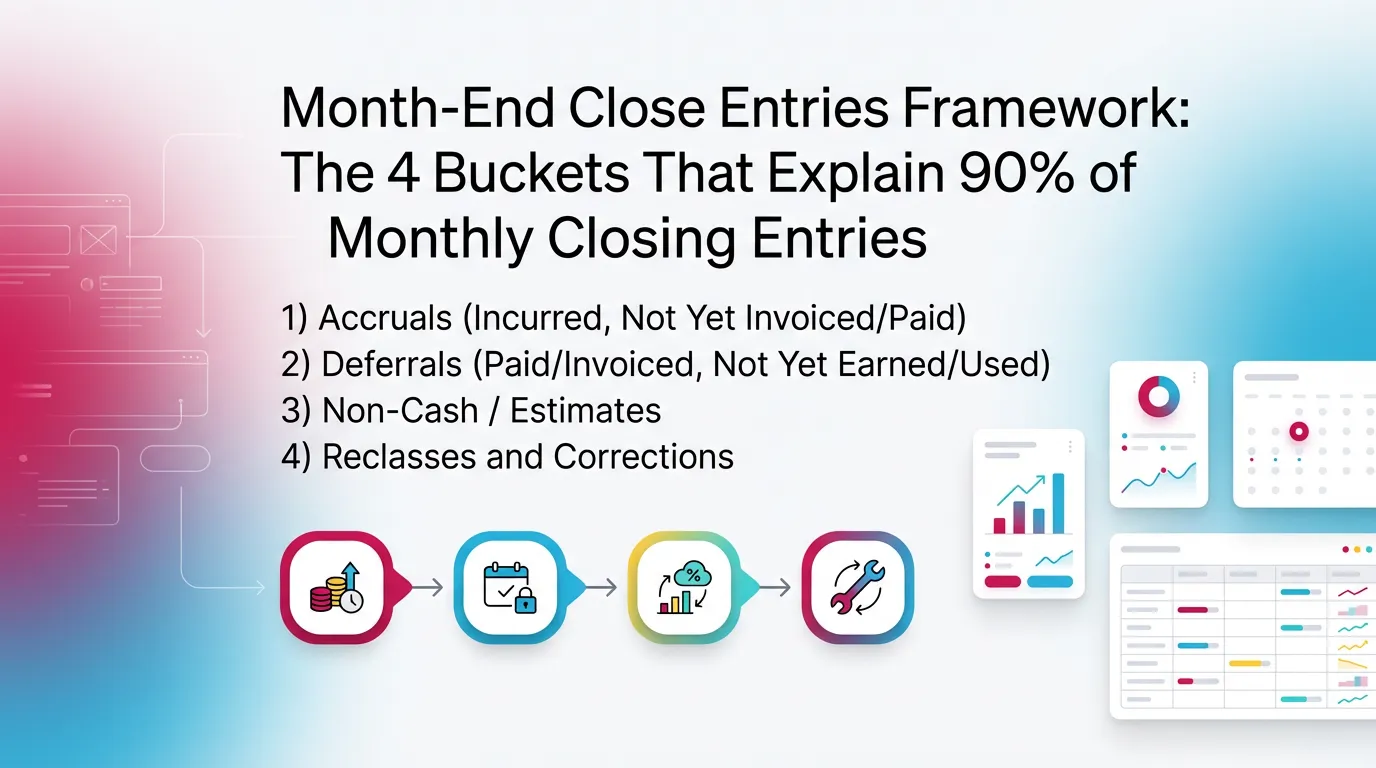
Most monthly closing entries fit four buckets. If you teach this framework, staff stop guessing. They also stop creating “plug” entries.
1) Accruals (Incurred, Not Yet Invoiced/Paid)
Accruals record expenses or revenue in the month you incurred them, which depends on recording accruals accurately. You use them when the cash or invoice hits later.
Common month-end closing entries in this bucket:
- Payroll accrual
- Contractor or freelance accrual
- Utilities accrual
- Professional fees accrual
- Bonus or commission accrual (when probable and estimable)
Why it matters: Accruals prevent understated liabilities. They also stabilize margins. Without accruals, your P&L swings based on vendor billing timing.
Practical insight from multi-client closes:
Payroll accruals cause the most repeat cleanup. Teams post them late. They also forget to reverse them. You fix that with a standard method and a standard review step.
2) Deferrals (Paid/Invoiced, Not Yet Earned/Used)
Deferrals shift activity out of the current month. You use them when you paid or billed early.
Common monthly closing entries here:
- Prepaid insurance amortization
- Prepaid software amortization
- Rent prepaids (when paid ahead)
- Deferred revenue (when cash arrives before delivery)
Why it matters: Deferrals prevent overstated expenses or revenue. They also keep your gross margin and operating expense trends usable.
3) Non-Cash / Estimates
These entries do not rely on a new invoice or cash movement. They reflect economic reality.
Common month end closing journal entries in this bucket:
- Depreciation
- Amortization
- Bad debt allowance adjustment
- Inventory reserve or shrink adjustment (if applicable)
- Warranty reserve (industry-specific)
Why it matters: These entries keep financials comparable month to month. They also support better forecasting. For example, depreciation should not “surprise” you in December.
4) Reclasses and Corrections
Reclasses fix classification. Corrections fix wrong postings. These entries protect reporting.
Examples:
- Move spend to the correct department or class
- Fix account mapping from bank rules
- Reclass a vendor bill from COGS to OpEx
- Move items out of suspense or clearing
Why it matters: A clean close does not just end on time. It produces reports people can use. Reclasses protect KPIs and budget-to-actual reporting.
Step-By-Step: How to Prepare Month-End Closing Journal Entries
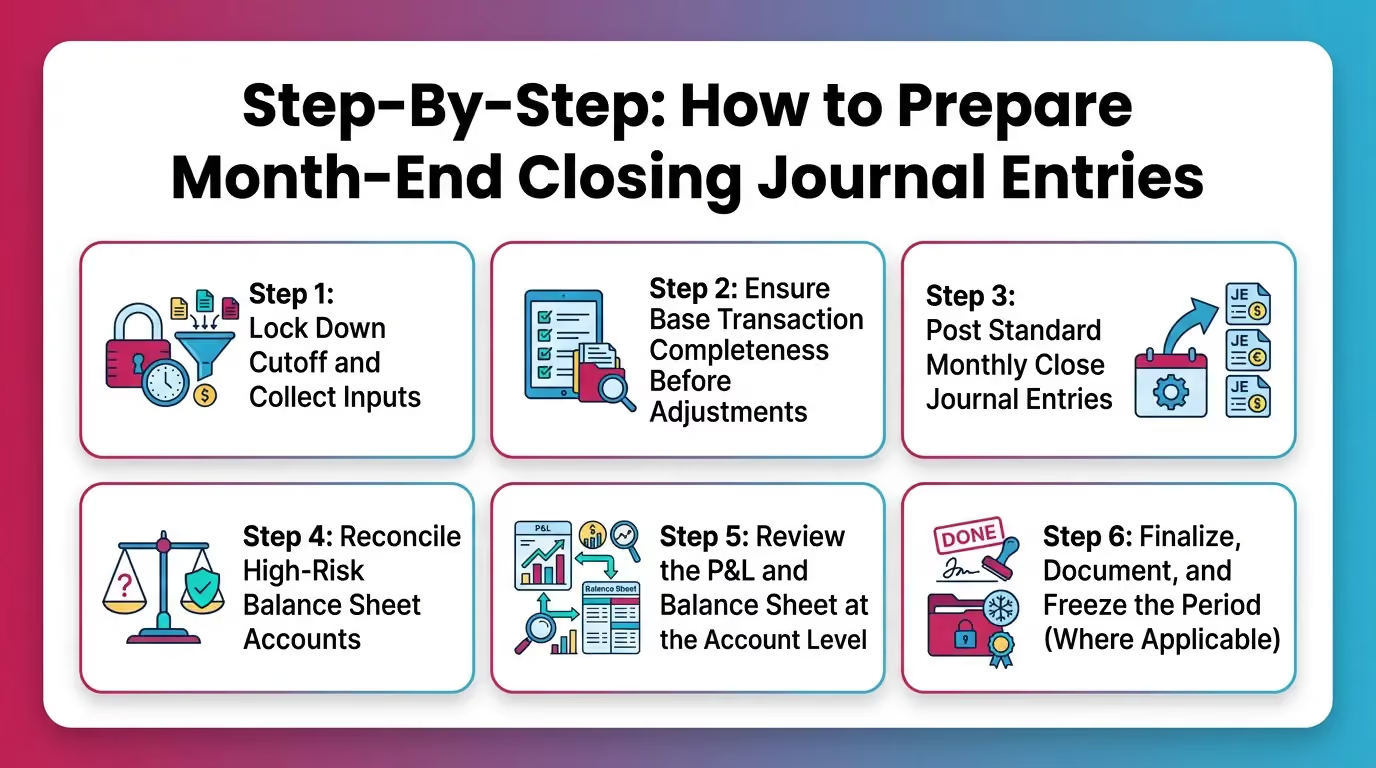
You prepare month end closing entries with a repeatable sequence. You get better results when you treat completeness as a gate. You do not treat it as a hope.
Step 1: Lock Down Cutoff and Collect Inputs
Define cutoff rules before you post monthly close journal entries. Write them down. Use the same rules every month.
Cutoff rules to set:
- Invoice cutoff date for revenue recognition
- Bill cutoff date for expense recognition
- Payroll cutoff and pay period mapping
- Shipping or delivery cutoff (if relevant)
Inputs to collect:
- Bank and credit card feeds through month-end
- A/R aging and invoicing reports
- A/P aging and open bills report
- Payroll register and liability reports
- Amortization and depreciation schedules
- Recurring JE templates
If you use QuickBooks or Xero, you can pull standard reports fast. However, you still need consistent naming and storage of support.
Step 2: Ensure Base Transaction Completeness Before Adjustments
Answer this first: “Did we record the month?” If not, accruals become guesses.
Check for:
- Missing bank or credit card postings
- Unrecorded vendor bills
- Unsent or uncaptured invoices
- A/R aging sanity check
- A/P aging sanity check
A practical control that works: Run bank reconciliation procedures early. Do it even if you do not finish it. You want to spot missing deposits, duplicated withdrawals, and timing gaps.
Step 3: Post Standard Monthly Close Journal Entries
Post repeatable entries first. They anchor the close.
Start with:
- Depreciation and amortization
- Prepaid amortization
- Payroll accrual and payroll tax accrual
- Recurring vendor accruals (if stable)
Then handle:
- Client-specific items
- One-off corrections
- Judgment-heavy estimates
Template discipline matters. When teams rebuild entries from scratch, they drift. Drift creates review notes. Review notes create rework.
Step 4: Reconcile High-Risk Balance Sheet Accounts
Balance sheet accounts act like controls, so follow consistent account reconciliation steps. If they do not tie out, the P&L will not either.
Prioritize:
- Cash and credit cards
- A/R control totals vs aging
- A/P control totals vs aging
- Payroll liabilities
- Intercompany and due to/due from
- Clearing and suspense accounts
- Prepaids schedule tie-out
A simple rule:
If an account should go to zero, treat any balance as an exception. Clearing accounts should not grow quietly.
Step 5: Review the P&L and Balance Sheet at the Account Level
Answer these questions in the first review pass:
- What changed, and why?
- Does it match expectations?
- Does it match prior month patterns?
Look for:
- Negative balances in asset or liability accounts
- Unusual spikes in expense categories
- Duplicated expenses from vendor bills plus credit card charges
- Missing accrual patterns
- Revenue that moved without an operational reason
In practice, account-level review beats report-level review. A total P&L can look fine and still hide misclassifications.
Step 6: Finalize, Document, and Freeze the Period (Where Applicable)
Finish by making the close repeatable.
Document:
- Workpaper links and supporting files
- Notes on estimates and judgment calls
- Reversal logic, if you reverse accruals
- Reviewer sign-off and date
If your system supports a close lock date, set it. If not, document the “final” timestamp and limit posting access.
Month-End Closing Entries Examples (With Debit/Credit Formats)
Use clean debit and credit formats. Keep support tied to each entry. That prevents next-month confusion.
Common Month-End Journal Entries
“Month End Closing Entries Example” Walkthrough (One Mini Case)
What you want: You want the expense in the current month. You also want the liability recorded.
- At month-end, post the accrual entry
- Dr Utilities Expense
- Cr Accrued Liabilities (or Utilities Payable)
Support to attach:
- Prior bill as a baseline
- Meter read or service period dates if available
- Estimate method, such as average of last three months
- Next month, reverse the accrual (if you use reversals)
On day 1 of the next month:
- Dr Accrued Liabilities
- Cr Utilities Expense
- When the real vendor bill arrives, record it normally
- Dr Utilities Expense
- Cr Accounts Payable
Why the reversal helps:
It prevents double counting. It also makes the bill posting simple.
When reversal can hurt:
Teams stop checking that the real bill hit. The expense can drop in the next month.
Add a control. Tie accrued utilities to the next month bill list.
This workflow shows why month-end closing entries need both posting and follow-up. An accrual without a cleanup plan becomes a permanent plug.
Monthly Closing Entries Checklist (Finance Team Version)
Use this checklist to keep monthly close journal entries consistent. It also supports faster review as a comprehensive close checklist.
Before Posting Entries
- All bank/credit card accounts updated through month-end date
- A/R and A/P aging reviewed for cutoff issues
- Payroll reports obtained and reviewed
- Recurring JE list prepared (depreciation, amortization, accrual templates)
Posting and Reconciliation
- Accruals posted (payroll, contractors, utilities, fees)
- Deferrals updated (prepaids, deferred revenue as applicable)
- Reconciliations completed (cash, CC, A/R, A/P, payroll liabilities)
- Clearing/suspense investigated and cleared or explained
Review and Sign-Off
- Account-level P&L and Balance Sheet review completed
- Material flux explained (documented)
- Approvals captured and period finalized (if applicable)
Best Practices for Month-End Close Entries (What Consistently Reduces Rework)
You reduce rework when you standardize how you think and consider automating your monthly close where it fits. You do not just standardize what you do.
Standardize Entry Logic (Not Just a Checklist)
Define “what good looks like” per account. This matters more than a generic close list and aligns with best practices for faster closes.
Examples of account logic:
- Payroll liabilities should tie to payroll reports each month
- Prepaids should tie to a schedule and decline predictably
- Clearing accounts should zero out or stay within a small range
- Depreciation should match the fixed asset register
Maintain:
- Recurring JE templates
- Prepaid schedules
- Depreciation schedules
- Accrual trackers with reversal status
Build Review Earlier Into the Close
Review while you post. Do not wait until the end.
Focus on:
- Missing accrual patterns
- Unusual vendor or category spend
- Balance sheet reasonableness
- Accounts that drift each month
Practical insight:
When you review early, you ask better questions. You still remember the context. When you review late, you only see symptoms.
Document Assumptions and Support in the Moment
A close only repeats when support repeats.
Good documentation includes:
- What drove the entry
- Who prepared it
- Who reviewed it
- What schedule or report supports it
- What you expect next month, including reversals
Avoid storing support in inboxes. Avoid storing it in personal drives. Both break continuity.
Use Reversing Entries Intentionally (Where Appropriate)
Reversing entries help when you record true timing accruals. They reduce double counting risk.
Use reversing entries when:
- The invoice will post next month
- The amount estimates close enough for cutoff
- You plan to match it to a specific bill or payroll run
Avoid reversing entries when:
- The entry represents a long-lived estimate
- The entry does not tie to a next-month posting
- The entry should remain until a real event changes it
Examples:
You often reverse utilities accruals. You do not usually reverse allowance adjustments.
Common Mistakes With Month-End Journal Entries (And How to Catch Them)
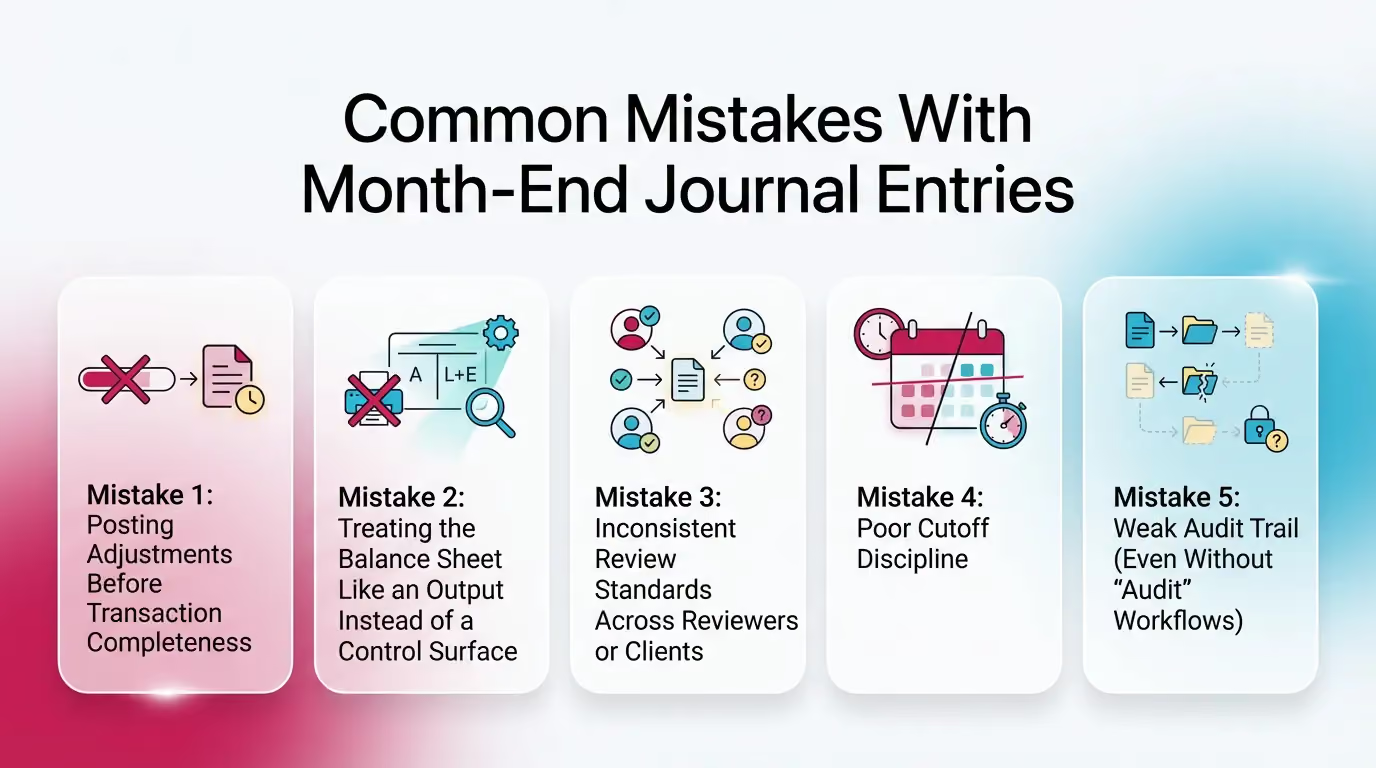
These mistakes show up in every close. You can catch them with a tighter sequence and earlier review.
Mistake 1: Posting Adjustments Before Transaction Completeness
Symptom: You post “plugs” early. Then you find missing bills. Then you post more plugs.
How to catch it:
- Run completeness checks before accruals
- Reconcile cash early
- Tie A/R and A/P to subledgers before estimates
Mistake 2: Treating the Balance Sheet Like an Output Instead of a Control Surface
Symptom: The P&L looks okay. The balance sheet holds garbage. It snowballs.
How to catch it:
- Require reconciliations for key balance sheet accounts
- Investigate clearing and suspense monthly
- Review negative or unusual balances every month
Mistake 3: Inconsistent Review Standards Across Reviewers or Clients
Symptom: Close quality depends on who reviews. Notes change each month.
How to catch it:
- Create account-level review standards
- Use the same flux thresholds
- Require the same support types by entry category
- Train staff on “what good looks like”
Mistake 4: Poor Cutoff Discipline
Symptom: Margin and revenue trends swing. Teams lose trust in month-to-month results.
How to catch it:
- Document cutoff rules
- Enforce them in the checklist
- Add a review question: “Does this month include next month activity?”
Mistake 5: Weak Audit Trail (Even Without “Audit” Workflows)
Symptom: No one can explain why an entry exists. Next month repeats the same confusion.
How to catch it:
- Require notes on estimates and reversals
- Attach support to the entry or its workpaper
- Capture preparer and reviewer sign-off
How Xenett Supports More Reliable Month-End Closing Entries (Without Relying on Heroics)
Teams usually do not fail at month-end because they lack effort. They fail because review happens too late. Or support sits in too many places. Or tasks do not reflect what the accounts show.
Xenett helps as an operational layer for month-end work. It supports execution, review, and visibility. It does not provide audit services and it does not act as an audit tool.
Review-First: Finding Entry Issues Before They Become Cleanup
Xenett operationalizes account-level P&L and Balance Sheet review. You can surface issues early, while the team can still act.
Examples of issues that show up early:
- An expected payroll accrual did not happen
- A clearing account drifts month over month
- A prepaid schedule does not match the balance
- A department shows a sudden spend spike
This review-first approach reduces late reclasses and late accrual fixes.
Close Task and Checklist Management (Built Around Review Findings)
A generic checklist does not tell you what to fix. The accounts tell you.
In Xenett, teams can drive tasks from review findings, for example:
- “Investigate payroll liabilities variance”
- “Explain insurance expense spike vs prepaid schedule”
- “Clear suspense balance and document root cause”
That keeps work tied to results, not just dates.
Review and Approval Workflows That Preserve Accounting Judgment
Xenett supports structured sign-offs for entry packages and account reviews. You keep judgment with the reviewer. You also keep a clean trail of who approved what.
This helps when:
- You manage many clients
- You rotate reviewers
- You train new staff
- You need consistent close standards
Visibility Into Close Status and Bottlenecks
Month-end gets noisy. People think they finished, but one dependency blocks the rest.
Xenett helps teams see:
- What remains open
- Which reconciliations still need work
- Which review exceptions remain unresolved
- Where handoffs stall
That supports more predictable close timelines.
FAQ: Month-End Closing Entries
What Are Month-End Closing Entries?
Month-end closing entries are journal entries recorded at month-end to recognize revenue and expenses in the correct period and ensure account balances are complete and accurate before issuing financial statements.
They usually include accruals, deferrals, estimates, and reclasses.
What Entries Are Done at the End of Every Month?
Typically: finalize transaction posting, record accruals/deferrals/depreciation, reconcile key balance sheet accounts, update workpapers, and review the P&L and Balance Sheet for anomalies.
Teams then document and approve results.
What Are Examples of Closing Entries?
Classic closing entries (often year-end) include closing revenue to income summary, closing expenses to income summary, closing income summary to retained earnings, and closing dividends or distributions.
Many accounting systems automate this at year-end.
Are Month-End Journal Entries the Same as Closing Entries?
Not always. Month-end journal entries usually adjust timing and classification, such as accruals and reclasses.
Closing entries traditionally zero out temporary accounts to retained earnings, typically at year-end.
What Are the Most Common Monthly Close Journal Entries?
Payroll accruals, depreciation, prepaid amortization, accrued expenses, bad debt allowance adjustments, and reclasses to correct account or department coding.
These show up in most industries.
Should Month-End Accruals Be Reversed the Next Month?
Often yes, if the accrual is a true timing entry and reversal reduces double-counting risk.
However, teams still need a control to confirm the real bill or payroll posts correctly.
What’s the Fastest Way to Reduce Month-End Rework?
Move review earlier and standardize account-level review logic. Define expected account behavior, thresholds, and required reconciliations.
Most rework comes from late discovery of missing entries or reconciliation gaps.
Conclusion
Month end closing entries work best when you treat them as a system. Start with completeness. Then post standard monthly close journal entries. Then reconcile and review at the account level. Document decisions as you go.
If you want fewer surprises, build a review-first close and adopt broader financial close management strategies. Keep tasks tied to what the accounts show. Standardize your entry logic by account. Then repeat it every month.
Use this guide as your monthly closing entries baseline. Update it as your business or client mix changes.