.svg)

What Is Financial Close Management?

Ask questions, get summaries, or uncover key takeaways from this article.

Financial close management is the structured process of reviewing, reconciling, and finalizing financial data at the end of a period. It ensures that financial records are accurate, complete, and ready for reporting.
Teams rely on financial close management to avoid errors, build audit readiness, and create trust in the numbers. Without it, decisions, forecasting, and compliance all take a hit.
However, traditional close processes are slow because they depend on manual checks, scattered communication, and disconnected tools. Therefore, automation is becoming essential for modern finance teams.
Why Is Financial Close Important?
Financial close is important because it ensures accurate reporting, compliance, and informed decision-making. It gives leadership confidence that the numbers reflect reality.
A strong close provides the foundation for preparing tax returns, analyzing performance, and planning budgets. It also reduces audit risks and prevents surprises in cash flow or expenses.
According to PwC, nearly 70% of finance leaders say delayed closes affect business planning. A clean close speeds up insights and improves organizational agility.
What Are the Goals of Financial Close?
The financial close has several clear goals that protect accuracy and build transparency.
1. Ensure data completeness
All transactions must be recorded before closing.
2. Maintain accuracy and consistency
Figures must reconcile across ledgers and systems.
3. Enable reliable reporting
Financial statements depend on clean, finalized numbers.
4. Strengthen compliance
Regulations require accurate books and proper documentation.
5. Support better decision-making
Leaders rely on timely insights for forecasting and strategy.
6. Reduce risk and audit issues
A documented close process increases audit readiness.
When these goals are met, teams save time, reduce stress, and work more confidently.
What Are the Financial Close Process Steps?
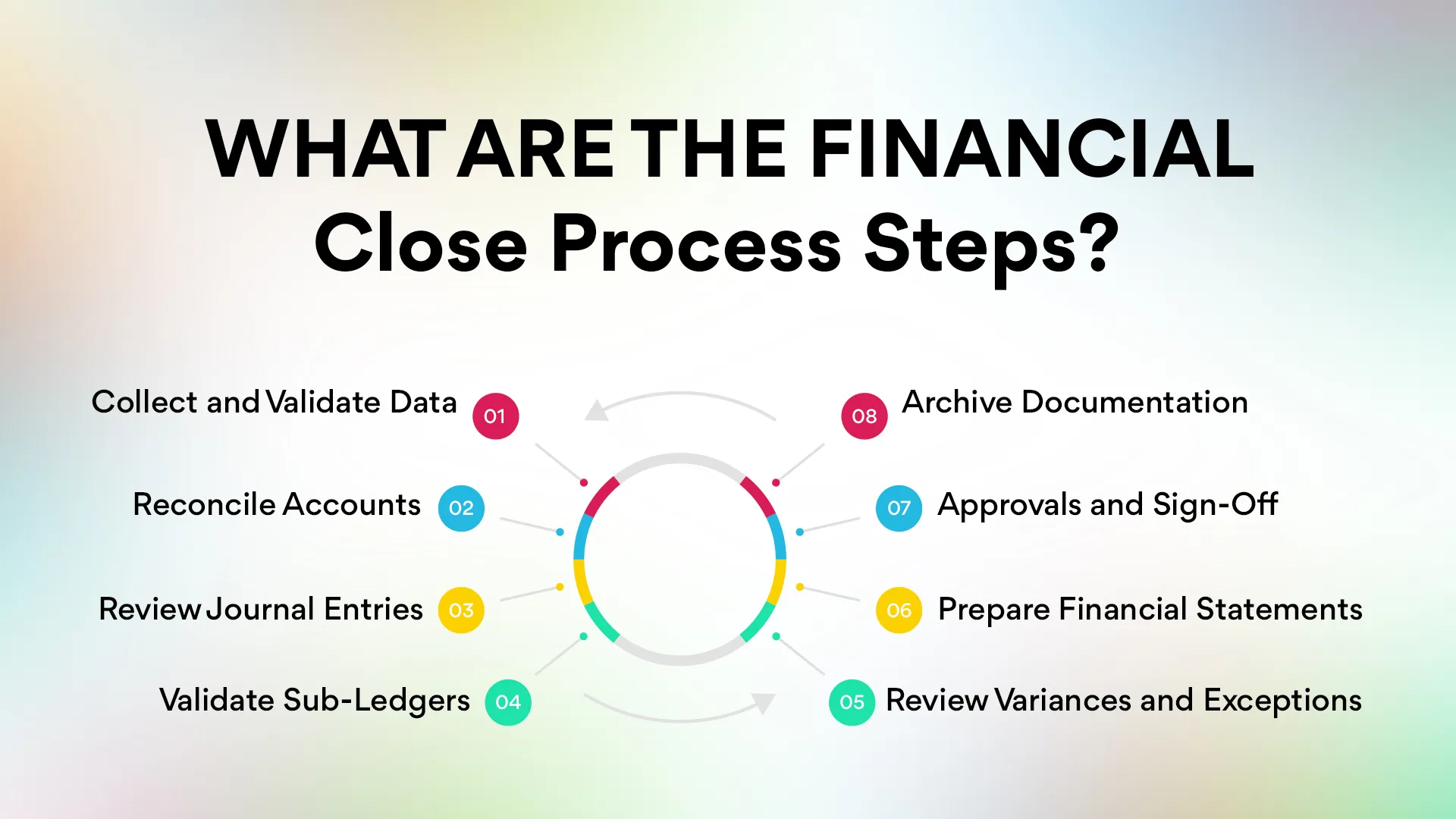
The financial close process involves a series of structured steps that help teams ensure accuracy, completeness, and compliance. Each step minimizes risk and prevents errors from carrying into reports or audits.
1. Collect and Validate Data
The close begins with gathering all financial information for the period. This includes bank statements, invoices, expense receipts, payroll reports, and system-generated records.
Teams verify that every required document is available and that no transaction is missing. Early validation prevents downstream reconciliation issues.
2. Reconcile Accounts
Reconciliation ensures that system records match actual financial activity. Teams compare bank and credit card statements with the general ledger.
They also reconcile accounts payable (AP), accounts receivable (AR), inventory balances, and loan accounts. Reconciliation helps catch errors such as missing entries, duplicates, or timing differences.
3. Review Journal Entries
Journal entries record adjustments that ensure accuracy at period end.
These include accruals, depreciation, amortization, prepaid expenses, and reclassifications.
Teams review each journal entry for correctness, proper documentation, and alignment with accounting standards. This step ensures a clean and accurate ledger.
4. Validate Sub-Ledgers
Sub-ledgers store detailed records for AP, AR, payroll, and inventory.
Teams compare each sub-ledger to the general ledger to confirm that amounts match.
When discrepancies appear, accountants investigate and correct the root cause before continuing. This step reduces the risk of reporting inconsistencies.
5. Review Variances and Exceptions
Variance review helps teams identify unusual changes or unexpected balances.
For example, if expenses rose significantly or revenue dropped without explanation, teams analyze the reason.
Exception management ensures that outliers are addressed, documented, and resolved before reporting.
6. Prepare Financial Statements
After validations and corrections, teams prepare formal financial statements.
These include:
- Income statement
- Balance sheet
- Cash flow statement
The goal is to present the organization’s financial position clearly and accurately.
7. Approvals and Sign-Off
Once the statements and reconciliations are complete, managers or CFOs review the final numbers.
They confirm completeness, accuracy, and compliance with accounting standards.
This approval locks the period and prevents accidental changes.
8. Archive Documentation
All supporting documents—statements, receipts, workpapers, reconciliation reports—are stored in a secure, accessible location.
Proper documentation ensures audit readiness and makes future closes smoother.
Archiving also creates a trail that strengthens compliance and transparency.
These steps create a repeatable, predictable workflow that improves team efficiency, reduces errors, and makes the financial close more manageable.
What Are Common Challenges in Financial Close?
Even experienced accounting teams face recurring challenges during the close. These issues lead to delays, inaccuracies, and unnecessary stress.
1. Manual Workloads
Many teams rely on spreadsheets and manual processes to reconcile accounts and review data.
This repetitive work consumes hours and increases the risk of human error.
The more clients or accounts a firm manages, the heavier the manual burden becomes.
2. Missing or Mismatched Data
If a transaction is missing, recorded twice, or assigned incorrectly, the reconciliation process stalls.
Teams then spend time searching emails, chasing clients, or digging through software systems to locate the right data.
These delays compound as the deadline approaches.
3. Duplicate Entries
Duplicates are among the most frustrating and common financial close issues.
They distort balances, trigger reconciliation mismatches, and can take hours to locate manually.
Without automated detection, teams often spend days identifying and resolving duplicate transactions.
4. Disconnected Systems
Many organizations use multiple tools—bank portals, accounting software, spreadsheets, payroll tools, and CRMs.
When data flows through different platforms without syncing, inconsistencies appear.
Disconnected systems make the closing slower and more prone to errors.
5. Poor Visibility Into Task Status
Managers often lack visibility into what has been completed, what is pending, and who is responsible.
This makes it difficult to identify bottlenecks or intervene before delays escalate.
Without a centralized dashboard, tracking progress becomes guesswork.
6. Communication Bottlenecks
Email threads and spreadsheets are the most common communication tools during close.
However, they create confusion, duplicate effort, and version-control issues.
Teams spend more time clarifying tasks than completing them, slowing the entire process.
A Gartner study found that finance teams spend up to 30% of their month-end time on manual close tasks. Automation eliminates these barriers by streamlining workflows, reducing manual work, and increasing visibility.
What Is the Difference Between Financial Close and Closing the Books?
Although similar, these two terms refer to different scopes.
Therefore, financial close is the broader process, while closing the books is the final step within it.
What Are the Best Practices for Financial Close?
Organizations can speed up and improve accuracy by following proven best practices.
1. Standardize Procedures
Use documented workflows and checklists.
2. Automate Repetitive Work
Reduce manual reconciliations and data entry.
3.Automate Repetitive Work
Managers should see task progress in real time.
4. Automate Repetitive Work
Review data two to three days before the formal close.
5. Centralize Documentation
Keep all support documents in one place.
6. Hold Monthly Review Meetings
Continuous improvement shortens future cycles.
7. Reduce Tool Fragmentation
One system avoids mismatched data.
These best practices reduce errors and shorten the close cycle.
What Is in the Financial Close Checklist?
A checklist ensures consistency across team members and reporting periods.
How Can Automation Improve the Financial Close Process?
Automation improves the financial close process by reducing manual work, increasing accuracy, and giving teams real-time visibility.
Key benefits include:
- Faster reconciliation
- Automatic error detection
- Instant duplicate identification
- Clear task tracking
- AI-driven recommendations
- Fewer bottlenecks
- Better audit readiness
A McKinsey study found that automation can reduce close time by up to 40% when implemented effectively.
Automation also reduces stress and improves team morale by removing repetitive tasks like manual data checks.
Real Story: How a Firm Cut Close Time by
During early testing of Xenett, we worked with a firm that closed books around the 12th of every month. Their biggest pain point was tracking thousands of transactions across multiple clients.
One partner said, “We spend more time finding problems than fixing them.”
After adopting Xenett, duplicate transactions were flagged instantly, and reconciliations became much smoother. The firm reduced its close time from 12 days to 5. Their team gained more time for advisory work and less time staring at spreadsheets.
This experience helped shape our automated review flows and one-click corrections.
How Xenett Helps Streamline Financial Close
Xenett simplifies and accelerates the financial close process through automation and intelligent workflows.
Key features include:
- AI Review (with more than 25+) checks
- Accruals Made Easy. Prepaids, missing entries, deferred revenue, and payroll handled in one module.
- AI-powered insights
- Progress tracking dashboards
- Close checklists with due dates
- Client portal
- Multi-Client Management
Our goal is to help firms close books faster, cleaner, and without stress.
Conclusion
Financial close management is essential for accuracy, compliance, and organizational decision-making. A structured process builds trust in your numbers and strengthens financial insight.
However, manual work slows everything down. Automation is the solution for modern accounting teams.
If you want a faster, cleaner, and more predictable close, Xenett is built for you.
FAQs
It is the structured process of reviewing and finalizing financial data at the end of each period.
Organizations aim for 5–10 days, but automation shortens it significantly.
Manual work, missing documents, communication issues, and duplicate transactions cause delays.
Automation platforms like Xenett assist with workflows, reviews, reconciliations, and documentation.
How does automation improve accuracy?