.webp)
.svg)

Accounts Payable Automation: Benefits and Process

Ask questions, get summaries, or uncover key takeaways from this article.
Blog Summary / Key Takeaways
- Accounts payable automation standardizes invoice intake, approvals, exceptions, and payments.
- The biggest wins come from fewer touches and clearer exception ownership.
- Your process decides what “best accounts payable automation software” means.
- Measure cycle time, exceptions, and duplicates, not just volume.
- Close improves when AP status stays clear and review stays consistent.
What Is Accounts Payable Automation?
Accounts payable automation is the use of digital workflows and software to automate invoice intake, data capture, coding, approval routing, exception handling, and payment execution, while maintaining controls and an audit trail.
It replaces copy‑paste work. It does not replace accounting decisions.
People also call it:
- AP automation
- Accounts payable invoice automation
- Accounts payable workflow automation
What AP automation is not
AP automation does not mean “we scan PDFs now.” It also does not mean “we use bill pay.” It also does not remove your AP policies.
It is not:
- Just scanning invoices into a folder
- Just paying bills faster
- A substitute for vendor controls, approvals, or judgment
A strong automated accounts payable process still needs policy. It just runs that policy consistently.
What Is Accounts Payable Automation Software?
Accounts payable automation software is a platform that manages invoice capture, approvals, matching, payment workflows, and integrations with ERP/accounting systems (e.g., NetSuite, QuickBooks Online, Xero).
It gives you workflow, controls, and reporting in one place.
Typical deployment models include:
- Cloud tools with faster setup and easier updates
- On‑prem tools for highly controlled environments
- SMB products that focus on intake, approvals, and bill pay
- Enterprise products with complex matching, global payments, and deep controls
If you evaluate what is accounts payable automation software, focus on fit. Do not focus on feature volume.
Why Teams Automate AP: The Core Problems in Manual AP
Manual AP breaks in predictable places. It breaks at intake. It breaks at approvals. It breaks at close.
Common pain points include:
- Invoice intake chaos across email, PDF, paper, and portals
- Manual data entry with inconsistent coding
- Approval bottlenecks with unclear ownership
- Exceptions handled in Slack with no trail
- Duplicate payments and missed payments
- Vendor frustration and constant “where is my payment” emails
- Weak visibility into liabilities and cash timing
- Month-end pressure and late accruals
One practical example. Many teams “close AP” by asking,
“Did we get all invoices?” That question has no system answer.
AP automation turns it into statuses you can report.
How Does Accounts Payable Automation Work?
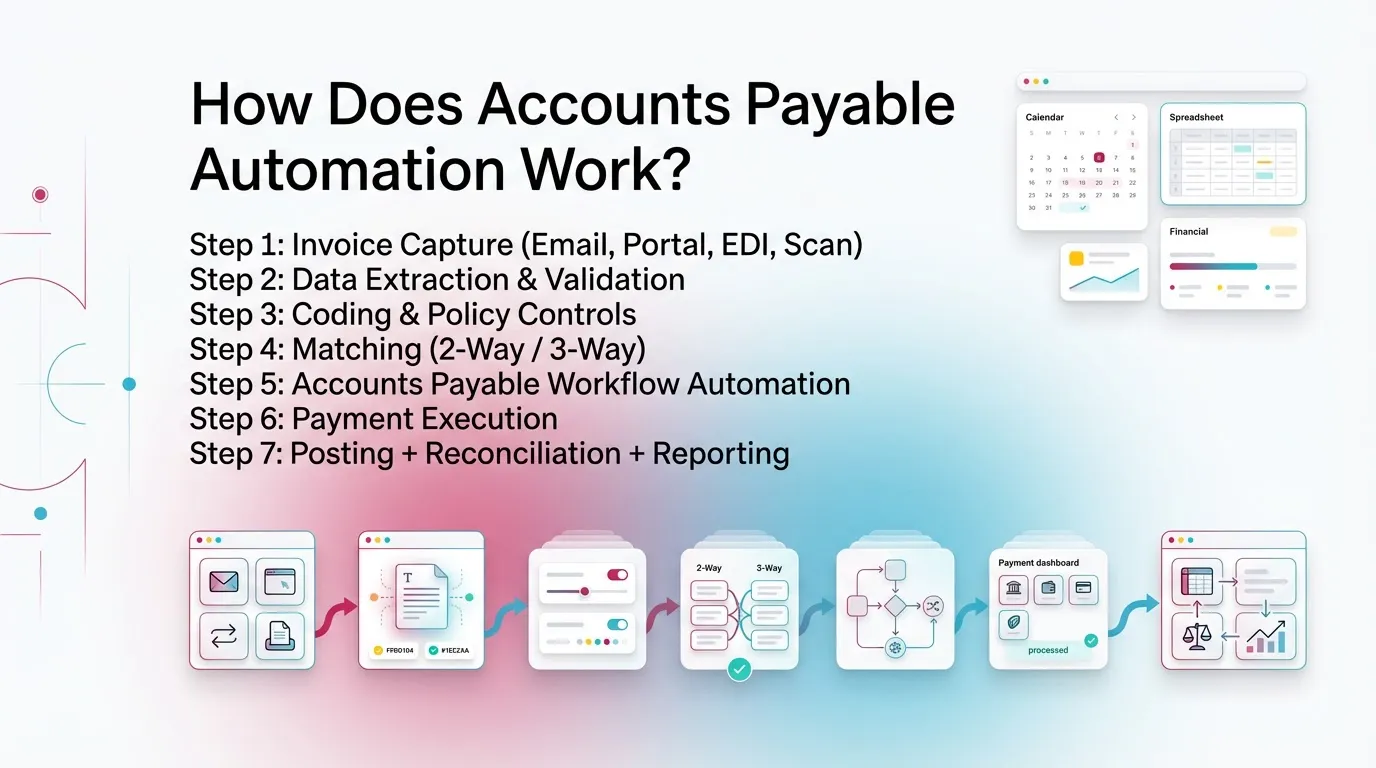
Accounts payable automation works by capturing invoices digitally, extracting and validating data, routing approvals by rules, managing exceptions in queues, and executing payments with controls.
It then posts results to the ERP and keeps a full trail.
Step 1: Invoice Capture (Email, Portal, EDI, Scan)
Invoice capture centralizes intake. It creates a single starting line.
It reduces lost invoices and duplicate entry.
Good capture includes:
- A dedicated AP inbox for vendor invoices
- Portal or EDI intake for high‑volume vendors
- Scanning for remaining paper invoices
- Automatic ingestion of attachments and metadata
- De‑duplication at entry, not after posting
Step 2: Data Extraction & Validation
OCR and AI extract invoice data. Rules validate it.
You reduce keying. You also reduce garbage data.
Common fields include:
- Vendor name and vendor ID
- Invoice number and invoice date
- Due date and terms
- Subtotal, tax, shipping, and total
- Line items and quantities when needed
Validation rules often check:
- Invoice number uniqueness to prevent duplicates
- Required fields before routing for approvals
- Tax checks where relevant
- Vendor status such as new vendor flags
For OCR performance expectations, use a test set.
Include clean PDFs and ugly scans. Vendors vary.
Step 3: Coding & Policy Controls
Coding becomes consistent when rules drive defaults.
People still review and adjust, however.
Typical coding automation includes:
- Default GL and expense category by vendor
- Default department, class, location, or entity
- Project or customer coding when needed
- Restricted categories that always require review
Policy controls often include:
- Approval thresholds by amount
- Required approver roles for certain spend types
- New vendor or bank change flags
This is where accounts payable workflow automation meets policy.
A tool can route. Only you can set the rules.
Step 4: Matching (2-Way / 3-Way)
Matching reduces overpayment risk. It also reduces “did we receive it” calls.
It matters most in PO‑heavy environments.
- 2-way match: invoice ↔ PO
- 3-way match: invoice ↔ PO ↔ receiving
Matching needs:
- Tolerances for price and quantity variances
- Handling for partial receipts and split shipments
- Clear exception reasons when tolerance fails
If your receiving data stays weak, matching will create noise.
Fix receiving discipline or widen tolerances thoughtfully.
Step 5: Accounts Payable Workflow Automation
Approvals should run by rule. Exceptions should go to queues.
That is the core of accounts payable workflow automation.
Routing logic often uses:
- Amount thresholds
- Department or cost center
- Vendor type or risk level
- PO vs non‑PO invoices
Exception queues commonly include:
- Missing PO
- Price variance
- Quantity variance
- Duplicate invoice suspected
- Vendor master data issue
A best practice. Assign an owner to each exception type.
Do not send every exception to AP. That slows everything.
Step 6: Payment Execution
Payments must stay controlled. Automation helps enforce that.
It supports batching and approvals.
Payment workflow features often include:
- Payment batches by due date and entity
- Payment approvals for segregation of duties
- ACH, check, card, and wire options
- Remittance notices to vendors
Step 7: Posting + Reconciliation + Reporting
Posting closes the loop. It keeps the ledger accurate.
Reporting gives you visibility and better accruals.
A strong system provides:
- Posting to ERP or accounting software
- A retained audit trail of actions and approvals
- AP aging and pipeline reporting
- Cash timing visibility for forecasting
- Accrual readiness reporting for close
For example, “invoices received but not approved” becomes a report.
That report drives cut‑off decisions.
Accounts Payable Automation Benefits (With Practical Outcomes)
Accounts payable automation benefits show up in time saved, fewer errors, stronger controls, and better cash visibility.
You also reduce close risk.
Efficiency & Cost Benefits
AP automation removes rekeying and chasing. It shortens cycle times.
Practical outcomes include:
- Reduced manual entry and rework
- Lower cost per invoice processed
- Faster invoice cycle times and fewer bottlenecks
AP teams often feel this first at month-end.
They stop hunting for invoice status across tools.
Accuracy & Control Benefits
Controls become consistent because workflows enforce them.
Audit trails become easier to produce.
Practical outcomes include:
- Fewer duplicates and keying errors
- Consistent approval enforcement
- Stronger documentation and operational traceability
If you ever had to rebuild “who approved this” from emails,
you already know the value of a system trail.
Cash Management & Visibility Benefits
You cannot manage cash timing if you cannot see the pipeline.
Automation improves visibility.
Practical outcomes include:
- Better timing of cash outflows
- Fewer late fees
- Better early‑payment discount capture when available
- Real‑time view of pending vs approved vs scheduled payments
Vendor Experience Benefits
Vendors care about predictability. They also care about responses.
Practical outcomes include:
- Faster exception resolution
- More predictable payment timing
- Invoice status visibility when portals exist
Accounts Payable Automation Process: A Practical Implementation Framework
A clean accounts payable automation process starts before tools.
You need defined workflow and clean data.
Phase 1: Prepare (Before You Buy Tools)
Start with process mapping. Keep it simple and real.
Document what people actually do today.
Do this first:
- Map the current invoice lifecycle from intake to posting
- Define invoice types: PO vs non‑PO, recurring vs one‑off
- Identify domestic vs international needs
- Set control requirements and approval matrix
- Define segregation of duties requirements
- Document vendor onboarding rules
A practical insight from implementations.
Most “automation” projects stall on approvals.
Teams never agree on who should approve what.
Solve that early.
Phase 2: Standardize (So Automation Actually Works)
Automation needs standard inputs. Standardization creates them.
Focus on:
- Standard coding rules for common vendors and spend types
- Clean vendor master data and consistent naming
- Standard payment methods and tax fields
- Normalized PO practices if you match invoices to POs
If vendor names vary, OCR will struggle.
If vendor IDs mismatch, integrations will break.
Phase 3: Automate (Rollout in Steps)
Roll out in layers. Protect the close. Avoid big bang changes.
A practical rollout order:
- Start with invoice intake plus approvals
- Add matching and exception management next
- Expand into payments and vendor portals last if complex
You get value early. You also avoid a full stop in AP.
Phase 4: Measure + Improve (Continuous)
AP automation is not set-and-forget. Exceptions will teach you.
A simple cadence works:
- Establish baseline metrics before go‑live
- Review exceptions monthly and assign owners
- Adjust routing, tolerances, and coding rules quarterly
Accounts Payable Automation Steps
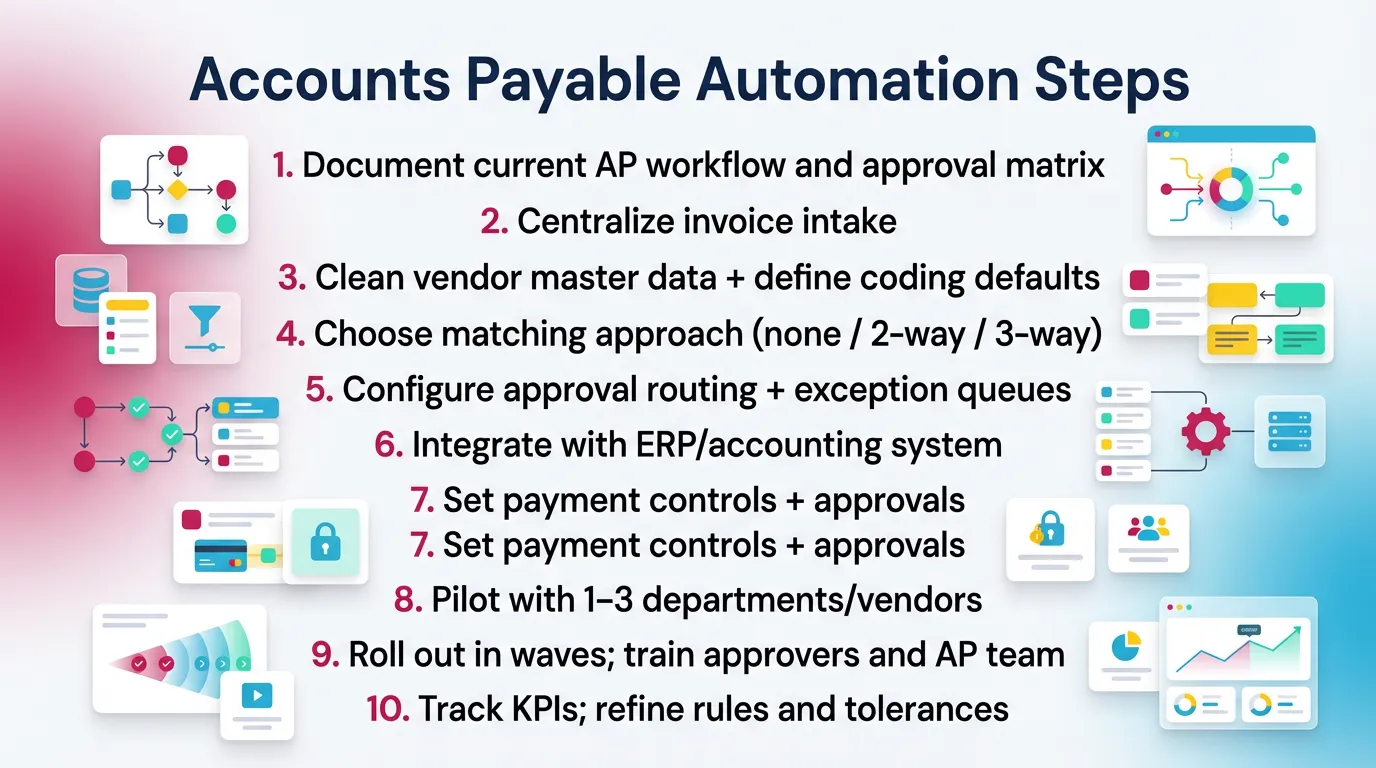
- Document current AP workflow and approval matrix
- Centralize invoice intake
- Clean vendor master data + define coding defaults
- Choose matching approach (none / 2-way / 3-way)
- Configure approval routing + exception queues
- Integrate with ERP/accounting system
- Set payment controls + approvals
- Pilot with 1–3 departments/vendors
- Roll out in waves; train approvers and AP team
- Track KPIs; refine rules and tolerances
These accounts payable automation steps reduce risk.
They also speed adoption.
AP Automation Tools: What Tools Simplify Accounts Payable Automation?
What tools simplify accounts payable automation? Tools that cover capture, approvals, matching, payments, and integrations. You should also include reporting.
That mix becomes your AP automation tools stack.
Core Tool Categories (And What Each Automates)
Common tool categories include:
- Invoice capture & OCR for extraction and validation
- Workflow automation for routing, approvals, reminders, escalations
- Matching engines for PO and receipt matching with tolerances
- Payments for ACH, check, card, wire, and remittance
- Vendor portals for submission and status
- Analytics & KPIs for throughput, exceptions, and cycle time
- Integrations for ERP sync, SSO, procurement connections
In practice, teams want one system for intake and approvals.
They tolerate separate payment tools if controls stay strong.
“Must-Have” vs “Nice-to-Have” Capabilities
Here is a simple guide you can use in demos.
Must-have
- Configurable approvals and routing
- Clear audit trail and timestamped history
- Role-based access and permissions
- Exception handling with queues and owners
- Reliable integrations with ERP or accounting system
Nice-to-have
- Vendor portal and self-serve status
- Dynamic discounting programs
- Advanced AI coding suggestions
- Multi-entity and global compliance features
- Complex procurement suite integrations
Accounts Payable Automation Solutions: How to Choose the Right Fit
Accounts payable automation solutions work best when they match your invoice mix, approval structure, and accounting system.
Therefore, evaluate around process, not brand.
Selection Criteria by Company Type
SMB
- Fast implementation
- Strong QuickBooks Online or Xero integrations
- Simple approvals and bill pay
- Low admin burden
Mid-market
- Multi-entity support
- PO matching and stronger controls
- Better analytics and exception reporting
- Role design for segregation of duties
Enterprise
- Global payments and local requirements
- Advanced segregation of duties
- Deep ERP support and high-volume performance
- Complex approval matrices and delegated authority
Evaluation Scorecard
Use this scorecard to compare accounts payable automation solutions.
Ask vendors to show exception flows in the demo. Not slides.
Best Accounts Payable Automation Software: How to Vet “Best” Lists
The best accounts payable automation software depends on your process, invoice types, and control needs.
So treat “best” lists as starting points, not answers.
Why “Best AP Automation Software” Depends on Your Process
Your process defines the “best” fit. Here are common drivers:
- PO-heavy vs non-PO-heavy environments
- Centralized AP vs distributed approvals
- Single entity vs multi-entity
- Global payments vs domestic only
That is why best accounts payable automation software lists vary.
One tool can win in enterprise matching. Another can win in SMB speed.
Shortlist Questions (Buyer Checklist)
Use these questions before you build a vendor shortlist:
- What invoice volume per month are we targeting?
- What percent is PO-backed?
- How many approvers exist and how many layers?
- What exceptions happen most often today?
- What system is the source of truth (ERP/QBO/Xero)?
- What controls are non-negotiable?
If you cannot answer these, pause selection.
You will buy features you do not use.
Accounts Payable Automation Examples (Realistic Use Cases)
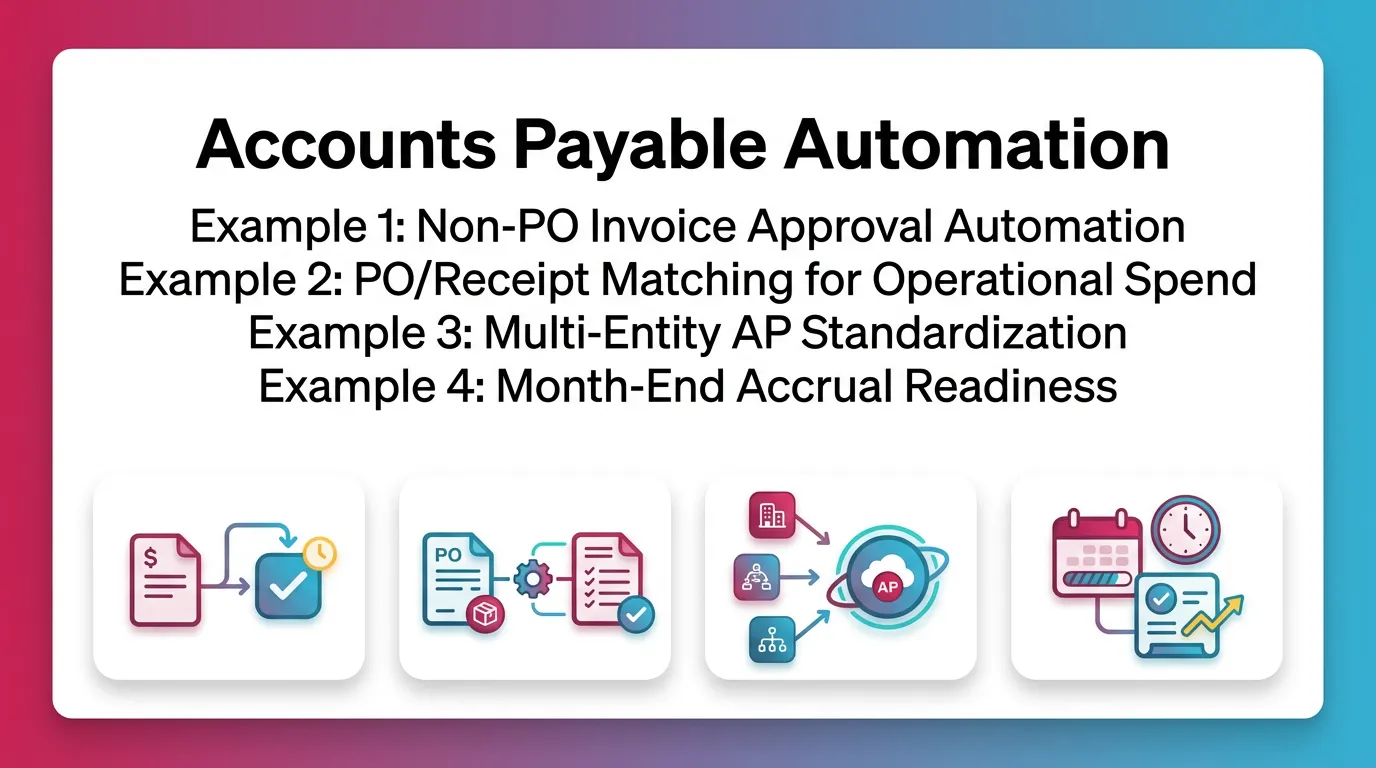
Accounts payable automation examples help you see where workflow saves time and reduces risk.
Use these to map your own process.
Example 1: Non-PO Invoice Approval Automation
Non-PO invoices create the most routing work. Automation reduces chasing.
A typical flow:
- Invoice arrives in AP inbox
- OCR extracts fields and suggests vendor defaults
- System routes to cost center owner based on rules
- Approver sees invoice, coding, and context
- Approver approves or rejects with a reason
- System posts to accounting after approval
Practical lesson. Require a cost center on every non‑PO invoice.
If not, everything becomes “AP’s problem.”
Example 2: PO/Receipt Matching for Operational Spend
This works well for inventory, facilities, and recurring operational spend.
A typical flow:
- Invoice arrives
- System performs 3-way match against PO and receipt
- Tolerance pass posts to ready-to-pay
- Tolerance fail creates an exception case
- Owner resolves and adds notes and support
Keep notes inside the workflow. Do not resolve in chat.
You will need that context later.
Example 3: Multi-Entity AP Standardization
Multi-entity teams need shared policy and reporting. Automation helps.
A typical approach:
- Standard approval policies across entities
- Shared exception taxonomy and owner mapping
- Central reporting across entities
- Entity-based permissions for segregation and confidentiality
This reduces “every entity does it differently.”
It also improves onboarding for new AP staff.
Example 4: Month-End Accrual Readiness
Close gets easier when invoice statuses are clear. Accruals get cleaner.
A close-ready status set often includes:
- Received, pending coding
- Pending approval
- Approved, pending posting
- Posted
- Scheduled for payment
This supports cut-off. It also supports explanations to leadership.
Accounts Payable Automation Case Study Template (So Readers Can Model ROI)
An accounts payable automation case study works best as a template.
Do not copy vendor ROI claims. Measure your own before-and-after.
Case Study Structure
Use this structure:
- Company profile (industry, size, invoice volume)
- Starting state (cycle time, manual steps, error rates)
- Implementation scope (what was automated first)
- Controls and approval matrix changes
- KPI outcomes (before/after)
- Lessons learned (exceptions, change management)
ROI Metrics to Include
Include metrics that connect to time, risk, and cash:
- Cost per invoice
- Invoice cycle time
- Exception rate
- Duplicate payment incidents
- On-time payment rate
- Early-payment discount capture rate
A practical measurement tip. Track “time to approve” separately.
Approvals often drive most cycle time.
Accounts Payable Automation Best Practices (What Consistently Works)
Accounts payable automation best practices focus on standardization, exception ownership, and simple approvals.
These create speed without losing control.
- Standardize before automating (vendor data, coding rules, approval matrix)
- Design exception handling as a first-class workflow (not an afterthought)
- Make approvals easy for approvers (mobile-friendly, clear context, reminders)
- Enforce segregation of duties (create vs approve vs pay)
- Track KPIs monthly and adjust routing and tolerances
- Start with the highest-volume invoice types for early wins
- Document policies in the system (not a PDF nobody reads)
- Integrate cleanly with ERP/accounting to avoid reconciliation drift
Best Practices Table: “Practice → Outcome”
Common AP Automation Mistakes (And How to Avoid Them)
Most failures come from process gaps, not software gaps.
Fix the workflow first.
Common mistakes:
- Automating a broken workflow without fixing root causes
- Adding too many approval layers and calling it “control”
- Ignoring vendor master data hygiene
- Having no plan for non-PO invoices
- Skipping change management for approvers
- Measuring only “invoices processed” instead of cycle time and errors
How to avoid them:
- Keep approvals tight and policy-based
- Assign exception owners outside AP when appropriate
- Clean vendor data before integrations
- Train approvers in 10 minutes or less
- Track exception categories and remove root causes
How Xenett Supports AP Automation Best Practices During Close (Without Replacing Accounting Judgment)
AP automation improves invoice flow. Close still needs execution.
That is where teams often need structure.
Xenett supports predictable close routines. It helps teams track work.
It also helps teams standardize review. It does not replace judgment.
Where AP Automation Commonly Breaks Down: Close Pressure + Inconsistent Review
Close pressure exposes gaps fast. Common breakdowns include:
- Invoices pending approval at cut-off
- Coding inconsistencies found late
- Accrual calls made without a clear pipeline view
- Rework caused by missing documentation or unclear ownership
Even with AP automation, you still need repeatable close steps.
You also need consistent review points.
How Xenett Helps Teams Operationalize a More Predictable Close
Xenett helps you run close like a system. It adds ownership and timing.
It keeps work visible across the team.
- Close Task And Checklist Management
- Standardized close checklists that include AP cut-off steps
- Examples: “review unposted invoices” and “validate accrual support”
- Task owners and due dates reduce last-minute cleanup
- Review And Approval Workflows (Review-First)
- Structured review workflows surface issues earlier
- Consistent review standards across periods and entities
- Less reviewer-by-reviewer variance
- Visibility Into Close Status And Bottlenecks
- Clear status tracking across close work
- AP-related blockers stay visible
- Leaders can see what is stuck and why
KPIs to Track After Implementing Accounts Payable Automation
AP automation only improves what you measure. Track speed and quality.
Also track exception drivers.
Recommended KPIs:
- Invoice cycle time (receipt → approval → posting)
- Cost per invoice
- Touchless or straight-through processing rate
- Exception rate and top exception categories
- On-time payment rate
- Duplicate invoice and duplicate payment rate
- Approval SLA compliance
- Percent coded correctly on first pass
- Accrual accuracy signals, like fewer post-close AP adjustments
A practical KPI habit. Review exceptions monthly with owners.
Pick one root cause to fix each month.
FAQ: Accounts Payable Automation
What Is Accounts Payable Automation?
Accounts payable automation is the use of software to automate invoice capture, data entry, approval routing, matching, and payment workflows while maintaining controls and an audit trail.
It reduces manual work and improves visibility.
How Does AP Automation Work?
AP automation works by ingesting invoices digitally, extracting and validating data, routing invoices for approval based on rules, handling exceptions through defined workflows, and posting and paying invoices through integrated systems.
It also records every step for traceability.
What Tools Simplify Accounts Payable Automation?
Common AP automation tools include invoice OCR and data capture, approval workflow automation, PO matching, payment automation, vendor portals, analytics dashboards, and ERP/accounting integrations.
Most teams start with intake and approvals first.
What Are the Benefits of Accounts Payable Automation?
Key benefits include faster invoice processing, fewer manual errors, improved approval controls, better cash visibility, fewer late payments, and a stronger documentation trail for accountability.
These benefits show up quickly at month-end.
What Are the Basic Steps in an Automated Accounts Payable Process?
The basic steps are invoice capture, data extraction, validation, coding, matching (if applicable), approval routing, exception handling, payment execution, and posting/reporting.
Those steps form the end-to-end workflow.
What Should I Look For in Accounts Payable Automation Software?
Look for strong integrations with your accounting or ERP system, configurable approvals and controls, reliable exception handling, role-based permissions, clear audit trails, and KPI reporting for cycle time and exception rate.
Also test real invoices in the trial.
What Are Common Challenges When Automating Accounts Payable?
Common challenges include messy vendor master data, unclear approval policies, too many exceptions (especially non-PO), weak change management for approvers, and integration issues that create reconciliation gaps.
Solve policy and data first.
Is AP Automation Only for Large Enterprises?
No. SMBs can benefit significantly, especially from invoice intake automation, approvals, and integrated bill pay.
Keep workflows simple and control-focused.
Conclusion
Accounts payable automation works best when you treat it as a workflow redesign. Start with intake and approvals. Clean vendor data. Then expand into matching and payments.
If you plan an AP automation rollout this quarter, document your current workflow first. Then list your top five exception types. Use that list to drive tool demos and configuration decisions.