.svg)

Month-End Close Steps for Small Businesses: Simple Checklist & Tips

Ask questions, get summaries, or uncover key takeaways from this article.

Blog Summary / Key Takeaways
- A small business month end close is a monthly routine within a broader month-end close process. It confirms what happened.
- Reconciliations come before reporting. Always.
- “Good enough and consistent” beats perfect and late.
- Use a month end close checklist for small business. Use the same order monthly.
- If you split work across people, add review and approval steps.
- Xenett helps teams run the close with clear owners and status.
Quick Summary: The 10-Step Small Business Month-End Close
These are the Month End Close Steps for Small Business most teams need. They work for a simple month end close process. They also scale as you grow.
- 1. Lock the cutoff date (stop backdating)
- 2. Collect all source docs (bank feeds, receipts, invoices)
- 3. Categorize and post transactions
- 4. Reconcile bank accounts
- 5. Reconcile credit cards & payment processors
- 6. Update accounts receivable (A/R)
- 7. Update accounts payable (A/P)
- 8. Record key month-end adjustments (payroll, subscriptions, depreciation, accruals)
- 9. Review the P&L and balance sheet for “does this make sense?”
- 10. Export/approve reports + archive support
Keep it lightweight. Define rules once. Then repeat them every month.
What Is a Month-End Close for a Small Business?
A small business month end close is a repeatable monthly routine. It ensures your books match what actually happened in that month.
For most small business accounting close cycles, “close” includes:
- Posting missing transactions
- Reconciling bank and credit card accounts
- Reviewing financials (P&L and balance sheet)
- Saving reports and backup
It is not:
- Complex multi-entity consolidation
- Formal audit procedures
- Heavy accrual infrastructure
You can run a clean close without making it complicated.
Why the Monthly Close Process Matters
A monthly close process for small business gives you numbers you can use. It also reduces tax-time panic.
Common outcomes small teams want
Most owners and finance leads want:
- Clear cash position and burn visibility
- Cleaner books for taxes and filings
- Faster responses to lender or investor asks
- Fewer surprises from missing or duplicate items
- Better decisions on pricing, hiring, and spend
If you run a month end close for startups, you also want runway clarity.
That starts with reconciled cash.
What usually breaks in a small business accounting close
Most problems come from a few repeat issues:
- Missing receipts and invoices
- Late reconciliation gaps
- Inconsistent categories month to month
- Mixed personal and business activity
These issues create bad reports. Bad reports create bad decisions.
Before You Start: Month-End Close Prep
Prep reduces close time more than any “hack,” and it helps you speed up your monthly close. Therefore, set rules first.
Set a close deadline and “cutoff rules”
Pick a close-by date. Many small teams choose the 5th business day.
Then set cutoff rules:
- Stop backdating after the cutoff
- Allow changes only with a note and approval
- Define who can reopen a closed month
This one step prevents endless “small edits” that snowball.
Gather what you need
Do not overbuild this. Use what you already have.
Gather:
- Bank and credit card statements
- Payment processor summaries (Stripe, PayPal, Square)
- Payroll reports
- Loan statements and interest detail
- Inventory counts, if you track inventory
- Recurring bills and subscriptions list
Tools suitable for small teams
A simple month end close process needs simple tools:
- Accounting system (QuickBooks Online or Xero)
- Receipt capture app or shared inbox
- Month end close checklist for small business (Doc or Sheet)
- Monthly folder structure (Drive or Dropbox)
Tip from practice: keep one folder per month. Keep one subfolder for bank.
Keep one for payroll. Keep one for sales and A/R.
How to Do Month-End Close for Small Business: Step-by-Step
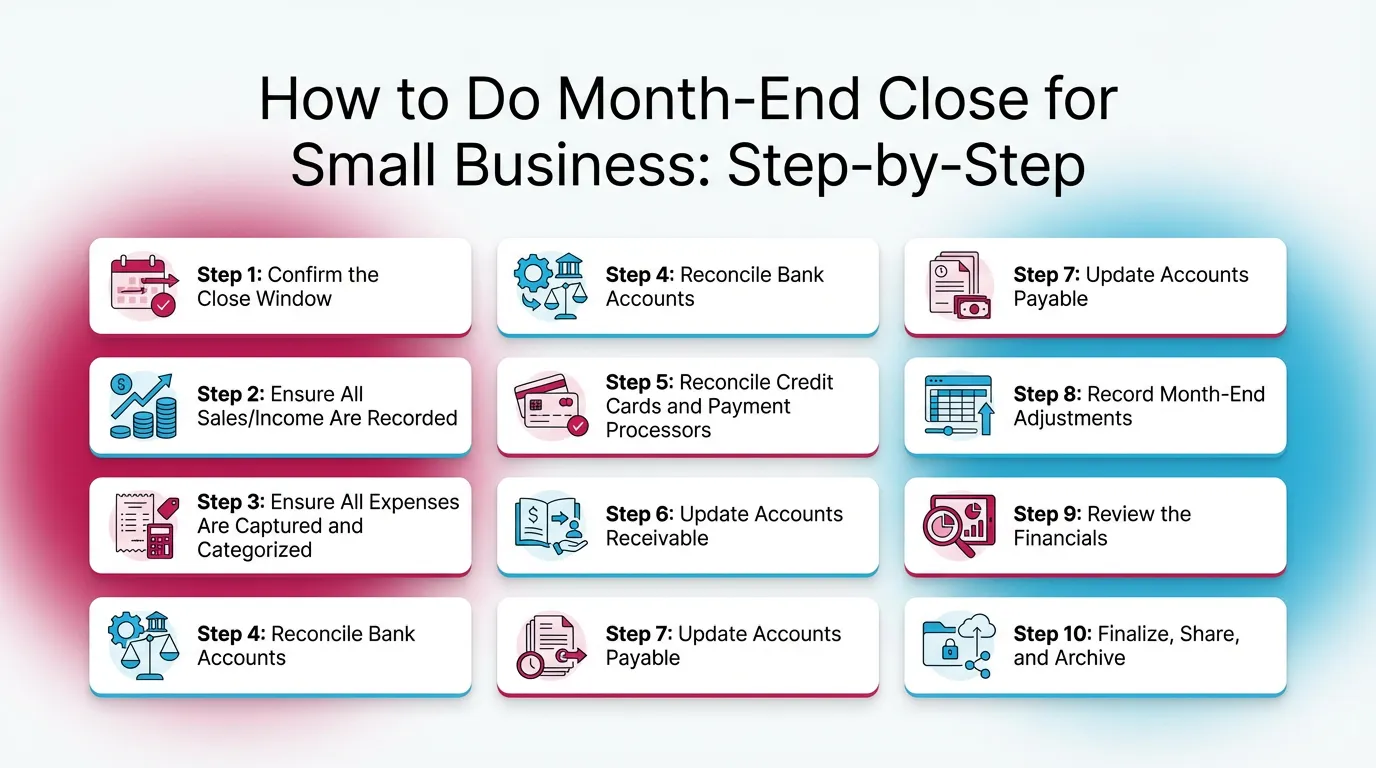
Step 1: Confirm the Close Window
Confirm the month and date range first. Then freeze changes.
Do this:
- Confirm the period you will close
- Lock the month in your team’s workflow
- Require approval for late changes
If you allow backdating, your reports never settle. That kills trust.
Step 2: Ensure All Sales/Income Are Recorded
Record all income next. Then tie it to cash movement.
Do this:
- Match sales system totals to deposits
- Confirm invoice timing (issued vs paid)
- Confirm credits and refunds hit the right month
Watch for:
- Deposits recorded twice
- “Undeposited funds” sitting too long
- Processor payouts that combine multiple days
Practical example: Stripe deposits often hit in batches.
Your books should show gross sales and fees, not only net deposits.
Otherwise revenue and fees both look wrong.
Step 3: Ensure All Expenses Are Captured and Categorized
Capture expenses before you reconcile. Then categories will settle faster.
Do this:
- Clear uncategorized transactions
- Confirm receipts for major spend
- Review “Ask My Accountant” or suspense accounts
Quick checks:
- Large one-off charges
- Refunds and chargebacks
- Mixed personal and business spend
A real-world rule that helps:
If it is over your receipt threshold, require support before close.
Step 4: Reconcile Bank Accounts
Reconcile every bank account to the statement ending balance using consistent bank reconciliation procedures. Every month.
This step matters most in a small business month end close.
If cash is wrong, everything becomes noise.
Resolve:
- Missing transactions
- Duplicate entries
- Timing differences from bank feeds
Keep it simple:
- Use the bank statement ending date
- Match all cleared items
- Investigate any difference right away
If the reconciliation does not match, stop. Fix it before step 9.
Step 5: Reconcile Credit Cards and Payment Processors
Reconcile credit cards to the card statement. Then tie processors to deposits.
Credit cards:
- Match cleared charges to the statement
- Confirm payments post to the right card account
Payment processors:
- Tie gross sales, fees, refunds, and net deposits
- Confirm payout timing across month end
Mini-checklist:
- Fees map to a consistent expense category
- Chargebacks post as refunds or disputes
- Payouts do not get double-counted as income
Step 6: Update Accounts Receivable
Update A/R so your revenue story matches reality. Then your cash forecast improves.
For invoicing businesses:
- Review open invoices
- Add short notes for overdue items
- Confirm credits and discounts apply correctly
For cash-based businesses:
- Ensure deposits match sales reporting
- Confirm you did not book income twice
A/R does not need perfection. It needs a clear list you can act on.
Step 7: Update Accounts Payable
Update A/P so bills do not disappear. Then you avoid surprise cash drops later.
Do this:
- Enter bills you received but have not recorded
- Confirm due dates and payment method
- Review old open bills for duplicates
Watch for:
- Duplicate vendor bills
- Old outstanding bills that should be voided
- Bills paid outside the system
Keep “received but not billed” simple. Add it only if it matters.
Step 8: Record Month-End Adjustments
Post only the adjustments you actually use. Keep a short list. Repeat monthly.
Typical adjustments for small teams:
- Payroll timing and payroll liabilities
- Loan interest vs principal split
- Depreciation, if you track fixed assets
- Prepaids, like annual software and insurance
- Accruals (see understanding accruals in your close), only if you run accrual accounting
Plain example from the field:
You pay annual insurance in January. You should not expense 12 months at once.
Instead, move most of it to prepaid insurance. Expense one month each close.
Do not turn this into a journal-entry marathon. Use “good enough” rules.
Then improve as complexity grows.
Step 9: Review the Financials
Review starts with “does this make sense.” Then you drill into variances.
Do not start here first. Reconcile first. Then review.
P&L checks
Scan the P&L for obvious issues:
- Revenue matches sales activity
- Gross margin stays in a normal range
- Big changes have a simple explanation
- Misclassifications do not distort results
Common misclassifications:
- Repairs booked as equipment
- Owner draws booked as expenses
- One-time vendor costs spread across categories
A practical workflow that works:
Write one sentence for each major variance. Then move on.
Balance sheet checks
The balance sheet prevents false confidence. Therefore, check it every month.
Focus on these accounts:
- Cash matches reconciled balances
- A/R and A/P do not grow “mysteriously”
- Credit cards and loans tie to statements
- Uncategorized or suspense does not linger
- Negative balances make sense, or get fixed
If you only review the P&L, you miss the real issues.
For example, a misposted loan payment can inflate expenses.
Step 10: Finalize, Share, and Archive
Finalize the month so the team can trust the numbers. Then save support.
Export and save:
- P&L and balance sheet
- Cash flow statement, if you use it
- Bank and credit card reconciliation reports
- Key schedules (A/R aging and A/P aging)
Document changes:
- Note what changed after cutoff
- Note why it changed
- Note who approved it
Archive supporting docs:
- Store by month
- Use consistent file names
- Keep one “Close Packet” folder
This step makes next month faster. It also helps when questions show up later.
Month-End Close Checklist for Small Business
Use this month end close checklist for small business every month, and pair it with a comprehensive close checklist if you want a printable master list. Keep it short. Print it. Or copy it into your close tool.
Core checklist
- Post/categorize all bank feed transactions
- Reconcile all bank accounts
- Reconcile credit cards
- Tie payment processor activity to deposits
- Review A/R and A/P (if used)
- Post month-end adjustments (payroll/loans/prepaids)
- Review P&L + balance sheet for anomalies
- Save reports + reconciliation backups
- Note exceptions and open items for next month
Optional checklist
- Inventory count and COGS adjustment
- Sales tax payable check
- Deferred revenue check (startups/annual plans)
- Fixed assets review
Month-End Close Steps, Owner vs Bookkeeper vs Outsourced Accountant
If one person does everything, keep the same sequence. Sequence matters.
Best Practices for a Predictable Monthly Close Process for Small Business
These practices keep your small business month end close stable—see our best practices for closing your books for more ways to reduce rework. They also reduce rework.
Standardize the close
Standardize three things:
- One checklist
- One owner per task
- One deadline
Run the same order every month. Reconcile before you review.
Therefore your review time drops.
Use “exception-based” review
Do not re-check everything. Focus on what changed.
Look for:
- Unusual variances
- New vendors
- Negative balances
- Uncategorized or suspense items
- Accounts with large round numbers
This approach works well for a monthly close process for small business.
It also works when you scale from 100 to 1,000 transactions.
Keep documentation lightweight but consistent
Keep a small monthly package:
- Reconciliations
- P&L and balance sheet PDFs
- A/R and A/P aging, if used
- One note file with exceptions
Write one short note per anomaly:
- What happened
- What you did
- What remains open
This creates continuity when people change roles.
Time-box the close
Time-boxing protects the business from perfection loops.
Common targets:
- 2–4 hours for very small operations
- 1–2 business days for growing teams
If it takes longer, you likely have a bottleneck.
Most teams get stuck on receipts, reconciliations, or A/R follow-ups.
Common Month-End Close Mistakes
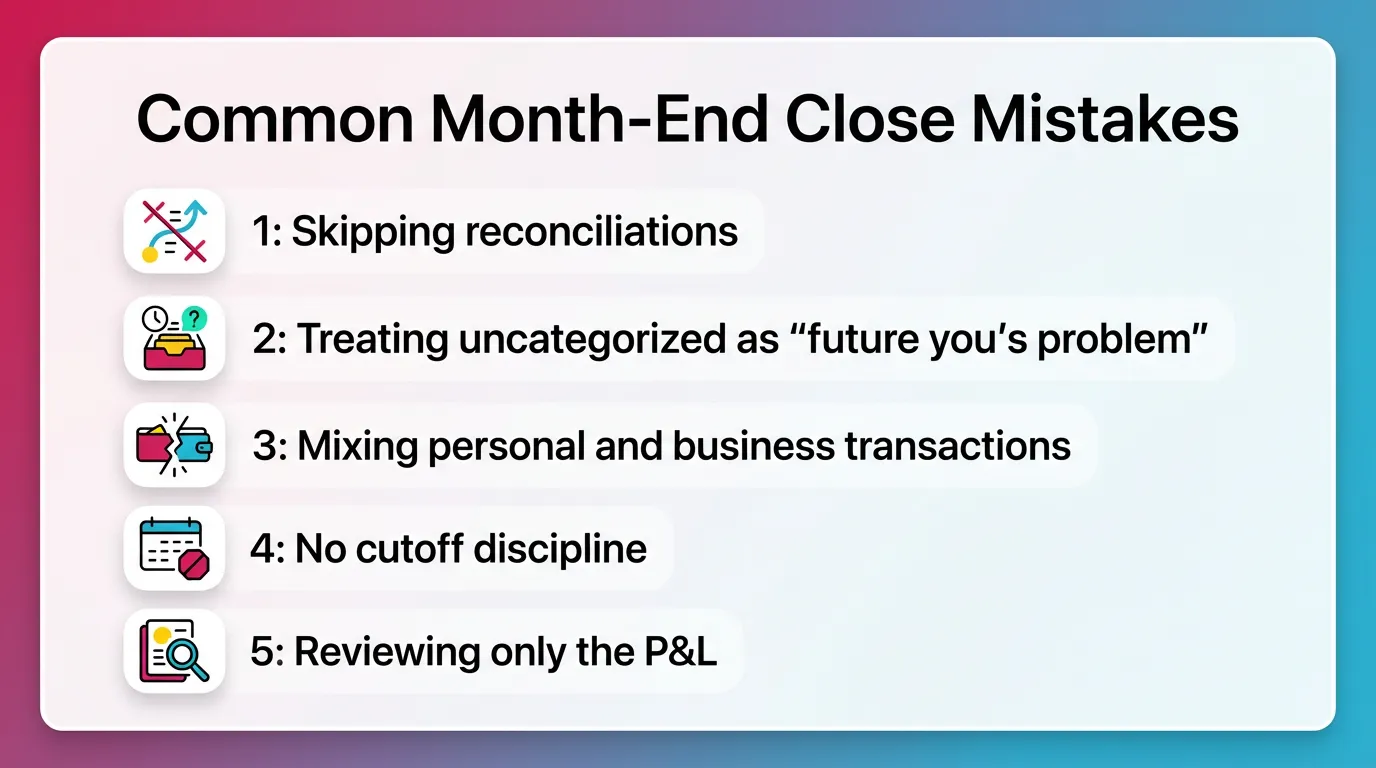
These mistakes show up in almost every small business accounting close.
Fix them once, then your close gets easier.
Mistake 1: Skipping reconciliations
Skipping reconciliations makes reports unreliable.
Fix:
- Make bank and credit card recs mandatory
- Do them before any financial review
Mistake 2: Treating uncategorized as “future you’s problem”
Uncategorized grows fast. Then close becomes a cleanup project.
Fix:
- Clear uncategorized weekly
- Set a rule for missing receipts
- Escalate exceptions before close week
Mistake 3: Mixing personal and business transactions
Mixed spend muddies categories. It also creates tax risk.
Fix:
- Separate cards and accounts
- Use a clear owner draw rule
- Reimburse owners instead of burying items
Mistake 4: No cutoff discipline
Constant edits break comparability.
Fix:
- Lock the month
- Require a note and approval for changes
- Track changes in one place
Mistake 5: Reviewing only the P&L
The balance sheet catches errors the P&L can hide.
Fix:
Add five balance sheet checks:
- Cash
- Credit cards
- Loans
- A/R
- A/P
How Xenett Helps Teams Operationalize a Cleaner Month-End Close
Xenett helps teams run the close as a system with streamlined accounting workflows. It supports execution and review. It does not provide audit services. It is not an audit tool.
Turning a checklist into a repeatable close system
A checklist helps. A system helps more.
With Xenett, teams can:
- Build recurring close tasks and checklists
- Keep the same sequence every month
- Assign clear owners and due dates
This supports a simple month end close process by automating repetitive close tasks. It also supports growth without chaos.
Related reading:
Review and approval workflows that fit real accounting review
Many teams split work:
- Bookkeeper prepares
- Senior reviewer approves
- Owner reviews highlights
Xenett supports review and approval workflows.
Work does not count as done until the reviewer signs off.
This reduces missed reconciliations and half-finished schedules.
Visibility into close status and bottlenecks
Small teams lose time when issues surface late. Visibility prevents that.
Xenett provides:
- Status by task and by close phase
- Clear blockers, like missing docs
- A single view of what remains open
Therefore you can follow an exception-based workflow.
You focus attention where it matters.
FAQ: Month-End Close Steps for Small Business
What are the steps in month-end close for a small business?
Record and categorize transactions. Reconcile bank and credit cards. Update A/R and A/P if you use them. Post key adjustments. Review P&L and balance sheet. Save and archive reports.
What are the month-end closing activities?
Month-end closing activities include posting transactions, reconciling accounts, recording adjustments, reviewing financial statements, and saving support. Most small teams also document exceptions for next month.
How long should a month-end close take for a small business?
A very small business can close in a few hours if it stays current weekly. Growing teams often need 1–2 business days. Volume, invoicing, and receipts drive timing.
What is the simplest month-end close process?
The simplest process is: enter all transactions, reconcile bank and credit cards, review the balance sheet and P&L for obvious issues, then save reports and backup. Repeat the same steps monthly.
Do startups need a month-end close?
Yes. Month end close for startups supports burn and runway tracking. It also reduces tax-time cleanup and speeds investor or lender requests.
What should I review first: P&L or balance sheet?
Reconcile first. Then review the balance sheet. Then review the P&L. Clean balance sheet accounts prevent misleading profit results.
What’s the difference between a month-end close checklist and a month-end close process?
A checklist lists tasks. A process adds sequence, ownership, timing, and review rules. A process makes the checklist reliable month after month.
Conclusion
Month End Close Steps for Small Business work best when you keep them simple and borrow from close processes used by professional accountants. Reconcile first. Review second. Then lock and archive.
If your close still feels messy, start with one improvement. Add a cutoff rule.
Then add a consistent checklist. Then add a clear review step.
If you want to make the process repeatable across people, set up your monthly close process for small business in Xenett and focus on managing your financial close effectively. Build the checklist. Assign owners. Track review and approvals. Keep your close moving without relying on memory.