.svg)

Financial Closing Explained: What Happens During the Close Cycle

Ask questions, get summaries, or uncover key takeaways from this article.
Blog Summary / Key Takeaways
- Financial closing works best when you treat review as the engine of the close. Reconciliations and adjustments support review. They do not replace it.
- A predictable financial close process follows a consistent sequence: capture activity, reconcile risk accounts early, post adjustments, review at the account level, then approve and lock.
- The biggest breakdowns in the closing process in accounting happen when teams push review to the end. That creates late “surprises,” rework, and longer close times.
- Month end closing process discipline stays mostly the same at year-end. Year end accounting adds heavier documentation, more true-ups, and more policy consistency checks.
- The best financial close solutions improve quality by enforcing review standards, approvals, and visibility. Speed becomes the result, not the goal.
Financial Closing looks simple on paper. You “reconcile the bank,” post a few entries, and publish statements. In real life, the comprehensive financial closing process breaks when review happens too late and issues surface after the team thinks the work is done.
This guide fits accounting firm owners, CAS leaders, and senior reviewers who run a repeatable month end closing process across many clients in QuickBooks Online or Xero. You will get practical steps in financial closing, a review-first close cycle accounting framework, and examples of financial close solutions that make the close more predictable.
What Is Financial Closing?
Financial closing is the recurring set of accounting activities used to finalize a period’s books (month/quarter/year), complete required reconciliations and reviews, record necessary adjustments, and produce reliable financial statements and reporting. It turns “what got posted” into “what you can stand behind.”
What “closing the books” actually means in practice
Closing the books means you enforce period discipline, not just task completion. You prove balances, document assumptions, and lock the period so results stay stable.
In practice, that includes:
- Period cutoff discipline. You capture transactions, date them correctly, and keep support.
- Balances reconciled and explained. Cash ties out. Clearing accounts clear. Strange balances get a story.
- Review standards applied consistently. You check the same accounts the same way each period.
Financial closing vs financial reporting
Financial closing finalizes data. Financial reporting presents and interprets results. Therefore the financial close and reporting process must run in sequence, with close integrity first.
Close vs Reporting
Why the Financial Close Process Breaks Down (And Why It’s Usually a Review Problem)
Most close cycles fail because teams treat review like a final checkpoint. Review should guide the work from the start. When you delay review, you delay the discovery of the real issues.
Common failure patterns seen in month-end close cycles
These patterns show up in firms and internal teams, especially in multi-client environments:
- Reconciliations happen late. You discover issues after you have already “finished” posting.
- Flux questions happen after statements get drafted. Review turns into a scramble.
- Reviews depend on who’s available. Standards shift between reviewers and months.
- Cleanup becomes the default process. People fix random items without a consistent rule set.
A practical example I see often: a team posts payroll, matches the bank, and calls the month “mostly done.” Then a reviewer notices payroll liabilities drifted for three months. Now the team backtracks across multiple periods. The close blows up, and nobody feels confident about the final story.
The operational cost of an unreliable close cycle
An unreliable closing cycle process creates real operational drag:
- Rework and longer close times. You do work twice because you learn the requirements late.
- More client escalations. You answer last-minute “why did profit drop?” questions with incomplete context.
- Higher risk of misstated financials. Even without “errors,” unexplained balances create misleading reporting.
If you want a faster close, build a better review system. Speed follows quality.
The Financial Close Process (Step-by-Step Close Cycle Accounting Framework)
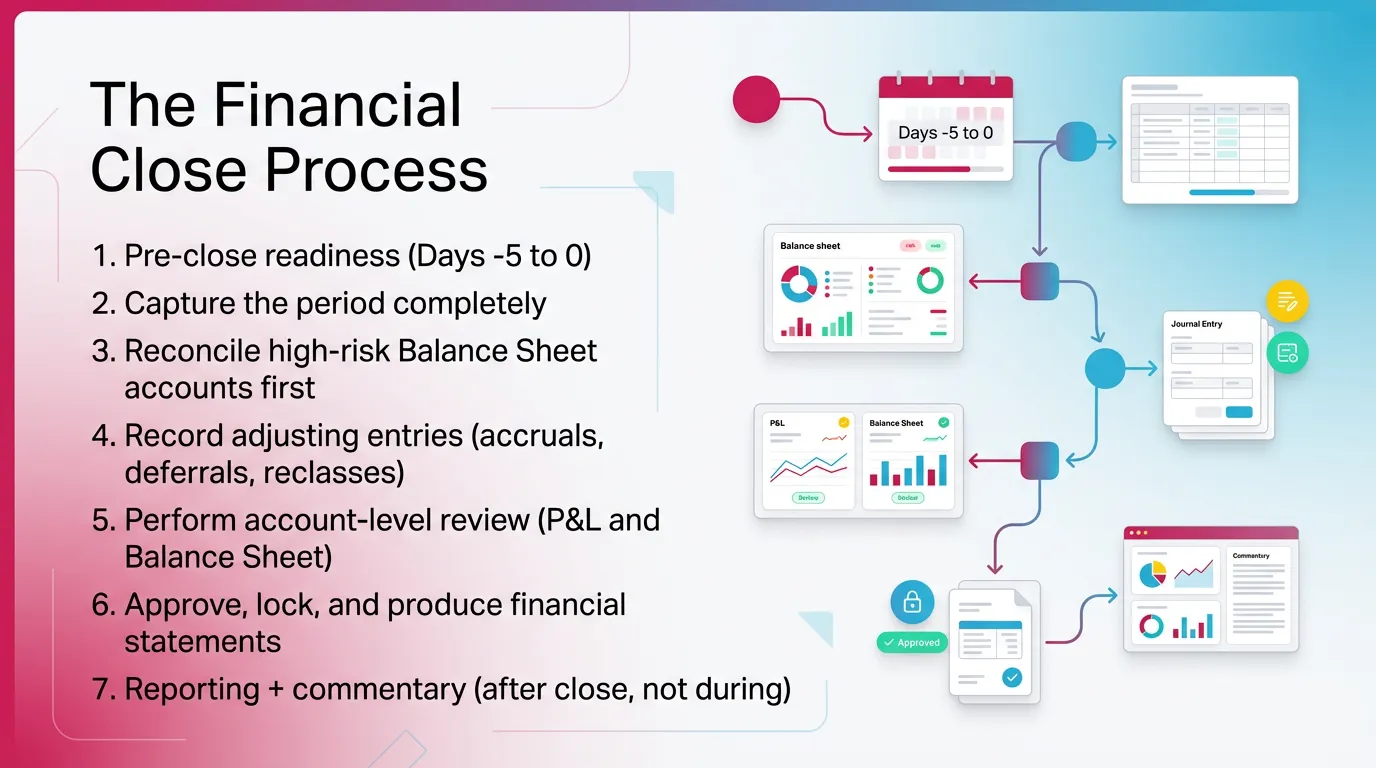
Use this close cycle accounting framework to make the steps in financial closing repeatable across clients and staff. You can adapt timing, but keep the sequence.
Steps in financial closing
- Pre-close readiness (Days -5 to 0)
- Capture the period completely
- Reconcile high-risk Balance Sheet accounts first
- Record adjusting entries (accruals, deferrals, reclasses)
- Perform account-level review (P&L and Balance Sheet)
- Approve, lock, and produce financial statements
- Reporting + commentary (after close, not during)
1) Pre-Close Readiness (Days -5 to 0)
Pre-close readiness means you remove preventable blockers before the deadline hits. You confirm data dependencies and set expectations on timing and cutoff.
Do this consistently:
- Confirm cutoff rules and dependencies:
- Bank feed timing and unmatched items
- Bill pay runs and vendor credits
- Payroll finalization and funding timing
- Merchant batches and deposit timing
- Lock schedules for subledgers and source systems. For example, decide when the client stops backdating.
- Identify accounts that historically cause issues. For example, undeposited funds, inventory clearing, tips payable, or loan interest allocations.
2) Capture the Period Completely
Capture means you get the period into the ledger correctly before you reconcile and review. You reduce noise, duplicates, and miscodings that distort P&L and Balance Sheet behavior.
Focus on:
- Ensure all transactions post to the right period. Watch for backdated bills and late bank feed imports.
- Scan for duplicates and missing items. Common sources include merchant connectors, bank rules, and manual bill entry.
- Check miscodings that break review logic. For example, loan payments coded fully to expense, or payroll taxes coded to wages.
In QBO and Xero environments, “capture” often equals “verify integrations behaved.” A broken mapping can change financials more than any single journal entry.
3) Reconcile High-Risk Balance Sheet Accounts First
Start with high-risk Balance Sheet accounts because they drive most downstream review questions. When these accounts stay messy, P&L review becomes guesswork.
Reconcile early and often using a consistent account reconciliation process:
- Cash and clearing accounts. Tie to bank statements. Clear uncleared items with support.
- AR/AP control accounts (where applicable). Tie to subledger aging. Investigate mismatches.
- Payroll liabilities. Tie to payroll reports and payment confirmations.
- Credit cards and loans. Tie to statements. Separate principal, interest, and fees correctly.
- Deferred revenue / deposits (client-dependent). Tie to a schedule. Validate recognition logic.
A useful internal rule: if you cannot explain a Balance Sheet account in two sentences, you cannot close it yet.
4) Record Adjusting Entries (Accruals, Deferrals, Reclasses)
Adjusting entries align activity to the period so financial statements reflect reality, including accrual accounting entries. You also fix mapping issues that would otherwise trigger false review flags.
Common adjusting work includes:
- Accrue expenses incurred but not yet billed.
- Defer prepaid expenses and recognize them over time.
- Reclass miscodings to the correct accounts or classes.
- Document assumptions clearly, including what changed and why.
Keep entries explainable. For example: “Accrued January utilities based on December bill trend. True-up next month when the invoice arrives.” That level of documentation saves hours later.
5) Perform Account-Level Review (The Step Most Teams Under-Systemize)
Account-level review answers one question: “Do these numbers behave like they should?” You do this before you finalize statements, not after.
Review the P&L and Balance Sheet with expectations:
- P&L review:
- Unusual flux versus prior month and prior year
- Margin shifts that do not match operational reality
- Category behavior that breaks expectation, such as repairs spiking or COGS dropping to zero
- Balance Sheet review:
- Unexplained balances, negative balances, and stale reconciling items
- Unusual movements, especially in clearing and liability accounts
- Accounts that should clear monthly but do not
A practical reviewer technique that works across clients: write down what you expect each “problem account” to do each month. For example, “Undeposited funds should clear to zero weekly.” Then review against that expectation.
If you do this, your review becomes consistent. It stops depending on memory.
6) Approve, Lock, and Produce Financial Statements
Approval and locking prevents silent edits after review. It keeps the close auditable and repeatable, especially with multiple staff touching the same client.
Use a clear internal sequence:
- Staff completes reconciliations and proposed entries.
- The reviewer completes an account-level review and either approves or sends findings back.
- Team resolves findings and re-reviews impacted accounts.
- The reviewer approves the final period.
- Team produces final P&L, Balance Sheet, and supporting schedules.
If your software allows period locks, use them. If it does not, enforce a strict “no backdating after approval” policy.
7) Reporting + Commentary (After Close, Not During)
Reporting should start after you finalize the numbers. Otherwise you rewrite the story every time the close changes.
Strong commentary ties directly to account behavior:
- Explain drivers with references to reconciled accounts or schedules.
- Use variance explanations that reflect reality, not just percent change.
- Keep client narratives consistent month over month.
Month-End Closing Process vs Year-End Accounting: What Changes (And What Doesn’t)
The month-end close process and year end accounting use the same core sequence. Year-end adds depth, documentation, and more true ups. Therefore, teams should not reinvent the process in December. They should extend it.
What stays the same
These elements stay consistent all year:
- Core sequence: reconcile → adjust → review → finalize
- Consistent review standards across periods
- Clear ownership and a definition of “done” per account
What gets heavier at year-end
Year-end brings more complexity and more scrutiny, even when no audit occurs:
- More complex accruals and true-ups
- Tax-related adjustments where applicable, often after tax planning discussions
- Fixed asset and depreciation validation, client-dependent
- Stronger documentation expectations for continuity into the next year
For example, a monthly close might accept a reasonable insurance accrual estimate. At year-end, you often true-up to actual invoices and ensure the prepaid schedule ties out cleanly.
Year-end close checklist additions (quick bullets)
Add these to your year end accounting playbook:
- Prior-year comparative review for trend sanity checks
- Balance Sheet rollforward validation for key accounts
- Policy consistency checks, such as revenue recognition approach, capitalization rules, and payroll allocations
“Closing Entries Are Prepared Before the Financial Statements”: Where That Fits (And What People Mean)
Closing entries are prepared before the financial statements in the sense that you must post required adjustments before you issue final statements. You can draft statements for review, however you should not publish “final” statements until entries post and approvals complete.
What “closing entries” usually refers to
People use “closing entries” in two ways:
- Adjusting entries required to reflect the period accurately, such as accruals, deferrals, and reclasses
- In some contexts, temporary year-end closing entries to retained earnings at year-end
In day-to-day client accounting, most teams mean adjusting entries. They mean “the journals we need so statements make sense.”
Practical clarification for modern close workflows
Modern workflows treat statements as a review tool, not the finish line:
- You cannot produce reliable financial statements until required entries are posted and reviewers approve them.
- You can use draft statements for review, but you should label them clearly.
- You should issue final statements only after approvals and period locking.
This approach prevents the classic pain point: you send statements, then you “just tweak one entry,” and now the statements no longer match what you sent.
Financial Close Solutions: What Actually Improves Close Quality (Not Just Speed)
Financial close solutions help when they reduce rework and make review consistent, including automating your financial close. They do not help when they only speed up posting while leaving review unstructured.
Solutions that reduce rework
These improvements lower close effort because they surface problems earlier:
- Standardized reconciliation formats and evidence requirements
- Systematic flux and anomaly detection by account, not by gut feel
- Controlled review and approval flow to prevent late changes
If you want one measurable target, track “review notes per client” and “re-opened accounts after approval.” When those drop, your close quality improves.
Solutions that improve visibility
Visibility turns a messy close into a managed closing cycle process:
- Clear ownership per account and per close step
- Status tracking by client and entity
- Bottleneck reporting that shows what blocks finalization
Problem → Root Cause → Practical Solution
Best Practices for a Calm, Predictable Financial Closing Process
A calm financial closing process depends on repeatable review standards — these are best practices for financial close. You want fewer surprises, not more heroics.
Best practice 1: Review the Balance Sheet like a system, not a list
Define normal behavior per account. Then review against that expectation each close.
For example:
- Sales tax payable should move with taxable sales and payments, not randomly.
- Payroll liabilities should clear when payroll pays and taxes remit.
- Clearing accounts should clear to zero on a defined cadence.
This mindset reduces the “hunt and peck” close.
Best practice 2: Sequence the close to surface issues earlier
Start with the accounts most likely to break the close:
- Reconcile and validate high-risk accounts first
- Do not push flux analysis to the end
- Use early review checkpoints, even if the month is not fully posted
When you move review earlier, you give the team time to fix issues without overtime.
Best practice 3: Enforce consistent review standards across staff and clients
Consistency prevents “review roulette.” Define:
- Same accounts, same rules, same thresholds
- Client-specific exceptions documented clearly
- Minimum evidence required per reconciliation
If you manage multiple clients, create a standard review pack. Include which accounts must be zero, which must tie to schedules, and what flux thresholds trigger questions.
Best practice 4: Separate “fixing” from “proving”
Reconciliations and review findings should drive work. Busywork checklists should not.
A simple way to enforce this: every task in the close should answer one of these questions:
- Did we capture the period completely?
- Did we reconcile and explain balances?
- Did we review against expectations?
- Did we approve and lock?
If a task does not support one of these, remove it.
Best practice 5: Build repeatable documentation habits
Document at the account level, not just in a general note. Capture:
- What changed
- Why it changed
- Who approved it
This documentation helps with staff changes, client questions, and year end accounting continuity. It also supports clean handoffs when someone covers a client mid-close.
Common Mistakes in the Closing Process in Accounting (And How to Avoid Them)
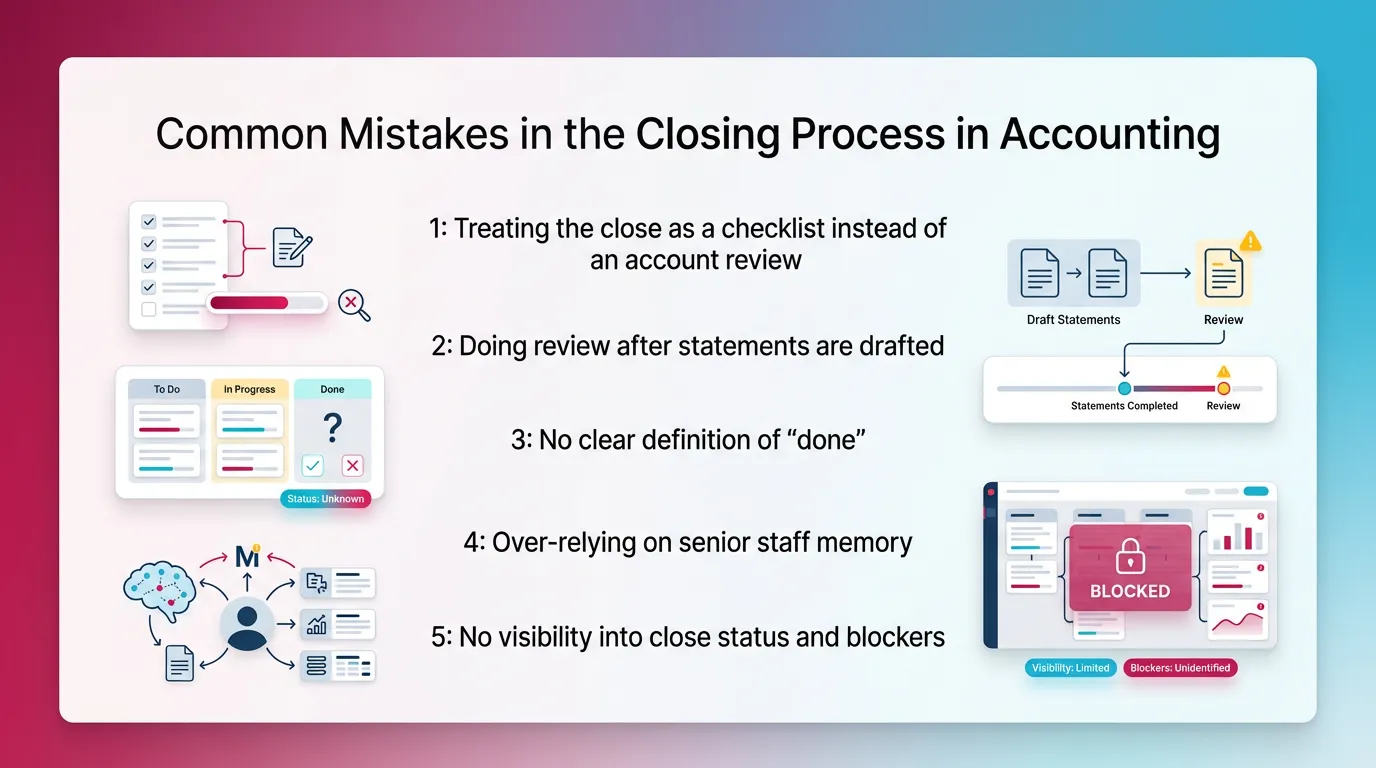
These mistakes create most month-end pain. They also explain why teams search for financial close solutions in the first place.
Mistake 1: Treating the close as a checklist instead of an account review
This mistake shows up when tasks look complete but balances still do not make sense. Fix it by making account review a required gate, not an optional step.
Avoid it by:
- Requiring a short explanation for every unusual balance
- Defining which accounts must reconcile to external evidence
- Reviewing Balance Sheet behavior before drafting client reports
Mistake 2: Doing review after statements are drafted
This creates last-minute “why is this here?” discoveries. It forces rework, and it undermines confidence in the close.
Avoid it by:
- Running account-level review before final statement formatting
- Using draft statements only as a review tool
- Locking the period after approval to prevent silent edits
Mistake 3: No clear definition of “done”
Without “done,” teams ship reports with unreconciled accounts and open questions. That creates recurring cleanup and client confusion.
Avoid it by defining done per account:
- Reconciled to evidence or to a schedule
- Reconciling items explained and aged
- Reviewer approval documented
Mistake 4: Over-relying on senior staff memory
Quality drops when a key reviewer goes on vacation. That signals you built a people-dependent close cycle accounting process.
Avoid it by:
- Documenting expected account behavior and review thresholds
- Standardizing review notes and resolution steps
- Training staff on the “why,” not just the clicks
Mistake 5: No visibility into close status and blockers
Work piles up at the end because dependencies did not get managed. The team spends the last two days asking, “What’s left?”
Avoid it by:
- Assigning owners by account and close step
- Tracking blockers explicitly, not in side conversations
- Reviewing close status mid-close, not only at the deadline
How Xenett Helps Teams Operationalize a Review-First Close (Without Replacing Judgment)
Xenett helps teams make account-level review structured and repeatable across clients or entities. It does not replace professional judgment. It operationalizes it so review happens earlier and more consistently.
Xenett’s role in the financial closing process
Xenett supports the closing cycle process by turning review into a managed workflow. It helps teams surface issues earlier so cleanup does not run the month-end.
In practice, Xenett fits as an operational layer on top of your ledger and close habits. It helps you standardize how you review accounts and track what happened.
Close task and checklist management (tied to review findings)
Xenett helps you connect tasks to findings, not just to dates. That changes how teams execute the financial close process.
You can:
- Create tasks based on anomalies, missing entries, and reconciliation gaps
- Organize close steps into consistent workflows across clients
- Reduce reliance on “who remembers what,” especially during high-volume weeks
Review and approval workflows (control without chaos)
Xenett standardizes reviewer expectations across staff. It captures what got reviewed, what changed, and who approved it. That supports internal quality control and continuity.
This matters because:
- Approvals prevent late, silent edits after review
- Review notes create context for future months
- Teams keep consistent standards across reviewers
Xenett does not provide audit services and does not function as an audit tool. It supports accounting review and close management only.
Visibility into close status and bottlenecks
Xenett makes close progress visible by client and by account. That helps leaders manage capacity and deadlines without constant meetings.
You can see:
- Which accounts block finalization and why
- Whether delays come from data dependencies, reconciliation issues, or unresolved review questions
- Where work clusters, so you can rebalance assignments earlier
Financial Closing Checklist
Use this as a high-level accounting close checklist. Keep the sequence intact, even if you change timing.
Month-End Close Checklist (high-level)
.webp)
- Confirm cutoff readiness and data availability
- Post/capture all period activity
- Reconcile priority Balance Sheet accounts
- Post adjusting entries and document assumptions
- Perform P&L + Balance Sheet account-level review (flux/anomalies)
- Resolve findings and re-review impacted accounts
- Approve, lock, and publish financial statements
- Deliver reporting commentary after numbers are final
Year-End Close Checklist Additions
- Rollforward checks on key Balance Sheet accounts
- Policy consistency validation and one-time true-ups
- Documentation clean-up for continuity into the next year
FAQ
What is financial closing?
Financial closing is the repeatable process of finalizing accounting records for a period by reconciling accounts, posting required adjustments, completing review and approvals, and producing reliable financial statements. It ensures balances make sense and stay stable.
What are the steps in financial closing?
The steps in financial closing are: pre-close readiness, capture all period activity, reconcile key accounts, post adjusting entries, perform account-level review (P&L and Balance Sheet), resolve findings, approve and lock, then report. Keep review before final statements.
What is the month end closing process?
The month end closing process is the monthly close cycle used to finalize the books for the month so financial statements reflect complete, reconciled, and reviewed balances. It should follow the same closing cycle process each month.
What’s the difference between the financial close and reporting process?
Close finalizes the numbers through reconciliations, adjustments, and approvals. Reporting explains results after the close. Therefore the financial close and reporting process must run in order, with close first.
Are closing entries prepared before the financial statements?
Yes. Closing entries are prepared before the financial statements in the sense that you must post and review required adjusting entries before issuing final statements. You can draft statements for review, however you should not publish them as final until approval.
What are the most common causes of close delays?
The most common causes include late reconciliations, missing entries discovered during review, unclear ownership by account, inconsistent review standards, and poor visibility into blockers. These issues usually trace back to delayed review.
What are financial close solutions that actually help?
Financial close solutions help when they standardize reconciliations, enforce account-level review, manage approvals, and provide status visibility. These improvements reduce rework and make the financial close process more predictable.
How do you improve close cycle accounting without burning out the team?
Move review earlier, standardize account-level expectations, and use systems that enforce consistency and visibility. Problems become easier to fix when they surface mid-close, not at the deadline.
Conclusion
Financial Closing runs smoothly when you treat review as the core of the financial close process and close the books in accounting with confidence. Reconcile high-risk accounts early. Post and document adjustments clearly. Review accounts against expectations. Approve and lock before you report.
If you want your month end closing process to feel calmer across multiple clients, start by writing down your account-level review standards and enforcing the same closing cycle process every period. Then evaluate financial close solutions that improve review consistency, approvals, and visibility, so your team spends less time scrambling and more time explaining results with confidence.