.webp)
.svg)

Financial Closing Explained: Process, Checklist, and Best Practices

Ask questions, get summaries, or uncover key takeaways from this article.
Blog Summary
Financial closing is the backbone of every finance function. It is the process that turns thousands of daily transactions into clear, accurate financial statements that leadership can trust. When financial closing works well, finance teams feel in control. When it does not, stress, delays, and confusion take over.
Many finance teams struggle because their closing process relies on manual work, disconnected systems, and last-minute fixes. However, financial closing does not have to be painful. With the right structure, checklist, and best practices, teams can close the books faster, reduce errors, and regain confidence in their numbers.
This guide explains financial closing in detail. It walks through the process step by step, outlines practical checklists, highlights common risks, and shares best practices used by modern finance teams to close smoothly and consistently.
What Is Financial Closing? (And What It Is Not)
Financial closing is the structured process of reviewing, reconciling, and finalizing financial records at the end of an accounting period. The purpose is to ensure that all financial activity is complete, accurate, and properly recorded before financial statements are produced.
In simple terms, financial closing is the moment when finance teams confirm that the numbers are correct and ready to be trusted. This includes validating transactions, resolving discrepancies, and approving balances.
What financial closing is not is a rushed clean-up at the end of the month. It is also not just reporting. Reporting communicates results, while closing verifies them. Without a proper close, reports are built on shaky ground.
Many accountants joke that financial closing is when “the numbers finally stop moving.” That is true, but only when the process is done correctly. A strong close creates stability, confidence, and control.
Types of Financial Closing Cycles
Financial closing happens regularly, not just once a year. Each cycle has its own purpose and level of complexity.
Month-End Financial Closing
Month-end closing is the most common and most frequent cycle. It focuses on operational performance, expense tracking, and revenue recognition.
Most organizations aim to complete the month-end close within a few business days. However, manual reconciliations, late data, and unclear ownership often extend this timeline.
A smooth month-end close sets the foundation for all other reporting. If month-end is messy, quarter-end and year-end will be worse.
Quarter-End Financial Closing
Quarter-end closing builds on month-end processes but adds more scrutiny. Financial statements are often reviewed by executives, boards, or external stakeholders.
This cycle includes deeper variance analysis, additional reconciliations, and tighter controls. Errors that might be tolerated at month-end receive far more attention at quarter-end.
Strong monthly discipline makes quarter-end less stressful. Weak monthly discipline makes it exhausting.
Year-End Financial Closing
Year-end closing is the most detailed and demanding cycle. It includes audits, tax preparation, regulatory filings, and external reporting.
During year-end close, finance teams must ensure compliance with accounting standards and provide detailed documentation. Even small issues can create major delays.
Organizations with strong month-end and quarter-end processes experience smoother year-end closes. Those without them often face long hours and high pressure.
Why Financial Closing Matters More Than Ever
Financial closing has always been important, but modern business has raised the stakes. Leaders expect faster insights. Investors expect transparency. Regulators expect accuracy. All of this depends on a reliable close.
When financial closing is slow or inaccurate, decisions are delayed or made using outdated data. This affects budgeting, hiring, investments, and cash management.
A strong financial close allows finance teams to move from reacting to issues toward planning ahead. It builds trust across the organization and reduces the need for constant explanations.
When the close is clean, leadership stops asking if the numbers are final.
Financial Closing Process: A Detailed Walkthrough
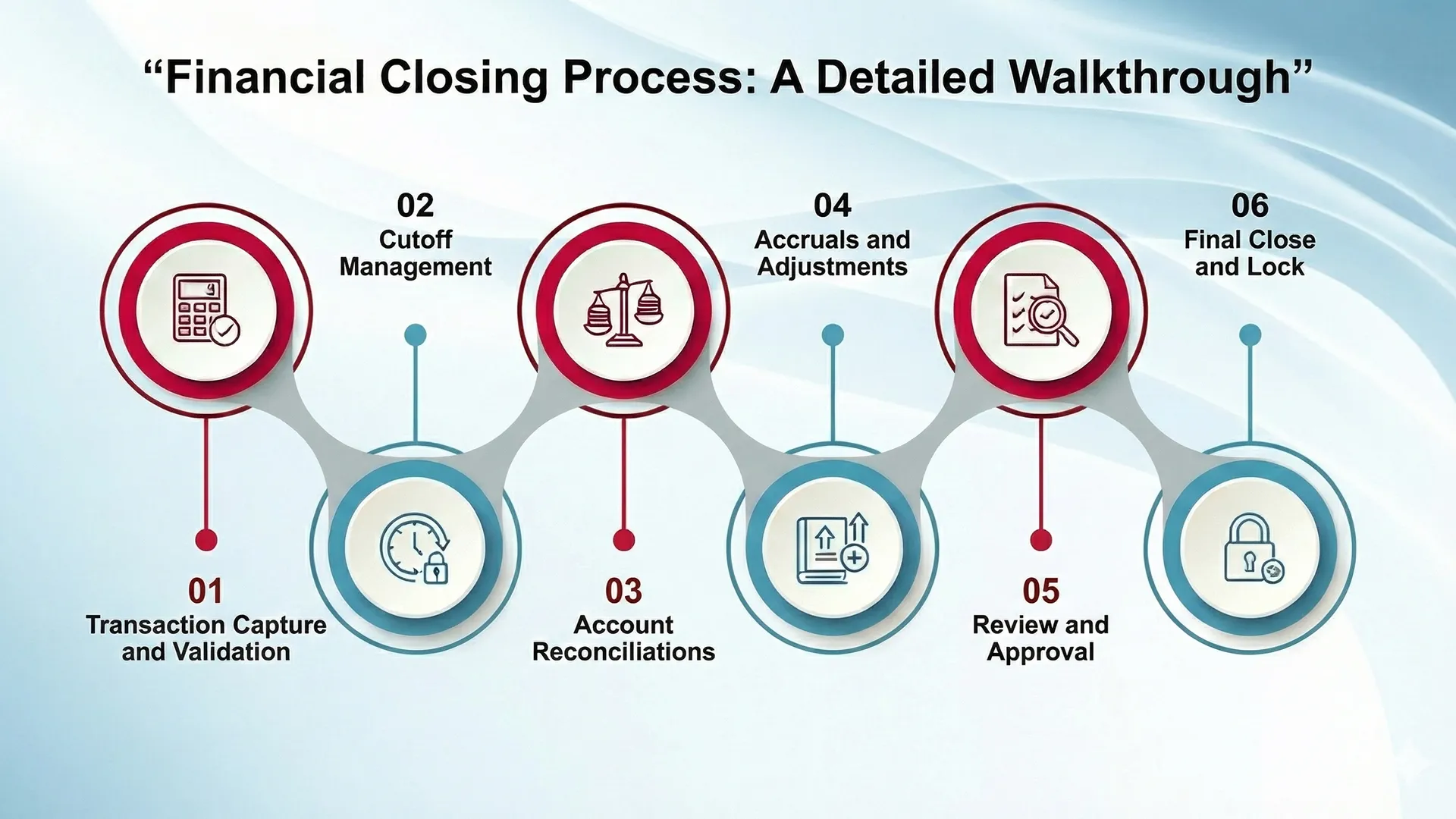
The financial closing process consists of several interconnected steps. Each step supports the next. Skipping steps rarely saves time and usually creates more work later.
Transaction Capture and Validation
The process begins with capturing all financial activity. This includes payroll, vendor invoices, customer revenue, expenses, and system-generated transactions.
Accuracy at this stage is critical. Errors introduced early often multiply later in the close.
Cutoff Management.
Cutoff determines which transactions belong in the current period. Timing issues are common, especially when invoices arrive late or services span multiple periods.
Proper cutoff ensures revenue and expenses are recorded in the correct month, maintaining consistency and accuracy.
Account Reconciliations
Reconciliations verify that account balances match supporting records. Bank accounts, credit cards, and sub-ledgers are compared to the general ledger.
This step often consumes the most time during closing. When reconciliations are manual, delays and errors are common.
Accruals and Adjustments
Accruals record revenue or expenses that have occurred but not yet been invoiced or paid. Adjustments correct errors such as misclassifications or duplicates.
Without accruals, financial statements may misrepresent actual performance.
Review and Approval
Senior team members review entries for accuracy and completeness. This step enforces internal controls and reduces risk.
Clear reviewer roles prevent bottlenecks and rework Final Close and Lock
Once approved, the period is closed and locked. This prevents unexpected changes and preserves data integrity.
At this point, financial statements are ready to be shared.
Financial Closing Checklist by Stage
Checklists bring order to the close and reduce reliance on memory.
Pre-Close Checklist
Preparation before close reduces last-minute stress.
- Confirm data availability from all departments
- Prepare recurring journal entries
- Review open transactions
- Validate system integrations
During-Close Checklist
This is where most close activity happens.
- Complete reconciliations
- Post accruals and adjustments
- Review variances
- Resolve discrepancies
- Approve journal entries
Post-Close Checklist
After the books are closed, teams finalize outputs and prepare for the next cycle.
- Generate financial statements
- Perform variance analysis
- Archive documentation
- Identify improvement areas
A good checklist saves future apologies.
Roles and Responsibilities in Financial Closing
Clear ownership keeps the close moving.
- Staff accountants prepare reconciliations and entries.
- Senior accountants review work and resolve issues.
- Controllers manage timelines and controls.
- CFOs oversee accuracy and strategic impact.
- Other departments provide timely data.
When roles are unclear, delays and confusion follow.
Key Risks in Financial Closing (And How to Avoid Them)
Every close carries risks. Most are predictable and manageable.
Manual Errors:-
Manual data entry increases mistakes. Automation reduces this risk significantly.
Late Data:-
Delayed invoices or reports slow the close. Clear deadlines and shared dashboards help.
Weak Controls:-
Missing approvals or documentation increases audit risk. Strong controls protect accuracy.
Poor Communication:-
Email-based coordination causes confusion. Centralized tools improve alignment.
Financial Closing Best Practices That Actually Work
Best practices simplify work instead of adding steps.
- Standardize workflows and calendars
- Automate repetitive tasks
- Use continuous closing throughout the month
- Define clear preparer and reviewer roles
- Review and improve after each close
A boring close is a successful close.
How Automation Changes Financial Closing
Automation changes financial closing by removing manual effort and replacing it with faster, more reliable processes. Instead of spending days on data entry and reconciliations, finance teams can close the books with less effort and fewer errors.
When automation is introduced, financial closing shifts from a reactive task to a controlled, ongoing process. Teams no longer wait until month-end to find problems. Issues are identified and resolved earlier, which makes the close smoother and more predictable.
Key Ways Automation Improves Financial Closing
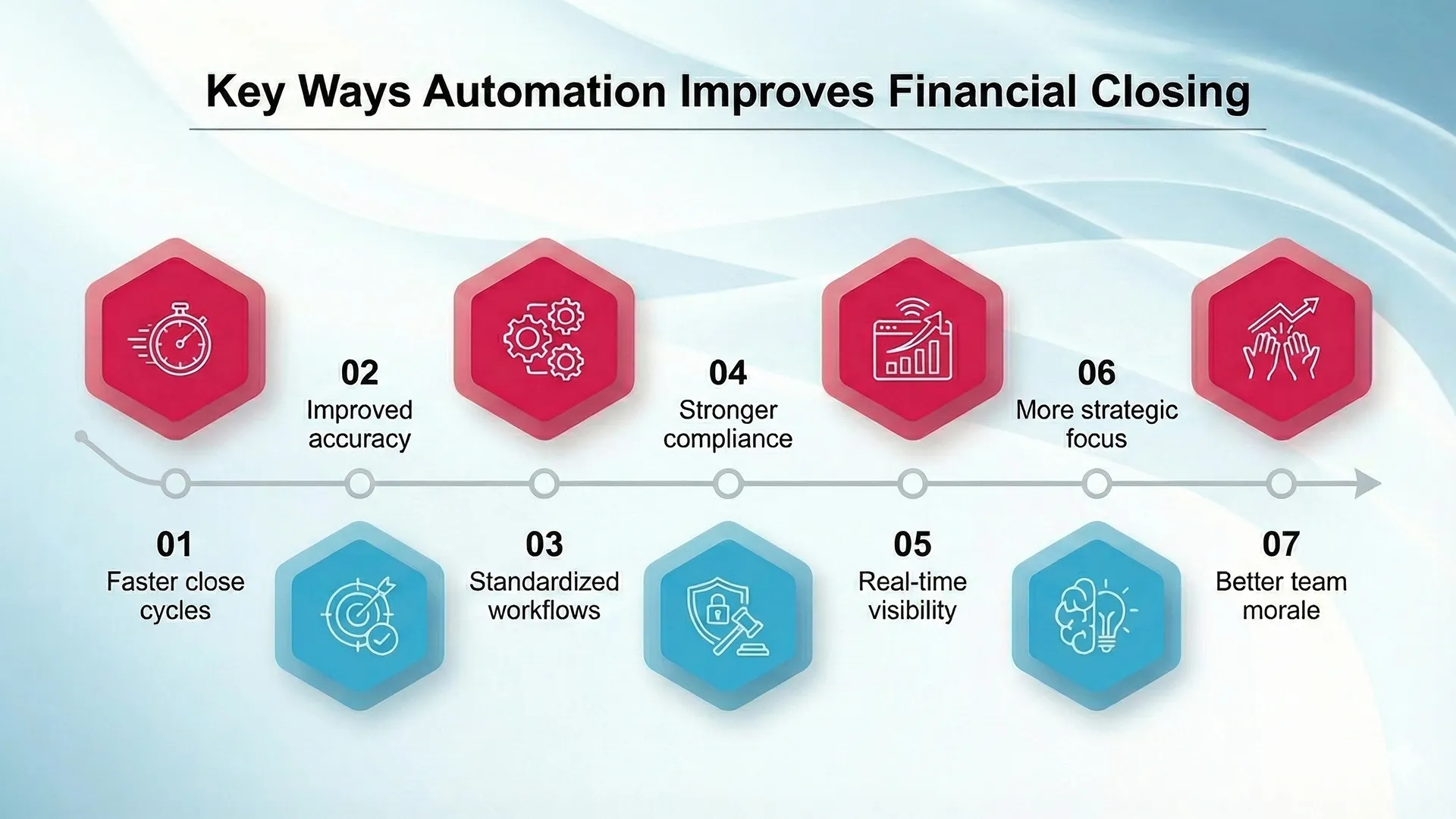
- Faster close cycles: Automation handles data collection, transaction matching, journal entries, and reconciliations. This can reduce close timelines by up to 50%, turning weeks into days.
- Improved accuracy: Automated rules and AI checks reduce human error and ensure consistent handling of transactions.
- Standardized workflows: Automation creates repeatable processes, so every close follows the same structure and standards.
- Stronger compliance: Automated audit trails and documentation make it easier to meet accounting and regulatory requirements.
- Real-time visibility: Dashboards provide instant updates on close progress and financial status, supporting quicker decisions.
- More strategic focus: With manual tasks reduced, finance teams can spend more time on analysis, forecasting, and advising leadership.
- Better team morale: Fewer late nights and less pressure improve job satisfaction and reduce burnout.
How Automation Works in Financial Closing
- Automated reconciliations: Systems match transactions automatically and flag only the exceptions that need review.
- Data consolidation: Information is pulled from multiple systems into a single, consistent view.
- Automated reporting: Financial reports are generated in real time using validated data.
By using automation, financial closing becomes faster, more accurate, and easier to manage. Instead of being a monthly bottleneck, the close becomes a steady process that supports better decisions and long-term growth.
Financial Closing Tools Comparison Explained
If a tool cannot show where the close stands, it creates more work than value.
How Xenett Can Help
Xenett helps finance teams simplify financial closing by removing manual work and improving visibility. It automates repetitive tasks, uses AI to detect errors, and provides real-time dashboards to track close progress.
Instead of treating month-end and year-end as stressful deadlines, Xenett supports a continuous close. Work happens throughout the period, which reduces pressure and improves accuracy.
How Xenett Streamlines Financial Closing
- Automation: Xenett automates data entry, transaction matching, reconciliations, and common adjustments like accruals and prepaids. This reduces manual effort and lowers the risk of errors.
- AI-powered error detection: AI scans transactions to identify duplicates, missing entries, and inconsistencies early, helping teams fix issues before close deadlines.
- Real-time visibility: Dashboards show close status, task progress, and detailed drill-downs, so teams always know what is complete and what needs attention.
- Integrated checklists: Customizable, task-based checklists with due dates help manage the close workflow from start to finish.
- Collaboration: Built-in comments, alerts, and client portals keep communication centralized and reduce follow-ups.
- System integration: Xenett connects with ERPs like QuickBooks and Xero, creating a single source of truth without replacing existing systems.
Best Practices Xenett Supports
- Continuous accounting: Close tasks are spread across the month instead of piling up at period-end.
- Standardization: Templates and workflows ensure consistent processes across cycles and teams.
- Efficiency: Automation can reduce closing time by up to 80% and review time by up to 70%.
- Accuracy: Early error detection leads to cleaner financials and more reliable reporting.
- Control: Built-in audit trails and clear preparer and reviewer roles support compliance and accountability.
How Xenett Works in Practice
- Prepare: Connect Xenett to your existing systems and set up workflows.
- Automate: Data flows in automatically while AI flags issues and runs reconciliations.
- Review: Use dashboards and checklists to track progress and resolve exceptions.
- Adjust: Manage accruals and prepaids in dedicated modules.
- Approve: Built-in sign-offs ensure proper review before closing.
- Report: Generate accurate reports from clean, validated data.
In simple terms, Xenett adds structure, speed, and clarity to financial closing. It turns a manual, high-pressure process into a controlled and repeatable one.
Conclusion
Financial closing does not have to be stressful or chaotic. With the right process, checklist, and best practices, finance teams can close faster, stay accurate, and feel confident in their numbers.
Instead of chasing transactions, teams can focus on insights and strategy.
Ready to simplify financial closing?
Explore how Xenett helps finance teams close with clarity, control, and confidence.
Frequently Asked Questions (FAQs)
It is the process of finalizing financial records at period-end.
It depends on process maturity and automation.
Manual work, late data, and poor visibility.
Automation greatly improves speed and accuracy.


