.avif)
.svg)

Common Month End Close Mistakes and How to Avoid Them

Ask questions, get summaries, or uncover key takeaways from this article.
Blog Summary / Key Takeaways
Month end close mistakes usually come from repeatable breakdowns. Think cutoff. Completeness. Classification. Reconciliations. Review evidence.
Use this guide to diagnose month end close problems fast. Then fix the root cause, not the symptom.
Key takeaways:
- Most month-end close challenges come from late reconciliations and late review.
- Close reconciliation mistakes often start as “small” reconciling items. They then age into noise.
- Close process inefficiencies happen when your checklist tracks tasks, not findings.
- You reduce accounting close errors by enforcing evidence, ownership, and cutoffs.
- You move faster when you review by exception, not by habit.
What Is A “Month-End Close Mistake”?
Month-End Close Mistakes vs. Normal Adjustments
A month-end close mistake is a preventable failure in your process. It usually affects cutoff, completeness, classification, reconciliation, review, documentation, or approvals.
A normal adjustment is different. It reflects judgment. For example, an updated bonus accrual estimate is not a mistake. It is a refined assumption based on better data.
Here is the practical line I use with teams.
- Mistake: You could have prevented it with a control.
- Adjustment: You made a reasonable call with the data you had.
This matters because teams waste time “fixing” judgment calls. They then miss the real accounting close errors that keep repeating.
Why Month-End Close Errors Keep Repeating
Month-end close errors repeat because the workflow stays fragmented. Teams pull data from too many places. They then rely on memory, spreadsheets, and last-minute reviews.
In my experience, repeat errors usually trace back to five root causes:
- Fragmented source data and weak integration checks
- Inconsistent standards across staff and clients
- Manual rework that no one logs or learns from
- Late reviews that find issues after posting
- Unclear ownership and weak evidence requirements
However, the biggest driver is simple. Teams do not define “done.” They define “submitted.”
The Most Common Month-End Close Errors
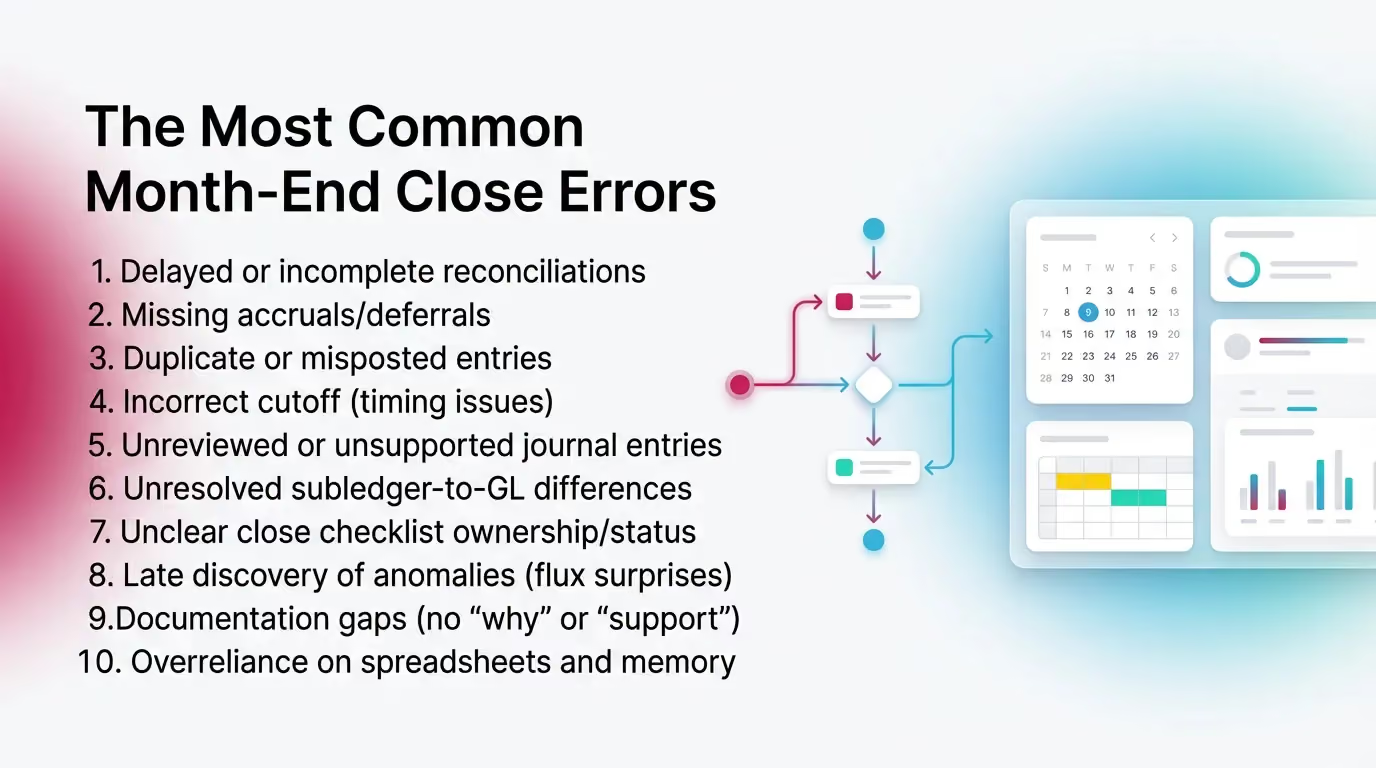
- Delayed or incomplete reconciliations
- Missing accruals/deferrals
- Duplicate or misposted entries
- Incorrect cutoff (timing issues)
- Unreviewed or unsupported journal entries
- Unresolved subledger-to-GL differences
- Unclear close checklist ownership/status
- Late discovery of anomalies (flux surprises)
- Documentation gaps (no “why” or “support”)
- Overreliance on spreadsheets and memory
How To Find The Source Of Close Problems
The 5-Lens Close Review
You do not fix month end close problems by adding tasks. You fix them by finding where the accounting logic broke. Use these five lenses.
- Completeness: Did everything that should be recorded get recorded?
- Cutoff: Did it land in the correct period?
- Classification: Is it in the correct account/class/location/customer/project?
- Reconciliation Integrity: Do balance sheet accounts tie to support?
- Review Evidence: Can someone else re-perform the review and agree?
This model also keeps reviews consistent across clients. That matters in QBO and Xero shops with high volume.
A Simple “Where Did It Break?” Flow
Start with the symptom. Then work backward. Do not guess.
- If trial balance looks fine but cash is wrong → start with bank feeds, undeposited funds, merchant clearing.
- If P&L swings unexpectedly → start with revenue recognition, COGS timing, payroll, allocations.
- If balance sheet drifts → focus on reconciliations, subledgers, and intercompany.
Practical example from a multi-client CAS team:
They saw “cash looks fine” but distributions looked high. The issue was not cash.
A merchant processor cleared into a liability account for two months.
The bank matched. The GL did not. That is a classic close reconciliation mistake.
12 Month-End Close Mistakes
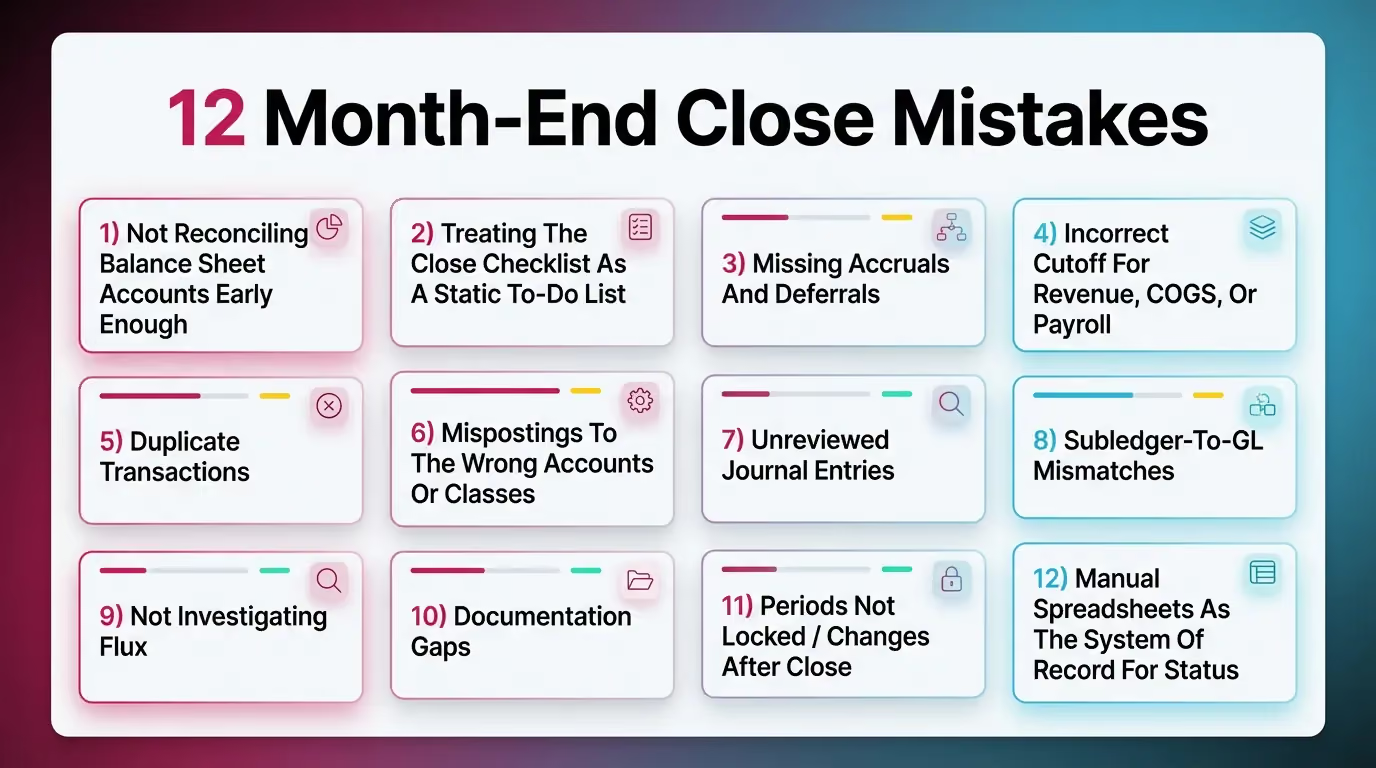
1) Not Reconciling Balance Sheet Accounts Early Enough (Close Reconciliation Mistake)
Late reconciliations create last-day surprises. They also force “plug” entries that hide real issues.
Symptoms
- Last-day scramble and late nights
- Unexplained month-over-month balance changes
- Reconciling items that never clear
- “We will true it up next month” entries
Why it happens
- Teams wait for “final” statements
- No cutoff for when support must exist
- Owners do not assign account ownership
- Staff reconcile only cash, not the full balance sheet
Fix
- Set a reconciliation cutoff like T+2 or T+3.
- Require support before sign-off.
- Triage accounts by risk and activity level.
Prevention control
- Use rolling reconciliations for stable accounts.
- Use exception-based review for low-risk balances.
- Escalate aged reconciling items every month.
“Done” criteria
- The balance ties to support.
- Reconciling items show age and owner.
- The reviewer notes the conclusion in plain English.
2) Treating The Close Checklist As A Static To-Do List
A checklist fails when it tracks tasks, not results. You need it to reflect account-level review findings.
Symptoms
- Boxes checked but issues remain
- Different outcomes by staff member
- “Close is done” but questions keep coming
- Reviewers chase details across email and chat
Why it happens
- Checklist templates stay generic
- The checklist does not tie to accounts
- Teams treat review as a final step
- No definition of evidence or sign-off
Fix
- Rewrite the checklist around account groups.
- Add required evidence per account type.
- Tie tasks to findings, not habit.
Prevention control
- Use standard templates across clients.
- Add “evidence required” rules by account.
- Review checklist health quarterly. Update it.
“Done” criteria
- The checklist points to support and conclusions.
- Each item has an owner and a due date.
- Each item shows reviewer sign-off.
3) Missing Accruals And Deferrals (Common Month-End Close Error)
Missing accruals create lumpy results and surprise true-ups. You fix this with recurring logic tied to source data.
Symptoms
- Expenses hit in random months
- Margins look unstable without operational change
- Next month shows large “cleanup” entries
- Management stops trusting monthly reporting
Why it happens
- Teams rely on invoices instead of incurred costs
- No accrual playbook by vendor or category
- Poor cutoff reminders to departments
- Staff avoid estimates because they fear “being wrong”
Fix
- Build recurring entries where appropriate.
- Tie estimates to source reports.
For example, use payroll registers or usage logs. - Track accrual reversals so you do not double count.
Prevention control
- Create an accrual playbook by vendor/type.
- Set thresholds. Do not chase immaterial items.
- Require a short narrative for each material accrual.
“Done” criteria
- Accrual schedule updates monthly.
- Source support attaches to the entry.
- The rationale states method and assumption.
4) Incorrect Cutoff For Revenue, COGS, Or Payroll (Month-End Close Problem)
Incorrect cutoff drives the biggest trust issues. The numbers change for timing, not performance.
Symptoms
- Large swings with no business reason
- AR and revenue do not align
- AP and COGS do not align
- Payroll expense falls in the “wrong” month
Why it happens
- No documented cutoff policy
- Confusion between invoiced, earned, and received
- Teams do not align ops timelines with accounting periods
- Payroll calendars do not match month-end
Fix
- Write a cutoff policy by transaction stream.
- Align “received vs. invoiced vs. earned.”
- Create a payroll cutoff routine. Use accruals when needed.
Prevention control
- Add cutoff checks to pre-close.
- Require departments to submit late items by a deadline.
- Track late items and fix the upstream process.
“Done” criteria
- Revenue and COGS reflect the correct period.
- Payroll accrual ties to payroll reports.
- Cutoff exceptions get documented and approved.
5) Duplicate Transactions (Bank Feeds, Bills, Or Journals)
Duplicates usually come from import settings and feed behavior. You fix them with a de-dupe routine and control points.
Symptoms
- Inflated expenses or vendor balances
- Two similar bills with close dates
- Bank matches that “look right” but totals do not
- Clearing accounts drift
Why it happens
- Bank feed rules post twice
- Bills import twice from an app
- Staff enter bills and also match bank activity
- Teams post journals to “fix” duplicates instead of deleting them
Fix
- Run duplicate checks before finalizing.
- Review bank rules and import settings.
- Use clearing accounts intentionally, not accidentally.
Prevention control
- Lock periods after close.
- Restrict who can change bank rules.
- Require documentation for any bulk import.
“Done” criteria
- Duplicate report clears.
- Bank feed matches align to the correct source transaction.
- Clearing accounts reconcile to zero or defined timing items.
6) Mispostings To The Wrong Accounts Or Classes (Accounting Close Error)
Misclassifications keep totals “right” but the story wrong. You fix them with mapping rules and restricted posting options.
Symptoms
- Department reporting breaks
- “Ask My Accountant” grows every month
- Repairs vs. CapEx gets inconsistent
- Class or location shows odd swings
Why it happens
- Chart of accounts lacks governance
- Too many similar accounts
- Staff book fast to clear queues
- No review focus on high-risk buckets
Fix
- Standardize mappings for common vendors.
- Review high-risk accounts every month.
- Clean up the chart when it causes confusion.
Prevention control
- Restrict posting to certain accounts.
- Use standardized account descriptions and examples.
- Add a monthly reclass routine for known problem areas.
“Done” criteria
- Exceptions list goes to zero or has explanations.
- Department reporting ties to operational reality.
- “Suspense” accounts stay near zero.
7) Unreviewed Journal Entries (Or Review Happens Too Late)
Unreviewed JEs create late surprises. You need a staged workflow with required support and timely approvals.
Symptoms
- Reversals next month without explanation
- Material entries posted on the last day
- Same issue appears every month
- Reviewers find missing support after posting
Why it happens
- JEs happen in isolation from review
- Teams treat reviewers as “final polish”
- No materiality thresholds for approvals
- Attachments live in email, not with the entry
Fix
- Use a staged JE workflow: draft → questions → posted → documented.
- Require attachments and a short rationale.
- Set approval levels by materiality and risk.
Prevention control
- Enforce a JE policy with standards.
- Require preparer and approver fields.
- Review JEs daily during close week.
“Done” criteria
- Every JE has support and rationale.
- Approver sign-off exists before posting.
- Recurring JEs have owners and review dates.
8) Subledger-To-GL Mismatches (AR/AP/Inventory/Payroll)
Subledger mismatches signal integration or posting breaks. You fix them with tie-out routines and clear ownership.
Symptoms
- AR aging does not tie to AR control account
- AP aging does not tie to AP control account
- Inventory valuation does not tie to the GL
- Payroll liability accounts drift
Why it happens
- Apps post summaries that do not map cleanly
- Teams post manual entries into control accounts
- Timing differences go unmanaged
- Integrations fail quietly
Fix
- Build tie-out routines each close.
- Identify the mismatch type: timing, mapping, or integration.
- Stop manual posting into control accounts except with policy.
Prevention control
- Monitor integrations and failed syncs.
- Assign ownership for each subledger tie-out.
- Keep a log of known timing differences.
“Done” criteria
- Subledger report ties to GL.
- Differences have clear timing support.
- Mapping changes get documented.
9) Not Investigating Flux (Month-End Close Challenge)
Flux review catches issues your reconciliations will not. You need thresholds and expected behavior by account.
Symptoms
- “Looks fine” close with hidden problems
- Client finds issues after delivery
- Variances get explained as “seasonality” every month
- Reviewers spend time on immaterial noise
Why it happens
- No defined thresholds
- Teams review every line the same way
- No expectation model for recurring accounts
- Review happens too late to fix anything
Fix
- Set flux thresholds by account type.
Use tighter thresholds for volatile accounts. - Require plain-English explanations for flagged variances.
- Create tasks for anomalies, not just comments.
Prevention control
- Use exception-based review.
- Track repeated variances and fix the source.
- Keep a “known drivers” list per client.
“Done” criteria
- Variances have clear cause and action.
- Material items get resolved before delivery.
- The reviewer can re-perform the analysis.
10) Documentation Gaps (No Support, No Narrative, No Re-Performance)
Documentation gaps create rework and reviewer churn. You need a minimum standard: support, explanation, and conclusion.
Symptoms
- Same questions every month
- Partner escalations for “missing backup”
- New staff cannot follow prior work
- Close slows down as volume grows
Why it happens
- Evidence lives in personal folders
- No naming conventions
- Teams treat documentation as optional
- Reviewers cannot tell what changed
Fix
- Define a minimum documentation standard.
Include support + explanation + conclusion. - Centralize storage. Keep it consistent.
Prevention control
- Use a standard naming convention.
- Require links or attachments at the task level.
- Train staff on “write it for future you.”
“Done” criteria
- Another person can re-perform and agree.
- Support is easy to find in one place.
- The narrative explains the “why,” not just the “what.”
11) Periods Not Locked / Changes After Close
Post-close changes break trust. Reports change after delivery. Reconciliations stop tying.
Symptoms
- Financials change after sending
- Reconciliations do not match later
- Clients question “which version is final”
- Staff backdate entries without approval
Why it happens
- No lock date policy
- Too many users have posting rights
- Teams reopen periods informally
- Adjustments do not follow a controlled workflow
Fix
- Set lock dates aligned to close milestones.
- Create a controlled reopen protocol.
- Log post-close changes and notify stakeholders.
Prevention control
- Use role-based permissions.
- Use a post-close change log.
- Require approval for any backdated entry.
“Done” criteria
- Period locks after final sign-off.
- Any reopen has documented approval.
- Delivered reports tie to the locked period.
12) Manual Spreadsheets As The System Of Record For Status
Spreadsheet status tracking breaks at scale. It causes stale status, unknown bottlenecks, and duplicate work.
Symptoms
- “Where are we?” meetings every day
- Work gets duplicated across staff
- Reviewers wait because dependencies stay hidden
- Close dates slip without clear reasons
Why it happens
- No single workflow system
- Status updates rely on manual entry
- Dependencies do not exist in the tracker
- Findings live in chat, not in tasks
Fix
- Use one system for close status.
- Show ownership, due dates, and dependencies.
- Tie work items to review findings and accounts.
Prevention control
- Standardize the close workflow per client type.
- Require updates in the system of record only.
- Review bottlenecks after each close.
“Done” criteria
- Anyone can see live status in one place.
- Bottlenecks show at the account level.
- Findings convert into tracked resolution work.
Month-End Close Mistakes → Control That Prevents Them
Step-By-Step: A Repeatable Month-End Close “Early Detection” Process
Step 1: Pre-Close Readiness (Days -5 to 0)
You prevent month end close mistakes by preparing before day 1. Confirm your inputs. Then set expectations with the client or internal teams.
Actions:
- Confirm bank feeds and key integrations run clean
- Review open items list from prior month
- Send cutoff reminders to approvers and departments
- List expected accruals and recurring entries
- Confirm payroll schedule and any off-cycle runs
Step 2: Record + Tie Out High-Risk Streams First (Days 1–3)
You reduce month end close problems fastest by handling cash-like streams first. These streams drive most downstream errors.
Actions:
- Cash and bank activity, including unmatched items
- Merchant clearing and payout timing
- Payroll postings and liability accounts
- AR and AP posting completeness
Tip from practice:
If you clear merchant activity late, you will chase revenue and fees all week.
Do it first. It prevents three different accounting close errors at once.
Step 3: Balance Sheet Reconciliations With Standards (Days 2–5)
Balance sheet reconciliations should not feel optional. They prevent close reconciliation mistakes and create confidence in the numbers.
Actions:
- Assign ownership by account
- Require support for every reconciliation
- Age reconciling items and assign follow-up
- Escalate long-aged items with a clear decision path
Step 4: Flux Review On P&L And Key Balance Sheet Accounts (Days 3–6)
Flux review should answer one question fast. “Do these results make sense?”
Answer it early enough to fix issues.
Actions:
- Set thresholds by account type
- Flag anomalies and create resolution tasks
- Document drivers and conclusions
- Track repeat variances month over month
Step 5: Final Review + Lock + Deliver (Days 5–8)
Close should end with control. Lock the period. Store evidence. Deliver one version of the truth.
Actions:
- Prepare a variance summary for stakeholders
- Confirm approvals and reviewer sign-offs
- Lock the period in QBO or Xero
- Store support and narratives in one place
- Deliver financials with notes on key drivers
Best Practices To Prevent Month-End Close Mistakes
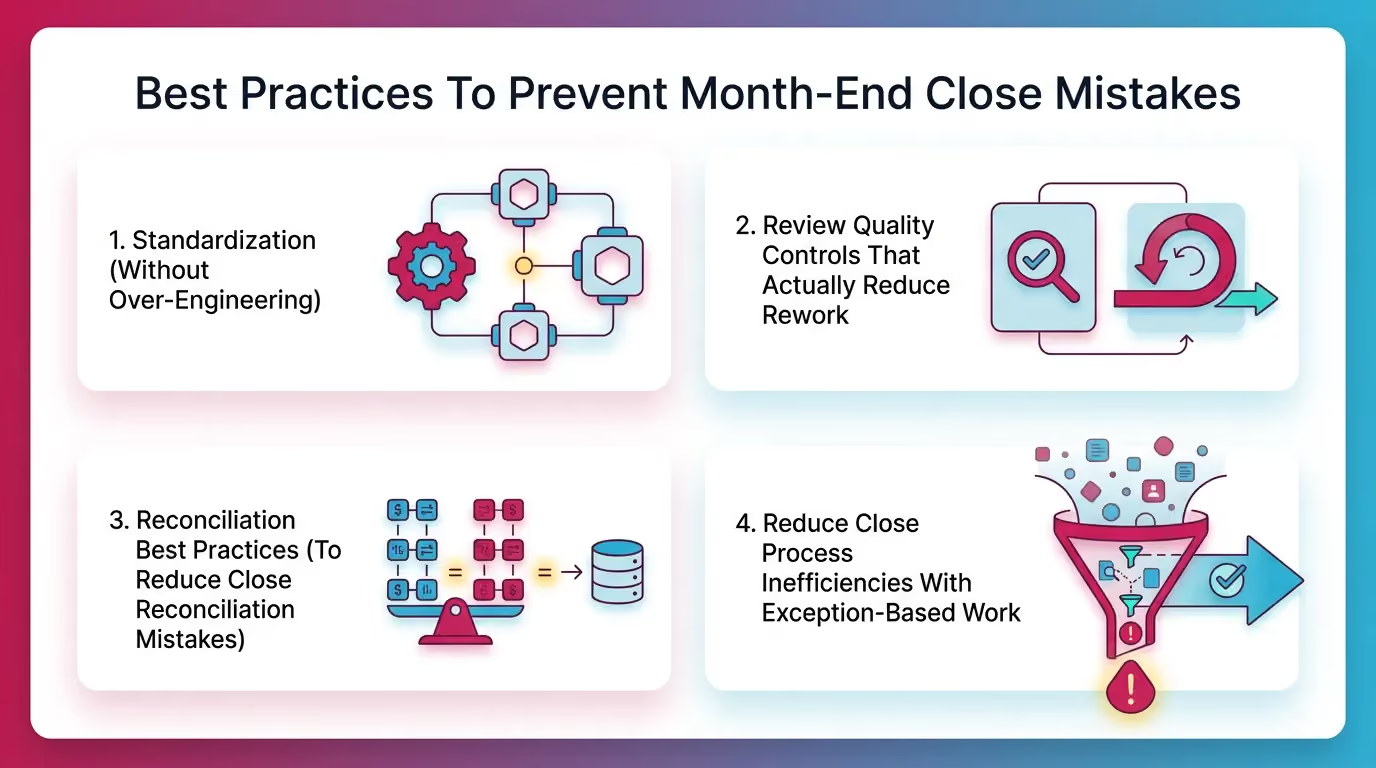
Standardization
Standardization prevents common month end close errors without slowing you down. It gives staff a default path. It also makes exceptions obvious.
What to standardize:
- Close calendar with cutoffs and dependencies
- A clear “definition of done” per close phase
- Account grouping by risk, not by tradition
- Cash-like accounts
- Accruals and estimates
- Liabilities and debt
- Equity and distributions
- Revenue and COGS
Review Quality Controls That Actually Reduce Rework
Good review reduces rework because it finds issues while you can still act.
It also forces consistent evidence.
Standards that work:
- Review by account, not by task list
- Require support + explanation + conclusion
- Capture what changed since last month
- Use a reviewer checklist that mirrors your 5-lens model
Reconciliation Best Practices
Close reconciliation mistakes often hide in plain sight. Teams reconcile, but they do not validate the logic. Or they accept stale reconciling items.
Best practices:
- Use standard recon templates
- Age reconciling items and assign owners
- Set escalation paths for aged items
- Apply tie-out rules consistently
- Subledger-to-GL ties
- Clearing accounts to zero or timing schedule
- Intercompany tie-outs with agreed timing
Reduce Close Process Inefficiencies With Exception-Based Work
Exception-based work reduces close process inefficiencies. It also respects reviewer time.
How to apply it:
- Stop giving every account the same review depth
- Set thresholds for flux and balance checks
- Define “expected behavior” for key accounts
For example, payroll tax liabilities should follow payroll cycles. - Track exceptions as findings, not as side comments
How Xenett Supports A More Predictable Month-End Close
How Xenett Can Help
You prevent month end close mistakes when you standardize review and execution.
Xenett supports that operational layer. It helps teams run a review-first close.
It does not provide audit services. It is not an audit tool.
Review-First Close: Turning “Best Practices” Into Repeatable Review Standards
Xenett supports account-level review across P&L and balance sheet accounts.
That structure helps surface accounting close errors as findings early.
For example, teams can standardize review logic like:
- Flux thresholds by account type
- Expected balance behavior checks
- Missing entry checks for known accruals
- Consistent review notes and conclusions
This matters most when you manage many clients.
It also helps when senior reviewers rotate across books.
Close Task And Checklist Management
Close checklists fail when they stay generic.
Xenett can convert review findings into tracked work.
That helps prevent this common pattern:
“The checklist is complete, but the financials still feel off.”
This also reduces close process inefficiencies.
Teams stop chasing updates across spreadsheets and Slack.
Related workflow context: Month End Close Process
Review And Approval Workflows
Month-end close challenges often come down to ownership and timing.
Xenett supports clearer handoffs between preparer and reviewer.
Teams can document:
- What changed
- What got investigated
- What evidence supports the conclusion
- Who approved and when
That reduces rework. It also speeds up training.
Visibility Into Close Status And Bottlenecks
Spreadsheet tracking goes stale fast.
Xenett helps teams see which accounts hold up close and why.
That visibility helps you fix bottlenecks permanently.
It also supports better capacity planning across clients.
FAQ: Month-End Close Mistakes
What Are The Most Common Month-End Close Mistakes?
Delayed reconciliations, missing accruals/deferrals, incorrect cutoff, duplicate or misposted transactions, unreviewed journal entries, and documentation gaps are the most common month-end close mistakes. These issues also drive most month end close problems.
What Are The Biggest Month-End Close Challenges For Accounting Teams?
The biggest month-end close challenges are manual processes, inconsistent review standards, late discovery of errors, unclear close ownership, and limited visibility into reconciliation status and bottlenecks. These gaps also create close process inefficiencies.
What Are Close Reconciliation Mistakes?
Close reconciliation mistakes are failures to tie balance sheet accounts to supporting detail. They also include failures to resolve reconciling items. They often come from late reconciliations and missing support.
How Do You Reduce Accounting Close Errors Without Adding More People?
Standardize cutoff rules. Enforce account-level review evidence. Use exception-based flux thresholds. Convert review findings into tracked resolution work. These steps reduce accounting close errors without adding headcount.
What Should Be Included In A Month-End Close Checklist?
A good checklist includes cutoff tasks, high-risk stream completeness checks, required balance sheet reconciliations with support, flux review steps, journal entry approvals, final review sign-off, and period lock. It should also assign ownership and define “done.”
What Are The 4 Types Of Errors In Accounting?
Errors of omission, errors of commission, errors of principle, and compensating errors are commonly cited categories of accounting errors. These categories help when you classify common month end close errors.
What Are Month-End Closing Entries?
Month-end closing entries typically include adjusting entries for accruals and deferrals, allocations, depreciation and amortization, reclasses, and corrections needed so the period reflects accurate activity.
Conclusion
Month end close mistakes do not come from one bad month. They come from the same few breaks that repeat. Cutoff slips. Reconciliations run late. Reviews happen too late. Evidence stays scattered.
Use the 5-lens diagnostic model in this guide next close. Pick two mistakes you see every month. Fix the control, not the cleanup. Therefore your close gets faster and your numbers get easier to trust.
If you want to make this repeatable across many clients, document your review standards. Then use a system that keeps findings, tasks, approvals, and evidence in one place. Xenett can support that close workflow through structured financial review and close management.