.svg)

Accounts Receivable Process: Step-by-Step Guide

Ask questions, get summaries, or uncover key takeaways from this article.

Blog Summary / Key Takeaways
- The AR process runs from customer setup and credit decisions through invoicing, collections, cash application, dispute handling, AR aging, write-offs, and reconciliation.
- Most AR problems start upstream. Fix invoice quality and proof of receipt before you “improve collections. ”
- Use AR aging buckets to drive actions, owners, and escalation paths every week.
- Automate the repeatable steps (reminders, delivery confirmation, matching rules). Keep judgment steps (credit, disputes, write-offs) human with clear approvals.
- A controlled month-end close process around AR requires repeatable checklists, account-level reviews, and visibility into open exceptions. Xenett supports that operating rhythm.
What Is the Accounts Receivable (AR) Process?
The accounts receivable process is the end-to-end workflow you use to bill customers, collect payments, apply cash, manage disputes and credits, monitor aging, and reconcile AR to the general ledger — and it’s foundational to accrual-based accounting methods. It starts before the invoice goes out and ends after the AR balance ties out.
Accounts Receivable Process
The AR process covers the full path from extending credit and issuing invoices to collecting cash and reconciling AR to the GL. In practice, that scope usually includes:
- Customer onboarding and terms setup
- Credit review and approvals
- Invoicing and delivery
- Payment reminders and follow-up
- Collections management
- Dispute handling and credit memos
- Payment processing
- Cash application and unapplied cash management
- AR aging reviews, write-offs, and reporting
- Month-end AR reconciliation and tie-out
What’s the Difference Between “AR Process,” “AR Cycle,” and “AR Workflow”?
These terms overlap, but they solve different problems.
- AR cycle: The repeating lifecycle of invoice → collect → apply → reconcile.
- AR workflow: The roles, handoffs, systems, SLAs, and approvals that move work through the AR cycle.
- AR management: The policies, controls, segmentation, KPIs, and continuous improvement that keep AR healthy over time.
Why the AR Process Breaks Down in Real Teams (Cause → Effect)
Most AR breakdowns come from small misses that compound. Therefore, teams feel like they “need better collections,” when they actually need better process control.
- Late or inaccurate invoices → customers delay payment or reject invoices
- Missing documentation → disputes stall collections and inflate aging
- Weak cash application controls → misapplied cash, false delinquency, messy unapplied balances
- AR aging not acted on → past-due balances compound and bad debt increases
What Are the Steps in the Accounts Receivable Process?
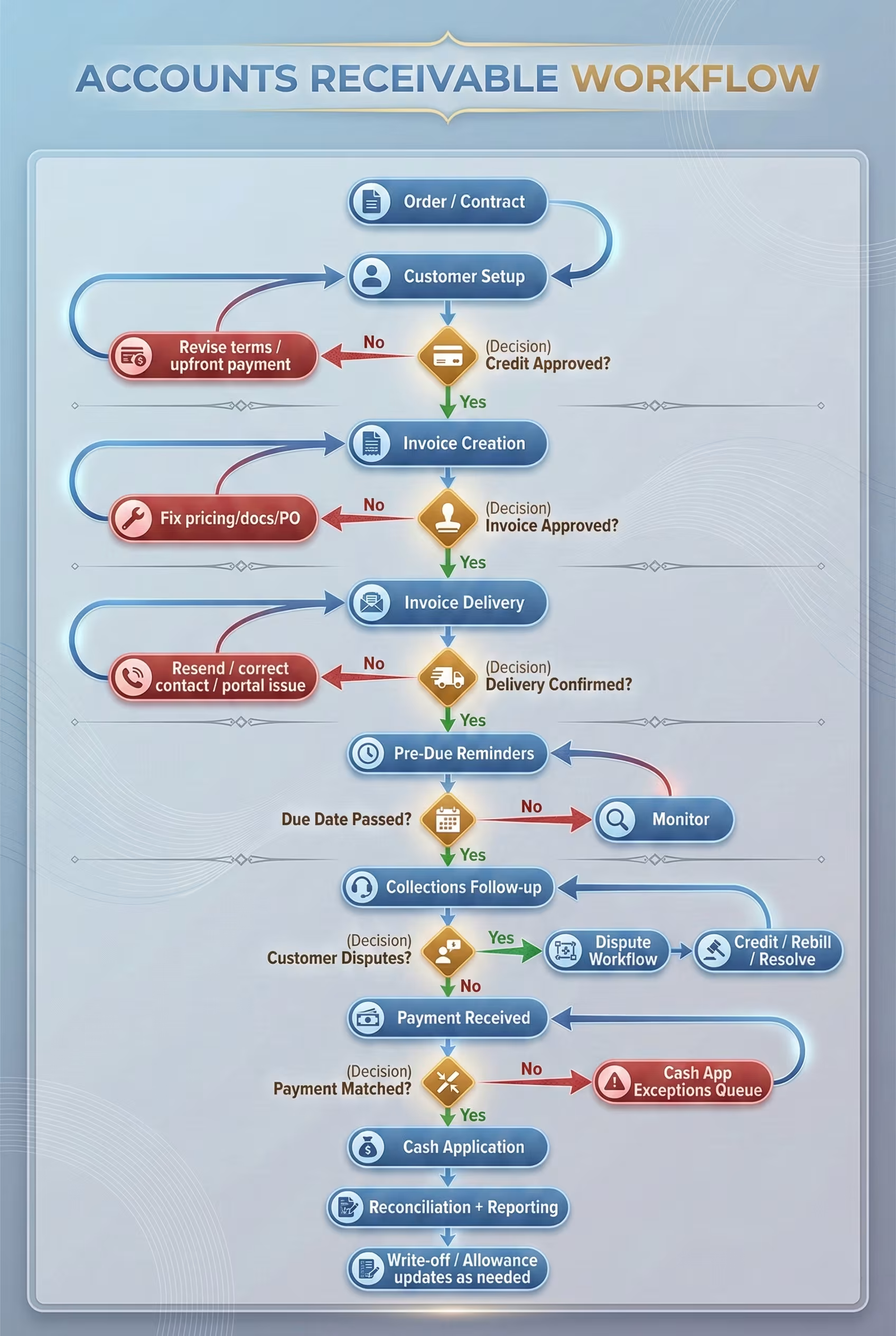
Here are the common steps in the accounts receivable process (and how they complement accounts payable workflows in the wider close). You can use this list to document your accounts receivable process flow and assign owners.
- Customer onboarding + terms setup
- Credit review / credit approval
- Invoice creation (invoice accuracy checks)
- Invoice delivery (dispatch) + confirmation
- Payment reminders (pre-due and due-date)
- Collections management (post-due follow-up)
- Dispute resolution + credit notes (as needed)
- Payment processing (ACH/card/check/wire)
- Cash application + matching to open invoices
- AR reconciliation, reporting, write-offs, and month-end close tie-out
The AR Cycle: Step-by-Step Workflow
The AR cycle works best when you treat it as one connected system. If you optimize only collections, you usually push work into disputes, credits, and month-end reconciliation.
Step 1: Customer Setup (Master Data That Prevents Downstream Errors)
Set up customer master data correctly so invoices do not bounce later. This step prevents “rejected invoice” issues that look like collection problems.
Use a required fields checklist:
- Legal entity name and billing address
- Billing contact name, email, and phone
- Remit-to instructions (and bank details if you include them on invoices)
- PO requirements and submission rules
- Tax status and exemption documentation (if applicable)
- Payment terms and due date logic
- Credit limit and escalation contacts
- Preferred payment method and portal/EDI requirements
Common failure: a wrong billing email or missing PO field triggers an invoice rejection. The invoice becomes “past due” even though the customer never accepted it.
Step 2: Credit Approval (Risk Control Before Revenue Becomes AR)
Approve credit before you ship work that becomes a receivable. This step controls exposure and reduces write-offs later.
Run credit checks when you see:
- A new customer request for terms
- A request to increase a credit limit
- A pattern of slowing payments
- A material change in order volume
Use a practical version of the 5 C’s of credit:
- Character: Do they pay on time? Do they communicate clearly?
- Capacity: Do they generate enough cash flow to pay?
- Capital: Do they have financial strength, not just revenue?
- Collateral: Do you have security or leverage if they default?
- Conditions: Do industry or market conditions increase risk?
For example, a customer can look strong on revenue, but a shrinking cash position can still create late payments.
Step 3: Invoice Creation (The Accounts Receivable Invoice Process Starts Here)
Create invoices only when they are invoice-ready and aligned with revenue recognition principles. If you invoice too early or with missing backup, you manufacture disputes.
“Invoice-ready” usually means:
- Approved deliverables or shipment confirmation
- Correct pricing, discounts, and contract terms
- Correct tax treatment
- Correct PO and billing entity
- Required attachments included
Accuracy controls that reduce downstream work:
- Duplicate invoice detection
- Required attachment validation
- Approved billing rates and terms
- Correct customer remit-to and legal entity
Step 4: Invoice Delivery + Proof of Receipt
Deliver invoices in a way that proves receipt. Proof of receipt reduces “we never got the invoice” delays.
Common delivery methods:
- Email with tracked delivery (and automatic resend rules)
- Customer portal upload
- EDI transmission for larger customers
Add a control point: delivery confirmation. If you cannot confirm dispatch, you cannot enforce collections timing.
Step 5: Pre-Due Reminders (Reducing DSO Before It Starts)
Send reminders before invoices become past due. Pre-due reminders reduce DSO because they catch missing PO issues and approval routing problems early.
A typical cadence:
- 7 days before due: friendly reminder + invoice copy
- Due date: due notice + payment options
- 3 days past due: reminder + ask for pay date
- 7 days past due: follow-up + confirm no dispute
- 14 days past due: escalation + request firm commit date
Include multiple payment options to reduce friction. For example, offering ACH and card options can speed small-balance payments.
Step 6: Collections Management (Accounts Receivable Collections Process)
Run collections like a prioritization system, not a daily scramble. Segment customers by balance, risk, and behavior so you spend time where it changes outcomes.
Segmentation examples:
- High balance / high risk: call cadence + leadership escalation
- High balance / low risk: confirm pay-run date and invoice approval
- Low balance / chronic late: automated reminders + limited manual time
Define an escalation path by days past due. Require documentation before escalation so sales and ops see facts, not emotions:
- Signed acceptance or delivery confirmation
- Time and materials support (if applicable)
- Contract and PO references
- Prior collection notes and customer commitments
Step 7: Dispute Resolution (Prevent “Uncollectible by Delay”)
Treat disputes as workflow, not email threads. Disputes become uncollectible when nobody owns them and time passes.
Common dispute categories:
- Pricing or discount mismatch
- Quantity or scope mismatch
- Service quality concerns
- Missing PO or incorrect PO
- Contract terms mismatch
- Missing backup documentation
A clean dispute workflow:
- Log the dispute (date, amount, reason, invoices impacted)
- Assign an owner and SLA
- Gather evidence and documents
- Decide: collect as-is, issue credit, or rebill
- Close the dispute and update root cause tracking
Step 8: Payment Processing
Payment method affects speed and reconciliation effort. Therefore, AR teams should understand tradeoffs, not just costs.
- ACH: fast, lower friction, easier matching when remittance is clean
- Card: fast, fees, can help for small balances
- Check: slower, often requires manual remittance handling
- Wire: fast for large balances, but can lack invoice detail
If you use lockbox or a payment processor, ensure you capture remittance advice in a usable format for cash application and your bank reconciliation procedures.
Step 9: Cash Application
Apply cash quickly and accurately so your aging reflects reality. Misapplied cash creates false delinquency and wastes collections time.
A practical matching hierarchy:
- Exact invoice number match
- Customer + amount match
- Remittance advice match (multiple invoices)
- Exception queue (short pays, deductions, missing detail)
Handle common exceptions with defined rules:
- Short pays due to fees or discounts
- Deductions that require investigation
- Credits issued but not yet posted
- Payments sent to the wrong entity
Step 10: AR Reconciliation, Write-Offs, and Month-End Close Tie-Out
Tie AR to the GL every period — this is why reconciling your accounts receivable needs to be repeatable. Clear unapplied cash. Review credits and dispute reserves. Update allowance assumptions.
Control objectives at month-end:
- AR subledger ties to the AR control account in the GL
- Unapplied cash clears or stays supported with documented reasons
- Credit memos and adjustments follow approval thresholds
- AR aging review occurs with clear actions by bucket
- Write-offs follow policy with an audit trail of approvals
Write-off controls should include:
- Approval thresholds (by amount and customer)
- Required documentation (collection attempts, dispute outcomes)
- Consistent GL coding and timing
AR Process Owners, Inputs, Outputs, and Controls
The Accounts Receivable Invoice Process
The accounts receivable invoice process succeeds when invoices are collectible on day one. If you send unclear invoices, you invite disputes that collections cannot “push through.”
What Makes an Invoice “Collectible” (Checklist)
A collectible invoice makes payment easy and approval frictionless. Use this checklist before dispatch:
- Correct legal entity and remit-to details
- Customer PO included (if required)
- Clear line items and quantities
- Correct terms and due date logic
- Supporting docs attached (POD, timesheets, acceptance, SOW references)
- Clear payment instructions and, when appropriate, a payment link
- Correct billing contact and delivery method
Practical example from real AR work: if a customer requires a PO line-level match, a single missing PO line can trigger a full invoice rejection. You lose two weeks waiting for the next AP run.
Common Invoice Process Bottlenecks (and Fixes)
- “Waiting on ops approval.” Define an invoice approval SLA and a backup approver.
- “Missing attachments.” Use standard doc pack templates by customer type.
- “Unclear scope.” Tighten contract-to-billing mapping and require references on invoices.
- “Wrong billing contact.” Treat billing emails as controlled master data, not free-text fields.
The Accounts Receivable Collections Process
The accounts receivable collections process works when it feels predictable to your customers and consistent inside your team. You need cadence, segmentation, and a clear definition of “next action.”
Collections Cadence Framework
A simple timeline you can standardize:
- Day -7: Friendly reminder + invoice copy
- Day 0: Due-date notice + payment options
- Day 7: Follow-up + confirm invoice acceptance and AP routing
- Day 14: Escalation + request firm pay date
- Day 30: Escalation + terms review or stop-ship evaluation (if applicable)
- Day 60+: Leadership involvement + settlement or third-party collections evaluation
Keep a single place for commitments. Track “promised pay date” and “next touch date” so nothing disappears in inboxes.
Call/Email Talk Tracks That Reduce Disputes
Use talk tracks that confirm process, not blame. Ask questions that uncover blockers early:
- “Can you confirm you received the invoice and it shows as approved in your system?”
- “What is your pay-run schedule for this vendor?”
- “Is there any PO, receiving, or approval step still pending?”
- “If there’s a hold, what documentation do you need to release it?”
These questions reduce the chance that a customer says “we dispute it” just to buy time.
When to Escalate vs. When to Pause for Dispute
Escalate when the customer acknowledges the invoice and misses a committed pay date. Pause when a legitimate discrepancy exists and you lack supporting documents.
- Escalate if: acknowledged invoice, no dispute, missed pay date, repeated silence
- Pause for dispute if: documented mismatch, missing backup, contract interpretation needed
The AR Aging Process (How It Works + What to Do by Bucket)
The AR aging process groups receivables by how long they have been outstanding so you can prioritize action. Aging only helps if you act on it weekly with owners and next steps.
What Is AR Aging?
AR aging is a schedule that groups open invoices by days outstanding. Most teams use buckets like current, 1–30, 31–60, 61–90, and 90+. You use it to manage collections effort and credit risk.
Aging also supports financial reporting decisions, like allowance evaluation and write-off timing. For public companies, AR also impacts working capital reporting.
AR Aging Buckets
The “10 Rule” for Accounts Receivable
A common “10 rule” is the 10% cross-aged risk signal. If 10% or more of a customer’s balance sits in a severely past due bucket (often 90+), treat the entire exposure as higher risk.
In practice, that means you may:
- Tighten terms or reduce credit limit
- Require partial upfront payment on new work
- Increase collections intensity on the full balance, not just the oldest invoices
- Revisit allowance assumptions for that customer segment
This rule helps teams avoid a common mistake: focusing only on one old invoice while the rest of the balance quietly slides into risk.
Accounts Receivable Process Improvement Ideas
If you want how to improve accounts receivable, focus on upstream accuracy, clear ownership, and a weekly operating rhythm. Most AR wins come from consistency, not heroics.
10 High-Impact Accounts Receivable Process Improvement Ideas
- Standardize customer onboarding fields and terms validation
- Automate invoice delivery confirmation and resend logic
- Offer frictionless payment options (ACH/card/link)
- Segment collections by risk and customer behavior
- Create a disputes “fast lane” with SLAs and owners
- Build an exceptions queue for cash application
- Introduce weekly AR aging reviews with clear actions by bucket
- Tighten credit approvals using a consistent rubric (5 C’s)
- Add root-cause tracking (why invoices go past due)
- Establish month-end AR tie-out using a comprehensive close checklist (subledger ↔ GL, credits, unapplied cash)
Practical insight from month-end close work: root-cause tracking changes behavior fastest. When you tag past-due invoices as “missing PO,” “sent late,” or “pricing issue,” you stop debating opinions and start fixing patterns.
Quick Wins vs. Structural Fixes
AR Automation: What to Automate vs. What to Keep Human
AR automation helps when it reduces manual work without removing control — and it’s often part of automating your accounting workflows. A good accounts receivable automation solution automates repeatable steps and highlights exceptions for accounting judgment.
What Is an Accounts Receivable Automation Solution?
An accounts receivable automation solution uses software to handle repetitive AR tasks. It usually covers invoicing workflows, reminder sequences, collections sequencing, payment processing support, cash application matching, and reporting.
It does not replace your policies. It enforces them.
What to Automate in the AR Cycle (Safe + High ROI)
These areas usually deliver the highest ROI with the lowest risk:
- Invoice generation triggers and delivery workflows
- Delivery confirmation, resend logic, and “bounce” handling
- Reminder sequences by segment and aging bucket
- Payment links and self-serve payment portals
- Cash matching rules and auto-application where confidence is high
- Exception routing to an owner with due dates
- AR aging dashboards and scheduled reporting
What Should Stay Under Accounting Judgment (Control Points)
Keep these decisions human with documented approvals:
- Credit approvals and limit exceptions
- Dispute outcomes and credit memo approvals
- Write-off approvals and allowance decisions
- Policy exceptions for strategic customers
For example, automation can route a credit memo request, but a finance owner should still approve it based on policy and documentation.
Common Mistakes When Automating Accounts Receivable
- Automating reminders before fixing invoice quality
- No exception handling queue, so automation creates more cleanup work
- Over-automation without clear ownership, so disputes linger
- Missing documentation and notes, so month-end tie-outs become detective work
Best Practices for Accounts Receivable Management
Good accounts receivable management looks boring on purpose. It uses policies, SLAs, and weekly reviews so AR stays predictable even when teams get busy.
Best Practices Checklist
- Documented AR policies: credit, invoicing, disputes, write-offs
- Standardized accounts receivable workflow with owners and SLAs
- Segmented collections strategy (not one-size-fits-all)
- Weekly AR aging review with actions and follow-ups logged
- Clear month-end AR close checklist and approvals
- Consistent metrics reporting (DSO, CEI, aging %, dispute cycle time)
Metrics That Actually Improve AR (Short List)
Track metrics that drive action, not vanity reporting:
- DSO (Days Sales Outstanding)
- % current vs. past due (by bucket)
- Collection Effectiveness Index (CEI)
- Dispute rate + average resolution time
- Unapplied cash balance + aging
- Bad debt/write-off rate
If you want a consistent definition of DSO and related metrics, document your formula and timing rules. Otherwise, teams compare numbers that do not match.
Common Accounts Receivable Problems (and How to Fix Them)
Most AR issues repeat because teams fix symptoms, not causes. Use this list to identify what breaks in your accounts receivable process flow and where controls should sit.
9 Common AR Problems
- Invoices sent late
- Invoices missing required PO/backup
- Customers claim non-receipt
- Disputes not owned or tracked
- Cash applied incorrectly / unapplied cash buildup
- Credits issued without clear approvals
- Collections notes scattered across inboxes
- No consistent AR aging actions
- AR doesn’t tie cleanly at month-end
Fix Map: Problem → Root Cause → Process Fix
How Xenett Supports a More Controlled Close Around AR
AR process improvements often fail at month-end because teams cannot consistently prove what they reviewed, what changed, and what remains unresolved. This is where a review-first close system helps teams run a repeatable close around AR without relying on memory.
Xenett supports AR by acting as an operational layer for close execution, review, and visibility. It does not act as an audit tool and it does not provide audit services.
Close Task and Checklist Management (Without “Heroics”)
Xenett helps teams run structured close checklists so AR-critical steps happen every period, for example:
- AR subledger ↔ GL tie-out
- Unapplied cash review and follow-up
- Credit memo review and approvals
- AR aging review and escalation log
- Dispute and write-off status check
This structure reduces the risk that someone skips an AR tie-out during a busy close.
Review and Approval Workflows for AR-Sensitive Accounts
Xenett supports consistent review of AR-related balance sheet accounts with clear reviewers and sign-offs. Teams often include:
- Accounts receivable
- Allowance for credit losses (or bad debt reserve accounts)
- Unapplied cash or undeposited receipts
- Credit memo and adjustment clearing accounts
You keep approvals tied to the account-level review process. Therefore, teams review first and create tasks only to resolve findings.
Visibility Into Close Status and Bottlenecks
Xenett makes it easier to see close status without chasing updates across email and spreadsheets. For AR, visibility usually means:
- Which AR reviews are complete
- Which accounts still have open findings
- Where the close is stuck (pending credits, unresolved cash exceptions, disputed invoices)
This visibility helps controllers manage close timing and reduce late-stage surprises that ripple into AR reconciliations.
FAQ
What is the accounts receivable process?
The accounts receivable process is the set of steps used to invoice customers, collect payments, apply cash to open invoices, manage disputes and credits, monitor AR aging, and reconcile AR for accurate reporting and close.
What are the steps in the accounts receivable process?
Typical steps are customer setup, credit approval, invoice creation, invoice delivery, reminders, collections, dispute resolution, payment processing, cash application, and period-end reconciliation/write-offs.
What is the AR cycle?
The AR cycle is the repeating lifecycle of a receivable from invoice issuance through collection and cash application, ending with reconciliation and reporting.
What is the AR aging process?
The AR aging process groups open invoices by how long they’ve been outstanding (current, 1–30, 31–60, 61–90, 90+) so teams can prioritize collections and manage credit risk.
How can you improve accounts receivable collections?
Improve collections by sending accurate invoices fast, confirming receipt, using a consistent follow-up cadence, resolving disputes with SLAs, offering easy payment options, and acting weekly on AR aging.
What is an accounts receivable automation solution?
An accounts receivable automation solution is software that reduces manual AR work by automating invoicing workflows, reminders, collections sequences, payment processing, cash application matching, and AR reporting—while keeping approvals and exceptions under accounting control.
What is the “10 rule” for accounts receivable?
A common “10 rule” is the 10% cross-aged risk signal. If 10% or more of a customer’s balance is severely past due (often 90+ days), treat the overall exposure as higher risk and take tighter credit and collection actions.
What are common mistakes in accounts receivable management?
Common mistakes include invoicing late, missing PO/support docs, inconsistent collections follow-up, weak dispute ownership, poor cash application controls, and skipping disciplined AR tie-outs during month-end close.
Conclusion
A strong accounts receivable process gives you faster cash collection, fewer disputes, and a cleaner month-end close — key to streamlining your financial close. Start by documenting your accounts receivable process flow, assigning owners, and running a weekly AR aging review with clear actions by bucket. Then automate the repeatable work while keeping credit, disputes, and write-offs under tight accounting control.
If you want to make AR tie-outs and reviews more repeatable during close, review your current AR close checklist and consider managing those steps in Xenett so the team can track completion, reviewers, and open findings in one place with effective close management practices.