
.svg)

Month End Close Guide: Step-by-Step Process for Accountants

Ask questions, get summaries, or uncover key takeaways from this article.
Blog Summary / Key Takeaways
- Month-end close is not just a reporting step it is a controlled process that forces issues to surface on a schedule, and a month is only truly "closed" when accounts are reconciled, adjustments are supported, review checks are complete, and the period is locked.
- The close sequence matters reconcile cash and balance sheet accounts before performing flux review because later steps depend on earlier truth, and skipping this order is what turns small gaps into inconsistent closes.
- Most close problems are review problems that close reveals, not close problems themselves late discovery of flux surprises, unreconciled clearing accounts, and miscoded expenses are all signs that review is happening too late in the cycle.
- A 5-day close timeline works when you push completeness forward on Days 1–3 and protect review on Days 4–5 you do not get a faster close by compressing review, you get it by reducing surprises earlier in the week.
- Xenett supports a review-first close by running account-level P&L and balance sheet checks, flagging anomalies and reconciliation gaps before reports are packaged, and routing findings to owners with clear sign-off so "done" reflects account truth, not just task completion.
Month End Close Guide: Step-by-Step Process for Accountants
Month-end close gets messy for one reason. You find issues late, then you rework entries, chase missing support, and scramble to make review "make sense." That is how small gaps turn into inconsistent closes across clients.
This month end close guide gives you a repeatable walkthrough you can run in QuickBooks Online or Xero. You will get the exact close sequence, a copy/paste checklist, and a 5-day timeline you can assign to a preparer and reviewer.
It is written for firms and in-house teams that run recurring closes across multiple entities. It assumes you know accounting. It focuses on clean cutoffs, account truth, and review discipline.
Quick Answer
Month-end close is the repeatable process you use to finalize a month's books. A month is "closed" when all activity is posted, cash and key balance sheet accounts are reconciled, required adjustments are recorded, review checks are completed, approvals are captured, and the financial package is produced and ready to use.
What Is the Month-End Close Process? (Month-End Closing Meaning)
Month-end close is how you turn ongoing bookkeeping into defensible monthly financials. You stop new posting for the period, confirm completeness, reconcile, adjust, review, and then package reports for use.
Month-end close is defined as the controlled set of procedures used to finalize a reporting period by confirming cutoff, reconciling key accounts, recording necessary adjustments, completing review checks, and approving the financial package.
If you want a longer definition and examples, see Xenett's month-end close explainer.
Month-End Close vs. Ongoing Bookkeeping (Where Close Starts and Ends)
Ongoing bookkeeping never really ends. Close does. Close starts when you set a cutoff and treat the month as final. Close ends when the period is locked and your reviewer can defend the balances without "we will fix it next month."
In practice, the boundary conditions look like this:
- You confirm the cutoff date and "no-post after" rule.
- You confirm all core feeds and subsystems posted (banks, payroll, billing).
- You reconcile cash and key balance sheet accounts to support.
- You document variances and unusual balances.
- A reviewer signs off, and you lock the period.
If you manage multiple clients, this boundary matters even more. Without it, "done" becomes personal opinion. That is where review drift and late surprises come from.
What "Good Close" Outputs Look Like (Minimum Deliverables)
A good close produces a minimum set of deliverables you can repeat every month. You do not need a 40-tab binder. You need consistent proof that the accounts tie out and the story makes sense.
Inputs You Need Before You Start (Close Readiness Inputs)
Close runs faster when you start with the right inputs. Otherwise, you spend Day 1 chasing basics.
Before you start, confirm:
- Bank feeds work and you have month-end statements (or final downloads).
- Payroll is posted and payroll liabilities reconcile to reports.
- Billing and revenue cutoff is confirmed with whoever owns it.
- AP capture is complete (bills, vendor credits, reimbursements).
- You have a list of open items from last month (and their status).
- Supporting docs are received for large or unusual items.
When these inputs are missing, you can still close. However, you will close with more exceptions. You should document those exceptions and assign owners.
Why Month-End Close Matters (Accuracy, Decisions, Compliance)
Month-end close matters because it protects review integrity. You cannot make good decisions, deliver clean client reporting, or stay audit-ready if you discover issues after you send financials.
The real value is not "reporting." The value is controlled accuracy. That control comes from reconciliations, tie-outs, and consistent review standards applied every month.
The Real Risk: Late Discovery of Issues (Rework + Delays)
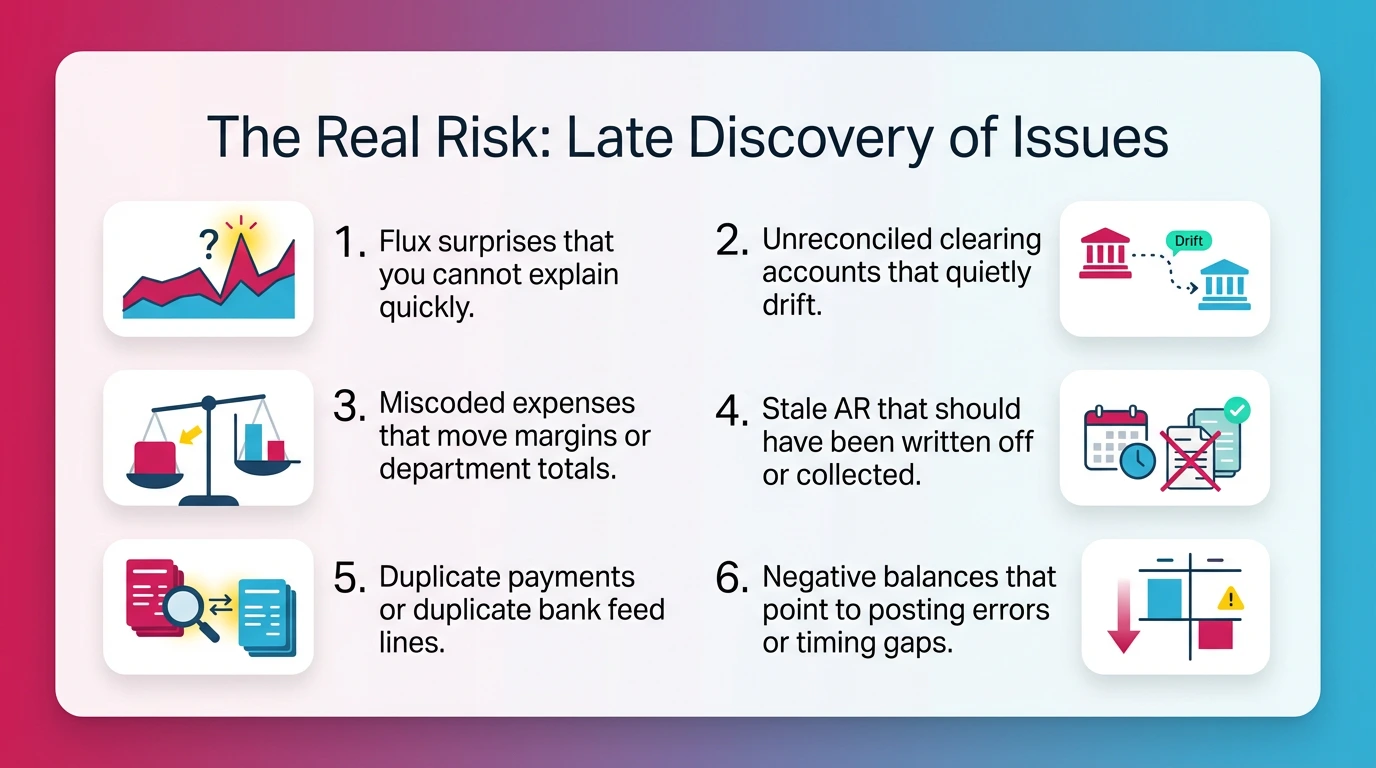
Late discovery causes rework. Rework causes delays. Delays cause people to cut review corners. That is the month-end loop you want to break.
The issues that show up late tend to look like this:
- Flux surprises that you cannot explain quickly.
- Unreconciled clearing accounts that quietly drift.
- Miscoded expenses that move margins or department totals.
- Stale AR that should have been written off or collected.
- Duplicate payments or duplicate bank feed lines.
- Negative balances that point to posting errors or timing gaps.
These are not "close problems." These are review problems that close reveals. The month-end close process forces these issues to surface on a schedule, instead of whenever someone notices.
Month-end close also supports compliance in a practical way. You build an audit trail through reconciliations, approvals, and documented explanations. You do not need to overbuild it. You need it to be consistent and retrievable.
For teams supporting lenders, investors, or board reporting, the close also sets confidence levels. If your close quality varies month to month, the reader will discount your numbers even when they are right.
Month-End Close Walkthrough (Step-by-Step Month End Close)
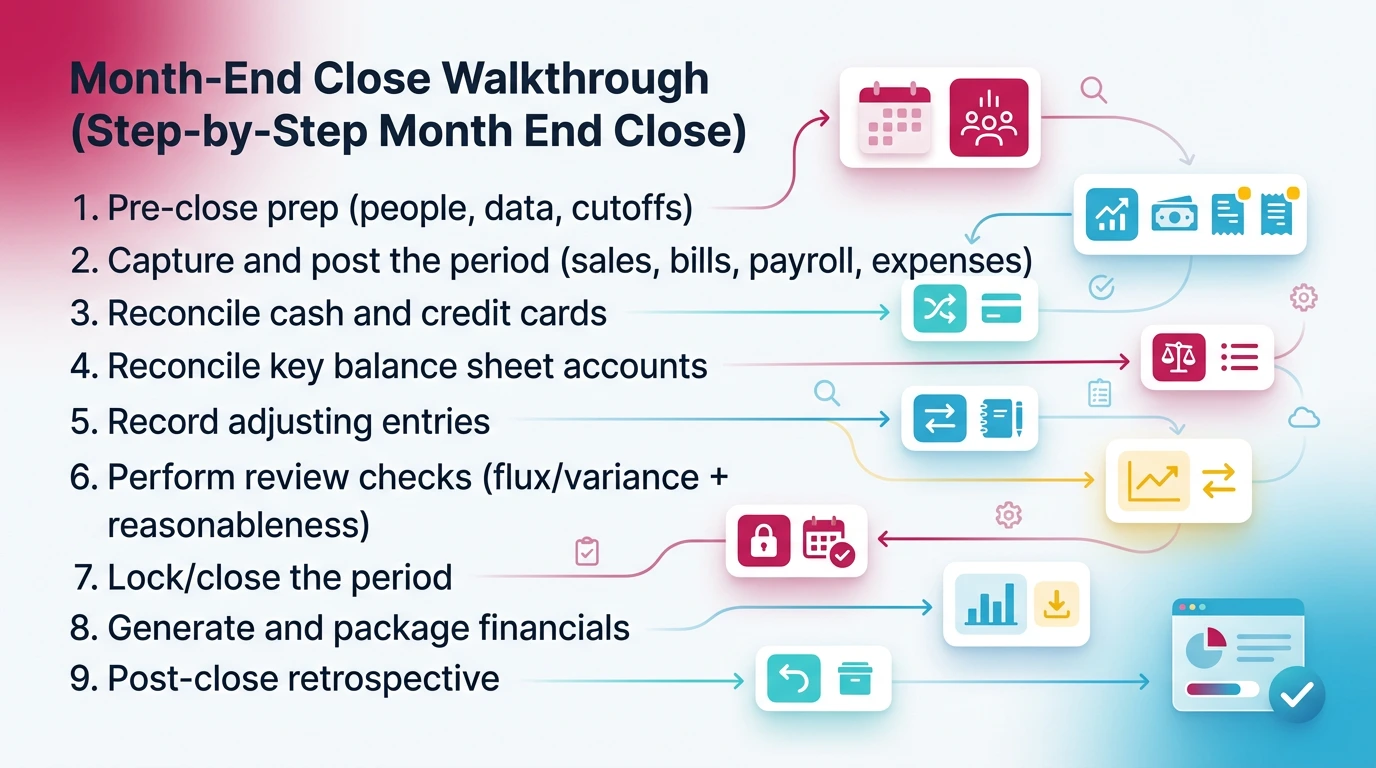
You do month-end close by following a set order: prep, post, reconcile, adjust, review, approve, lock, and package. The sequence matters because later steps depend on earlier truth.
Here is the step by step month end close walkthrough you can standardize across clients.
How to Do Month-End Close (9 Steps)
- Pre-close prep (people, data, cutoffs)
- Capture and post the period (sales, bills, payroll, expenses)
- Reconcile cash and credit cards
- Reconcile key balance sheet accounts
- Record adjusting entries
- Perform review checks (flux/variance + reasonableness)
- Lock/close the period
- Generate and package financials
- Post-close retrospective
Step 0 (Optional): Set Your Close Calendar + Cutoff Rules
You should set the calendar before you close. This is how you prevent "soft closes" that reopen themselves all month.
Define:
- Cutoff rules for sales, expenses, and payroll.
- A "no-post after" time for the period.
- Who can approve changes after review.
- What triggers a reopen (material changes, missed payroll, banking error).
- What "done" means for preparer vs reviewer.
Keep this simple. You can use a 5-day schedule and still run tight control. The key is that you document it and enforce it.
Step 1: Pre-Close Prep (People, Data, Cutoffs)
Pre-close prep is how you avoid spending the close chasing support. You do not need a long meeting. You need a short kickoff and a clean chase list.
Do this first:
- Send a missing-documents request with a hard deadline.
- Confirm bank feed health and that connections did not break.
- Confirm you have statements or final downloads for the month.
- Confirm payroll is scheduled or already posted.
- Confirm the prior period is locked.
If you run multiple clients, add one more check. Confirm that last month's exceptions are either resolved or still documented. Unresolved exceptions tend to repeat.
Step 2: Capture and Post the Period (Sales, Bills, Payroll, Expenses)
You post the period by confirming completeness across the main sources of truth. You do not want to reconcile against incomplete books.
Minimum posting checks:
- AR is posted and cash is applied correctly.
- AP is captured and coded to reasonable accounts and classes.
- Payroll is posted and employer taxes are included.
- Recurring entries are reviewed before you accept them.
- Large one-off items have support attached or at least requested.
If you rely on bank feeds for expense capture, you still need to confirm coding quality. Bank rules help, but they also repeat mistakes at scale.
Step 3: Reconcile Cash and Credit Cards (Bank Feeds + Exceptions)
You reconcile cash and credit cards by matching the ledger to independent statements. You should treat reconciliations as a truth test, not a clerical step.
Handle exceptions in a consistent way:
- Stale outstanding checks: confirm void or reissue policy.
- Duplicate feed lines: delete or exclude, then document the cause.
- Timing differences: document them as expected timing, not "mystery."
- Transfers: confirm both sides post to the right accounts.
If you hit a reconciliation break, pause and investigate. Do not force a reconciliation just to get a green checkmark. Forced reconciliations push the problem into next month.
If you need deeper reconciliation guidance, this Xenett guide helps.
Step 4: Reconcile Key Balance Sheet Accounts (Beyond Cash)
You reconcile key balance sheet accounts by proving the balances make sense and tie to support. Cash alone does not make the books clean.
Start with accounts that cause the most close pain:
- Accounts receivable: review aging reasonableness and old credits.
- Accounts payable: confirm missing bills, old debits, and duplicates.
- Undeposited funds and clearing accounts: clear and explain.
- Loans and interest: tie to lender statements and amort schedules.
- Payroll liabilities: tie to payroll reports and payment status.
- Fixed assets: confirm depreciation support and disposal handling.
- Inventory and COGS (if applicable): tie counts, adjustments, and valuation method.
A useful standard is "support or explain." If you cannot support it, you document the explanation and the next action. You do not leave it as silent drift.
Step 5: Record Adjusting Entries (Accruals, Prepaids, Deferred/Unearned)
You record adjusting entries to put revenue and expense in the right period. You do not do adjustments to make the month "look better." You do them to make the month correct and explainable.
Examples by category:
- Accruals: contractor invoices not received, utilities, interest.
- Prepaids amortization: insurance, software, retainers.
- Depreciation: fixed assets tied to a schedule.
- Revenue deferrals: invoices issued early, services not delivered.
- Payroll liabilities true-up: benefits, taxes, accrual corrections.
- Reclasses: fixes for miscoding that breaks reporting.
Keep your adjustment log simple. Track date, account, amount, reason, and who approved it. That log becomes your review memory next month.
Step 6: Perform Review Checks (Flux/Variance + Reasonableness)
You perform review checks by scanning for "what changed and why" across P&L and balance sheet accounts. You should use thresholds so your review stays consistent across reviewers.
A practical threshold set:
- Flag anything over 10% and $1,000, or over 20% regardless of dollars.
- Flag any new account activity over a set dollar amount.
- Flag negative balances where they should not exist.
- Flag margin shifts that do not match known business changes.
Then document:
- What changed.
- Why it changed.
- What you checked to confirm it is correct.
This is where close quality lives. If you skip this, you can still reconcile and still be wrong.
Step 7: Lock/Close the Period (Controls + Approval)
You lock the period after review approval. This is the control step that keeps your reporting stable.
Use separation of roles when you can:
- Preparer completes posting, reconciliations, and adjustments.
- Reviewer completes flux review and tie-out checks.
- Client or partner approves material changes if needed.
Define reopen criteria in writing. For example, you reopen only for material payroll errors, missed bank accounts, or material billing corrections. Otherwise, you roll it forward.
Step 8: Generate and Package Financials (Internal Use vs Client Delivery)
You package financials so the reader gets consistency. A consistent package reduces questions and reduces rework.
A basic package usually includes:
- P&L with comparative period and YTD.
- Balance sheet with comparative period.
- Cash flow statement if you use it consistently.
- AR and AP aging.
- Key schedules (loans, fixed assets, deferred revenue) as needed.
- A short commentary page with major variances and open items.
If you deliver to clients, include an open issues list. Do not hide exceptions. List them with owners and next steps.
Step 9: Post-Close Retrospective (What to Fix Next Month)
You improve close by doing a short retrospective. Keep it under 15 minutes per client or entity.
Capture:
- Top three issues that caused delays.
- Any recurring coding or reconciliation problems.
- Missing documents pattern and who owns the fix.
- Checklist edits for next month.
- Any weekly checks you should add to prevent repeat problems.
This is how you move from heroics to systems.
Month-End Close Checklist (Copy/Paste + Download)
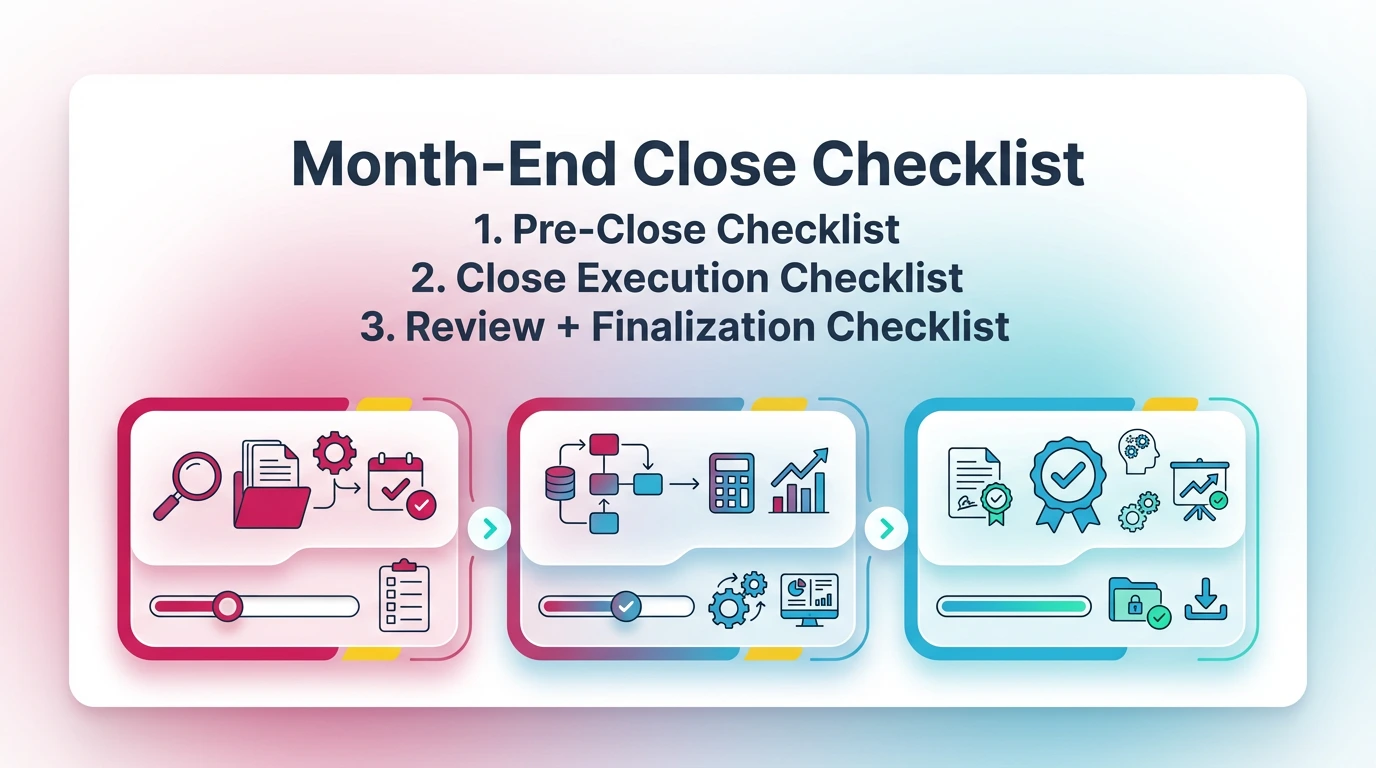
You should use a checklist to keep close consistent across staff and clients. The checklist should not replace review judgment. It should make sure you never skip the steps that protect accuracy.
Below is a complete month end close guide checklist you can copy into your close template. It is short on purpose. It covers the steps that prevent rework.
Pre-Close Checklist (Before Day 1)
- Confirm month cutoff rules and close calendar
- Confirm prior period is locked
- Confirm bank feeds are connected and current
- Collect bank and credit card statements (or final downloads)
- Confirm payroll is posted or scheduled with a cutoff time
- Confirm billing and revenue cutoff with the owner
- Send missing-documents chase list with deadline
- Pull last month's open issues list and confirm status
Close Execution Checklist (During Close)
- Post remaining sales, bills, and expenses for the period
- Apply customer payments and review unapplied cash
- Confirm bills and vendor credits are captured and coded
- Reconcile all cash accounts to statements
- Reconcile all credit cards to statements
- Clear undeposited funds and investigate aged items
- Review clearing and suspense accounts for drift
- Tie payroll liabilities to payroll reports
- Tie loans and interest to lender statements
- Update fixed assets and record depreciation (if applicable)
- Record accruals, prepaids, deferrals, and needed reclasses
- Confirm intercompany balances reconcile (if applicable)
Review + Finalization Checklist (Before Publishing Reports)
- Complete flux/variance review with short notes
- Check for unusual or negative balances and explain them
- Confirm AR and AP aging reasonableness
- Confirm key tie-outs have support or documented explanation
- Capture reviewer sign-off and approvals
- Lock/close the period in QBO or Xero
- Generate the reporting package (P&L, BS, aging, schedules)
- Document exceptions and assign owners with due dates
Download the Month-End Close Checklist Template.
Month-End Close Timeline (Example 5-Day Close)
A 5-day close works when you push completeness forward and keep review standards consistent. You do not get a faster close by rushing review on Day 5. You get it by reducing surprises on Days 1–3.
Here is an example month end close process guide timeline you can use as a starting point.
5-Day Close Timeline Table
Day 0–1: Capture & Cutoff
You focus on completeness. You chase documents. You confirm systems posted. You avoid starting reconciliations until posting is stable.
Day 2–3: Reconcile + Adjust
You reconcile cash and credit cards first. Then you move to key balance sheet accounts. You record adjustments with support and reasons.
Day 4–5: Review + Reporting + Close
You run flux and reasonableness checks. You document what changed and why. Then you lock the period and package reporting.
If you need best-practice sequencing ideas, this Xenett post complements the timeline.
Best Practices to Make Close Repeatable (Systems Over Heroics)
Close becomes repeatable when you standardize review rules and reduce surprises before month-end. You cannot scale accuracy through memory and effort. You scale it through consistent standards.
These best practices keep your accounting month end guide process stable even when staff changes.
Standardize Review Rules (Consistency Across Reviewers)
You should define what reviewers must check every month. Otherwise, review becomes personal style.
Standardize:
- Flux thresholds by account type.
- Required explanations for variances over thresholds.
- Required attachments for specific accounts (loans, payroll, fixed assets).
- The minimum tie-out set per client type.
- A "no forced reconcile" rule with escalation steps.
Also standardize outputs. If your package changes every month, you will get questions every month. Consistency reduces client back-and-forth and internal review time.
Reduce Late Surprises (Do These Checks Weekly)
Weekly checks reduce month-end pain. They also spread work across the month.
Do these weekly:
- Cash and credit card exception scan.
- Clearing accounts scan for drift and new balances.
- AR aging drift and old credits review.
- AP aging scan for duplicates and missing bills.
- Expense classification outliers for high-volume categories.
Weekly checks do not need to be perfect. They need to be consistent. Your goal is early detection, not early completion.
Document Exceptions (So Next Month Is Easier)
You should document exceptions in a structured way. This becomes your close memory and prevents repeat investigations.
Use an exception log with:
- Issue type (timing, missing doc, coding, reconciliation break).
- Account(s) affected.
- Owner and due date.
- Status and resolution notes.
Also maintain a "known timing differences" list. For example, merchant deposits that always clear two days later. This prevents the same conversation every month.
Common Month-End Close Problems (and What They Usually Mean)
Most close problems point to a specific root cause. If you diagnose the symptom quickly, you stop wasting time in the wrong place.
Use the table below as a fast "what does this usually mean" guide.
Missing Transactions / Late Documents
Late documents usually mean you lack a clear cutoff process. You can fix this by using a chase list and a documented "late item" rule. For example, you post late bills into next month unless they are material.
Reconciliation Breaks (Clearing Accounts, Undeposited Funds)
Clearing accounts break when workflows break. Undeposited funds is not an account problem. It is a deposit process problem. Fix the workflow, then clean the account.
Unexpected Flux or Negative Balances
Unexpected flux often points to miscoding, duplicates, or missing accruals. Negative balances often point to wrong posting order. For example, a payment posted without the bill.
Close Delays From Cross-Team Dependencies
Most delays come from payroll, billing, inventory, or approval bottlenecks. You fix this by setting deadlines, defining escalation paths, and making exceptions visible in the close package.
Where Automation Helps (Without Compromising Judgment)
Automation helps most when it reduces volume and surfaces anomalies earlier. It should not make accounting decisions for you. It should make your review and close more consistent.
This section is not about buying software. It is about knowing what to automate first so you get real close impact.
What to Automate First (High Volume + High Error Risk)
Start with tasks that repeat and create avoidable noise:
- Document collection nudges with clear due dates.
- Standardized tie-out packs for key accounts.
- Exception queues for unreconciled items and stale balances.
- Variance alerts that trigger review notes.
- Rules that route transactions to the right reviewer based on risk.
Automation also helps with consistency. For example, you can enforce that every flagged variance requires a reason and an attachment before sign-off.
If you want more examples, see Xenett's guide on month-end close automation.
You can also use accounting platform automation where it is strong. For example:
- QBO: recurring transactions, bank rules, closing date controls.
- Xero: repeating invoices, bank rules, tracking categories.
What Not to Automate Blindly (High Judgment Areas)
Some areas require professional judgment every time. Automation can support them, but it should not decide them.
Do not automate blindly:
- Revenue recognition decisions and performance obligations.
- One-off reclasses that change management reporting meaning.
- Materiality calls on cutoff and accrual completeness.
- Complex accrual assumptions without human review.
- Inventory valuation methods and reserves.
Use automation to surface candidates for review. Then use your judgment to decide.
How Xenett Can Help (When You Need More Review Discipline)
Xenett helps when your close breaks down at the review layer. It supports account-level review, issue tracking, and close readiness visibility, so "done" reflects account truth and not just task completion.
This matters most when you manage many clients, or when senior reviewer time becomes the bottleneck.
When a Checklist Isn't Enough (Common Dealbreakers)
A checklist fails when the same issues keep showing up late. It also fails when reviewers apply different standards.
Common dealbreakers look like this:
- Recurring flux surprises with no consistent explanations.
- Clearing accounts that drift because no one owns them.
- Work marked complete while accounts remain wrong.
- Too many clients per senior reviewer, so review becomes rushed.
- Reopens that happen constantly because close controls are weak.
Account-Level Review to Surface Findings Earlier (P&L + Balance Sheet)
Xenett runs account-level review across P&L and balance sheet accounts to surface anomalies earlier. It flags unexpected flux, reconciliation gaps, and inconsistencies so you can investigate before you package reports.
It is AI-assisted, not AI-led. You set review rules and thresholds. The system helps you apply them consistently across clients and periods.
Turn Findings Into Resolution (Ownership + Sign-Off)
Xenett routes findings into resolution work with clear ownership. You can tie a finding to the account, assign it, track support, and capture sign-off.
This helps in two ways:
- You stop losing issues in Slack, email, or memory.
- You create a clean audit trail of what you found and how you resolved it.
Close Readiness Visibility (What's Actually Done vs. Marked Done)
Xenett helps you see close readiness based on reconciliations, review results, and documented explanations. That reduces false confidence from checklists that get checked too early.
If you want more context on Xenett's review-first approach, see the month-end close best practices and month-end close explainer.
Sign up for a 14-day free trial.
Month End Close Guide FAQs
What Is the Month-End Close Process?
Month-end close is the repeatable set of steps you use to finalize a month. You post all activity, reconcile key accounts, record necessary adjustments, and complete review checks. A month is "closed" when the books are defensible, approvals are captured, and the reporting package is ready for use.
How Long Should Month-End Close Take?
Many small-business closes take 3–10 business days. Time depends on volume, document timeliness, and review rigor. Faster closes come from early issue detection, clear cutoffs, and consistent flux standards. You do not get faster by compressing review into the last day.
What Are Month-End Closing Entries?
Month-end closing entries are adjustments that align revenue and expenses to the correct period. Common types include accruals, prepaid amortization, depreciation, deferred or unearned revenue adjustments, and reclasses for coding errors. The goal is period accuracy and explainability, not extra ledger activity.
What's Included in a Month-End Close Checklist?
A month-end close checklist usually covers cutoff confirmation, posting AR/AP/payroll, reconciling bank and credit cards, key balance sheet tie-outs, adjusting entries, variance or flux review, approvals, and packaging financials. The best checklists also require short documentation for exceptions and unresolved items.
How Do You Improve Accuracy During Month-End Close?
You improve accuracy by structuring review. Reconcile high-risk accounts first, set variance thresholds, require documentation for unusual balances, and separate preparer and reviewer roles when possible. Automation helps most when it surfaces anomalies early and routes them to resolution before you lock the period.
What's the Difference Between Month-End Close and Year-End Close?
Month-end close focuses on recurring period accuracy and consistency. Year-end close adds heavier requirements, like tax adjustments and audit support schedules. A disciplined month-end close reduces year-end cleanup because reconciliation gaps and coding drift get corrected monthly instead of compounding.
What Is a Month-End Close Walkthrough?
A month-end close walkthrough is a step-by-step sequence for executing the close in a consistent order. It covers posting, reconciliations, adjusting entries, review checks, approvals, and report packaging. The most useful walkthroughs include inputs, outputs, a timeline, and a checklist so "done" is clear.
Conclusion
You get a clean close when you treat review as a system. Post completely, reconcile what matters, document what changed, and lock the period with clear approval gates.
Use the walkthrough to run the same close sequence every month. Use the checklist to keep steps consistent across staff. Use the 5-day timeline to timebox dependencies and reduce rework.
If you are also tightening year-end readiness, this guide helps.
Ready to close faster?
Try Xenett free.


.webp)
