.svg)

Accounts Payable Month End Close Process Explained

Ask questions, get summaries, or uncover key takeaways from this article.

Blog Summary / Key Takeaways
- A strong AP close means your AP subledger ties to the GL, cutoff is enforced, accruals have support, and exceptions have owners and resolution notes.
- Most AP close problems come from weak cutoff discipline, unclear GR/IR ownership, and “plug” accruals without support.
- The fastest path to a calmer close is an exception-first workflow, continuous GR/IR cleanup, and tight controls around the AP control account.
- Tools like Xenett help teams execute consistently by managing tasks, reviews, approvals, and evidence in one place. Xenett does not provide audit services and is not an audit tool.
What Is the Accounts Payable Month-End Close Process?
The AP month-end close process is the set of steps used to ensure all supplier invoices, credits, payments, and accruals are recorded in the correct period, reconciled to the general ledger, and supported with documentation before financials are finalized—this sits inside a broader comprehensive accounts payable process.
What “done” looks like at month-end:
- AP aging total (subledger) ties to the GL AP control account.
- You apply cutoff consistently and log exceptions with decisions.
- You book unbilled AP accruals with support and a clear reversal approach.
- You resolve or formally defer variances (GR/IR, statements, disputes).
- You lock the period and retain support for review and future questions.
Who typically owns what:
- AP team: invoice intake, coding checks, duplicates, vendor statements, AP aging hygiene.
- Procurement: PO controls, vendor setup requests, price/qty dispute support.
- Receiving/operations: timely receipts, service completion evidence, GR/IR cleanup actions.
- GL/accounting (Controller team): accrual review, AP-to-GL tie-out ownership, period lock governance.
- FP&A / treasury: cash forecasting inputs and working capital analysis from clean AP aging.
Why AP Month-End Close Matters (And What Breaks When It’s Weak)
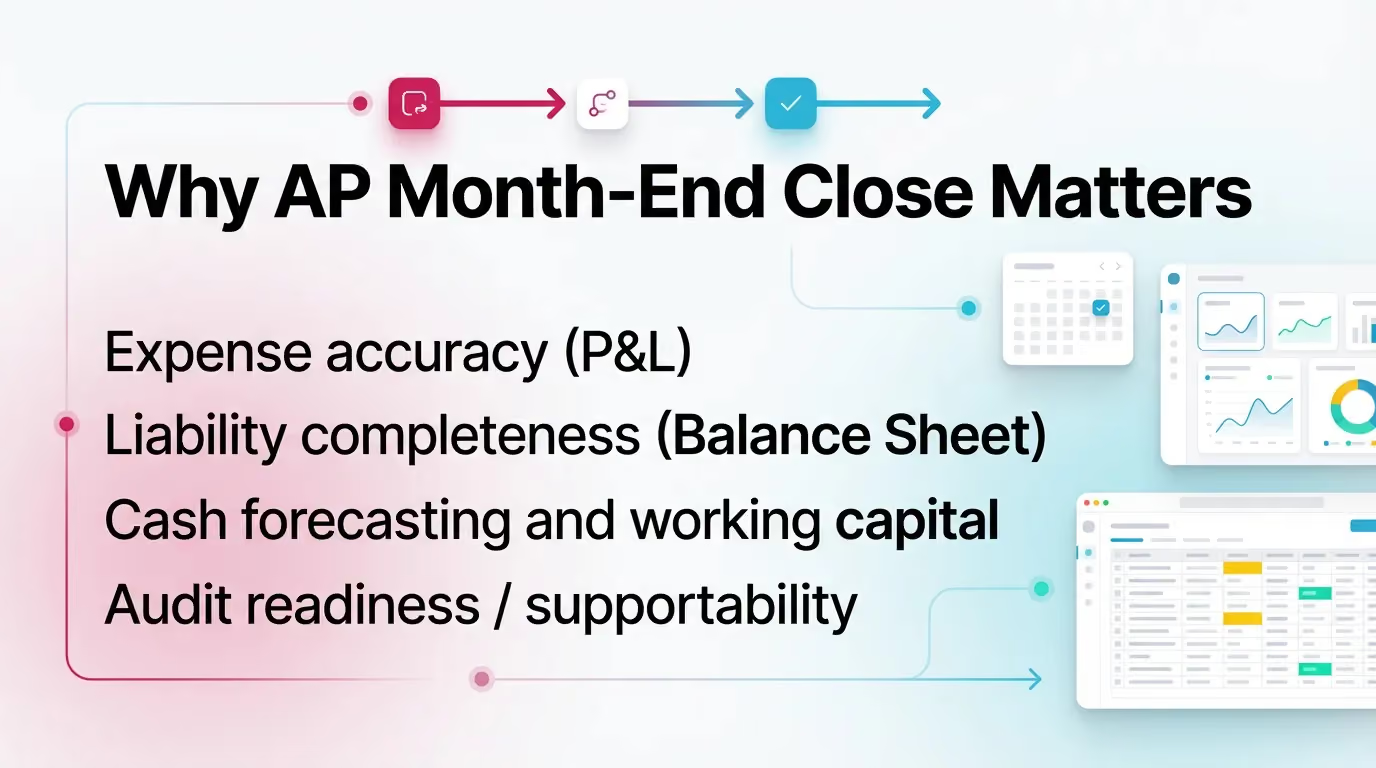
AP month-end close matters because AP drives both the P&L (expenses) and the balance sheet (liabilities). When AP close runs late or loose, you close the month on incomplete information.
Impact on:
- Expense accuracy (P&L): miscoding and missed invoices distort department spend and margin.
- Liability completeness (Balance Sheet): missing bills and weak accruals understate payables.
- Cash forecasting and working capital: AP aging quality drives short-term cash needs and payment timing.
- Audit readiness / supportability: clean reconciliations and documented assumptions reduce fire drills. Keep evidence organized, even if no one asks this month.
Common symptoms:
- Late surprises like missing bills, duplicate invoices, or expenses posted to the wrong month.
- Unexplained AP-to-GL differences that “magically” get fixed with manual entries.
- GR/IR build-ups that never clear, therefore masking receiving or matching problems.
- Post-close adjustments that stack up and train the organization to be late.
Practical insight from the field: most AP close pain shows up during review, not data entry. A reviewer finds one variance, then the team spends hours hunting context across email, spreadsheets, and system notes.
What Should Be Included in AP Month-End Close? (Scope Checklist)
Core Transaction Types to Capture
- Supplier invoices (PO and non-PO).
- Credit memos / vendor refunds.
- Payments, voids, and bank clearing items.
- Vendor statement items and disputes.
Month-End-Specific Accounting Items
- Accounts payable accrual process (unbilled AP).
- Accounts payable cutoff procedure (timing/period correctness).
- GR/IR reconciliation (received-not-invoiced, invoiced-not-received).
If you skip any of these, you usually “feel it” later as a reclass request, an unexplained variance, or a cash forecast miss.
AP Month-End Close Timeline (Practical Operating Cadence)
Month-end works best when you run AP like a cadence, not an event. This calendar keeps intake, cutoff, accruals, and reconciliations moving in order.
Example AP Close Calendar (Day -3 to Day +5)
The Accounts Payable Month-End Close Process: Step-by-Step
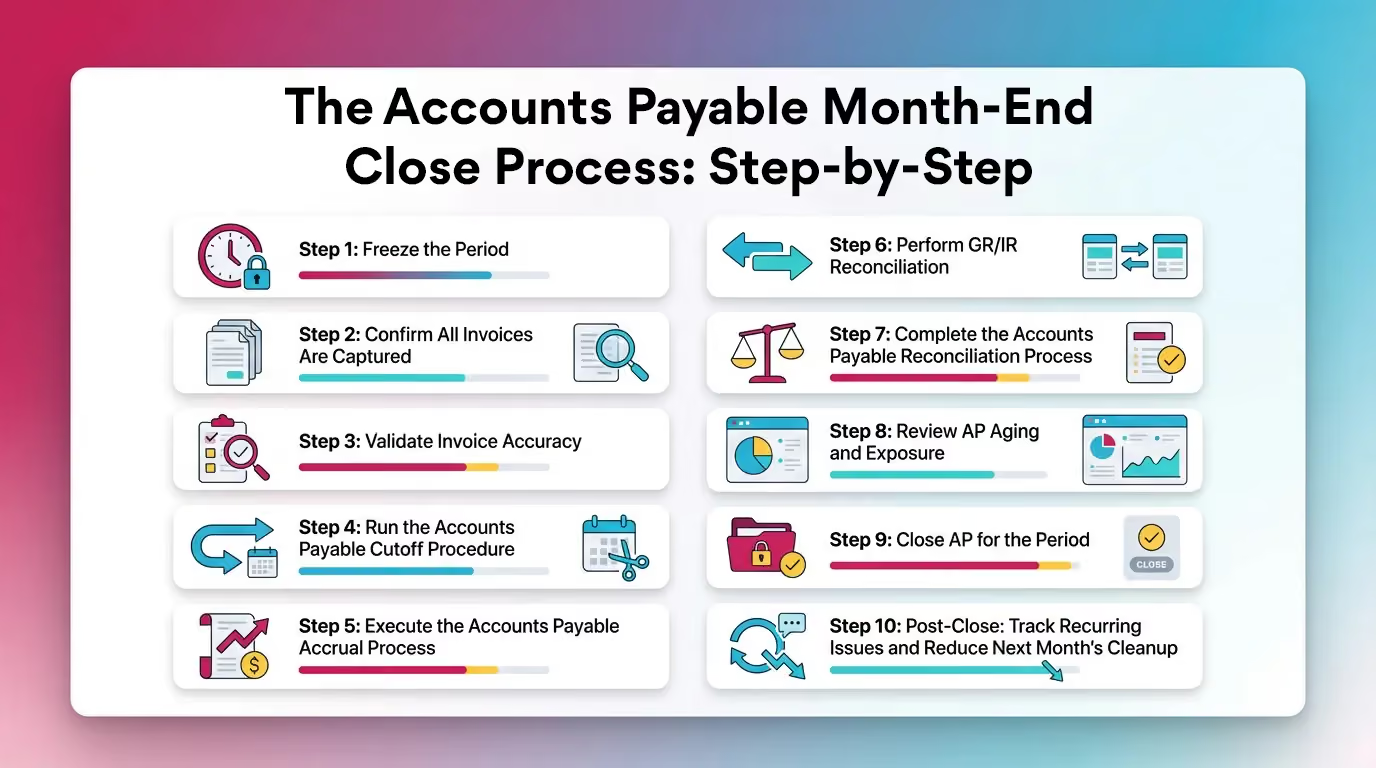
Use this as your standard operating procedure. Keep outputs consistent each month so reviewers stop re-learning your process.
Step 1: Freeze the Period (Operational Cutoff)
Define a cutoff timestamp and enforce it. Time zones matter if you use shared service centers or global approvers.
What to define and communicate:
- Cutoff date and time (for example, “Day 0 at 5:00 PM ET”).
- What counts as “received” for services versus goods.
- Where late invoices go (next-period queue) and who approves exceptions.
What to stop/hold:
- Manual invoice entries after cutoff, unless you log an approved exception.
- Receiving postings after cutoff, unless you treat them as next-period activity.
Output:
- A “cutoff memo” or system note with ownership and the exception path.
Step 2: Confirm All Invoices Are Captured (Invoice Completeness)
Confirm you captured invoices from every intake channel. If you miss invoices, you miss expenses or book messy accruals later.
Reconcile inputs:
- AP inbox and shared mailboxes.
- OCR and invoice capture queues.
- PO system invoice feeds.
- Employee reimbursements if AP pays them through the same workflow.
Build an exception list:
- Missing invoice number or invoice date.
- Missing PO, receipt reference, or requester.
- Pending approvals with no approver response.
Practical example: if you manage a multi-entity close, run completeness by entity. One entity with “quiet” volume often hides the missing invoices.
Step 3: Validate Invoice Accuracy (Coding, Duplicates, and Vendor Master Issues)
Fix quality before you reconcile. Bad coding and duplicate risk create AP-to-GL noise and rework.
Duplicate detection checks:
- Same vendor + invoice number + amount.
- Similar amount + date proximity + repeated description.
- Duplicate attachments submitted through different channels (email plus portal).
Coding checks:
- Out-of-pattern GL usage for recurring vendors.
- New vendors mapped to the wrong expense bucket.
- Missing departments, locations, projects, or classes that your reporting requires.
Vendor master sanity checks:
- Payment terms match the contract.
- Remit-to and banking fields follow change controls.
- Tax fields (W-9/W-8 status, 1099 flags) align with policy.
Step 4: Run the Accounts Payable Cutoff Procedure (Period Correctness)
Apply the accounts payable cutoff procedure so invoices and liabilities land in the correct period. Do this consistently, therefore your accruals become smaller and more defensible.
Services vs goods cutoff differences:
- Services: accrue based on the service period and completion evidence (timesheets, milestones, contract terms).
- Goods: match to receiving. If you received goods before cutoff, you owe for them even if the invoice arrives later.
Practical cutoff tests:
- Invoices dated pre-close but received post-close. Decide whether you accrue or defer based on service/goods evidence.
- Receipts dated pre-close with no invoice. Trigger an unbilled accrual or GR/IR action.
Output:
- Cutoff exceptions log with a disposition for each item: book, accrue, or defer.
Step 5: Execute the Accounts Payable Accrual Process (Unbilled AP)
The accounts payable accrual process follows core accrual accounting procedures to record liabilities for goods or services incurred but not yet invoiced. Build accruals from the most reliable sources first.
Accrual inputs (ranked by reliability):
- GR/IR received-not-invoiced items supported by posted receipts.
- Open PO commitments with receipt evidence or milestone completion.
- Recurring vendor schedules (utilities, contractors, subscriptions with known timing).
Accrual method options:
- PO-based accrual: accrue from receipt quantity and PO price, adjusted for known variances.
- Estimate-based accrual: use a supported estimate when receipts do not exist (for example, professional services through month-end). Document the assumption.
Output:
- Accrual JE support package by vendor/PO, including:
- What you accrued and why.
- Source documents or reports.
- Reversal approach (auto-reverse next period, or reverse when invoice posts).
Practical example: for a marketing agency retainer billed in arrears, you can accrue a fixed monthly amount backed by the contract, then reverse next month when the invoice posts.
Step 6: Perform GR/IR Reconciliation (Received vs Invoiced vs Posted)
GR/IR reconciliation matches goods receipts to supplier invoices to identify received-not-invoiced and invoiced-not-received items. This keeps expenses and liabilities stated correctly.
What GR/IR is (short definition for snippet):
GR/IR is the clearing process that aligns goods received (GR) with invoices received (IR) so you can identify timing gaps and variances.
Minimum reconciliation views:
- Received not invoiced (RNI): receipts posted, invoice missing. These often drive accruals.
- Invoiced not received (INR): invoice posted, receipt missing. These often indicate receiving delays or PO process issues.
- Price/quantity variances and stuck partials that never clear.
Common root causes:
- Receiving does not post receipts on time.
- AP posts an invoice to the wrong PO line or wrong unit of measure.
- Timing differences across systems (procurement tool, receiving app, ERP).
Output:
- GR/IR aging and cleanup list with owners assigned to each action: receiving, procurement, or AP.
Step 7: Complete the Accounts Payable Reconciliation Process
The accounts payable reconciliation process is part of the broader account reconciliation process and confirms AP activity lands correctly in the GL and that you can explain every difference. Do the tie-out first, then chase vendor statements for completeness.
Step 7a: Reconcile Accounts Payable to the General Ledger (AP Subledger Tie-Out)
To reconcile accounts payable to general ledger (i.e., reconciling to the general ledger), compare AP aging (subledger) to the GL AP control account and resolve variances until they match.
Tie-out sequence:
- Pull the AP aging total from the subledger as of period-end.
- Pull the GL AP control account balance as of the same date/time.
- Investigate variances, correct errors, and document the resolution.
Typical variance causes:
- Journal entries posted directly to AP control.
- Unposted AP batches or interface failures.
- Multi-entity or intercompany postings filtered incorrectly.
- FX revaluation timing differences for foreign currency AP.
Output:
- Reconciliation worksheet and variance explanation that a reviewer can follow in five minutes.
Practical experience tip: most “mystery variances” come from two things—someone posting directly to the control account, or reports pulled with different entity/date filters. Fix those first.
Step 7b: Reconcile Vendor Statements (Completeness and Dispute Detection)
Vendor statements help you catch missing invoices, unapplied credits, and payment issues. Use them selectively so the work stays proportional.
When statements matter most:
- High-volume vendors.
- Critical suppliers where disruption risk is high.
- Vendors with frequent credits, disputes, or short-pay behavior.
What to look for:
- Invoices not recorded in AP.
- Credits not applied or posted to the wrong vendor site.
- Payment misapplications, therefore leaving false open items.
Output:
- Vendor statement reconciliation log with actions and owners.
Step 8: Review AP Aging and Exposure (Controls and Reasonableness)
Review AP aging for reasonableness so you catch issues that tie-outs do not show. A clean tie-out can still hide bad payables.
Review lenses:
- Oldest items (90/120/180+).
- Negative balances and debit vendors (often credits, prepayments, or misapplied cash).
- Large or unusual swings by vendor or category (flux analysis).
Output:
- Exception list with sign-off notes explaining what you will fix now versus later.
Step 9: Close AP for the Period (Approvals, Lock, and Evidence)
Close the period only after you capture approvals and evidence. This protects the GL from backdating and keeps your support package consistent.
Required sign-offs:
- AP lead sign-off on completeness and aging exceptions.
- Controller or GL owner sign-off on accruals and AP-to-GL reconciliation.
- For firms, a client reviewer sign-off if the engagement requires it.
What to lock:
- AP period close settings in your ERP.
- Restrictions on backdating without explicit approval and documentation.
Output:
- Final close packet: reconciliations, accrual support, GR/IR aging, and exception dispositions.
Step 10: Post-Close: Track Recurring Issues and Reduce Next Month’s Cleanup
Use post-close review to reduce future work. Treat repeat exceptions as process defects.
Post-close review questions:
- What exceptions repeated from last month?
- Which vendors consistently submit late invoices?
- Which GL mappings caused reclass work?
- Where did approvals stall, and why?
Output:
- “Next month prevention” actions that change the process or system behavior.
Example: if one department approves invoices late every month, set an earlier internal cutoff for that department and escalate automatically on Day -2.
Accounts Payable Month-End Close Checklist
Use this month-end close checklist as your baseline. Keep it stable month to month, then add only what your organization truly needs.
Pre-Close (Before Day 0)
- Confirm cutoff date/time and communicate to stakeholders
- Clear invoice intake queues (email/OCR/portal)
- Identify approvals pending and escalate
- Run duplicate invoice checks
- Confirm receiving deadlines (goods and services)
Close Execution (Day 0 to Day +3)
- Apply cutoff procedure to invoices/receipts
- Book AP accruals (unbilled liabilities) with support
- Complete GR/IR reconciliation and isolate stuck items
- Reconcile AP subledger to GL control account
- Reconcile key vendor statements (as applicable)
Finalization (Day +3 to Day +5)
- Review AP aging exceptions (old items, negatives, large swings)
- Obtain review/approval sign-offs
- Lock period / restrict backdating
- Archive reconciliation and accrual support package
AP Close Deliverables (What to Produce Each Month)
Common AP-to-GL Variances and Fastest Fix Path
Mini Flowchart: “Invoice → Approval → Posting → Payment → Reconciliation”
Invoice intake → Approval routing → Posting to AP subledger → Payment run → Bank clearing → Reconciliation
Where month-end happens:
- Cutoff: between intake/approval/posting.
- Accruals: after cutoff for unbilled items.
- Reconciliations: after postings and accruals, before lock.
Accounts Payable Internal Controls for Month-End Close (What Auditors/Controllers Expect to See)
Strong accounts payable internal controls, supported by internal controls for accounting processes, reduce duplicate risk, prevent unauthorized payments, and keep balances supportable. Keep controls practical, therefore teams actually follow them.
Key Controls (Practical, Not Theoretical)
- Segregation of duties: separate invoice entry, approval, and payment release.
- No direct posting to AP control account: allow only controlled exceptions with documentation.
- Approval thresholds: require higher-level approvals for high-dollar invoices and non-PO spend.
- Vendor master controls: require dual review for new vendors and changes to banking details.
- Change logs and period locks: keep a clear record of who changed what and when.
Evidence and Retention (Supportability)
- Reconciliations with preparer and reviewer sign-off.
- Accrual support with assumptions and reversal approach.
- Exception logs with resolution notes and dates.
Best Practices to Make AP Close Faster Without Losing Control
Speed comes from cleaner inputs and fewer surprises, not from skipping steps.
- Standardize cutoff rules and enforce them consistently.
- Use an exception-first workflow. Review anomalies first, not routine invoices.
- Reconcile GR/IR continuously, not just at month-end.
- Define “allowed reasons” for AP-to-GL differences, then eliminate the rest.
- Keep a single source of truth for close status so no one reconciles three spreadsheets.
- Treat recurring issues as process defects, not “month-end realities.”
- Use accounts payable automation—like automating accounts payable workflows—where it reduces cycle time without weakening approvals. For example, automate capture and routing, but keep human review for exceptions and vendor master changes.
Where AP Month-End Close Goes Wrong (Common Mistakes)
.avif)
These mistakes create the same pattern every month: late close, messy support, and avoidable rework.
- Posting directly to AP control account to “force the tie.”
- Treating accruals as a plug with no support and no reversal discipline.
- Letting GR/IR age indefinitely, therefore hiding receiving and matching issues.
- Over-relying on a checklist without account-level reasonableness review.
- Fixing issues after close, which trains the organization to be late.
How Xenett Helps Operationalize a Review-First AP Month End Close
Month-end AP breaks down most often during review, when inconsistencies, missing entries, and reconciliation gaps surface late. Xenett supports a review-first approach by helping teams execute consistently and keep work visible. Xenett is accounting workflow, review, and close management software. Xenett is not an audit tool and does not provide audit services.
Close Task and Checklist Management (Without Spreadsheet Sprawl)
Xenett centralizes close tasks by client/entity and period, therefore teams stop managing close in disconnected files.
- Centralizes the AP month-end close checklist with consistent steps and owners.
- Makes cutoff, accrual, reconciliation, and exception tasks explicit and repeatable.
- Reduces “tribal knowledge” by standardizing required evidence.
Review and Approval Workflows That Map to Accounting Reality
Xenett routes work through preparer-to-reviewer flow so teams resolve issues before they lock the period.
- Routes reconciliation and accrual packages for review and sign-off.
- Holds work at review until the team resolves review notes.
- Tracks exception ownership so fixes do not get lost in email threads.
Visibility Into Close Status and Bottlenecks
Xenett gives real-time visibility into what is done, what is stuck, and why.
- Shows status across AP tasks, including pending approvals and GR/IR exceptions.
- Surfaces where time gets lost, like vendor follow-ups or miscoding cleanup.
- Helps firms managing many clients avoid late discovery across multiple closes.
FAQ: Accounts Payable Month-End Close
What is the month-end closing process for accounts payable?
The AP month-end close is the process of finalizing all AP activity for the period by confirming invoice completeness, enforcing cutoff, booking accruals for unbilled items, reconciling AP to the general ledger, and documenting review support.
Teams then lock the period and retain a support package for future questions.
What is the accounts payable reconciliation process?
The accounts payable reconciliation process is the set of tie-outs used to confirm the AP subledger (aging) matches the AP control account in the GL, and that differences are identified, explained, and corrected.
It often also includes vendor statement reconciliations for completeness.
How do you reconcile accounts payable to the general ledger?
To reconcile accounts payable to general ledger, compare the total AP aging report to the GL AP control account balance, investigate any variance (unposted items, direct-to-control entries, timing, entity filters), correct errors, and document the final tie-out with support.
Always confirm both reports use the same cutoff time and entity filters.
What is the accounts payable accrual process?
The accounts payable accrual process records liabilities for goods received or services incurred but not yet invoiced at month-end, typically using GR/IR, open PO/receiving evidence, or supported estimates.
You should document assumptions and define how you reverse the accrual.
What is an accounts payable cutoff procedure?
An accounts payable cutoff procedure ensures invoices, receipts, and related expenses/liabilities are recorded in the correct accounting period by applying a defined cutoff date/time and handling late items via accruals or deferrals.
A good cutoff process produces an exceptions log, not silent adjustments.
What is GR/IR reconciliation?
GR/IR reconciliation is the process of matching goods receipts to supplier invoices to identify received-not-invoiced and invoiced-not-received items and resolve variances so liabilities and expenses are stated correctly.
It also helps you prevent GR/IR accounts from aging indefinitely.
What internal controls are most important in AP close?
The most important accounts payable internal controls include segregation of duties, controlled vendor master changes, required approvals, restricted posting to the AP control account, documented reconciliations, and period locks.
These controls prevent duplicates, unauthorized payments, and unsupported balances.
How can accounts payable automation help month-end close?
Accounts payable automation helps by speeding invoice capture and approvals, reducing duplicates and coding errors, improving visibility into pending items, and producing cleaner inputs for accruals and reconciliations at month-end.
However, you still need clear cutoff rules and strong review discipline.
Conclusion
A reliable Accounts Payable Month End Close Process gives you cleaner expenses, complete liabilities, and fewer last-minute surprises. Start by tightening cutoff, making accrual support non-negotiable, and running AP-to-GL and GR/IR reconciliations the same way every month.
If your team struggles with scattered checklists, inconsistent evidence, or late-stage rework, standardize the workflow first—and align AP within a streamlined month-end close process so tasks, sign-offs, and supporting documentation stay connected to the close.