
.svg)

Accounting Workflow Automation: Tools & Best Software Compared

Ask questions, get summaries, or uncover key takeaways from this article.
Blog Summary / Key Takeaways
- Accounting workflow automation is not about adding more tasks — it is about routing work, enforcing checkpoints, and surfacing exceptions early before close turns into last-minute cleanup.
- The biggest gap in most firms is visibility: knowing which clients are ready to close, what exceptions exist, and who owns each one — not just how many tasks are marked complete.
- The highest-impact workflows to automate first are close kickoff and readiness checks, reconciliation routing, and review follow-ups — the three that most directly prevent late-stage surprises.
- Choosing the right workflow software depends on your firm's main bottleneck — coordination across clients, close controls and evidence, or review consistency — not on feature lists or popularity.
- Xenett takes a review-first approach, detecting account-level anomalies across the P&L and Balance Sheet and turning findings into resolution workflows — so exceptions drive the work, not just deadlines.
Accounting Workflow Automation: Tools, Benefits & Software Compared (2026)
Late discovery is the real problem in most firms.
Work gets marked "done," but exceptions show up days later. Reconciliations slip. Flux questions land after you already told the client the month is closed. And across 30, 80, or 200 clients, you lose the one thing you need most: a reliable view of close readiness.
That is why accounting workflow automation matters. Not because you need more tasks. You need systems that route work, enforce checkpoints, and surface exceptions early, before close turns into cleanup.
This guide covers workflows, month-end close automation, and review discipline. It is not a generic "tools list." You will also get a comparison table, a selection checklist, and practical rollout steps.
Quick Answer
Accounting workflow automation uses software rules and integrations to run recurring accounting work consistently. It assigns tasks, routes approvals, triggers reminders, captures evidence, and escalates exceptions. The goal is fewer coordination gaps and earlier issue detection, especially during reconciliations, review, and month-end close.
Accounting Workflow Automation (Definition + Scope)
Accounting workflow automation means you standardize recurring work and let the system move it forward. It replaces manual chasing with routing, approvals, and evidence so you can find exceptions earlier.
Accounting workflow automation is defined as the use of software rules, templates, and integrations to coordinate recurring accounting processes by triggering tasks, routing approvals, tracking dependencies, and recording evidence so work progresses consistently and exceptions surface early.
That scope matters. Many firms buy "workflow" tools that only rename tasks. Those tools help you remember work. They do not help you enforce work.
Workflow automation usually spans:
- Recurring templates (monthly close, AP, AR, reporting)
- Dependencies (you cannot review until recs finish)
- Approvals and sign-offs (who approved, when, and why)
- Evidence links (recs, support, schedules, client answers)
- Exception handling (something looks wrong, who owns it next)
- Cross-client visibility (what is at risk this week)
What Counts as Automation vs "Just Task Tracking"
Automation means the system takes action based on rules. Task tracking means you still manage everything manually.
You have real automation when the tool can:
- Auto-create work on a schedule (per client, per service)
- Route tasks when a dependency finishes
- Escalate when SLAs break (late recs, no client response)
- Require sign-off and evidence before completion
- Push exceptions to the right owner, not a shared inbox
You only have task tracking when:
- Work exists as static checklists
- Status updates depend on manual comments
- "Complete" means "someone clicked a box"
- Evidence lives in email threads or drives with no link
Workflow Automation vs Accounting Process Automation (What's Different)
Workflow automation coordinates people and steps. Accounting process automation moves data or executes transactions.
Accounting process automation often covers things like invoice capture, bank feeds, rules-based coding, or AP automation.
Accounting task automation focuses on reducing coordination work like reminders, handoffs, and approvals.
You usually need both. However, firms break down when workflow stays manual. Great AP automation does not help if nobody owns reconciliation follow-ups or review questions.
Manual Accounting Workflow Problems (Why Automation Fails Without Systems)
Manual workflows fail because they rely on memory and heroics. You can work hard and still discover issues late because the system never forced review discipline or clear ownership.
If you feel like you "manage close" by checking Slack, email, and spreadsheets, you already know the problem. You do not have one workflow. You have 50 personal workflows.
Common Failure Points (Signs You Have Accounting Process Inefficiencies)
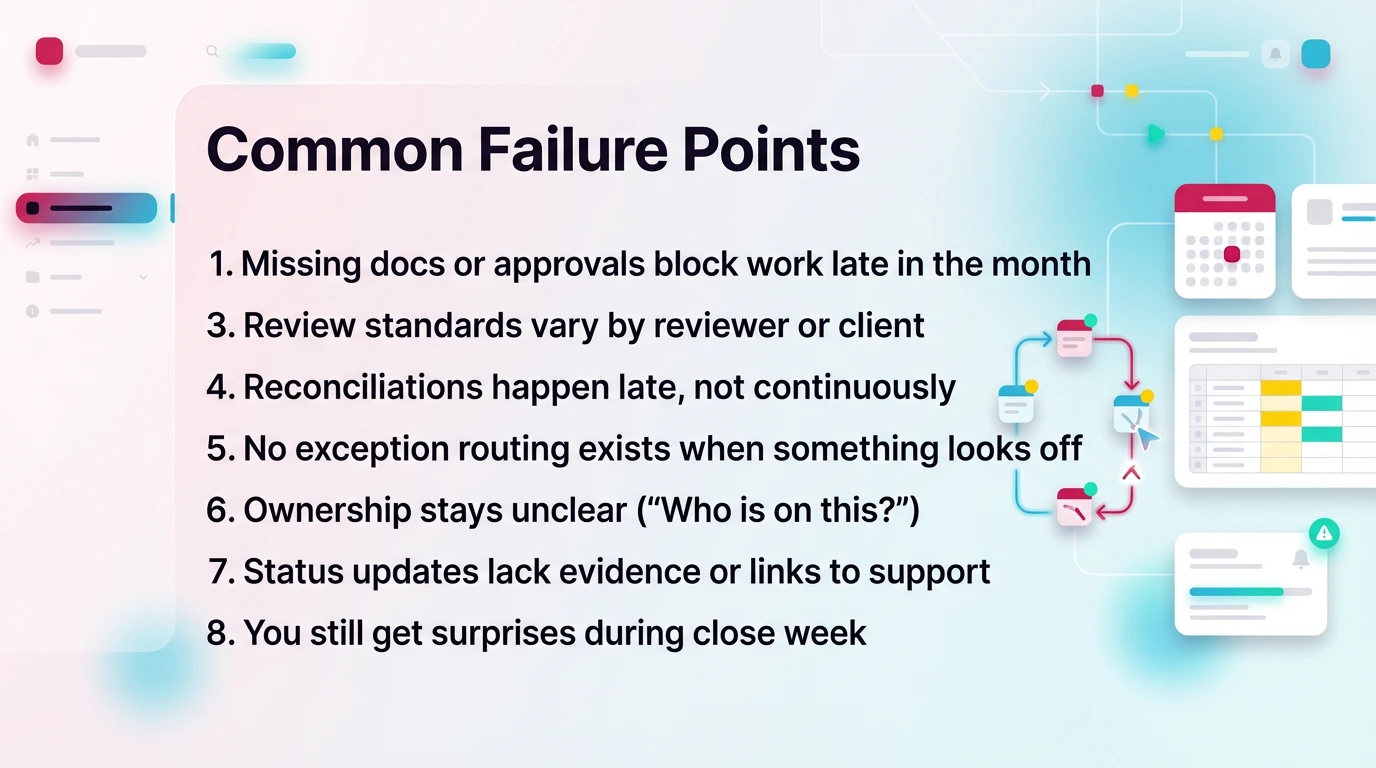
These are the most common manual accounting workflow problems. If you see several of these, workflow automation will help, but only if you build real systems.
Signs you have accounting process inefficiencies:
- Missing docs or approvals block work late in the month
- Review standards vary by reviewer or client
- Reconciliations happen late, not continuously
- No exception routing exists when something looks off
- Ownership stays unclear ("Who is on this?")
- Status updates lack evidence or links to support
- You still get surprises during close week
These problems show up as rework. Rework creates longer closes. Longer closes create more client pressure. Then your team starts cutting review corners.
What "Visibility" Should Mean in an Accounting Firm
Visibility means you can answer three questions fast:
- Is this client ready to close?
- What exceptions exist right now?
- Who owns each exception, and what evidence supports resolution?
Most tools report "tasks completed." That is not visibility. A task can be complete and still be wrong.
Real visibility includes:
- Close readiness by client (not just due dates)
- Exceptions by account area (cash, AR, AP, payroll, accruals)
- Review status with proof (recs linked, approvals logged)
- Capacity view (who can take the next exception)
If you define visibility this way, your software selection becomes simpler. You stop buying dashboards. You buy control.
What to Automate First (10 High-Impact Accounting Workflows)
You should automate workflows that reduce late surprises first. Start with the steps that control readiness, exceptions, and review follow-ups, not the steps that simply "feel busy."
If you automate the wrong things first, you will move faster into a bad close. That still hurts.
The Top 10 Workflows (10 Accounting Workflows to Automate First)
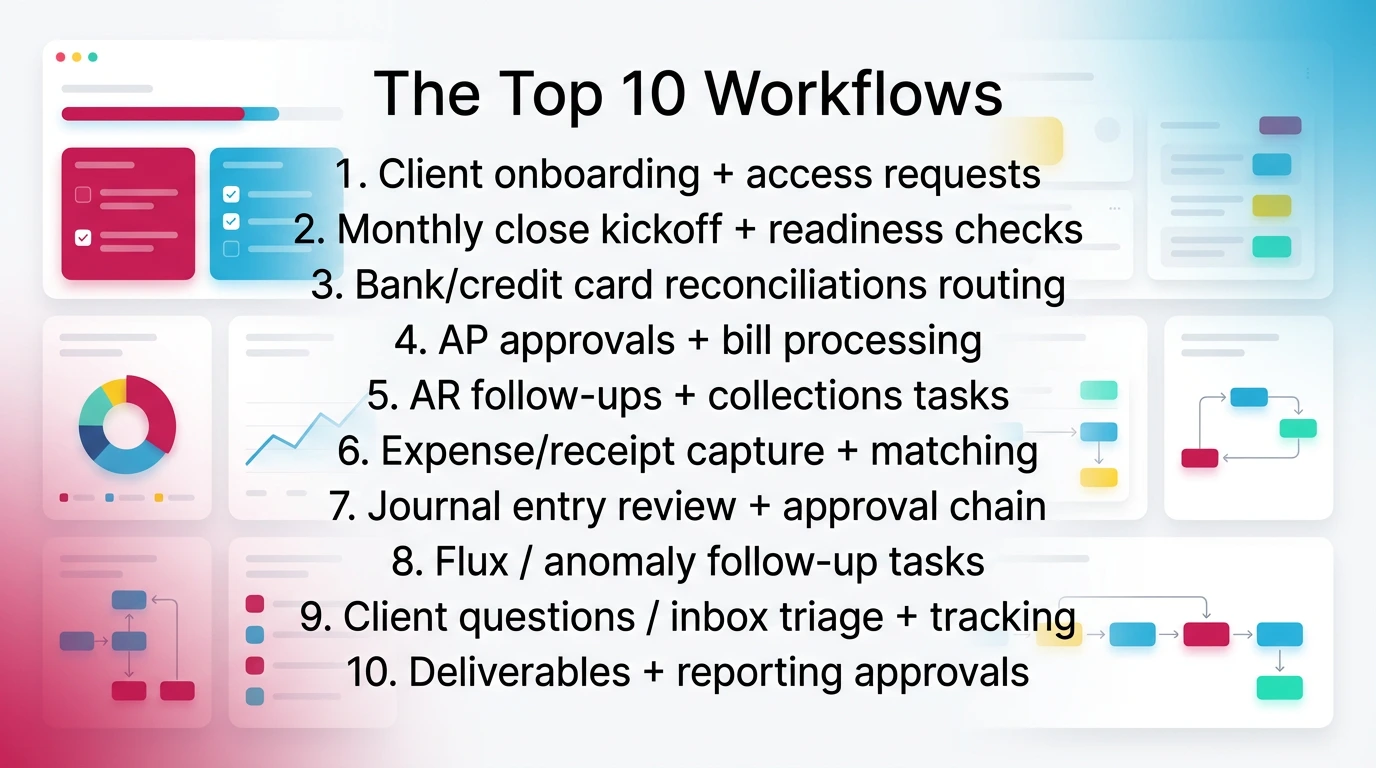
This list fits most CAS and outsourced accounting teams. It also fits internal accounting teams with repeating monthly cycles.
- Client onboarding + access requests
- Monthly close kickoff + readiness checks
- Bank/credit card reconciliations routing
- AP approvals + bill processing
- AR follow-ups + collections tasks
- Expense/receipt capture + matching
- Journal entry review + approval chain
- Flux / anomaly follow-up tasks
- Client questions / inbox triage + tracking
- Deliverables + reporting approvals
#9 matters more than most teams admit. If your inbox drives your workflow, you do not have a workflow. You have noise. If you want a tighter approach to inbox routing and internal threads, see our guide on internal communication.
Start Here (2–3 Workflows That Usually Deliver the Fastest Lift)
If you want fast impact, pick workflows that prevent late discovery.
- Close kickoff + readiness checks
Make readiness explicit. Require bank statements, subledger exports, and cut-off confirmations early. - Reconciliations routing
Route bank and credit card recs to owners immediately. Escalate when recs are late. - Review follow-ups (flux, anomalies, missing support)
Turn review findings into assigned work with deadlines and evidence.
These three reduce last-week chaos. They also create cleaner data for any automation downstream.
Month-End Close Automation (Where Workflow Tools Often Break)
Month-end close automation works when the system enforces dependencies, evidence, and sign-offs. Many workflow tools break here because they treat close as a checklist, not as a controlled process.
You can run close in a generic task tool. However, you will rebuild controls manually. Over time, that becomes fragile.
What Close Automation Should Include (Controls + Evidence)
Close management software, or close-capable workflow software, should support:
- Dependencies (rec before review, review before reporting)
- Required sign-offs (preparer and reviewer)
- Evidence links (recs, schedules, support, client confirmations)
- Escalation rules (late items, high-risk exceptions)
- Close readiness reporting (what is blocking close today)
- Non-negotiable review checkpoints (P&L and Balance Sheet)
If you want a clear model for close structure, see Xenett's close process overview.
For review checkpoints that fit real month-end work, see Xenett's review process guide.
Close automation also supports auditability. Even if you do not face a formal audit, you still need an internal trail. That trail protects you during client disputes and staff turnover.
Close Checklist vs Close Management (Difference)
A close checklist is static. It lists steps. It does not enforce order, evidence, or approvals.
Close management is dynamic. It:
- Prevents completion without evidence
- Flags blockers and dependencies automatically
- Shows readiness and risk, not just status
- Records approvals and changes over time
If your "close" lives in a spreadsheet, you have a checklist. If your close system can tell you which clients cannot close and why, you have management.
When You Need a Close Tool (FloQast / BlackLine / Numeric Category)
You should shortlist dedicated close management software when close complexity drives your risk.
That often means:
- Controller-led environments with strict close calendars
- Larger teams with multi-entity consolidations
- Heavier reconciliation and approval requirements
- Need for strong audit trails and standardized close evidence
FloQast, BlackLine, and Numeric often fit this category. They can be strong, but they can also be too heavy for multi-client CAS workflow if you mainly need client request routing and recurring templates.
If you run an accounting firm, you may need workflow-first systems that handle multi-client volume. Then you add close depth where needed.
Best Accounting Workflow Automation Software (Compared)
The best accounting workflow automation software depends on what breaks in your firm today. Some tools coordinate work well. Others focus on close. Very few help you standardize review so exceptions drive the workflow.
Below is a comparison focused on what matters in real accounting firm workflow management.
Comparison Table (Workflow + Close + Review)
How to read this table (summary):
- Pick workflow tools for recurring, multi-client coordination and intake.
- Pick close tools when close controls and approvals drive your risk.
- If review consistency is your bottleneck, prioritize exception-first review controls.
- Implementation effort usually tracks how much standardization you are willing to enforce.
Sidebar: AP automation tools are not workflow systems
If you search for AvidXchange accounting workflow automation, you will mostly find AP automation. That can help with invoice capture and approvals. However, it does not replace accounting workflow software for month-end close, reconciliations, or review discipline.
Direct Workflow Competitors (Accounting Firm Workflow Management)
You should compare Xenett with workflow and close tools, not bookkeeping software. Here is a grounded view of the main accounting workflow software options.
Xenett
- Best fit when you need review-first automation tied to close outcomes.
- Focuses on account-level review signals that create resolution work.
- Useful when tasks can be "done" but the books still carry risk.
- Implementation requires agreement on review checkpoints and evidence.
Financial Cents
- Best fit for firms that want clean recurring workflows and client requests.
- Strong for visibility into tasks, due dates, and team workload.
- Review quality still depends on your internal standards.
- Close depth varies by how you configure templates and sign-offs.
Jetpack Workflow
- Best fit for deadline tracking and recurring deliverables.
- Simple to adopt and easy to standardize across a team.
- Limited depth for exception routing and review evidence.
- Works best when your review process already runs smoothly.
Karbon
- Best fit for firms that want workflow plus collaboration in one place.
- Stronger around communication and capacity planning.
- Close and review depth depends on process design, not native review logic.
- Requires more change management than lightweight trackers.
Pixie
- Best fit for practice workflows with structured templates and client interaction.
- Good for standardization and repeatable delivery.
- Review-first exception handling is not the primary focus.
- Confirm integrations and regional fit before committing.
Canopy (Workflow module)
- Best fit for firms already invested in the Canopy suite.
- Strong suite benefits if you want portal plus workflow in one ecosystem.
- Workflow works best when you standardize across the suite.
- Review depth still depends on your process, not account-level checks.
Close & Reconciliation Tools (Indirect but Relevant)
If your close breaks because approvals, rec governance, or audit trails fail, look at close-first tools.
FloQast
- Best if you run a structured close calendar and need strong close visibility.
- Fits finance teams that want a close hub and evidence collection.
- Can be overkill if your core issue is multi-client workflow intake.
BlackLine
- Best if reconciliations and governance drive your control environment.
- Fits larger environments with formal controls and complex reconciliations.
- Often too heavy for smaller firms seeking lightweight workflow automation.
Numeric
- Best if you want a modern close workspace for a finance team.
- Strong close coordination and visibility.
- Not a replacement for firm-style workflow software across many clients.
Why Generic PM Tools Fail Accounting Workflows (Contrast Only)
Generic PM tools can help you organize work. They usually fail when you need accounting-native controls.
ClickUp, Asana, Monday.com, Trello often lack:
- Accounting-native templates and dependencies at scale
- Structured approvals with evidence expectations
- Close readiness concepts and close reporting
- Exception-first review logic tied to accounts and reconciliations
You can build anything in a generic tool. However, you become the product team. That is fine until turnover hits or close volume grows.
How to Choose Workflow Software for CPA Firms (Selection Framework)
You should choose workflow software for CPA firms based on control and visibility, not features. Your goal is to reduce manual work in accounting without weakening review.
Start by naming your main constraint:
- Coordination across clients?
- Close controls and evidence?
- Review consistency and exception handling?
Then select software that solves that constraint with the least customization.
If you want more context on Xenett's workflow management layer, see the dedicated page.
The 9-Point Evaluation Checklist
Use this checklist in demos. Ask the vendor to show each item live.
- Recurring templates + dependencies
- Status visibility across clients
- Exceptions & rework routing
- Approvals + audit trail
- Close workflow support
- Review standardization (P&L/BS checks)
- Client request intake + reminders
- Integrations (QBO/Xero + document store)
- Reporting (WIP, capacity, cycle times)
If a tool misses #3, #4, or #6, you will feel it during close.
Dealbreakers (What to Eliminate Quickly)
Do not buy if:
- The tool cannot require evidence for completion.
- Recurring templates do not scale by client and service line.
- You cannot see cross-client risk and blockers in one view.
- Approvals exist only as comments with no audit trail.
- Review checkpoints live outside the system with no enforcement.
- Exceptions have no routing and no owner by default.
These dealbreakers drive future switching. They also create "checkbox closes," where tasks finish but issues remain.
Who This Is For / Who Shouldn't Buy Yet
Workflow automation is for you if:
- You manage recurring work across many clients or entities.
- You lose time to chasing answers, not doing accounting.
- You see recurring close surprises tied to missing review discipline.
You should wait if:
- You only need a personal to-do list.
- Your volume is low and you close in a day or two consistently.
- You are not ready to standardize templates and review checkpoints.
Generic PM may be enough for a while. Close pressure will expose gaps later.
Implementation Plan (How to Automate Accounting Processes Without Breaking Close)
You can automate accounting processes safely if you pilot, measure, and expand. If you rebuild everything at once, you will break close and lose team trust.
The goal is stable change. One close cycle at a time.
How to Automate Accounting Processes in 6 Steps
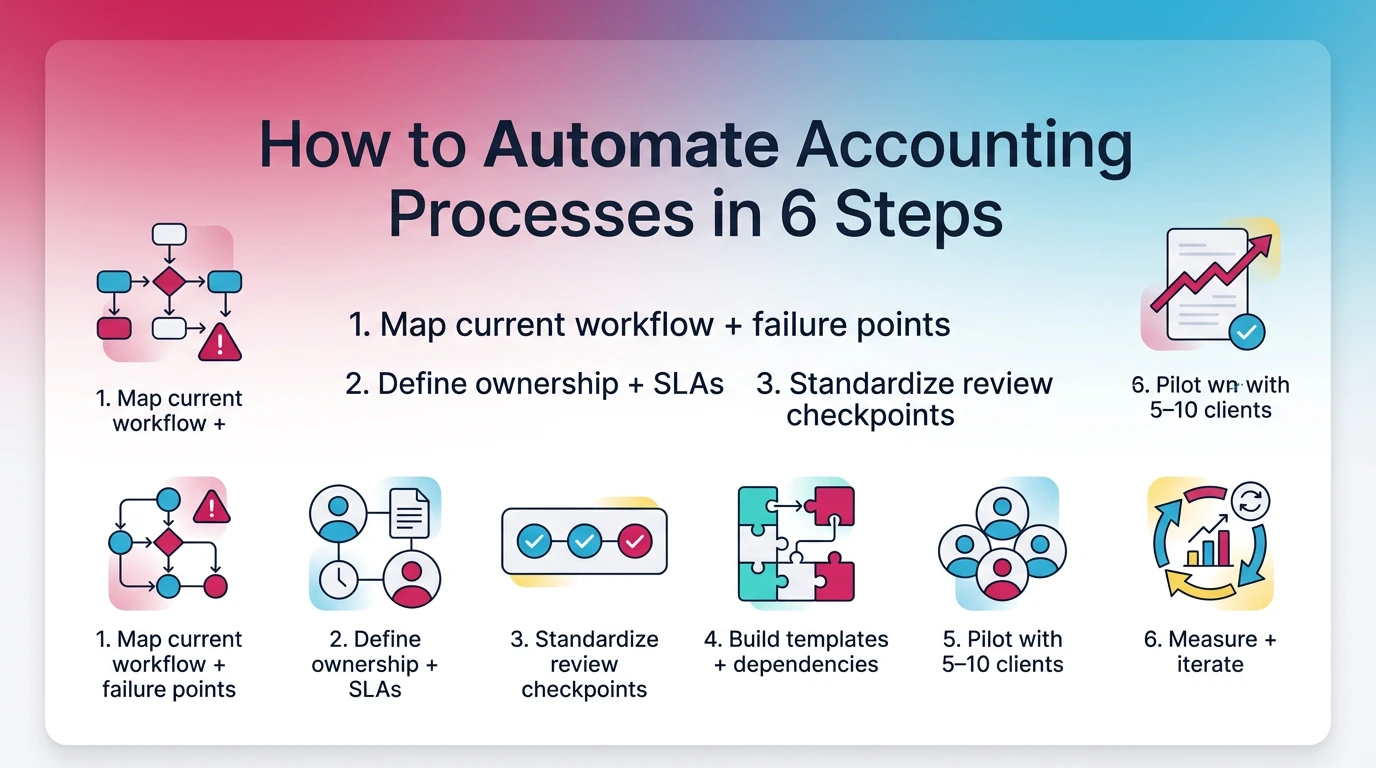
Follow these steps in order. Do not skip step 3.
- Map current workflow + failure points
List where work stalls and where exceptions get found late. - Define ownership + SLAs
Decide who owns reconciliations, review follow-ups, and client requests. - Standardize review checkpoints
Define what "review complete" means for P&L and Balance Sheet. - Build templates + dependencies
Convert your standards into recurring templates with required evidence. - Pilot with 5–10 clients
Pick a mix of easy and messy clients. Run one full close cycle. - Measure + iterate
Track cycle time, rework, and late exceptions. Fix the template.
This is how you reduce manual work in accounting without weakening controls.
30/60/90 Day Plan (Change Management Included)
Days 1–30: Design and pilot
- Pick one service line and one close cycle.
- Train the team on "evidence required" rules.
- Run parallel tracking if you need risk coverage.
Days 31–60: Expand templates
- Add more clients in the same service line.
- Tighten dependencies and escalation rules.
- Hold short weekly reviews on what broke and why.
Days 61–90: Standardize and report
- Lock naming conventions and template ownership.
- Build reporting for WIP, cycle times, and readiness.
- Document "definition of done" for key tasks and reviews.
The win is not the tool. The win is consistency.
Setup Checklist (Pre-Launch Requirements)
Before you launch, make these decisions:
- Client list hygiene (names, entities, close days, owners)
- Template ownership (one person owns changes)
- Evidence standards (what links or files prove completion)
- Naming conventions (tasks, accounts, exceptions)
- Escalation rules (what triggers a manager review)
- Access rules (who can approve, who can close)
If you skip this, templates sprawl and people stop trusting the system.
Limitations, Risks, and Switching Reassurance
Workflow automation software helps, but it does not fix bad standards. It also creates new risks if you treat it like a set-it-and-forget-it tool.
If you buy software and keep your old habits, you will automate chaos.
Common Failure Modes After Buying Software
Watch for these patterns in the first 90 days:
- Template sprawl with no owner, so nobody trusts "the process"
- Unclear ownership, so exceptions bounce around
- Checkbox closes, where tasks finish with no evidence
- Review standards that live in people's heads
- Over-automation of reminders, which creates noise not clarity
You can prevent most of these by enforcing evidence and review checkpoints early.
Switching / Cancellation Reassurance (What to Protect)
If you are switching tools, protect your operational memory.
Plan for:
- Export expectations (tasks, templates, completion history)
- Keeping document links stable or mapped
- Running parallel for one close cycle to reduce risk
- Avoiding lock-in where one admin holds all knowledge
Switching goes well when you migrate standards, not just tasks.
Pros & Cons (Workflow Automation Software Category)
Pros
- Reduces manual chasing and status meetings
- Improves on-time completion with clear ownership
- Creates repeatable processes across clients
- Builds an evidence trail for reviews and approvals
- Improves close visibility and capacity planning
Cons
- Requires process standardization to work well
- Can create noise if reminders and rules are poorly designed
- Implementation takes time and team buy-in
- Does not guarantee review quality unless review checkpoints exist
- Can hide problems if "complete" does not require evidence
How Xenett Can Help (When You Need More Review Discipline)
Xenett helps when your main problem is not tasks. It helps when review consistency and early exception detection drive whether close feels calm or chaotic.
Many firms already have task lists. They still find issues late.
The Gap: Tasks Can Be "Done" and the Books Still Be Wrong
You can complete onboarding, coding, and reconciliations and still carry risk.
That happens when:
- Accounts move in ways nobody notices until reporting
- Recs technically "finish," but key variances stay unexplained
- Flux questions get asked after the close meeting
- Review standards vary by reviewer, so quality drifts over time
In that environment, workflow automation needs a review engine. Otherwise, the system tracks progress, not truth.
Account-Level Anomaly Detection → Creates Resolution Work
Xenett operates review-first.
It checks account behavior across the P&L and Balance Sheet. It flags anomalies, missing entries, and reconciliation gaps. Then it creates resolution work from those findings so you route exceptions to the right owner with evidence.
That operating model matters because it changes what "work" means. Work exists to resolve review findings. You stop pushing tasks forward just to hit a date.
For how Xenett approaches AI-assisted review signals, see Xenett's financial review page.
Review Standardization Across Reviewers and Clients
Xenett supports standard review checkpoints so your team applies the same expectations across clients. That reduces reviewer-to-reviewer variance and makes training easier.
You still apply accounting judgment. Xenett stays AI-assisted, not AI-led. The system helps with consistency and routing, not decisions.
If you want the review discipline structure behind this, see the review process guide.
Close + Review Workflow Integration (Predictable Close)
Xenett ties review and close workflows together so close readiness reflects exceptions and evidence, not just task completion. That reduces late discovery and lowers rework.
If you want the close workflow model, see the close process guide.
Schedule a free consultation → Get started
Final Recommendations (Best Tool by Firm Scenario)
The best-rated accounting workflow automation tools depend on your firm size and your bottleneck. You will get better results when you pick based on failure points, not popularity.
Use these scenarios as a practical shortlist.
Best for 1–5 Person Firms
Pick a lightweight workflow tool if you need structure fast and you do not have heavy close governance.
You will usually value:
- Simple recurring templates
- Deadline views across clients
- Low setup time
Jetpack Workflow or Financial Cents often fit this phase. If review consistency already causes rework, consider a review-first approach earlier than you think, because small teams feel close risk immediately.
Best for 5–20 Person Firms
At this size, handoffs break. Visibility and ownership matter more than personal productivity.
You will usually need:
- Cross-client dashboards
- Clear routing for exceptions and client requests
- Approvals and evidence habits
Karbon, Financial Cents, and Canopy's workflow module can fit depending on your stack. If month-end surprises come from inconsistent review, you will want stronger review checkpoint enforcement.
Best for Close-Heavy, Controller-Led Environments
If you run a strict close calendar, prioritize close management software depth.
FloQast, BlackLine, or Numeric can be strong options, especially with more formal controls, approvals, and audit trails. These tools shine when close governance is the product you need.
If you also serve many clients, confirm the tool fits multi-client workflow volume, not just a single close team.
Best if Review Consistency Is the Bottleneck (Natural Xenett Fit)
Choose Xenett when early exception detection and standardized financial review drive close outcomes.
This fit looks like:
- You finish work, then find issues late
- Flux and account behavior create repeated follow-ups
- Close speed varies by reviewer, not by client complexity
- You want review findings to drive resolution workflows
That is where review-first automation tends to outperform task-first tracking.
FAQs
What Is Accounting Workflow Automation?
Accounting workflow automation uses software, rules, and integrations to run recurring accounting work consistently. It assigns tasks, routes approvals, tracks evidence, and triggers follow-ups automatically. The goal is fewer coordination gaps and earlier exception detection, especially during reconciliations, review, and month-end close.
What Accounting Workflows Should You Automate First?
Start with high-volume, high-friction workflows: onboarding and access requests, close kickoff and readiness checks, reconciliation routing, receipt collection, AP approvals, and review follow-ups. These reduce back-and-forth and prevent late surprises. Prioritize workflows that clarify ownership when something looks wrong.
What's the Difference Between Accounting Workflow Software and Close Management Software?
Workflow software coordinates recurring work across clients using templates, due dates, assignments, and client requests. Close management software focuses on the financial close with dependencies, sign-offs, evidence, and readiness reporting. Some tools overlap, but close tools usually provide deeper controls and auditability.
Why Do Generic Project Management Tools Fail for Accounting Firms?
Asana, Trello, ClickUp, and Monday track tasks well, but they usually lack accounting-native templates, close readiness reporting, structured approvals with evidence, and exception routing. Firms rebuild controls manually and still struggle with review consistency because the tool tracks activity, not accounting risk.
What Is Month-End Close Automation?
Month-end close automation standardizes close activities using templates, dependencies, reminders, sign-offs, and evidence links. The goal is not speed alone. It is a predictable close where exceptions get identified early, owned clearly, and resolved with an audit trail you can trust.
What Should I Look for in Workflow Automation for Accounting Firms?
Look for recurring templates with dependencies, cross-client visibility, exception routing, approvals with audit trails, close workflow support, and reporting for WIP, capacity, and cycle times. If quality is the constraint, prioritize review standardization so workflows get driven by findings and evidence.
What Makes Xenett Different From Typical Accounting Workflow Automation Software?
Most workflow tools organize tasks and deadlines. Xenett is review-first. It runs account-level checks across the P&L and Balance Sheet, flags anomalies and reconciliation gaps, and drives resolution workflows from those findings. Xenett is AI-assisted for rule setup and interpretation support, while judgment stays with the reviewer.
How Do I Roll Out Workflow Automation Without Disrupting Close?
Pilot with a small client set for one full close cycle. Standardize ownership, SLAs, and review checkpoints before you expand templates. Keep evidence requirements simple and consistent. Measure cycle time and rework, then iterate. Avoid rebuilding every process at once to protect close stability.
Conclusion
Accounting workflow automation works when it reduces late discovery. That requires more than task lists. You need repeatable workflows, close controls, and review discipline that routes exceptions fast.
If you pick tools based on where your process breaks, you will get a calmer close and fewer surprises. If review consistency is the constraint, prioritize systems that treat exceptions as the driver of work.


