.svg)

Deferred Revenue in QuickBooks Online and Xero: Setup and Review

Ask questions, get summaries, or uncover key takeaways from this article.

Key Takeaways
- Account type: Use a current liability account in both QuickBooks Online and Xero. Never post advance payments to income.
- The release: A recurring or manual journal moves the earned amount to revenue each month.
- The schedule: The platforms record entries. The recognition schedule usually lives outside the ledger.
- Review check: Run a roll-forward from the account transactions report at every close.
Ask a few bookkeepers how they handle deferred revenue in QuickBooks Online and you'll hear journals from one, invoice items from another, and a spreadsheet nobody else can read from a third.
All of them can work. What matters is that the balance ties to a schedule, the release happens on time, and a reviewer can prove it. This guide covers setup in QuickBooks Online and Xero, the monthly release, and the review.
For the accounting behind it, start with our deferred revenue guide.
What Account Type Is Deferred Revenue in QuickBooks Online and Xero?
A current liability account in both. Deferred revenue is an obligation to deliver work, so it never belongs in an income account. Use a long-term liability only for the portion delivered after 12 months.
Pick one label for the firm and use it on every client. If a client already has both Unearned Revenue and Deferred Revenue accounts, merge them first. Our guide on deferred revenue vs unearned revenue shows how.
Why Does Deferred Revenue Go Wrong in QuickBooks Online and Xero?
Because the platforms follow the invoice, not the contract. A sales invoice posts to an income account by default, so an advance invoice lands in revenue before any work is done.
None of these are software faults. They're setup and review gaps, and they show up the same way in both platforms.
Who Sets Up Deferred Revenue at a Firm?
The bookkeeper creates the account and posts the entries. The reviewer checks the balance at close. The owner decides the firm standard: one account name, one release method, one review check.
Without a standard, every client file ends up different, and review depends on who opened it. Write the standard once and add it to the month-end close checklist.
How Do You Record Deferred Revenue in QuickBooks Online and Xero?
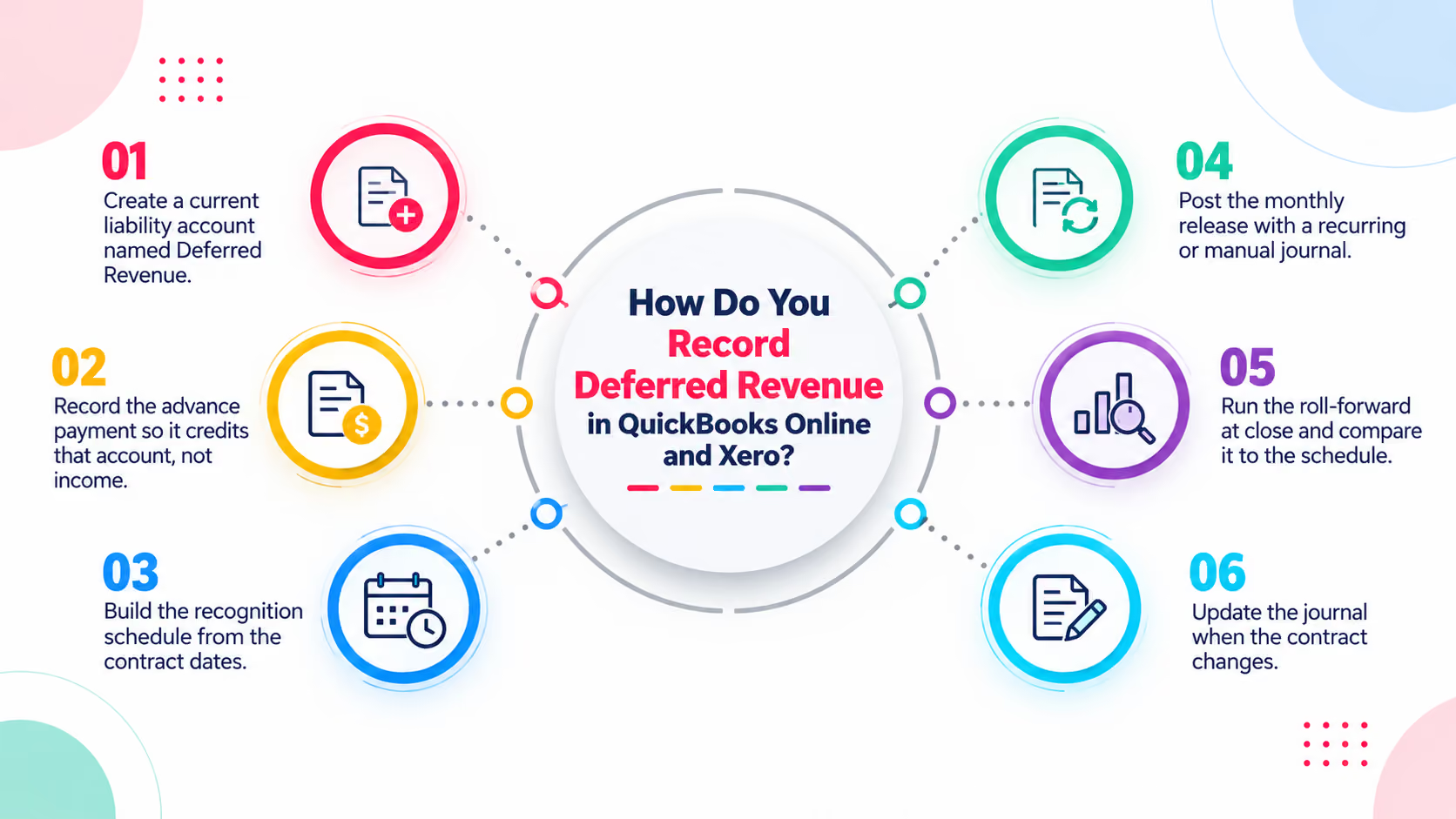
Create the liability account, post the advance payment to it, and release the earned amount to revenue each month. The steps are the same in both platforms.
- Create a current liability account named Deferred Revenue.
- Record the advance payment so it credits that account, not income.
- Build the recognition schedule from the contract dates.
- Post the monthly release with a recurring or manual journal.
- Run the roll-forward at close and compare it to the schedule.
- Update the journal when the contract changes.
As far as we can tell, QuickBooks Online has no dedicated deferred revenue transaction. The setup relies on the liability account plus a journal or an item mapped to it.
Intuit's community guidance describes a service item whose income account is the liability account. Confirm the method with the client's accountant before you roll it out.
How do you record unearned revenue in QuickBooks?
When payment arrives, debit the bank account and credit the Deferred Revenue account. Each month, debit Deferred Revenue and credit the revenue account for the earned amount. Unearned revenue and deferred revenue are the same balance.
What about advance invoices?
When you invoice before the work, the invoice usually posts to income. A client is invoiced $12,000 on January 5 for 12 months of service. Here is the fix, assuming the contract is non-cancellable and payment is due.
January keeps $1,000 of income, and $11,000 sits in the liability. If the contract is cancellable, many firms wait until cash arrives. Read the terms first.
For the full entry sequence, see our deferred revenue journal entry guide.
When and How Do You Post the Monthly Release?
At every month-end, using the amount from the schedule. The right method depends on how steady the amounts are and how many clients you carry.
Intuit lists automated revenue recognition as a QuickBooks Online Advanced feature. If a client is on that plan, check whether their contracts fit its setup. Many clients aren't on it.
As far as we can tell, Xero has no built-in recognition schedule, so most firms use journals plus a schedule kept elsewhere. Check Xero's current features before advising a client.
Here's what a recurring release looks like for the $12,000 contract above.
Recurring journals suit fixed monthly amounts only. They don't fit usage-based or milestone releases, and they won't adjust when a contract changes, so update or end them from the change date.
In Xero, repeating manual journals run weekly or monthly and can be saved as drafts, so a reviewer approves each one before it posts. Confirm the options in the client's file.
Where Do You Find the Numbers to Review?
In the account transactions report for the liability account. In QuickBooks Online, use Transaction Detail by Account. In Xero, use Account Transactions. Both show debits and credits for the period.
Here's the roll-forward for one client file at March month-end.
A difference means an entry is missing, duplicated, or posted to the wrong account. Find it before you sign off. For more on why schedules need this tie-out, see how to recognize deferred revenue.
Working Inside QuickBooks Online Every Day: Yeti Books
Yeti Books is a bookkeeping, payroll, and tax firm serving home service business owners. Its first Xenett review surfaced discrepancies, duplicates, and misclassifications nobody had caught.
Review time during close dropped by 4 days. Bookkeepers now spend 2-3 minutes a day fixing errors inside QuickBooks Online, and the firm gained room to take on more clients.
To be clear, Yeti Books didn't adopt Xenett for deferred revenue, and this isn't a deferred revenue case study. The overlap is the workflow: a review finds the error and someone fixes it in the ledger, which is how an unreleased deferred balance should get caught. See the Yeti Books case study for the details.
How Xenett Can Help
Journals and a spreadsheet hold up for a handful of clients. As the client list grows, recurring entries drift from their contracts, and the roll-forward is the first check dropped when close gets busy.
Xenett connects to QuickBooks Online and Xero. Its AI Accruals for deferred revenue scans the GL for advance invoices and proposes the schedule, and a reviewer approves it before anything is booked.
- AI Accruals, Deferred Revenue: finds advance invoices and builds the schedule
- Anomaly detection: flags revenue spikes in the month an advance invoice posted
- XenettGO: shows real-time error alerts inside QuickBooks and Xero
For a wider look at tools, see our guide to deferred revenue software.
Conclusion: Standardize the Account, the Release, and the Check
In both platforms, deferred revenue comes down to three habits: a liability account, a monthly release, and a roll-forward that ties to a schedule.
Xenett Pulse, our free QuickBooks diagnostic, is a quick first look at a QuickBooks Online file. When you want the check to run on every client, try Xenett free for 14 days, no credit card required. See how it fits the month-end close process.
FAQ: Deferred Revenue in QuickBooks Online and Xero
How do you do deferred revenue in QuickBooks Online?
Create a current liability account, post the advance payment there instead of to income, and release it to revenue each month with a recurring or manual journal entry. Tie the balance to a recognition schedule at every close.
What account type is deferred revenue in QuickBooks Online and Xero?
A current liability account in both platforms. In QuickBooks Online that is typically an Other Current Liabilities account. Use a long-term liability account only for the part delivered after 12 months.
How do you record unearned revenue in QuickBooks?
When payment arrives, debit the bank account and credit the deferred revenue liability account. Each month, debit the liability and credit the revenue account for the earned amount. The liability falls to zero at the end of the term.
How do you record deferred revenue in Xero?
Post the advance payment to a current liability account, then release it to revenue with a manual journal each period. For fixed monthly amounts, a repeating manual journal can post the release.
How do you check a deferred revenue balance in QuickBooks Online or Xero?
Run the account transactions report for the liability account. Beginning balance plus new payments minus revenue released should equal the ending balance. Compare it to the recognition schedule and investigate any difference.
Does QuickBooks Online have automated revenue recognition?
Intuit offers automated revenue recognition for QuickBooks Online Advanced. Check the plan, the setup, and whether it fits the client's contracts. Many firms still rely on journals and a schedule, especially for clients on other plans.
Can you use recurring journal entries for deferred revenue?
Yes, for fixed monthly amounts. They don't suit usage-based or milestone releases, and they don't adjust when a contract changes. Update or end them from the change date.
FAQ: Deferred Revenue in QuickBooks Online and Xero
Create a current liability account, post the advance payment there instead of to income, and release it to revenue each month with a recurring or manual journal entry. Tie the balance to a recognition schedule at every close.
A current liability account in both platforms. In QuickBooks Online that is typically an Other Current Liabilities account. Use a long-term liability account only for the part delivered after 12 months.
When payment arrives, debit the bank account and credit the deferred revenue liability account. Each month, debit the liability and credit the revenue account for the earned amount. The liability falls to zero at the end of the term.
Post the advance payment to a current liability account, then release it to revenue with a manual journal each period. For fixed monthly amounts, a repeating manual journal can post the release.
Run the account transactions report for the liability account. Beginning balance plus new payments minus revenue released should equal the ending balance. Compare it to the recognition schedule and investigate any difference.


.avif)
.avif)