.avif)
.svg)

Closing Entries Examples: Journal Entries Template

Ask questions, get summaries, or uncover key takeaways from this article.

Blog Summary / Key Takeaways
- Closing entries reset temporary accounts to zero each period.
- You close revenues and expenses into Income Summary.
- Then you close Income Summary into equity.
- Finally, you close dividends or draws into equity.
- Post a post‑closing trial balance to confirm only permanent accounts remain.
- Use a checklist and reviewer sign‑off to avoid rework and misstatements.
What Are Closing Entries?
Closing entries are end‐of‐period journal entries that zero out temporary accounts within the broader financial closing process. They move the period’s net income or net loss into equity, like retained earnings or owner’s capital.
They matter because they reset the next period—if you need a refresher on what closing entries are and why they matter, start there. They also ensure equity reflects current‐period performance. Without them, revenue and expense accounts carry old balances forward.
What Accounts Are Closed (And What Accounts Are Not)?
.avif)
You close temporary accounts. You do not close permanent accounts. This point drives every closing entries accounting example you will see.
Temporary Accounts (Closed to Zero)
Temporary accounts track activity for one period. You reset them to start the next period clean.
You close:
- Revenue / income accounts
- Expense accounts
- Dividends (corporation) or Draws (sole prop or partnership)
- Income Summary (a clearing account in many workflows)
This is the core example of closing entries logic. Temporary accounts should show zero after close.
Permanent Accounts (Not Closed)
Permanent accounts carry forward. They reflect the balance sheet at a point in time.
You do not close:
- Assets, liabilities, and equity accounts
- Examples: Cash, A/R, A/P, retained earnings
If someone tries to close Cash, stop. That error breaks the balance sheet.
Secondary keywords used naturally here: closing entries accounting example, example of closing entries.
The 4 Closing Entries, Step by Step
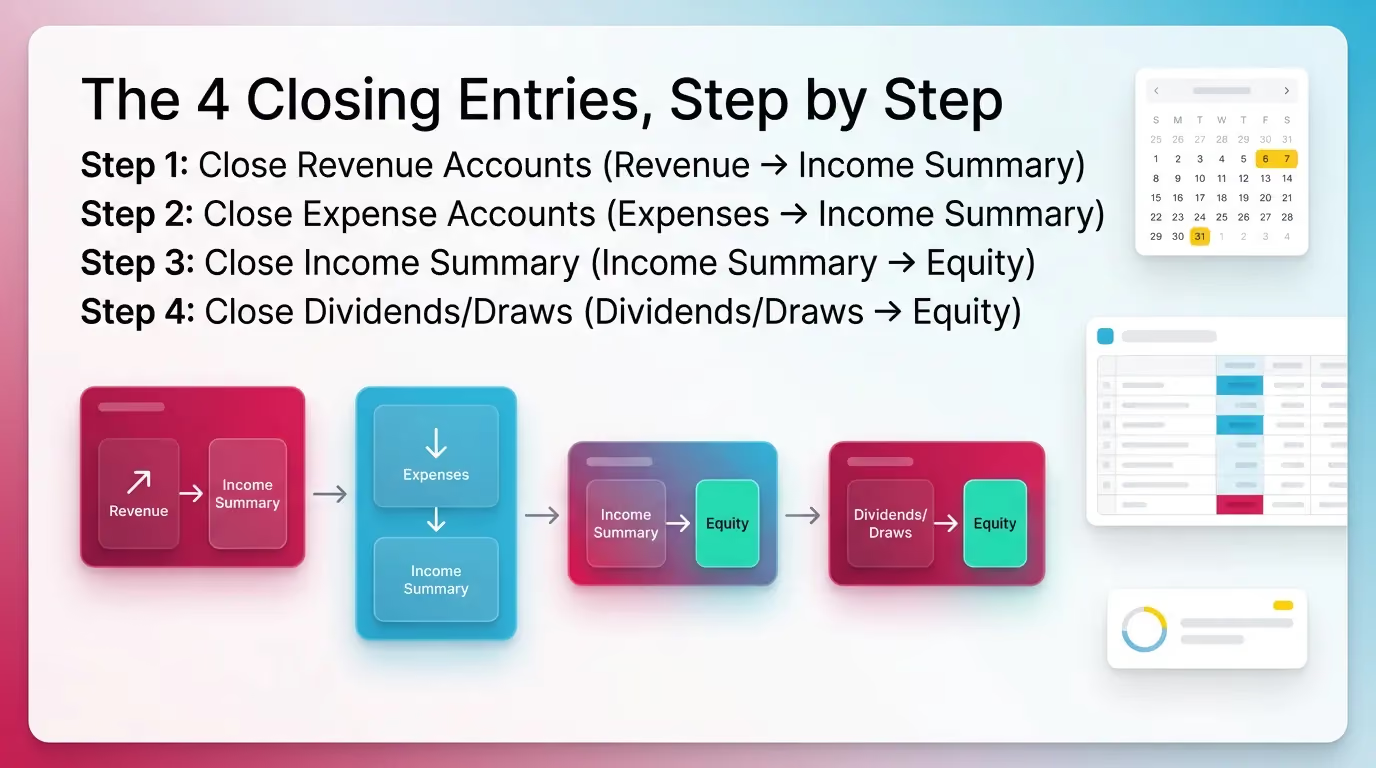
You post four closing entries in a standard order. You can post them monthly or annually. Most teams post them at year‑end. Some teams also run monthly closes for management reporting.
In practice, I see fewer errors when teams treat closing as a controlled step. They finish adjusting entries that precede the closing process first. They review next. Then they close.
Step 1: Close Revenue Accounts (Revenue → Income Summary)
You debit each revenue account for its balance. You credit Income Summary for the total revenue. This resets revenues to zero.
- Goal: Bring each revenue account balance to zero.
- General journal closing entries example (template):
- Debit: Each Revenue account (for its balance)
- Credit: Income Summary (total revenue)
Notes that matter in real work:
- If you use multiple revenue lines, close each line.
- Do not net revenues together unless your policy allows it.
- Keep the entry readable for reviewers and future staff.
This step forms the first part of most accounting closing entries examples.
Step 2: Close Expense Accounts (Expenses → Income Summary)
You credit each expense account for its balance. You debit Income Summary for the total expenses. This resets expenses to zero.
- Goal: Bring each expense account balance to zero.
- Closing journal entries example (template):
- Debit: Income Summary (total expenses)
- Credit: Each Expense account (for its balance)
Practical tip from the field:
- Watch for “misc” accounts. They often hide coding issues.
- Review large or unusual expense swings before you close.
- Otherwise, you lock in a bad P&L and create rework.
This template matches common closing entries examples journal entries in textbooks and ERP guides.
Step 3: Close Income Summary (Income Summary → Equity)
You move net income or net loss into equity. Income Summary should end at zero.
- Goal: Transfer net income or net loss into equity.
If Net Income
- Debit: Income Summary
- Credit: Retained Earnings (or Owner’s Capital)
If Net Loss
- Debit: Retained Earnings (or Owner’s Capital)
- Credit: Income Summary
Why this step matters:
- It updates equity for the period’s performance.
- It prevents Income Summary from carrying a balance forward.
- It supports a clean post‑closing trial balance.
This is the step where teams most often flip debits and credits. A reviewer should always check it.
Step 4: Close Dividends/Draws (Dividends/Draws → Equity)
You move distributions into equity. Dividends or draws must reset to zero.
- Goal: Move distributions to equity and reset dividends/draws to zero.
- Template:
- Debit: Retained Earnings (or Owner’s Capital)
- Credit: Dividends (or Owner’s Draws)
Important nuance:
- Dividends are not expenses. They do not hit Income Summary.
- Draws are not payroll. They are equity distributions.
- Misclassifying them distorts profit and equity.
Closing Entries Example: One Complete Set
This closing entries example shows a complete set with numbers. You can copy the format into your journal entry screen. It also works as a training model for staff.
This section is built to satisfy “closing entries examples” intent: users want a copyable model.
You start from the adjusted trial balance after reconciling accounts before posting closing entries. You do not start from the unadjusted trial balance. Adjustments must come first, especially under accrual-based accounting methods.
Assume the adjusted trial balance shows:
- Service Revenue: $50,000
- Rent Expense: $12,000
- Salaries Expense: $25,000
- Utilities Expense: $3,000
- Dividends: $5,000
Total expenses = 12,000 + 25,000 + 3,000 = 40,000.
Net income = 50,000 − 40,000 = 10,000.
Closing Entries (General Journal Closing Entries Example)
.avif)
1) Close Revenue
- Dr Service Revenue 50,000
- Cr Income Summary 50,000
Result: Service Revenue now equals zero.
2) Close Expenses
- Dr Income Summary 40,000
- Cr Rent Expense 12,000
- Cr Salaries Expense 25,000
- Cr Utilities Expense 3,000
Result: Each expense account now equals zero.
3) Close Income Summary to Retained Earnings (Net Income = 10,000)
After Steps 1 and 2, Income Summary has a credit of 50,000 and a debit of 40,000.
That leaves a credit balance of 10,000. You close it to retained earnings.
- Dr Income Summary 10,000
- Cr Retained Earnings 10,000
Result: Income Summary now equals zero. Retained earnings increases.
4) Close Dividends
Dividends has a debit balance. You credit it to zero it out. You debit retained earnings.
- Dr Retained Earnings 5,000
- Cr Dividends 5,000
Result: Dividends now equals zero. Retained earnings decreases for distributions.
These sources align with this general journal closing entries example structure.
Closing Entries With a Net Loss (Common Search Variant)
With a net loss, you reverse the direction for the Income Summary close. You debit equity and credit Income Summary.
This section matters because many users search for a net loss closing journal entries example.
Example (Condensed)
- Total Revenue: $20,000
- Total Expenses: $28,000 → Net loss = $8,000
Income Summary close (net loss):
- Dr Retained Earnings 8,000
- Cr Income Summary 8,000
What to watch:
- Do not debit Income Summary for a loss close.
- That mistake flips loss into income.
- It also misstates equity in the wrong direction.
Closing Entries Examples: Common Variations by Entity Type
The mechanics stay consistent. However, the equity account changes by entity type. This section gives quick accounting closing entries examples you can map to real clients.
Corporation (Uses Retained Earnings + Dividends)
Corporations use retained earnings. They track distributions in dividends.
Common treatment:
- Dividends closed to Retained Earnings
- Net income or net loss closed to Retained Earnings
This matches the core closing entries examples journal entries you see in GAAP training.
Sole Proprietorship (Uses Owner’s Capital + Draws)
Sole proprietorships use owner’s capital. They track distributions in draws.
Common treatment:
- Draws closed to Owner’s Capital
- Net income or net loss closed to Owner’s Capital
If you support many small businesses, this is the most common variation.
Partnerships/LLCs (Often Multiple Capital Accounts)
Partnerships and multi‑member LLCs often have multiple capital accounts. The agreement drives allocation.
Typical approach:
- Close Income Summary into partner or member capital accounts.
- Allocate based on ownership, guaranteed payments, or agreement terms.
Practical note:
- Do not guess allocation percentages at close.
- Confirm them before posting entries.
- Otherwise, you create partner capital clean‑up work later.
How To Journalize Closing Entries Without Mistakes (Practical Checklist)
You journalize closing entries by following a tight order and using simple checks. You should finish adjustments and reviews first. Then you post closing entries. Then you validate with a post‑closing trial balance.
In my experience, most closing errors come from timing. Teams close too early. Or they close with open review notes.
Pre-Close Checks (Before You Post)
Use these checks—and your month-end close checklist—right before you post your closing entries example set:
- Confirm adjusting entries are complete
- Depreciation, accruals, deferrals, payroll accruals
- Verify revenue and expense accounts are final
- Resolve uncoded transactions and suspense balances
- Confirm mapping for dividends vs draws
- Especially when clients use one “Owner” account in the bank feed
- Ensure Income Summary logic matches your firm standard
- Income Summary vs direct close to equity
A practical workflow tip:
- Run a P&L and scan for obvious surprises.
- For example, a negative rent expense often signals a coding issue.
- Fix it before you close.
Posting Checks (Immediately After Posting)
Right after posting, validate results. Do not wait until the next day.
- Revenue, expense, dividends or draws show zero balances
- Equity reflects net income or loss and distributions
- Trial balance remains in balance
Then run the post‑closing trial balance. It should show only permanent accounts.
Copy/Paste Closing Entries Templates
Common Mistakes in Closing Entries (And What They Break)
Closing entries look simple. However, small mistakes create big downstream issues. Here are the most common ones I see during month‑end close support.
- Closing before adjustments are complete
- Breaks: net income, tax reporting inputs, and management reporting
- Closing the wrong accounts
- Breaks: balance sheet integrity when someone “closes” Cash or A/R
- Mixing up dividends vs expenses
- Breaks: profit accuracy and equity presentation
- Reversing the Income Summary close
- Breaks: turns losses into income or income into losses
- Forgetting to run or review the post-closing trial balance
- Breaks: your ability to prove you closed correctly
One real‑world example:
I once saw a team close “Owner Draw” through Income Summary.
They overstated expenses and understated net income.
They also posted the same draws again to equity.
They had to reopen and reclose the period.
That kind of rework costs time. It also hurts trust in the financials.
Best Practices for Closing Entries (Month-End and Year-End)
Best practices reduce rework and review notes. They also help new staff follow a consistent method.
Use these practices whether you run monthly closes or only year‑end closes.
- Standardize your close order: adjust → review → close → post-close TB
- Use consistent naming and mapping for revenue and expense groupings
- Require reviewer sign‑off before posting closing entries
- Keep a repeatable file trail
- Adjusted trial balance, closing entries, post‑close trial balance
- Treat closing as a controlled step, not a cleanup move
A useful benchmark:
Public companies often report close timelines in the 4–10 business day range.
Smaller teams vary widely. Process discipline usually drives speed.
How Xenett Helps Teams Operationalize Closing Entry Discipline (Without Relying on Memory)
Closing entries succeed when the process stays consistent. That gets harder with many clients, entities, or staff. Teams need clear steps, clear review points, and clear ownership.
Xenett fits as an operational layer for close and review execution. It helps teams standardize the steps around closing entries. It also helps teams document completion and review.
You can learn more about the platform here:
Close Task and Checklist Management (Standardization at Scale)
Teams often rely on memory for the “last mile” tasks. Closing entries sit in that last mile. That creates missed steps.
With Xenett, teams can maintain a standard close checklist that includes:
- “Adjusting entries complete”
- “Review exceptions resolved”
- “Closing entries prepared”
- “Post-closing trial balance reviewed”
Teams can reuse the structure across clients. They can still add client‑specific steps. Therefore, the process stays consistent without forcing one rigid template.
Review and Approval Workflows (Before Entries Get Posted)
Closing entries work best after review. Review should happen before posting, not after.
Xenett supports reviewer checkpoints so staff prepare closing entries only after:
- They review key accounts for unexpected flux
- They resolve missing entries and open questions
- They clear review notes that impact revenue or expenses
This approach reduces late “surprise” corrections. It also reduces re‑closing a period.
Visibility Into Close Status and Bottlenecks
Leaders need to see where the close gets stuck. They also need to see which clients repeat the same issues.
Xenett provides visibility into:
- What’s complete vs blocked
- Where review findings delay the close
- Which clients or entities cause recurring close friction
This view helps CAS leaders manage multiple closes at once. It also helps managers coach to the real bottleneck.
FAQ: Closing Entries Examples
What are examples of closing entries?
Examples include closing revenue to Income Summary, closing expenses to Income Summary, closing Income Summary to equity, and closing dividends or draws to equity.
In other words, you move temporary accounts to zero. You move the net result into retained earnings or owner’s capital.
What are the four closing entries?
1)Close revenue accounts.
2) Close expense accounts.
3) Close Income Summary.
4) Close dividends or draws.
Most accounting closing entries examples follow this exact order.
How do you journalize closing entries?
You record end‑of‑period general journal entries that debit and credit temporary accounts to zero. Then you transfer the net result to equity.
Use an adjusted trial balance as your starting point. Then confirm results with a post‑closing trial balance.
What is a general journal closing entries example?
A common general journal closing entries example is:
Dr Service Revenue; Cr Income Summary to close revenue.
Then Dr Income Summary; Cr each expense to close expenses.
You then close Income Summary to retained earnings or capital.
Do you always need an Income Summary account?
No. Some systems close revenue and expenses directly to retained earnings or capital. The concept stays the same: temporary accounts move to equity.
However, Income Summary can make review easier. It shows net income in one place.
What happens if you do closing entries wrong?
You can misstate net income, distort equity, and start the next period with incorrect balances in revenue and expense accounts.
You can also create rework. You may need to reopen and reclose a period.
What is the post-closing trial balance and why does it matter?
It is a trial balance prepared after closing entries are posted. It should contain only permanent accounts.
It matters because it confirms temporary accounts closed fully. It also confirms the ledger stays in balance.
Conclusion
Closing entries examples look straightforward. They still cause real close delays. Use the four‑step structure. Copy the templates. Then run a post‑closing trial balance every time.
If you manage close work across many clients or entities, document the process and consider automating repetitive closing tasks. Use a checklist. Require review sign‐off. Track completion and blockers.
Review your current close checklist today. Add explicit steps for closing entries and the post‐closing trial balance. Then standardize them across the team while streamlining your month-end close process.