.svg)

Will AI Replace Accountants? The Real Impact of AI on Accounting
.jpg)
Ask questions, get summaries, or uncover key takeaways from this article.
Blog Summary / Key Takeaways
- AI in accounting works best as a detection and drafting layer. It does not own outcomes.
- AI accounting automation will keep shrinking time spent on coding and matching.
- Accountants will keep owning judgment, controls, and accountability.
- The future of accounting with AI depends on repeatable review standards.
- Tools like Xenett help teams run consistent account reviews. They also help track findings through resolution.
Why This Question Keeps Coming Up
What People Mean When They Ask “Will Accountants Become Obsolete?”
No, accountants will not become obsolete. People worry because they see tasks disappear. They also see AI generate answers fast.
Most anxiety comes from real changes, like:
- Bank feeds reduce manual entry.
- OCR reduces invoice typing.
- Matching tools reduce “find the deposit” work.
People also mix up roles. They blend bookkeeping tasks with accounting judgment. They also assume speed equals correctness. It does not.
Here is the key difference. AI can draft outputs. Accountants own outcomes.
The Real Question Behind “AI vs Accountants”
The real question is not “AI vs accountants.” The real question is, “Which work stays human-led?”
Two checks help:
- “Can we test it?”
- “Who takes responsibility if it goes wrong?”
If you can test it and errors stay low risk, you can automate it. If it needs judgment, you keep it human-led.
What “AI in Accounting” Actually Means
AI in Accounting
AI in accounting means systems that extract, classify, reconcile, summarize, and flag anomalies in financial data. This includes machine learning, rules engines, and generative AI. Most teams use a mix.
AI does not equal “fully autonomous accounting.” It usually acts like:
- a fast assistant, and
- a noisy detector that needs tuning.
The 3 Types of “AI Accounting Automation” You’ll See in Practice
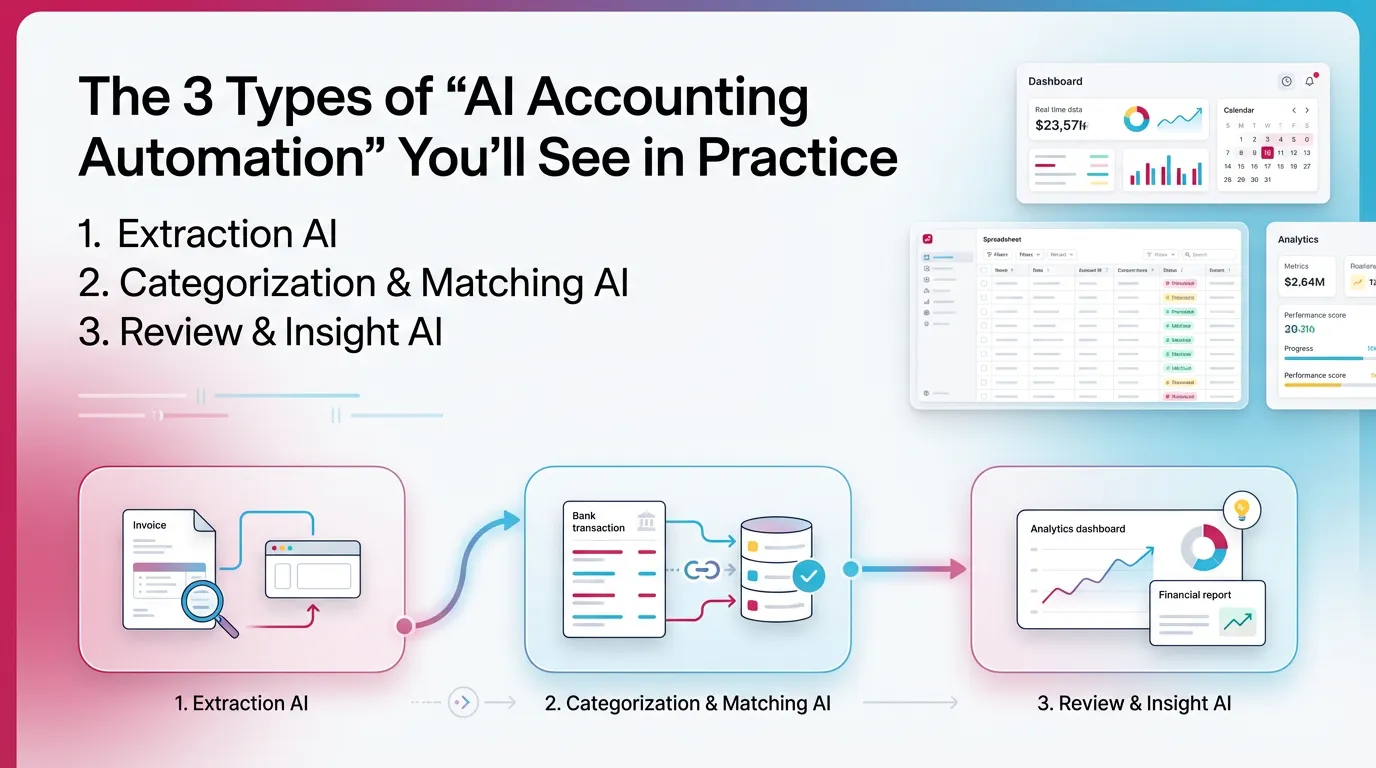
- Extraction AI (documents → data)
- Invoices, bills, receipts, and statements
- Categorization & Matching AI (data → ledger behavior)
- Coding suggestions and duplicate detection
- Review & Insight AI (ledger → findings)
- Flux analysis, unusual balances, and missing entries
This taxonomy matters. Extraction errors hurt less. Review errors can drive bad decisions. Therefore, you must design controls around the risk.
What AI Can Automate in Accounting Today
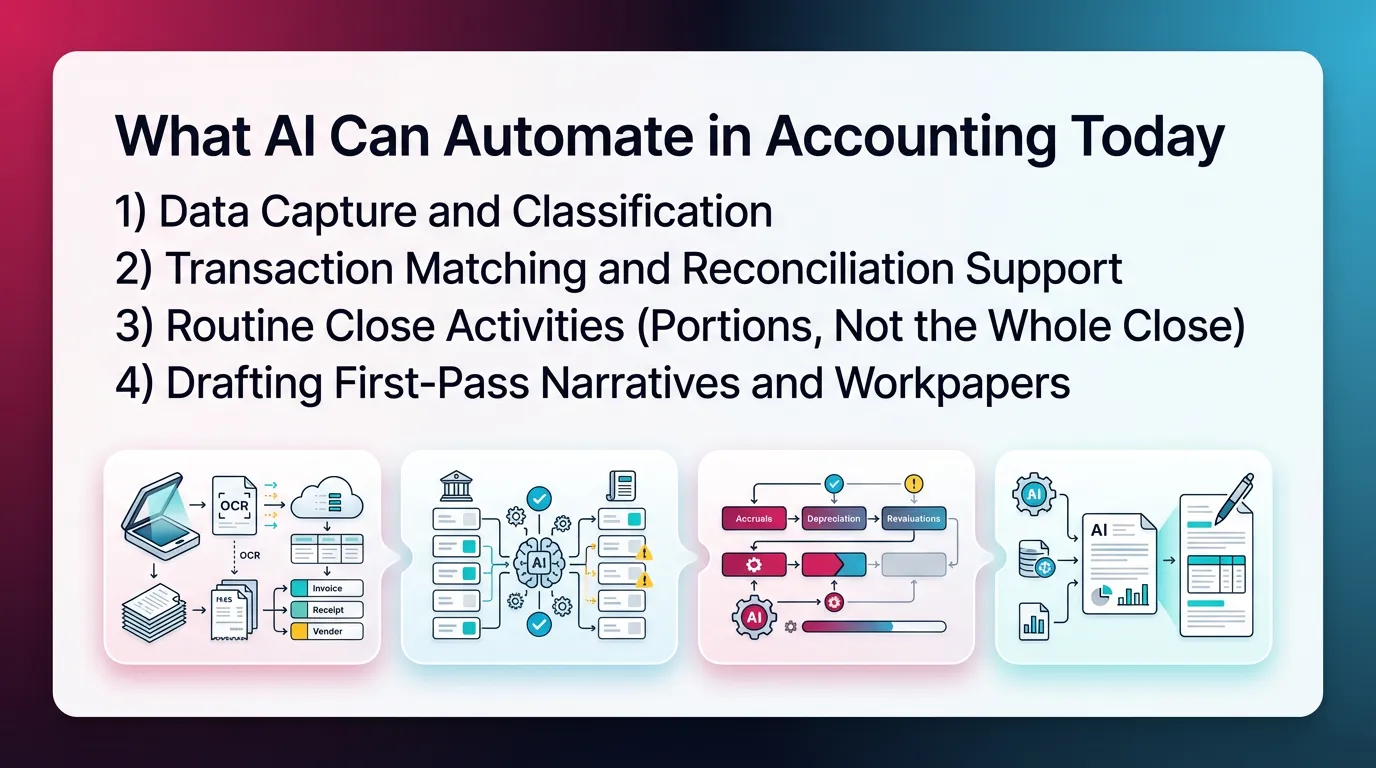
1) Data Capture and Classification
AI can automate capture and first-pass classification. It does this well when inputs look consistent. It struggles with messy vendors and odd receipts.
Common wins:
- Invoice and receipt capture with line extraction
- Vendor normalization across spelling variations
- Suggested expense categories based on patterns
- Auto-filled fields like memo, class, or location
However, you still need to review. A wrong class or location can break segment reporting. A wrong vendor mapping can hide spend trends.
2) Transaction Matching and Reconciliation Support
AI can match transactions fast. It also flags duplicates and timing outliers. This reduces manual ticking and tying.
Common automation:
- Bank feed matching and duplicate detection
- Suggested matches for payments and deposits
- Better grouping for batch deposits
- Exception lists for unmatched items
- Alerts for stale outstanding checks
However, matching still needs guardrails. A wrong match can “reconcile” cash while hiding a real issue. That risk goes up with high volume.
In my experience, the best teams treat AI matches as “proposed.” A preparer accepts them. A reviewer spot-checks by threshold.
3) Routine Close Activities (Portions, Not the Whole Close)
AI can support close. It cannot run close end-to-end. Close needs coordination, timing, and approvals.
What AI can do:
- Flag unusual variances early
- Suggest what to review next based on last month
- Draft explanations for changes
- Suggest missing accruals based on patterns
What AI cannot do reliably:
- Decide materiality in context
- Confirm completeness of accruals
- Own cutoff decisions
- Resolve conflicting source data
Close still needs a human-led review rhythm. The future of accounting with AI depends on this rhythm.
4) Drafting First-Pass Narratives and Workpapers (With Review Required)
AI can draft text quickly. It can also format workpapers. This helps when you start from a standard template.
Useful drafting areas:
- Management report commentary drafts
- “What changed this month” summaries
- First draft SOPs for recurring processes
- Checklist step drafts from last month’s notes
However, AI can hallucinate. It can state causes without evidence. Therefore, treat drafts as a starting point only.
Task Automation Heatmap
What AI Cannot Replace (Where Accountants Stay Essential)
1) Judgment Under Uncertainty
AI cannot replace judgment in unclear situations. Accounting lives in the gray. Real books include missing details and messy reality.
Examples:
- A vendor bill covers mixed periods.
- A customer contract changes mid-term.
- A founder “reimburses later” with no paperwork.
AI can suggest treatment. It cannot weigh tradeoffs with confidence. You do that.
2) Accountability, Ethics, and Professional Responsibility
AI cannot take professional responsibility. Regulators and stakeholders expect a person to sign, attest, and stand behind the work.
This includes:
- Signing returns and filings
- Representing positions and estimates
- Handling conflicts and governance issues
- Responding to fraud risk indicators
3) Contextual Understanding of the Business
AI does not understand “why” unless you teach it. Even then, it can miss the real driver.
Accountants connect financial activity to operations, like:
- seasonality and promotions
- churn and renewals
- supply chain delays
- staffing changes
A variance does not matter because it exists. It matters because it changes decisions.
4) Designing and Enforcing Controls
AI can detect issues. It cannot design and enforce controls across a team. Controls require standards and follow-through.
Accountants still must:
- define review expectations per account
- set thresholds and materiality rules
- ensure exceptions get resolved
- maintain documentation trails
This is where many teams struggle. They “have AI,” but they lack consistent review. Therefore, issues still show up late.
Will AI Replace Accountants by 2030? A Practical Forecast
What’s Likely by 2030
AI will keep improving. AI accounting automation will expand in repeatable areas. Most teams will see more of this by 2030:
- More automation in coding and mapping
- Better matching across systems
- More anomaly detection earlier in the month
- More first-draft reporting and narratives
This will reduce time spent on:
- manual checking
- late-stage cleanup
- hunting for recon breaks
AI tools will also become more embedded. You will not “log into AI.” You will see AI features inside close and GL workflows.
What’s Unlikely by 2030
AI will not deliver a fully autonomous close with no oversight. Not in any responsible environment.
Unlikely outcomes by 2030:
- fully self-driving close without review
- consistent interpretation of complex accounting without context
- AI owning professional responsibility
- reliable audit-grade explanations with no support
Even if the tech improves, the liability model does not change. A person still owns the result.
A Simple Framework: “Automate the Repeatable, Reserve the Accountable”
Use this rule during tool selection and process design.
- If it is repeatable and testable, automate it.
- If it is material, judgment-heavy, or high-risk, keep it human-led.
This framework keeps you safe. It also keeps teams focused on value. The goal is not to automate everything. The goal is to reduce waste.
Impact of AI on Accounting Jobs (What Changes, What Doesn’t)
Which Roles Are Most Affected First
AI will change junior work first. It already has. This drives the “will accountants become obsolete” fear.
Most exposed areas:
- repetitive data entry
- basic coding and mapping
- simple matching work
- checklist-only close roles
However, that does not mean fewer accountants long term. It means different entry paths.
A real risk exists, though. Teams can lose training reps. If AI does the easy work, juniors see fewer patterns. Therefore, managers must teach review logic on purpose.
What New Work Expands (Even in Smaller Firms)
AI creates more findings. It surfaces more exceptions. Someone must resolve them.
Work that expands:
- review standardization across accounts
- exception handling and root-cause analysis
- controls design for new tools
- advisory and decision support
- earlier client conversations
In CAS firms, this often looks like “client drift” management. AI flags anomalies mid-month. The team fixes them before close.
The “New Baseline” Skill Set for Accountants
To future-proof, build review strength. Learn to validate AI outputs. Do not just operate tools.
Core skills that matter more now:
- account behavior review habits
- flux logic and threshold setting
- reconciliation structure and tie-outs
- ability to test AI suggestions
- clear writing for stakeholders
If you build these skills, you will not fear “can AI replace accountants.” You will lead the workflow.
Will AI Replace Tax Accountants?
What AI Helps With in Tax
AI helps with organization and drafting. It speeds up information gathering. It also helps teams spot missing items.
Common help:
- organizing source documents
- creating client info requests
- drafting memos and emails
- identifying missing forms
- summarizing rule changes for review
However, you must verify tax law summaries. AI can miss nuance. It can also cite wrong sources.
What AI Won’t Replace in Tax
AI will not replace tax judgment and responsibility. Tax work includes positions and risk.
AI cannot own:
- position-taking and risk assessment
- entity structure and timing strategy
- elections and elections support
- audits, notices, and representation
- complex interpretation under uncertainty
So, no, AI will not replace tax accountants. It will change tax workflows. It will reduce grunt work.
Real-World Use Cases: AI vs Accountants in Daily Work (Practical Examples)
Bookkeeping / Monthly Close
AI can flag issues early. Accountants confirm cause and post entries. That is the best division of labor.
Example 1: unusual balance
- AI flags prepaid insurance doubled.
- Accountant checks the policy term.
- Accountant reclasses the new bill to prepaid.
- Reviewer confirms amortization schedule ties out.
Example 2: missing accrual pattern
- AI notices payroll tax expense drops in the last week.
- Accountant checks the payroll schedule.
- Accountant books the accrual based on known timing.
- Reviewer documents the basis and materiality.
This is where “AI vs accountants” becomes practical. AI finds. Accountants decide.
Multi-Client CAS / Firm Environment
AI can help triage across clients. It helps answer, “Who is drifting?” This matters more than perfect automation.
In firms, you often see:
- clients with late bank feeds
- clients with recurring coding errors
- clients with out-of-policy spend
- clients with missing AP bills
AI surfaces the drift earlier. The team resolves it earlier. Close becomes calmer.
In my experience, the biggest win comes from standard review. Not from new automation. Automation without review just creates faster confusion.
Controller / Finance Team
Controllers need explainability. AI can draft variance explanations. Controllers must validate and add business context.
Example:
- AI drafts, “Gross margin declined due to higher COGS.”
- Controller adds, “We ran a clearance promo. We also paid rush freight.”
- Controller confirms this matches operational data.
Stakeholders do not want generic text. They want decision-ready explanation.
Best Practices: Using AI in Accounting Without Losing Control
Best Practice 1: Make Review Standards Explicit (Not Tribal Knowledge)
Write down what “good” looks like per account. Do this before you scale AI.
Include:
- expected monthly behavior
- normal timing patterns
- acceptable thresholds
- required tie-outs
- common failure modes
Therefore, reviewers stop relying on memory. They also stop reviewing only what “feels off.”
Best Practice 2: Separate “Detection” From “Resolution”
AI can detect. Your team must resolve. Do not confuse alerts with completion.
Resolution means:
- identify root cause
- post correcting entry or fix source process
- document what changed and why
- confirm the issue stays fixed next month
This separation prevents false confidence.
Best Practice 3: Build a Repeatable Close System
A repeatable close reduces stress. It also makes AI more useful. AI needs structure.
A strong close system includes:
- standard monthly steps
- clear ownership per account group
- due dates tied to dependencies
- a single view of blockers
- documented review outcomes
This is where many teams add a review-first layer, like Xenett, to keep the close consistent across people and periods.
Best Practice 4: Use AI for Early Detection, Not Last-Minute Cleanup
Use AI during the month. Do not wait until day five. Early detection prevents pile-ups.
A practical approach:
- run anomaly checks weekly
- resolve exceptions as they appear
- keep a live list of open items
- avoid “close week surprises”
This is how you get faster close without lower quality.
Common Mistakes When Adopting AI in Accounting (What Breaks Trust Fast)
Mistake 1: Treating AI Output as Final
AI output stays a draft until a person validates it. This includes coding, matches, and narratives.
If you skip validation:
- errors compound
- reviewers stop trusting the system
- close becomes slower again
Mistake 2: Automating Before Standardizing
If your review process varies by reviewer, automation scales inconsistency. It also scales rework.
Standardize first:
- what gets reviewed
- how it gets reviewed
- what documentation is required
- what thresholds apply
Then automate parts of it.
Mistake 3: Letting Tools Drive the Close Instead of Review Findings
Close should exist to resolve review findings. It should not exist to check boxes.
If checklists drive everything:
- teams complete tasks without improving account integrity
- issues still show up in management review
- close drags on with rework
Use tasks as a response to findings. Not as the purpose.
Mistake 4: Ignoring Audit Trail and Repeatability
Speed without explainability creates risk. If you cannot explain changes, you lose trust.
Keep:
- who reviewed what
- what got flagged
- what got resolved
- what entry fixed it
- what support backs it up
This also helps with turnover. New staff can follow the story.
How Xenett Helps Teams Operationalize AI-Assisted Accounting Without Replacing Judgment
(Dedicated required section; educational, non-promotional)
Where Xenett Fits in the “AI in Accounting” Conversation
Xenett fits as a review-first accounting system. It helps teams run a structured, account-level review of the P&L and Balance Sheet. This helps teams find issues earlier and resolve them before close pressure peaks.
This matters because AI will replace accountants only in narrow task areas. The real value stays in review, controls, and resolution. Xenett supports that operational layer.
You can see how Xenett approaches account reviews and close structure here:
xenett.com
xenett.com/blog
How Xenett Supports Close Task and Checklist Management (Without Becoming “Workflow-First”)
Xenett organizes close work from review findings. This keeps tasks tied to account integrity. It avoids “busywork checklists.”
Teams can use tasks and checklists to:
- resolve anomalies
- clear reconciliation gaps
- explain unexpected flux
- document what changed and why
Therefore, the team closes based on what the data needs. Not based on habit.
How Xenett Improves Review and Approval Workflows
Xenett standardizes what reviewers look for. It reduces reviewer-to-reviewer variability. It also supports clear handoffs.
This helps in AI-assisted workflows because:
- AI produces more flags and drafts
- reviewers need consistent criteria
- preparers need clear resolution status
A consistent approval flow keeps quality stable while volume increases.
How Xenett Improves Visibility Into Close Status and Bottlenecks
Xenett helps teams see close status in one place. It highlights what blocks progress.
Teams can see:
- which accounts block close
- which clients drift late in the month
- where rework piles up
- which items need reviewer attention
Therefore, managers can intervene earlier. Close becomes more predictable.
FAQ
Will AI Replace Accountants?
No. AI will automate many repetitive accounting tasks, but accountants remain necessary for judgment, accountability, compliance, and interpretation of results.
Can AI Replace Accountants Completely?
No. AI can draft outputs and detect patterns. It cannot reliably own ethics, professional responsibility, or context-based decisions.
Will Accountants Become Obsolete?
No. Roles will change, especially at the junior level. Demand stays strong for accountants who can review, interpret, and advise.
Will AI Replace Accountants by 2030?
AI will replace portions of manual work like coding, matching, and first-pass analysis. It will not replace human-led review and decision-making by 2030.
What Accounting Jobs Are Most at Risk From AI?
Roles focused on repetitive data entry, basic transaction coding, and manual matching face the most risk. Review, controls, and advisory roles face less risk.
What Can AI Automate in Accounting Today?
AI can automate invoice capture, categorization suggestions, transaction matching, anomaly alerts, and first-draft summaries. Humans still must review and approve.
Will AI Replace Tax Accountants?
No. AI helps organize documents and draft communications. Tax judgment, position-taking, and responsibility for outcomes stay human-led.
Is CPA Still Worth It in 2025?
Yes. The CPA remains valuable because judgment, ethics, and accountability do not automate. Tools improve efficiency, but credentials still signal responsibility.
How Can Accountants Future-Proof Their Careers?
Strengthen account-level review skills. Learn to validate AI outputs. Build repeatable close systems. Expand into controls, communication, and advisory work.
Conclusion
AI will not replace accountants. It will replace manual steps inside accounting workflows. The teams that win will treat AI as a detection and drafting layer. They will keep review standards clear and consistent.
If you want to prepare for the future of accounting with AI, start with your close. Document review expectations by account. Set thresholds. Track findings through resolution. Then add automation where work stays repeatable and testable.
Review your last two closes. Identify the top five rework drivers. Fix those first. Then let AI and structured review systems, like Xenett, help you catch issues earlier and close with less stress.


.webp)