
.svg)

Accounts Receivable Month-End Close Process

Ask questions, get summaries, or uncover key takeaways from this article.
Blog Summary / Key Takeaways
- The Accounts Receivable Month End Close Process should end with controls-based exit criteria, not just completed tasks.
- Your accounts receivable month end close checklist must include cash posting, unapplied cash cleanup, credit memo review, aging review, cut-off testing, subledger-to-GL tie-out, and reserve support.
- The fastest way to stabilize AR close is to standardize evidence packs and maintain an exceptions log all month.
- A strong close narrative explains AR movement versus revenue and cash, and it documents why aging bucket shifts happened.
- Xenett helps teams operationalize ownership, review, and evidence retention so AR close stays consistent across entities and months.
You already know AR basics. You need a controlled month-end close that holds up under review and scales across multiple entities or clients.
This guide targets accounting and bookkeeping teams who want clean AR, accurate revenue cut-off, resolved unapplied cash, reliable aging, and practical documentation support.
What Is the Accounts Receivable Month-End Close Process?
The accounts receivable month-end close process is the set of controls and review steps used to confirm AR balances and AR-related revenue are complete, accurate, and recorded in the correct period before financials are finalized.
This process matters because AR touches revenue, cash application, customer credits, and the allowance. If AR is wrong, your income statement narrative breaks and your balance sheet does not tie.
Why AR Month-End Close Breaks Down (Common Failure Points)
.avif)
Most AR close issues start as small operational delays. However, they stack up and become late-close rework.
Common failure points include:
- Cash posting delays. Unapplied cash grows and distorts aging.
- Credit memos issued late or without linkage to invoices.
- Cut-off errors (ship/service dates vs invoice dates).
- Subledger vs GL differences from manual journals, mis-postings, or sync issues.
- Bad debt provision not updated to reflect current risk signals.
Practical example from the field: I’ve seen teams “finish AR” by running an aging and moving on. Then the controller asks why DSO jumped. The real cause ends up being $180k sitting in unapplied cash from two lockbox batches posted after cut-off. The aging looked worse, and the reserve was overstated.
AR Month-End Close: What Must Be True Before You “Sign Off”
Close “Exit Criteria” (Controls-Based)
You can sign off on AR only when these statements are true and supported. If one fails, the close stays open for AR.
- AR subledger reconciles to the general ledger (tie-out documented).
- A/R aging review completed with clear action decisions on past due and disputes.
- Unapplied cash review completed. Unapplied items explained or cleared.
- Revenue cut-off accounts receivable testing completed (late invoices, early invoices, unbilled items).
- Credit memo process month end completed and supported.
- Bad debt provision process updated and supported.
- Exceptions list maintained (what’s open, why, who owns it, and expected resolution date).
These exit criteria keep your close calm because they focus on outcomes, not activity. Therefore, you reduce “we did the steps” arguments when the numbers still look wrong.
AR Month-End Close Checklist (Operational Checklist + Supporting Evidence)
Featured-snippet format tip: present this as a checklist with short imperative verbs and a “support” column.
Accounts Receivable Month-End Close Checklist (Core Tasks + Support)
If you manage multiple entities, treat this as your baseline accounts receivable month end close checklist. Then add entity-specific steps only when policy demands it.
If you want a practical structure, many teams keep one “AR Close Package” folder per month with:
- Reports (cash posting, unapplied cash detail, aging, credit memo register).
- Workpapers (cut-off worksheet, tie-out, reserve calc).
- Exceptions log (open items with owners and dates).
This keeps re-performance simple during internal reviews and year-end support requests.
Step-by-Step: Accounts Receivable Reconciliation Process (AR Subledger to GL)
What “Reconcile Accounts Receivable to General Ledger” Actually Means
To reconcile accounts receivable to general ledger, you confirm AR in the subledger (customer-level detail) equals the AR control account(s) in the GL, after you account for valid reconciling items.
In plain terms: customer detail must add up to the balance sheet. If it does not, something posted without customer support or landed in the wrong place.
Step-by-Step AR Reconciliation Process
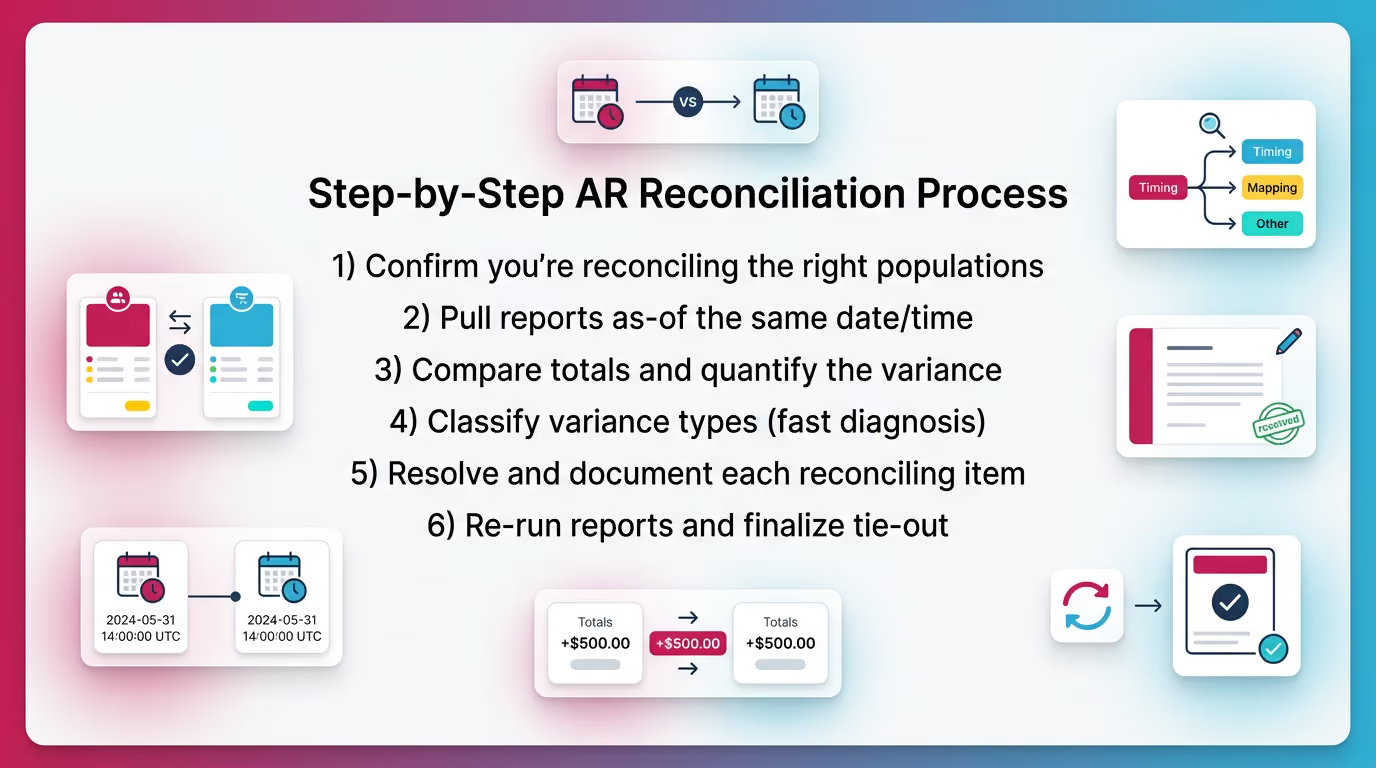
Use this accounts receivable reconciliation process every month, in this order. It prevents circular troubleshooting.
1) Confirm you’re reconciling the right populations
Start by defining scope. Otherwise, you can “tie” to the wrong total.
- Which AR accounts sit in the GL?
- Trade AR
- Retainage AR (if applicable)
- Unbilled AR (if applicable)
- Contra AR or allowance accounts
- Which subledger report ties to the GL?
- Summary aging total, or AR trial balance total
Tip: do not mix “open invoice” reports with “AR balance” reports unless you know how your system treats credits, prepayments, and on-account cash.
2) Pull reports as-of the same date/time
Run subledger and GL reports as-of the same cut-off timestamp. If your system updates in real time, capture the run time in the workpaper header.
This matters more than people think. Even a 30-minute gap can capture late cash posting or automated billing runs.
3) Compare totals and quantify the variance
State the variance clearly before you investigate. For example:
- Subledger AR total: $2,483,210
- GL AR control: $2,467,950
- Variance: $15,260 (subledger higher)
Now your troubleshooting stays grounded. You avoid chasing noise.
4) Classify variance types (fast diagnosis)
Most variances fall into a few buckets. Classify first, then investigate.
- Timing differences (wrong period).
- Classification differences (wrong account).
- Manual journal entries hitting AR control without customer detail.
- Sync/integration failures (for example, QBO or Xero connectors).
- Multi-currency revaluation differences (when applicable).
5) Resolve and document each reconciling item
For each reconciling item, document:
- Source (report, transaction ID, JE number).
- Owner (who fixes it).
- Fix (reclass, reversal, repost, mapping update).
- Whether it needs an entry or an operational correction.
- Expected resolution date if it cannot close now.
This is where close discipline shows up. If you only “make it tie” with a plug, you create next month’s variance.
6) Re-run reports and finalize tie-out
Re-run both reports after fixes. Save:
- Final tie-out schedule.
- Supporting detail exports.
- Any journal entries with explanation.
Common standard: teams typically set a materiality threshold for investigation versus roll-forward tracking. However, they still document even small differences when they signal a control issue.
Common Reconciliation Red Flags (Checklist)
These items usually predict repeat variances and late close pain:
- AR control has manual JE activity without customer mapping.
- Negative receivable balances by customer not explained.
- Large “other current assets” used as a parking account for AR issues.
- Big late-month swing in AR without a revenue/cash narrative.
Accounts Receivable Cutoff Procedure (And How It Connects to Revenue Cutoff)
What Is an Accounts Receivable Cutoff Procedure?
An accounts receivable cutoff procedure tests whether invoices and AR entries land in the correct accounting period, aligned to shipment, service delivery, or performance obligation timing.
You run this because AR cut-off equals revenue cut-off for many businesses. Therefore, AR cut-off errors usually become revenue misstatements.
Revenue Cutoff Accounts Receivable: The Practical Tests
Run these tests every month. Keep them lightweight, consistent, and evidence-based.
1) “Late invoice” test (most common AR cut-off miss)
Look for shipments or services delivered before month-end but invoiced after month-end. Decide whether you need an accrual or unbilled AR, based on your policy.
How to do it in practice:
- Pull a shipping or service delivery report for the last 5–10 business days of the month.
- Match to invoices issued through the cut-off.
- Flag delivered-not-invoiced items.
This test usually finds revenue leakage in fast-moving environments. It also finds billing bottlenecks.
2) “Early invoice” test
Look for invoices dated before month-end for goods or services delivered after month-end. Determine whether you need deferral or reclassification.
This matters when billing runs on fixed schedules. For example, a team invoices monthly retainers on the 28th, but service starts on the 1st. If your policy requires deferral, you need a consistent entry.
3) Credit memo cut-off test
Check credits issued after month-end that relate to pre-month-end issues. Evaluate them consistently using a documented policy.
This prevents the quiet pattern where operations “fixes” a customer issue in the next month, but the original month stays overstated.
4) Returns/allowances and disputes cut-off
Verify whether known concessions, pricing adjustments, or expected credits require accrual.
If a dispute exists at month-end and you expect a concession, you should at least decide and document the accounting treatment. Do not leave it as an unspoken assumption.
Table: Cutoff Evidence Pack (What to Save Each Month)
Save a tight evidence pack so the test stays repeatable:
- Shipping/fulfillment report (or service delivery log).
- Invoice register (month-end through early next month).
- Credit memo register (month-end through early next month).
- Exception worksheet with outcomes (accrue, defer, no action).
- Approvals for any entries or policy exceptions.
Unapplied Cash Review (How to Prevent Hidden AR Distortion)
What Is Unapplied Cash
Unapplied cash is a cash receipt recorded without being applied to an open invoice or customer balance, or applied to the wrong customer or invoice.
Unapplied cash matters because it can overstate AR, distort aging buckets, and hide collection performance. Your bank rec can still tie while AR reporting stays wrong.
Unapplied Cash Review Process (Repeatable Steps)
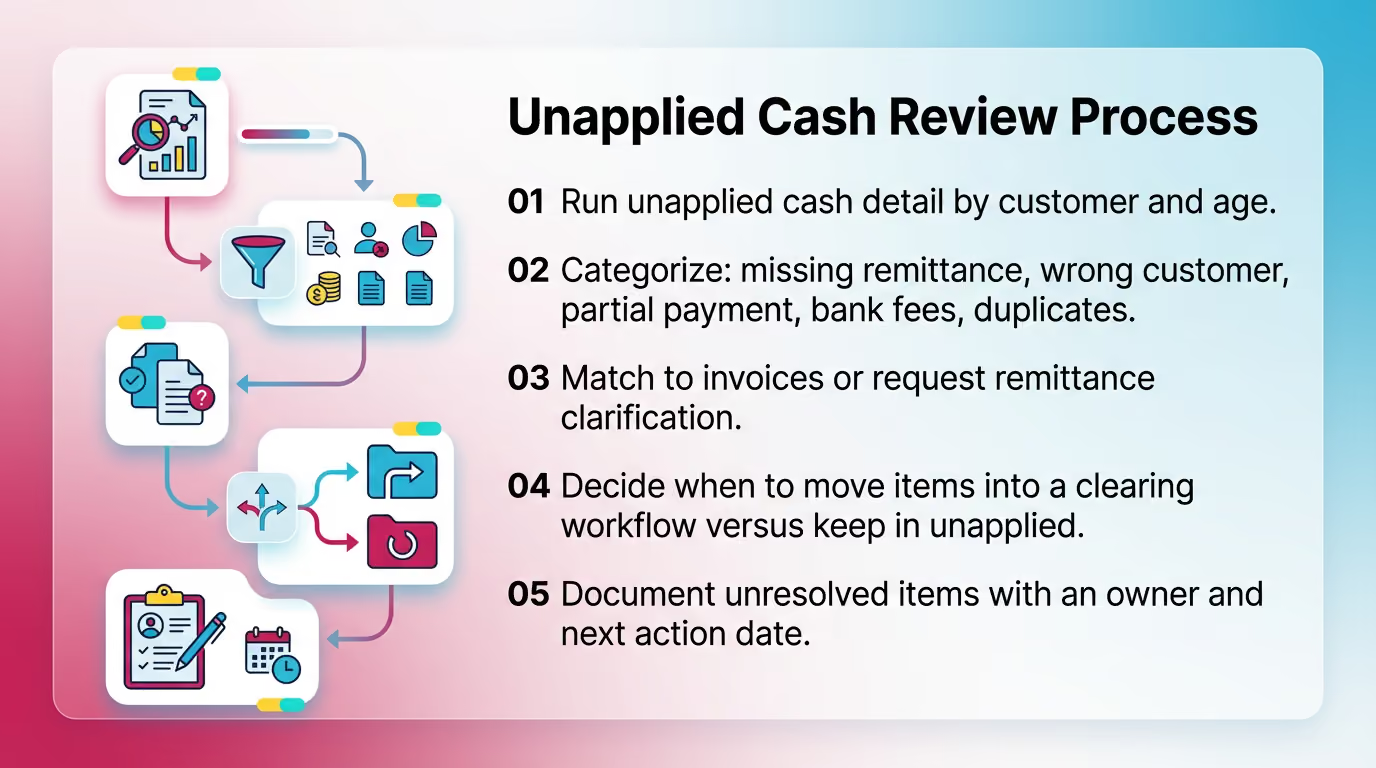
Run this unapplied cash review the same way every month.
- Run unapplied cash detail by customer and age.
- Categorize: missing remittance, wrong customer, partial payment, bank fees, duplicates.
- Match to invoices or request remittance clarification.
- Decide when to move items into a clearing workflow versus keep in unapplied.
- Document unresolved items with an owner and next action date.
Practical tip: if you manage multiple clients, set a policy that unapplied cash older than a threshold (for example, 30 days) must appear in the exceptions log with documented outreach.
High-Risk Patterns
Watch for these patterns because they tend to repeat:
- Old unapplied cash (>30/60/90 days).
- Large unapplied amounts created right at month-end.
- Frequent reapplications without clear support.
When you see reapplications, ask one direct question: “What new information did we receive that changed the application?” If the answer is vague, your process needs tighter remittance capture.
Accounts Receivable Aging Review (What to Look for Beyond “Past Due”)
What Is an AR Aging Review?
An accounts receivable aging review is a structured review of receivables by age bucket to assess collectability, dispute status, credit exposure, and reporting accuracy.
You do not review aging to admire buckets. You review it to decide actions and accounting outcomes.
AR Aging Review Checklist (What Experienced Reviewers Actually Test)
In the first pass, reviewers should look for patterns, not one-off invoices.
- Concentration risk: top customers and top past-due customers.
- Disputes: true disputes versus stalled follow-ups.
- Credits: open credit memos not applied.
- Negative balances and unapplied cash effects.
- “Stuck” invoices with repeated promise-to-pay.
- Bucket migration: why current shifted into 30/60/90 this month.
A useful metric to sanity-check trends is DSO. DSO varies by industry, but the directional movement should match what you know operationally. If revenue stays flat and DSO jumps, something changed in billing, cash application, or dispute handling.
Bad Debt Provision Process (Allowance for Doubtful Accounts) at Month-End
The bad debt provision process updates the allowance to reflect expected credit losses based on current aging, customer risk signals, and historical collection patterns.
You update it monthly because risk changes monthly. A single customer dispute can change your expected loss picture more than a hundred small invoices.
Practical Approaches (Choose and Standardize)
Pick one method, document it, and apply it consistently.
- Aging-matrix method (rates by bucket).
- Specific identification for material balances.
- Hybrid: matrix plus specific reserves for known-risk accounts.
Real-world insight: the hybrid approach usually works best for B2B companies with customer concentration. The matrix handles the long tail. Specific reserves capture the one customer that can move the needle.
Minimum Support to Retain
Keep the package lean but defensible:
- Current aging (same cut-off timestamp used for AR tie-out).
- Historical write-off rates (by bucket, if using a matrix).
- Specific reserve rationale for material exposures.
- Approvals (preparer and reviewer).
- Roll-forward: beginning allowance + provision - write-offs +/- adjustments.
If you cannot explain the change month over month in two sentences, your reserve support needs cleanup.
Credit Memo Process Month-End (Controls That Prevent Silent Revenue Leakage)
Why Credit Memos Are a Month-End Risk
Credit memos can represent returns, concessions, pricing corrections, or billing errors. Each has different accounting and approval implications. Therefore, the credit memo process month end needs controls, not just data entry.
Credit memos also create quiet cut-off problems. Operations often resolves issues after month-end, and accounting books the credit in the next month without evaluating whether the prior month needs adjustment.
Month-End Credit Memo Review Steps
Answer “what happened” fast, then decide accounting treatment.
- Run the credit memo register for the month, plus early next month for cut-off lookback.
- Tie each credit to an invoice and a standardized issue category.
- Confirm approvals and reason codes (use a consistent taxonomy).
- Confirm application status (applied vs open credit).
- Assess whether credits imply revenue adjustments or reserves.
Practical example: if you see a spike in “pricing correction” credits, that might indicate a quoting or contract setup problem. Your close should surface that as an operational finding, not just an accounting clean-up.
Common Credit Memo Errors
These errors usually show up as AR noise and margin confusion.
- Credits posted to revenue instead of contra revenue (policy-dependent).
- Credits not applied. AR stays overstated and aging looks worse.
- Credits issued without linkage or support. Reporting becomes unreliable.
Best Practices for a Faster, More Predictable AR Month-End Close
Process and Control Best Practices
These practices reduce late surprises without adding heavy process.
- Establish a documented AR cut-off policy. Define what date drives recognition and which reports are authoritative.
- Maintain a standing AR exceptions log during the month, not just at close.
- Separate posting from review. Preparers complete. Reviewers validate.
- Standardize a supporting documentation pack with consistent naming and storage.
Teams that close fast do not move faster at month-end. They remove decisions from month-end by standardizing them.
Review Quality Best Practices (What Keeps Close Calm)
A strong AR review reads the story behind the numbers.
- Review AR as account behavior, not just tasks completed.
- Trend checks: AR movement versus revenue versus cash collections.
- Require explanations for material variances and aging bucket migration.
- Assign every exception an owner and next action date.
If you close multiple entities, define a short list of “review triggers.” For example, “Any entity with AR up more than 15% must include a short narrative and top drivers.”
Common Mistakes That Create Rework Late in Close
These mistakes cause avoidable reopenings and late-night tie-outs.
- Reconciling AR to GL before cash posting completes.
- Treating unapplied cash as harmless because the bank rec ties.
- Skipping cut-off lookback into the first few days of next month.
- Allowing manual journals to AR control accounts without mapping or documentation.
- Reviewing aging without tracking dispute status and root cause.
- Updating the bad debt reserve mechanically without checking concentration and recent credit events.
One simple rule prevents several of these: do not let the AR tie-out start until cash application and credit memo posting hit the defined cut-off.
How Xenett Helps Operationalize a Review-First AR Month-End Close
Teams struggle with AR close when work stays trapped in spreadsheets, inboxes, and people’s heads. Xenett helps teams run AR close as a repeatable workflow with visible ownership, review, and support retention.
Xenett is not an audit tool and does not provide audit services. It supports accounting workflow execution and internal review discipline.
Turning AR Close Into Review Findings (Not Just a Checklist)
Xenett supports a review-first approach by structuring AR close work around findings. For example, reviewers can require explanations for AR flux, aging anomalies, or tie-out variances before sign-off.
This shifts the close conversation from “did you do the step?” to “did the account make sense?”
Close Task and Checklist Management (Without Losing Accounting Context)
In Xenett, teams can:
- Standardize an AR month end close checklist across clients or entities.
- Assign owners, due dates, and dependencies (for example, unapplied cash before aging sign-off).
- Keep a consistent close package structure month over month.
This is especially helpful when multiple preparers work across many books. The process stays consistent even when staffing changes.
Review and Approval Workflows (Preparer → Reviewer)
Xenett helps teams route key AR workpapers through defined review steps, including:
- AR tie-out support for “reconcile accounts receivable to general ledger.”
- Cut-off testing worksheets and conclusions.
- Reserve calculations and approvals.
Teams can track what changed after review and what still remains open. Therefore, reviewers rely less on memory and ad-hoc spot checks.
Visibility Into Close Status and Bottlenecks
Xenett provides a central view of where AR close stalls, such as:
- Unapplied cash not cleared.
- Missing support for credit memos.
- Unresolved disputes affecting the aging review.
- Tie-out variances that keep repeating.
This helps firm leaders manage close risk across many simultaneous closes without chasing updates in email threads.
FAQ: Accounts Receivable Month-End Close
What Is the Month-End Closing Process for Accounts Receivable?
It’s the set of steps used to confirm AR activity is complete and accurate for the month, including cash posting, unapplied cash cleanup, AR aging review, cut-off testing, subledger-to-GL reconciliation, and reserve updates.
After you complete those steps, you document outcomes, exceptions, and approvals so the AR balance holds up in management review.
What Is Included in an AR Month-End Close Checklist?
At minimum: post cash, clear unapplied cash, review credit memos and open credits, review AR aging and disputes, perform AR cut-off procedures, reconcile AR subledger to GL, update bad debt provision, and archive supporting documentation.
Use the same checklist monthly to prevent “custom” closes that depend on who is working that week.
How Do You Reconcile Accounts Receivable to the General Ledger?
Run AR subledger totals (aging or AR trial balance) and GL AR control account balances as-of the same cut-off time. Quantify the variance, classify the likely root cause, resolve items, and re-run until it ties with support saved.
Do not accept unexplained manual JEs to the AR control account. They break the customer-level audit trail inside your accounting process.
What Is an Accounts Receivable Cutoff Procedure?
A control test to ensure invoices and AR entries are recorded in the correct accounting period. It typically uses late-invoice and early-invoice testing tied to shipment or service dates, plus a credit memo lookback.
This procedure directly supports clean revenue cut-off and reduces restatement risk.
What Is Revenue Cutoff in Accounts Receivable?
Revenue cutoff accounts receivable confirms revenue and the related receivable are recorded in the proper period based on delivery or performance timing. It prevents both premature revenue recognition and delayed billing accruals.
The work usually centers on late invoices, early invoices, and credits that relate to prior-period issues.
What Is Unapplied Cash and Why Does It Matter at Month-End?
Unapplied cash is customer cash not matched to an invoice. If left unresolved, it can overstate AR, distort the aging, and hide collection performance issues.
It also causes confusion during the aging review because customers appear past due while cash sits unlinked.
How Often Should You Update the Bad Debt Provision?
Most teams update it monthly during close. Use a documented method (aging matrix, specific reserves, or hybrid) and retain consistent support and approvals.
If customer concentration is high, consider adding a specific reserve review step even when you use a matrix.
What Should You Review in Credit Memos at Month-End?
Review the volume and value, reason codes, approvals, cut-off timing, application status (applied vs open credit), and whether credits imply revenue adjustments or needed reserves.
If credits spike in one category, treat it as an operational signal and document the root cause.
Optional Downloadable / CMS Assets (Add-Ons for Engagement)
- AR Month-End Close Checklist (Google Sheet/Excel template)
- AR Reconciliation Tie-Out Template
- Aging Exception Log Template
- AR Cut-Off Testing Worksheet (late/early invoice + credit memo lookback)
Conclusion
Use this process to turn AR close into a controlled, repeatable routine. Start by enforcing exit criteria, then run the checklist in the right order: cash and unapplied first, then aging and cut-off, then the tie-out and reserve. Save the same support every month.
If you manage multiple entities or clients, set up your AR close as a standardized workflow in Xenett so preparers, reviewers, and leaders can see status, open exceptions, and supporting documentation in one place.




.avif)