.svg)

How Xenett Delivers Accounting Document Management Software Without Replacing Your Drive
.jpg)
Ask questions, get summaries, or uncover key takeaways from this article.
Blog Summary / Key Takeaways
- Most accounting firms already store documents in Google Drive, OneDrive, or SharePoint.
- The challenge is that files live outside the practice management platform where work actually happens.
- Xenett Drive Integration connects existing cloud storage directly inside Xenett.
- No file migration, duplication, or folder restructuring is required.
- Teams can preview, upload, download, rename, and delete files without leaving Xenett.
- Every action is performed directly on the storage provider and updates instantly.
- Each team member authenticates using their own Microsoft or Google account for audit-ready activity tracking.
- Setup takes less than five minutes and requires no technical expertise.
- Firms retain full ownership and control because files remain in Google Drive or OneDrive.
- Ideal for accounting firms with 3–20 staff that want document access embedded into daily workflows.
Accounting Document Management Software: Connect Google Drive and OneDrive Directly Inside Xenett
Most accounting firms already have solid accounting document management software they just do not think of it that way. Google Drive. Microsoft OneDrive. SharePoint. Years of organized client folders, tax year subfolders, and engagement binders, all filed neatly. The system works.
The problem is that this system lives completely outside Xenett, the tool your team uses to actually do client work. So all day, every day, the team toggles between two worlds: client tasks in Xenett, client files somewhere else. That context switching is quiet, constant, and expensive.
Xenett's Drive Integration closes that gap. This post explains how it works, why it is built differently from traditional document management software for accounting firms, and who it is designed for.
1. The document management problem every accounting firm has
Here is how the day typically goes at a mid-size firm. A team member opens a client's workspace in Xenett to work through an engagement checklist. Halfway through, they need to pull up last year's financials. They switch to Google Drive, navigate through three folder levels, find the file, and come back. Later they upload a new document same process in reverse. Then someone else on the team needs the same file and asks where it is.
This is not a people problem. It is a document management software accounting problem. The files and the work are in two completely separate systems, and nothing bridges them.
Legacy accounting document management software tried to fix this by replacing Drive altogether asking firms to migrate everything into a new document silo. Nobody wanted to do that. The folder structure they had built over the years still worked fine. They did not need a new place to store files. They needed their existing files to be accessible where the work happens.
2. What good accounting document management software actually does
The right accounting software document management solution does not ask you to change how you store files. It works with what you already have. Specifically, accounting firms need:
- Access to existing Drive or OneDrive folders inside their practice management tool
- The whole team to see and act on the same files, no emailing attachments, no sharing links manually
- Every file action (upload, rename, delete) to reflect instantly in the provider
- No migration, no duplicate storage, no re-organization of existing folders
- Per-user identity tracking for compliance and audit purposes
That is the standard. Most document management software for accounting firms does not meet it because most tools want to be your primary storage layer, not a bridge to the one you already have.
3. Introducing Xenett Drive Integration
Xenett Drive Integration connects your firm's Microsoft OneDrive, SharePoint, or Google Drive directly inside Xenett not as a bolt-on module, but as a native tab inside each client's Files view.
Your files stay exactly where they are. Xenett does not copy, host, or move anything. The folder structure you have spent years building stays intact. The integration surfaces it inside the tool your team already works in every day.
This is what best accounting document management software should look like: not a migration, not a replacement a connection.
4. How it works: three steps, under five minutes
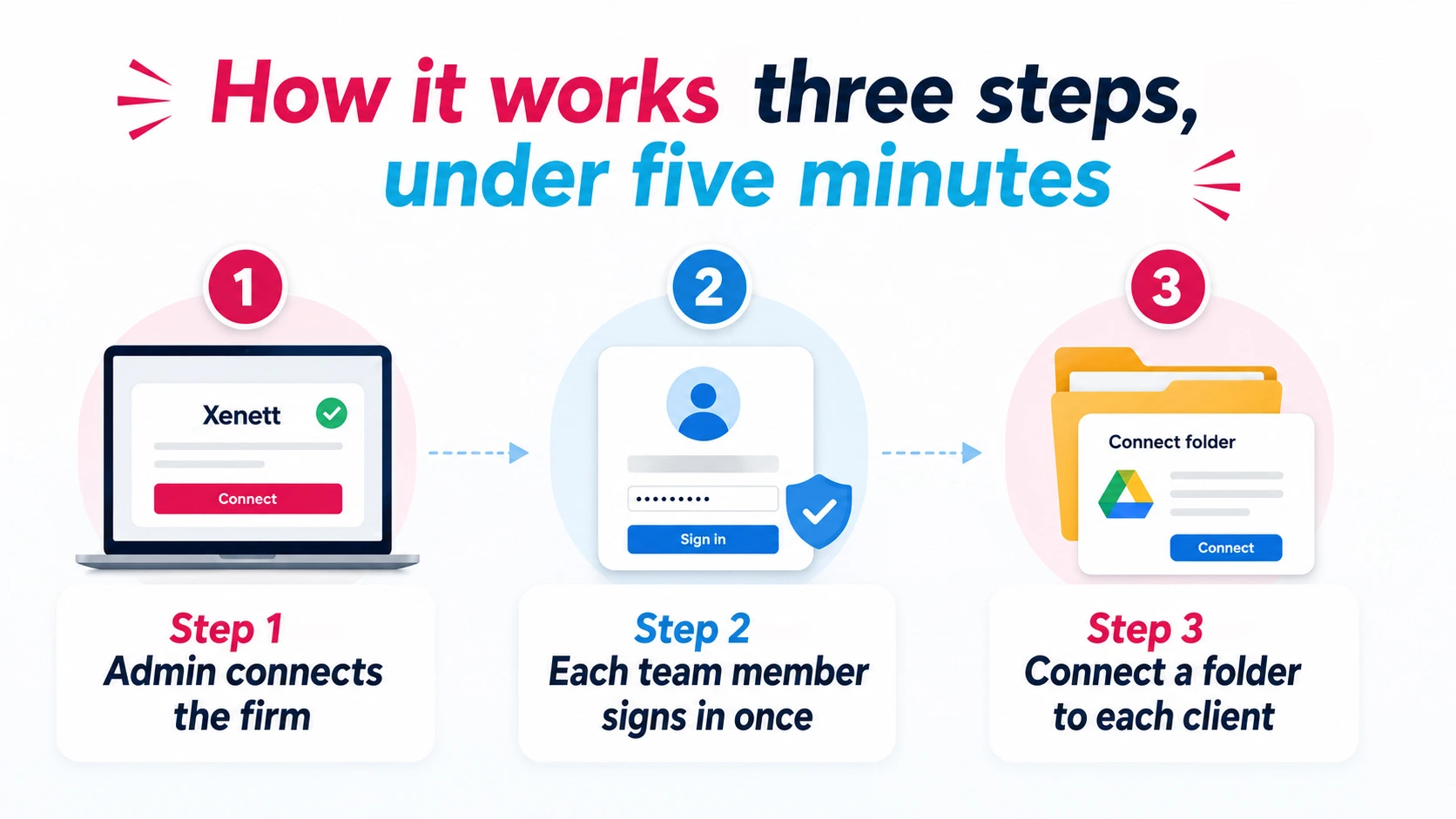
Setup requires no technical knowledge and no IT involvement.
Step 1: Admin connects the firm
From Firm Info → External Storage, the admin authenticates with Microsoft or Google. This creates the firm-level connection. The admin's personal account is linked automatically. The whole process takes about 30 seconds.
Step 2: Each team member signs in once
Every team member does a one-time sign-in from their My Account page using their own Google or Microsoft credentials. This is intentional design each person's file actions are logged under their own identity, not a shared service account. For firms that need to demonstrate who accessed or changed a client file, this is audit-ready by default.
Step 3: Connect a folder to each client
The admin browses the existing folder tree and connects the right folder to each client profile. Once connected, every team member sees those files as a tab inside that client's workspace in Xenett no navigation away, no searching, no sharing links.
5. File actions available inside Xenett
Once a folder is connected, the team can take the following actions on files directly from Xenett without opening Drive or OneDrive in a separate tab:
- Preview: open files using the provider's native viewer, no download required
- Download: pull files locally directly from Xenett
- Upload: add new files via file picker or drag and drop, straight into the connected folder
- Rename: rename files from Xenett; the change reflects in Drive or OneDrive instantly
- Delete: "permanently remove files from the provider
Every action is real-time. There is no sync queue, no refresh needed, no version drift between what Xenett shows and what is in Drive.
6. How this compares to traditional document management tools for CPA firms
Traditional document management software for CPA firms typically requires one of two things: migrate your files in, or pay for a deep integration that takes weeks to configure. Either way, the firm is reorganizing around the tool rather than the tool adapting to the firm.
The difference with Xenett is structural. Because the integration works with your existing folder setup in Drive or OneDrive, there is zero migration cost and zero reorganization. Files stay in the provider your firm retains full ownership and control. If you ever stop using Xenett, your files are still exactly where they were.
There is also a meaningful compliance difference. With traditional accounting firm document management software, file actions are often logged under a shared account or not logged at all. With Xenett, every action is tied to the individual team member who performed it using their own Google or Microsoft identity. That makes the system audit-ready without any extra configuration.
Comparison Table
7. Who should use this
Xenett Drive Integration is designed for accounting firms that already use Google Drive or OneDrive to store client files, have more than one team member who needs daily access to those files, and use Xenett for client and work management.
It is most valuable for mid-size firms typically 3 to 20 staff where the overhead of managing file access across the team creates real operational friction every day. At this size, the firm is too large to manage files informally (forwarding attachments, sharing links case by case) but may not need or want a full-scale enterprise document management platform.
What it is not: This is not a replacement for Google Drive or OneDrive. It does not add new storage. It makes your existing Drive accessible inside Xenett. Firms that do not already use Drive or OneDrive, or that need features like bulk file actions, cross-folder file moving, or shareable link generation from within Xenett, should note that those are not part of the current release.
If you are evaluating accounting software with document management built in and you already use Drive or OneDrive, this is built for you.
FAQs
What is accounting document management software?
Accounting document management software is a tool that lets accounting firms store, organize, and access client documents such as tax files, engagement records, and financial statements in a central, accessible location. Modern solutions connect directly to cloud storage providers like Google Drive or OneDrive so teams can access files inside their practice management tool without switching apps.
Does Xenett store or copy our files?
No. Files remain in your Google Drive or Microsoft OneDrive. Xenett provides access to them inside the app but does not copy, host, or move any files. Your firm retains full ownership and control.
Do we need to reorganize our folder structure to use Drive Integration?
No. Xenett works with whatever folder structure you already have. The admin browses the existing folder tree and connects the right folder to each client no reorganization required.
Can we connect both Google Drive and OneDrive at the same time?
Not in the current version. You can connect one provider per firm either Google Drive or Microsoft OneDrive (including SharePoint). You pick the one your firm already uses.
Is this available for all clients or just selected ones?
The connection is set at the firm level, making it available across all clients. The admin then connects a specific folder to each individual client profile.
What is the best document management software for accounting firms?
The best accounting document management software depends on how your firm already stores files. If you use Google Drive or OneDrive, a solution that connects your existing Drive inside your practice management tool like Xenett is significantly easier to adopt than one that requires migration. It keeps your existing folder structure, eliminates tab switching, and gives the whole team unified access.
Does each team member need their own Google or Microsoft login?
Yes. Each person authenticates once with their own account from the My Account page. This ensures every file action is logged under that person's identity not a shared account making the system audit-ready by default.
Conclusion
Accounting firms already have a document management system in Google Drive or OneDrive. Xenett simply brings those files into the workflow where the work happens. With no migration, no folder reorganization, and audit-ready access controls, teams can manage client documents faster and more efficiently without leaving Xenett.
Accounting document management software is a tool that lets accounting firms store, organize, and access client documents such as tax files, engagement records, and financial statements in a central, accessible location. Modern solutions connect directly to cloud storage providers like Google Drive or OneDrive so teams can access files inside their practice management tool without switching apps.
No. Files remain in your Google Drive or Microsoft OneDrive. Xenett provides access to them inside the app but does not copy, host, or move any files. Your firm retains full ownership and control.
No. Xenett works with whatever folder structure you already have. The admin browses the existing folder tree and connects the right folder to each client no reorganization required.
Not in the current version. You can connect one provider per firm either Google Drive or Microsoft OneDrive (including SharePoint). You pick the one your firm already uses.
The connection is set at the firm level, making it available across all clients. The admin then connects a specific folder to each individual client profile.