.svg)

Account Reconciliation: A Complete Guide
.jpg)
Ask questions, get summaries, or uncover key takeaways from this article.
Blog Summary / Key Takeaways
- Account reconciliation is the process of comparing recorded balances to supporting documentation to verify accuracy, identify errors, and ensure every balance sheet account reflects true financial position.
- Unlike bank reconciliation (which covers cash accounts only), account reconciliation applies to all balance sheet accounts: accounts receivable, accounts payable, fixed assets, prepaid expenses, accruals, and equity accounts.
- Most accounting errors surface during account reconciliation. Catch them monthly and they take minutes to fix. Ignore them for multiple periods and your cleanup becomes a significant project.
- Xenett's AI-powered reconciliation automation catches account discrepancies across all clients simultaneously. 1,000+ firms use this to reconcile faster and catch errors before they compound.
What is Account Reconciliation?
Account reconciliation is the process of comparing the balance recorded in your general ledger for a specific account to its supporting documentation such as sub-ledgers, vendor statements, customer invoices, fixed asset schedules, or clearing accounts to confirm they match, explain any differences, and ensure the balance sheet is accurate.
Account reconciliation is more comprehensive than bank reconciliation. While bank reconciliation focuses on cash accounts only, account reconciliation applies to every balance sheet account.
The goal is simple: The GL balance and the supporting documentation balance must match. Any difference must be documented, explained, and corrected.
Timing differences are normal. A vendor invoice recorded in accounts payable but not yet paid is a timing item that will resolve next period. An error such as a missing entry or wrong amount must be corrected immediately.
Who does it? Bookkeepers and accounting clerks execute reconciliations. Senior accountants or managers review them. Partners sign off before financial statements are released.
When is it done? Monthly, for every account with significant activity. Some firms reconcile quarterly for accounts with minimal transaction volume.
Why Account Reconciliation Matters
Account reconciliation catches errors before they become problems.
Duplicate entries, transposed amounts, miscoded transactions all surface when you compare GL balances to supporting documentation. When caught monthly, they take minutes to fix. When caught six months later, the cleanup absorbs hours and the team scrambles.
It detects fraud and unauthorized transactions. When you review account activity systematically every month, unusual patterns surface quickly. An unauthorized vendor payment, an inflated customer credit memo, or a suspicious fixed asset purchase becomes visible.
It keeps audit readiness intact. Auditors spend their first days reconstructing unreconciled account activity. Firms with monthly reconciled accounts move straight to testing and analysis. The difference in audit cost is substantial.
It proves the balance sheet is correct. Every analytical review, every loan covenant calculation, every tax filing depends on accurate balance sheet balances. Without reconciliation, the balance sheet is an estimate, not a fact.
It reveals missing transactions. A client invoice recorded on the customer's books but not in your GL. A vendor credit memo issued but never recorded. Account reconciliation surfaces these gaps before they create downstream problems.
Types of Account Reconciliation
Accounts Receivable Reconciliation
AR reconciliation compares the GL customer balance to the accounts receivable aging report. Every customer invoice and payment should be accounted for.
Common issues: Duplicate invoices, applied payments recorded twice, credits issued but not yet applied, disputed amounts.
Timing: Monthly, always before month-end close.
Accounts Payable Reconciliation
AP reconciliation compares the GL vendor balance to the vendor aging report and outstanding payment commitments. Every vendor invoice and payment must match.
Common issues: Invoices received but not recorded, payments made but not yet cleared the bank, duplicate payments, credits received but not applied.
Timing: Monthly, before paying vendors or finalizing close.
Also learn about - Accounts Payable Reconciliation: Process, Examples, and Best Practices
Fixed Asset Reconciliation
Fixed asset reconciliation compares the GL asset cost and accumulated depreciation balances to the fixed asset schedule. Every asset purchase, sale, and depreciation entry must be accounted for.
Common issues: Assets retired but not removed from the schedule, depreciation calculated on wrong asset lives, duplicate asset entries, capitalization vs. expense decisions reversed later.
Timing: Monthly for depreciation, quarterly or annual for asset additions and disposals.
Prepaid Expense Reconciliation
Prepaid accounts (insurance, subscriptions, licenses, rent) must reconcile to the actual prepaid schedule. Monthly amortization entries reduce the prepaid balance.
Common issues: Insurance policies renewed but old prepaid never reversed, subscription cancellations not recorded, rent paid in advance but not tracked properly.
Timing: Monthly, when amortization entries are posted.
Accrued Expense Reconciliation
Accrual accounts (accrued payroll, accrued bonuses, accrued vacations, accrued utilities) must reconcile to supporting schedules. Accruals are recorded at month-end and reversed the next period.
Common issues: Accruals not reversed when the actual transaction posts, accrual amounts estimated wrong, forgotten accrual categories.
Timing: Monthly, at period close and reversal.
Intercompany Reconciliation
For multi-entity clients, intercompany accounts (amounts owed between entities) must reconcile. Every transaction recorded as a payable in one entity must be recorded as a receivable in the other.
Common issues: Timing differences between entities, transactions recorded in one entity but not the other, consolidation eliminations missing.
Timing: Monthly, before consolidation and before close.
Clearing Account Reconciliation
Clearing accounts (such as merchant services clearing, payroll clearing) temporarily hold amounts that will be distributed. They should always reconcile to zero or have a documented explanation for remaining balance.
Common issues: Items stuck in clearing for multiple periods, transfers initiated but not completed, reconciliation never verified.
Timing: Monthly, before close.
How to Reconcile an Account: Step-by-Step Process
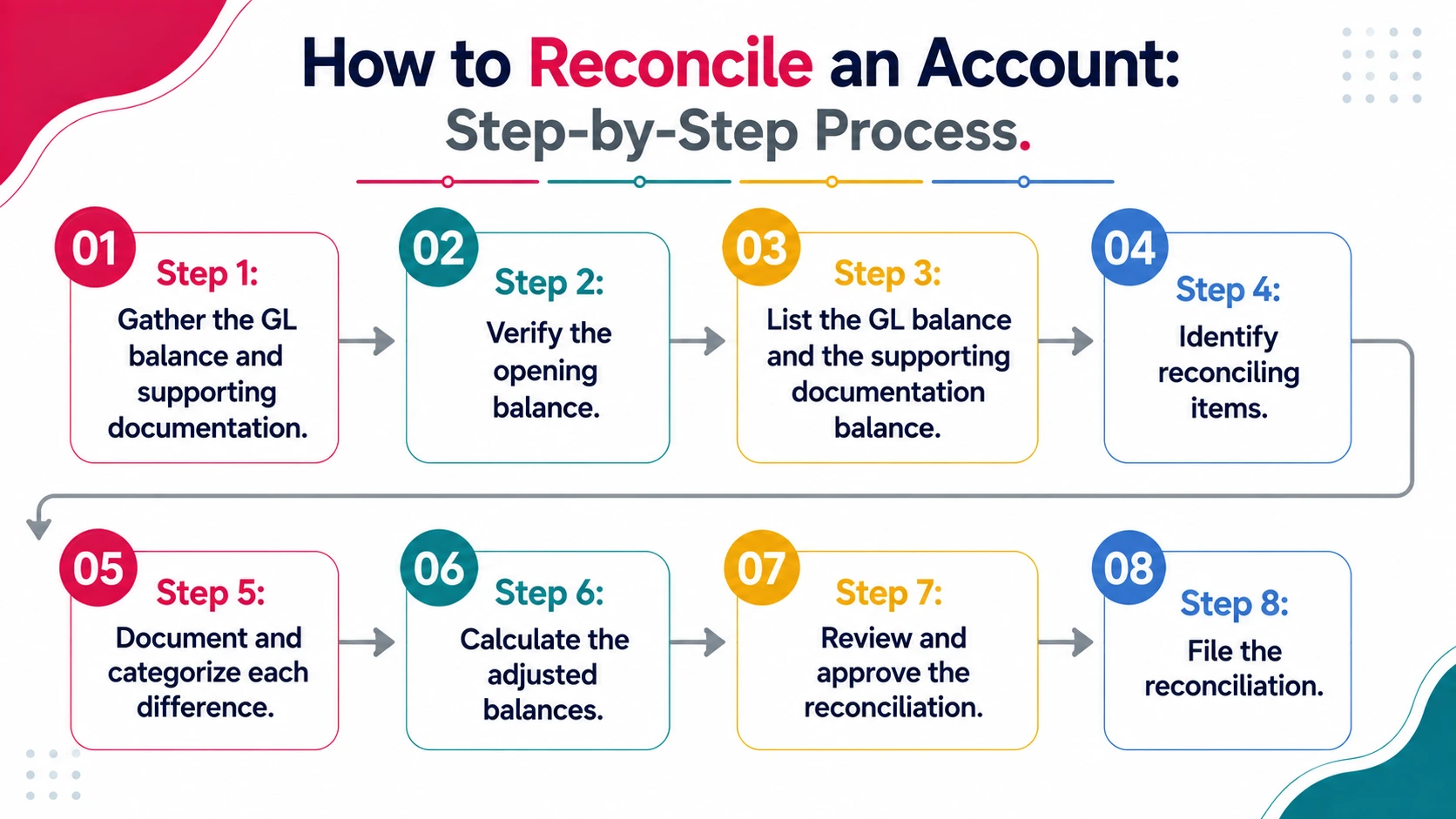
Step 1: Gather the GL balance and supporting documentation.
You need two things: the GL account balance as of month-end and the supporting schedule (aging report, asset register, accrual schedule, vendor statement, or clearing schedule).
Both must cover the same date range.
Step 2: Verify the opening balance.
The opening balance on this month's reconciliation should match the ending balance from last month's reconciliation.
If it does not, last month's reconciliation has an unresolved item or was edited incorrectly. Resolve it before proceeding.
Step 3: List the GL balance and the supporting documentation balance.
GL balance: [amount] Supporting documentation balance: [amount] Difference: [amount]
If the difference is zero, the account is already reconciled. If not, you have reconciling items to identify.
Step 4: Identify reconciling items.
A reconciling item is a transaction or entry that explains the difference between the GL and supporting documentation.
Timing items: Transactions recorded in one record but not yet in the other. These will resolve next period.
Example: An invoice recorded in AP but not yet received by the vendor. The vendor has not entered it yet, so it does not appear on the vendor statement.
Errors: Incorrect amounts, missing entries, or duplicate entries. These must be corrected immediately.
Example: A payment recorded twice in the GL but only once on the vendor statement.
Step 5: Document and categorize each difference.
For each reconciling item, document:
- Description of the item
- Amount
- Whether it is a timing difference or an error
- Action taken (if any)
- Date resolved
Step 6: Calculate the adjusted balances.
GL adjusted balance = GL balance + Additions - Deductions + Corrections Supporting documentation adjusted balance = Supporting balance + Additions - Deductions + Corrections
Both adjusted balances must equal. If they do not, you have an unresolved item.
Step 7: Review and approve the reconciliation.
The preparer documents the reconciliation. A supervisor or manager reviews it. The review should verify:
- Opening balance matches last month's ending balance
- All reconciling items are explained
- All errors have been corrected
- Adjusted balances match
- Documentation is complete and legible
Step 8: File the reconciliation.
Save the reconciliation workpaper with all supporting documentation. This is the audit trail for the account.
Common Account Reconciliation Errors
Error 1: Duplicate Entries
A transaction entered twice in the GL. The reconciliation shows the GL higher than the supporting documentation.
Fix: Identify the duplicate entry and delete it. Verify the deletion does not create a new imbalance.
Prevention: Implement a rule to catch duplicate amounts and dates during data entry. Use bank feeds and vendor feeds to reduce manual entry.
Error 2: Timing Items Never Cleared
A reconciling item from two or three months ago that was supposed to clear but did not. The reconciliation still shows the same unresolved item.
Fix: Investigate why the item did not clear. Is the supporting transaction missing? Did the other party not post it?
Prevention: List all open reconciling items at the start of each month. Follow up on items that do not clear within one period.
Error 3: Wrong Amount Recorded
An invoice recorded as $5,400 instead of $4,500. The reconciliation shows a $900 difference.
Fix: Find the transaction, correct the amount, and verify the correction posts to the GL.
Prevention: Review data entry line-by-line during reconciliation. Use alerts for unusual amounts or patterns.
Error 4: Missing Transaction
A vendor credit memo issued but never recorded in the GL. The supporting documentation is lower than the GL.
Fix: Record the missing transaction as a journal entry. Verify the entry posts to the correct account.
Prevention: Review vendor statements and confirmations for items not appearing in the GL.
Error 5: Accrual Never Reversed
An accrual posted at month-end but the reversal entry never posted the next period. The accrual balance is inflated.
Fix: Post the reversal entry manually. Verify the subsequent actual transaction cleared the balance.
Prevention: Use recurring journal entry templates that automatically post accrual and reversal on the correct dates.
Error 6: Reconciliation Edited After Completion
A reconciled transaction was edited after the reconciliation was marked complete. The reconciliation is no longer accurate.
Fix: Re-reconcile the account. Identify what changed and why. Update the reconciliation to reflect the change.
Prevention: Lock reconciled transactions so they cannot be edited without generating a discrepancy. Use workflow systems that flag edited reconciled items.
Manual Reconciliation vs. Automated Reconciliation
Manual reconciliation works for: Firms with fewer than 10 clients and minimal account complexity.
Automated reconciliation is necessary for: Firms managing 30+ clients, multiple accounts per client, or complex account structures (multi-entity, accruals, clearing accounts).
How to Automate Account Reconciliation
Automation does not mean "never reconcile." It means the system matches transactions automatically, flags exceptions for human review, and documents the process.
How it works:
The system connects to your GL and supporting sub-ledgers (such as AR aging, AP aging, fixed asset register, or accrual schedule).
It matches GL entries to supporting documentation by date, amount, and description.
Matched items are marked cleared. Unmatched items are flagged.
A human reviews the flagged items, categorizes them as timing or errors, and documents the resolution.
The reconciliation is recorded as complete when all items are resolved and balances match.
Benefits:
Matching is done in seconds instead of hours. Errors are caught consistently. Nothing is missed because the system checks every account every month. Documentation is automatic and complete.
Implementation timeline:
Week 1-2: Set up account mappings and matching rules. Week 3-4: Run first automated reconciliation and train the team. Week 5+: Review and approve automated reconciliations as part of close process.
How Xenett Can Help
Xenett's reconciliation feature automates account matching across all your clients' balance sheet accounts: AR, AP, fixed assets, accruals, clearing accounts, and intercompany balances.
Key capabilities:
Automated Matching - The system compares GL balances to supporting documentation automatically. Matched items are cleared in seconds.
Exception Flagging - Unmatched items, unusual patterns, and aging issues are flagged for immediate review.
Multi-Entity Reconciliation - Intercompany accounts reconcile automatically. Both sides of the transaction match, eliminating consolidation surprises.
Accrual Automation - Accrual accounts reconcile to supporting schedules. Month-end accruals and next-period reversals are tracked automatically.
Clearing Account Management - Temporary clearing balances are monitored. Items that should clear but do not are flagged.
Reconciliation Tracking - Every account's status is visible in the Close Dashboard. Which accounts are complete, which have open items, which are overdue.
Audit-Ready Documentation - Reconciliations are documented automatically with all supporting detail. No manual workpapers needed.
1,000+ accounting and bookkeeping firms use Xenett to reconcile faster, catch errors before close, and manage reconciliation across all clients simultaneously.
[Link to internal: Review Process Page] - See how reconciliation fits into your close workflow.
[Link to internal: Close Process Page] - View the full close dashboard that tracks reconciliation status.
Real Scenario: A Missing Intercompany Account
A multi-entity client with 15 subsidiary companies had a $247,000 variance on the consolidated balance sheet.
The firm's close process included bank reconciliation but did not include systematic intercompany reconciliation. The subsidiary controllers recorded transactions on their books, but the parent company did not always record the offsetting entry at the same time.
When the variance surfaced during consolidation, three days were spent matching transactions across 15 entities to find the unrecorded intercompany balance.
The fix: Implement intercompany reconciliation as part of the month-end close process. Both the paying entity and receiving entity must reconcile the intercompany payable/receivable to the same amount before consolidation. Any variance is resolved before the financial statements are finalized.
With automated intercompany reconciliation, this type of variance is caught and flagged on day one of the close cycle, not discovered three days later during consolidation.
FAQs
What is the difference between account reconciliation and bank reconciliation?
Bank reconciliation compares the cash account in the GL to the bank statement. It covers one account type only.
Account reconciliation covers all balance sheet accounts (AR, AP, fixed assets, accruals, equity). Each account is reconciled to its supporting documentation.
Bank reconciliation is one component of the full account reconciliation process. Learn more: How to Do a Bank Reconciliation
How often should accounts be reconciled?
Monthly, for every account with significant transaction activity.
Accounts with minimal activity (such as certain fixed asset accounts or equity accounts that do not change monthly) can be reconciled quarterly or annually, as long as the reconciliation is documented and reviewed.
What is a reconciling item?
A reconciling item is a difference between the GL balance and the supporting documentation balance that has been identified, documented, and explained.
Timing items will resolve next period. Errors must be corrected immediately.
What happens if account reconciliation does not balance?
The reconciliation cannot be marked complete until the adjusted GL balance and adjusted supporting documentation balance match.
An unbalanced reconciliation indicates an unresolved item: a missing transaction, a wrong amount, a duplicate entry, or an error in the supporting documentation.
Investigate each unresolved item until the balances match.
Who is responsible for account reconciliation?
Bookkeepers and accounting clerks execute reconciliations. Managers or senior accountants review them. Partners sign off before financial statements are released.
At larger firms, there may be a dedicated reconciliation team. At smaller firms, reconciliation may be shared across the team.
Can account reconciliation be automated?
Yes. Reconciliation automation systems match GL entries to supporting documentation automatically, flag exceptions for review, and document the process.
Automation reduces reconciliation time from hours to minutes per account and improves consistency across clients.
What should I do if I find an error during account reconciliation?
Post a correcting journal entry immediately. Do not wait until next month.
Document why the error occurred. Determine if it is a one-time issue or a systemic problem that requires a process change.
Update the reconciliation to reflect the correction.
Conclusion
Account reconciliation is the foundation of accurate financial statements. It catches errors, detects fraud, and proves the balance sheet is correct.
The challenge is not the skill. Most accountants know how to reconcile. The challenge is doing it consistently, for every account, every month, across every client and tracking that it happened.
Firms that manage this well have two things: a clear process that every team member follows and a system that tracks completion.
Xenett's automated reconciliation gives you both. [Link to: Book a Demo] or [Link to: Start Free Trial]
See how Xenett automates account reconciliation across all your clients.
Book a 15-Minute Demo | Start Free Trial - 14 Days, No Credit Card
Bank reconciliation compares the cash account in the GL to the bank statement. It covers one account type only. Account reconciliation covers all balance sheet accounts (AR, AP, fixed assets, accruals, equity). Each account is reconciled to its supporting documentation. Bank reconciliation is one component of the full account reconciliation process. Learn more: How to Do a Bank Reconciliation
Monthly, for every account with significant transaction activity. Accounts with minimal activity (such as certain fixed asset accounts or equity accounts that do not change monthly) can be reconciled quarterly or annually, as long as the reconciliation is documented and reviewed.
A reconciling item is a difference between the GL balance and the supporting documentation balance that has been identified, documented, and explained. Timing items will resolve next period. Errors must be corrected immediately.
The reconciliation cannot be marked complete until the adjusted GL balance and adjusted supporting documentation balance match. An unbalanced reconciliation indicates an unresolved item: a missing transaction, a wrong amount, a duplicate entry, or an error in the supporting documentation. Investigate each unresolved item until the balances match.
Bookkeepers and accounting clerks execute reconciliations. Managers or senior accountants review them. Partners sign off before financial statements are released. At larger firms, there may be a dedicated reconciliation team. At smaller firms, reconciliation may be shared across the team.
Yes. Reconciliation automation systems match GL entries to supporting documentation automatically, flag exceptions for review, and document the process. Automation reduces reconciliation time from hours to minutes per account and improves consistency across clients.