.svg)

Best Financial Close Software for 2026 (Compared)

Ask questions, get summaries, or uncover key takeaways from this article.
Blog Summary / Key Takeaways
- Financial close software is not just a task tracker — it centralizes close checklists, reconciliations, approvals, and supporting evidence in one governed system so issues surface earlier and close timelines become more predictable.
- The most important capabilities to compare are reconciliation workflow and exception handling, role-based approvals, evidence management, and close status reporting — if a tool cannot cover these, it is closer to a checklist app than true close software.
- Choosing the right tool comes down to your environment and failure point — firms on QBO/Xero need review consistency across clients, mid-market teams need governance and visibility, and enterprise teams need deep automation and segregation of duties.
- AI-assisted features in 2026 should surface anomalies and flag unusual account behavior earlier — but they should support reviewer judgment, not replace it.
- Xenett is built for accounting firms where review quality drives rework — it runs account-level P&L and balance sheet checks, routes findings into resolution workflows, and makes review standards consistent across clients and periods.
Best Financial Close Software for 2026 (Compared)
Month-end slips for the same reasons every time. Issues show up late, reviewers redo work, support lives in too many places, and close steps vary by person or entity. Financial close software helps you standardize the work and surface problems earlier, but vendors cover different parts of the close.
In this guide, you'll get:
- A comparison table to shortlist tools fast
- The 8 close capabilities teams compare in 2026
- A decision framework with a scoring rubric and 30-day pilot plan
- Implementation, security, and compliance expectations
- Tool reviews and scenario-based picks
- A month-end close readiness checklist and FAQs
This is for in-house accounting teams and accounting firms. It's also written for QBO- and Xero-heavy firms that need consistent review across many clients.
Methodology (how we assessed tools):
- Reviewed public docs, product pages, and help centers where available
- Validated core capabilities and integration targets (GL/ERP focus)
- Checked pricing transparency and likely pricing model fit
- Used available demos/trials and third-party review signals when possible
"Tested" here means evaluated for fit and coverage. It does not mean audited.
Quick Answer (financial close software):
Financial close software is a system that helps you run period-end close work in a controlled, repeatable way. It replaces scattered spreadsheets, email-based approvals, and ad hoc evidence storage with a single place for close tasks, reconciliations, approvals, and documentation. The goal is a more predictable close with stronger controls and easier audit readiness.
Financial Close Software: Definition, Scope, And What It Replaces
Financial close software helps you execute and control the close, not just track tasks. It replaces the messy parts of close work that usually live in spreadsheets, inboxes, and shared drives. If you want fewer late surprises, this is the category built for that outcome.
Financial close software is defined as a platform that centralizes close execution across people, accounts, and entities by managing close checklists, reconciliation workflows, approvals, supporting evidence, and close status reporting in one governed system.
In practice, it replaces:
- Spreadsheet-only close calendars and checklists
- Email or chat approvals with no audit trail
- Evidence stored in scattered folders with unclear versioning
- Manual follow-ups to clear recon exceptions and missing support
- Status meetings that exist because no one trusts the dashboard
What Financial Close Software Does
It gives you one operating layer for the close. Most tools centralize:
- Close calendar and recurring checklists with owners and due dates
- Reconciliations, matching, exceptions, and follow-up workflow
- Journal entry preparation, approval routing, and attachments
- Evidence collection and an audit trail of who approved what, when
- Close status reporting by entity, account, preparer, or workstream
Financial Close Management vs Financial Close Automation (What's Different?)
Close management software governs the work. Close automation software reduces manual work. Many tools include both, but they usually lean one way.
- Close management: ownership, deadlines, dependencies, approvals, audit trail, and status dashboards
- Close automation: matching rules, exception handling, reconciliation automation, anomaly flags, and rule-based checks
Dealbreaker note: If it only tracks tasks but cannot support reconciliation evidence and controls, it is closer to a workflow tracker than true financial close software.
Month-End Close Software vs Accounting Close Software (Are They the Same?)
Most teams use these terms interchangeably. "Month-end close software" often signals cadence and workflow. "Accounting close software" often signals controls and documentation. The label matters less than whether the tool covers reconciliations, approvals, evidence, and reporting across periods.
Where Financial Close Ends (And Consolidation Begins)
Close software helps you close the books. Consolidation software helps you combine entities and report as one group. Some consolidation tools include close features, but you still need to separate requirements like intercompany elimination, multi-currency consolidation, and group reporting from close execution.
If you want a deeper year-end close angle, this guide pairs well with that resource.
Quick Comparison Table: Best Financial Close Software (2026)
If you want to shortlist fast, compare tools on close management strength, automation strength, reconciliation depth, and controls. Then look at implementation complexity and integration targets. The right pick depends on whether your pain is governance, reconciliation throughput, or review discipline.
Comparison Table (Expanded Columns)
Use this table to shortlist. Details and tradeoffs are below.
The 8 Capabilities Finance Teams Compare (2026 Baseline)
You should compare close tools on the same baseline capabilities, even if vendors package them differently. If you do this upfront, you avoid buying a "close tool" that is really a task tracker. You also avoid paying enterprise rates for features you will not use.
Close Calendar, Checklists, And Ownership
You need a close calendar that supports recurrence, owners, and dependencies. Look for:
- Task owners and reviewers with clear due dates
- Templates by entity, client, or industry
- Dependencies (task B cannot close until task A clears)
- Standardized close steps across periods
- Escalation when items age or stall
Reconciliations + Matching + Exceptions
Reconciliation workflow is where close time disappears. Strong tools support:
- Standard reconciliation formats and evidence requirements
- Matching rules and exception queues
- Follow-ups tied to specific recon exceptions
- Aging on unreconciled items and open exceptions
- Reviewer sign-off tied to evidence, not just a checkbox
Journal Entry Workflow (Prep, Review, Approve, Post)
You need clean segregation of duties and traceable approvals. Look for:
- Draft, review, and approval steps that match your controls
- Attachments and tie-outs stored with the entry
- Posting controls or integration with your GL workflow
- Clear visibility on pending approvals and rejected entries
Evidence & Documentation (Audit Trail, Tie-Outs, Attachments)
Close software should make evidence easy to find later. You want:
- A consistent place for support and tie-outs
- Versioning or clear evidence history
- Approval timestamps and user-level activity logs
- Period-based evidence retention rules
Approvals, Controls, And Segregation of Duties
Controls matter most when things go wrong. Baseline expectations:
- Role-based permissions and reviewer assignments
- Locked periods or controlled reopening workflow
- Control attestations where needed
- Escalation paths for exceptions and late items
Variance / Flux Analysis And Anomaly Detection (AI-Assisted, Not AI-Led)
AI-assisted features should surface issues earlier. They should not pretend to replace judgment. In 2026, "good" usually means:
- Flags for unusual account movement or pattern breaks
- Suggestions for what changed, not final answers
- Repeatable rules you can tune by client or entity
- Clear explanation trails so reviewers can validate quickly
Integrations (ERP/GL, Banks, Data Warehouse, Spreadsheet Layer)
Integration depth matters more than the logo list. Ask:
- How often data syncs and how failures are handled
- What evidence of sync is logged
- Whether data can be traced back to source
- Whether spreadsheet workflows remain governed
Reporting Close Status (Readiness, Bottlenecks, Aging)
A close tool should reduce status meetings. Strong reporting includes:
- Close readiness by entity or client
- Bottlenecks by workstream and owner
- Aging on open reconciliations and exceptions
- Reviewer workload and queue visibility
For workflow automation context, see that guide.
If It Can't Do These, It's Not Close Software
- Reconciliation workflow with evidence and reviewer sign-off
- Role-based approvals and an audit trail
- Close status reporting beyond a simple checklist view
- Standard templates that repeat each period
- Exception workflow that drives follow-up work
- Evidence storage tied to the period and the account
- Clear ownership and escalation when work stalls
How To Choose The Best Financial Close Software (Decision Framework)
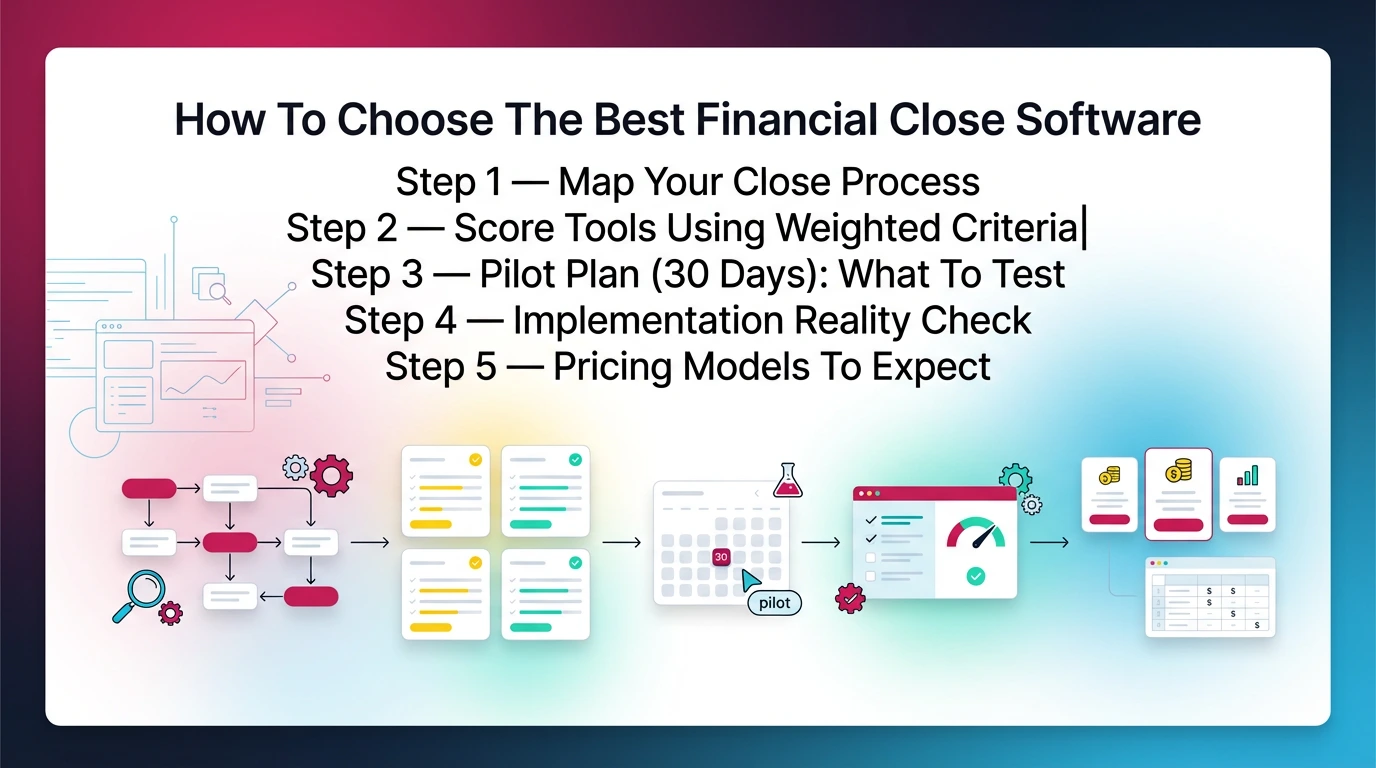
You choose the best financial close software by matching tool strength to your real failure points. If your close slips because reconciliations stall, prioritize exception workflow and evidence. If your close slips because review is inconsistent, prioritize account-level review discipline and repeatable standards.
Use this five-step approach. It keeps you out of feature-chasing mode.
Step 1 — Map Your Close Process (Inputs → Reviews → Outputs)
Start with what actually happens in your close. Use this simple map:
- Inputs: GL/ERP, bank feeds, subledgers, payroll, AP tools
- Reviews: bank recs, key balance sheet accounts, revenue, payroll, accruals
- Outputs: final trial balance, reporting package, management review, tax handoff
Write down where work breaks. Common breakpoints:
- Missing support for balance sheet accounts
- Reviewer bottlenecks and inconsistent standards
- Unclear ownership on recon exceptions
- Journal entries waiting on approvals
Step 2 — Score Tools Using Weighted Criteria (Rubric)
Use a rubric so your team stops arguing from preference. Score each tool 1–5 per criterion.
Step 3 — Pilot Plan (30 Days): What To Test
Run a pilot on a real close cycle. Test these scenarios:
- Bank rec exceptions: create mismatches and see how the tool handles follow-up
- Balance sheet evidence: attach support and test reviewer approval and retrieval
- Journal entry approvals: test prep → review → approve, including rejection
- Close status reporting: confirm you can see bottlenecks and aging
- Integration sync: confirm data refresh, traceability, and failure handling
Define success metrics first. For example: fewer late adjustments, fewer reviewer escalations, fewer hours spent chasing support.
Step 4 — Implementation Reality Check (Data, Users, Change Mgmt)
Implementation fails when you do not standardize. Plan for:
- Template ownership (who maintains the standard close)
- Training for preparers and reviewers
- Migration of evidence standards, not just tasks
- Governance (what counts as "done")
Step 5 — Pricing Models To Expect (And How They Affect Scale)
Expect one of these pricing models:
- Per user: common in in-house finance teams
- Per entity: common in multi-entity environments
- Per client file: common in accounting firms
- Usage-based: common where automation volume drives cost
Ask about implementation fees, premium support tiers, and overage rules. This is where total cost changes.
Implementation, Security, And Compliance (What Buyers Expect In 2026)
In 2026, buyers expect implementation to be structured and security to be baseline, not a premium feature. You should also expect clear evidence retention options, especially if you serve clients and need workpaper boundaries.
Typical Implementation Timelines (By Complexity)
Simple tools can go live fast. Enterprise automation takes longer.
- Light close management: days to a few weeks
You set up templates, users, and basic approvals. - Mid-market close management + standard integrations: a few weeks to 2 months
Integrations, permissions, and standardized evidence rules drive the timeline. - Enterprise automation + complex environments: several months
Multiple ERPs, entity complexity, segregation of duties, and control mapping slow rollout.
What drives timeline most:
- Integration count and depth
- Multi-entity requirements and intercompany workflows
- Control requirements and approval chains
- Change management and training across teams
Security Baseline Checklist
Use this as a minimum standard. You should be able to confirm these quickly:
- SSO/SAML support (if your org requires it)
- MFA and strong password policies
- Encryption in transit and at rest
- SOC 2 or ISO-aligned posture (or clear security documentation)
- Role-based access control (RBAC)
- Audit logs with user-level activity history
- Data retention and deletion policies
- Export options for evidence during audits or tool changes
Evidence Retention And Audit Readiness (Especially For Firms)
If you are a firm, you need clean boundaries by client. You also need reviewer traceability.
Look for:
- Client-level access boundaries and permissions
- Evidence tied to period and account
- Reviewer sign-off history that survives team changes
- Retention rules that match your engagement and regulatory needs
This is also where tools differ the most. Some are great at tasks but weak at governed evidence.
Tool Reviews (What Each Is Best For)
These tools are all used in close workflows, but they solve different problems. Read this section as "best for" and "tradeoffs," not as a ranking. Your best tool depends on whether your pain sits in reconciliations, approvals, evidence, or review discipline.
Xenett
Xenett fits when your close issues are really review issues. It is a review-first accounting system built for accounting and bookkeeping firms. It runs account-level P&L and balance sheet review logic, then routes findings into resolution workflows. It is AI-assisted, not AI-led.
Best For
- Accounting and bookkeeping firms on QuickBooks Online or Xero
- Teams managing 10–500+ client files that need consistent review standards
- Firms that want earlier detection of anomalies and reconciliation gaps
Standout Strengths
- Account-level review logic across P&L and balance sheet accounts
- Flux and anomaly flags that surface issues earlier
- Reconciliation gap detection that drives what work needs to happen next
- Review standards that do not depend on "who reviewed it this month"
Close Workflow Coverage
- Findings drive follow-up work, not just checklist completion
- Review and resolution work stays tied to account conditions
- Close readiness becomes clearer because open items link to real issues
Integrations
- QuickBooks Online and Xero are the core context
- This matters if your firm lives in QBO/Xero and needs scale
Controls & Audit Trail
- Traceability from finding → resolution → review sign-off
- Standardized review expectations across clients and periods
- Evidence tied to the work that cleared the finding
Implementation Notes
- Start with one client segment and a standard review template
- Standardize review rules before you expand across the full book
- Assign one owner to maintain review standards across periods
Pricing (What's Known / Not Public)
- Xenett publishes pricing. You can review current details on the Xenett pricing page.
- Pricing is commonly structured per client file, which aligns with firm scale
Tradeoffs
- Less oriented to large enterprise ERP environments
- Best fit when you want review discipline, not only task tracking
- Newer category approach compared to legacy enterprise platforms
Start Free Trial | Request a Demo
Keeper.app
Keeper.app is strong for bookkeeping teams that want structured close checklists, task templates, and client collaboration. It behaves more like close management for firms than deep close automation.
Best For
- Small to mid-size bookkeeping firms
- Teams that need repeatable close checklists and client requests in one place
Standout Strengths
- Client portal and collaboration features
- Task checklists and templates geared to recurring work
- Firm-friendly structure for managing many client closes
Close Workflow Coverage
- Strong checklist and coordination support
- Automation depends on what you integrate and how you configure your process
Integrations
- QuickBooks Online and Xero are common targets
Controls & Audit Trail
- Better than email-based approvals
- You still need to confirm evidence requirements and sign-off traceability
Implementation Notes
- Start with one template by client type
- Define what "complete" means for reconciliations and support
Pricing
- Pricing is often shared as per client per month, with plan tiers
- Confirm current rates and what features are included at each tier
Tradeoffs
- Not always as deep on reconciliation exception handling as enterprise tools
- Some teams report a learning curve during early adoption
FloQast
FloQast is a common mid-market choice for close management with strong visibility and controls. It tends to shine when you have a structured team close and want dashboards, ownership, and close governance.
Best For
- Mid-market accounting teams
- Teams that need strong close management, document organization, and status visibility
Standout Strengths
- Close checklists and task ownership visibility
- Centralized documentation and tie-out storage
- Workflow visibility for controllers and close owners
Close Workflow Coverage
- Strong on managing close steps and sign-offs
- Automation depends on add-ons and integration scope
Integrations
- NetSuite is a common integration target
- Confirm fit if you run other ERPs or multi-GL setups
Controls & Audit Trail
- Strong governance for approvals and tracking
- Verify the level of audit log detail your auditors expect
Implementation Notes
- Plan time for initial setup and template standardization
- Assign one close owner to maintain governance
Pricing
- Pricing is typically quote-based and not always published
- Ask early about implementation fees and support tiers
Tradeoffs
- Can feel heavy if you already run a disciplined spreadsheet close
- Setup effort can be non-trivial for smaller teams
More detail in our FloQast reviews if you want it.
BlackLine
BlackLine is built for enterprise-grade close automation, controls, and deep reconciliation workflows. It fits when complexity, scale, and segregation of duties drive the decision.
Best For
- Large finance orgs with complex close environments
- Teams with strict control requirements and high reconciliation volume
Standout Strengths
- Deep reconciliation and matching capabilities
- Enterprise-level controls, auditability, and workflow governance
- Broad integration options across enterprise systems
Close Workflow Coverage
- Strong coverage across reconciliations, approvals, and automation
- Often supports scaled close processes across many entities
Integrations
- Broad ERP compatibility, but integration work can be significant
Controls & Audit Trail
- Enterprise-grade audit trail and change history
- Strong fit where SoD requirements are strict
Implementation Notes
- Treat implementation as a project, not a "tool rollout"
- Budget for integration work and process design
Pricing
- Typically quote-based and not publicly listed
Tradeoffs
- Implementation complexity can be high
- May be more tool than you need for simple close environments
Numeric
Numeric is a modern close tool that focuses on checklists, variance workflows, and team coordination. It can be a good fit if you want a clean UI and structured close tracking with some automation, depending on the plan.
Best For
- Small to mid-market teams that want structured close workflows
- Teams that want variance workflows without heavy enterprise implementation
Standout Strengths
- Close checklists and ownership
- Variance analysis workflows and collaboration features
- Integrations with common tools like Slack in some setups
Close Workflow Coverage
- Strong close coordination and visibility
- Reconciliation depth varies, so confirm exception handling needs
Integrations
- Connects to accounting systems and collaboration tools
- Confirm your GL and reporting needs before committing
Controls & Audit Trail
- Often solid on approvals and traceability
- Validate audit log detail and retention options
Implementation Notes
- Start with one entity and one close cycle
- Define evidence standards early so adoption sticks
Pricing
- Pricing is often quote-based and not published
Tradeoffs
- Some features may depend on plan level
- If you need deep reconciliation automation, confirm coverage
Limitations And Dealbreakers (Before You Commit)
Most close tool disappointments come from mismatched expectations. Teams buy a checklist tool and expect reconciliation depth. Or they buy enterprise automation and underestimate change management. If you screen for dealbreakers early, you avoid re-platforming later.
Common Dealbreakers Buyers Miss
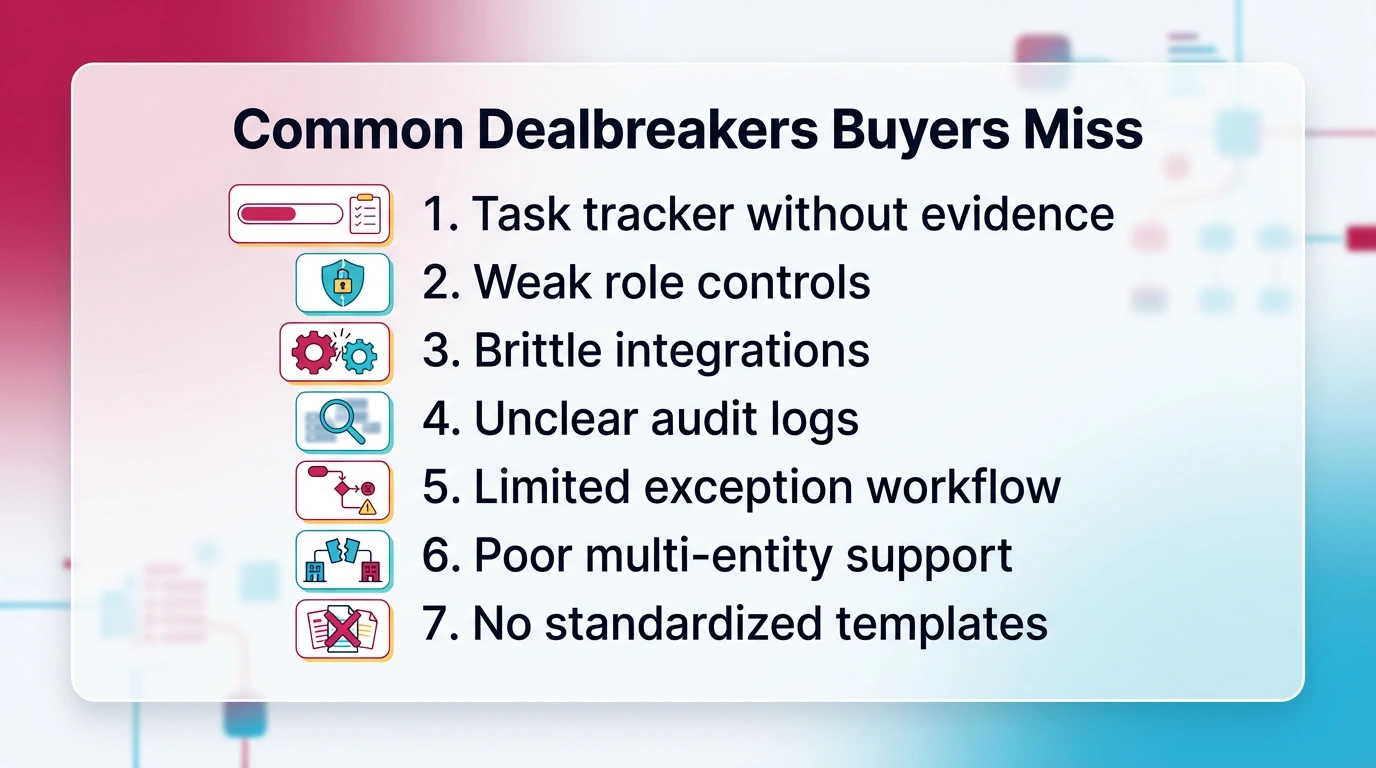
Watch for these before you sign:
- Task tracker without evidence: tasks close, but support stays scattered
- Weak role controls: you cannot enforce segregation of duties cleanly
- Brittle integrations: exports become manual, sync failures go unnoticed
- Unclear audit logs: you cannot prove who changed what and when
- Limited exception workflow: mismatches become side conversations
- Poor multi-entity support: reporting and close status break at scale
- No standardized templates: every close turns into reinvention
A practical test: ask the vendor to show how you go from a recon exception to resolution, to reviewer sign-off, with evidence attached and timestamped.
Who Shouldn't Buy Close Software Yet
You should wait if:
- You run a very small close and your main problem is basic process discipline
- Your chart of accounts and monthly bookkeeping are unstable
- Your team cannot agree on what "done" means for key balance sheet accounts
In those cases, you may get faster ROI by standardizing:
- A close checklist
- Evidence requirements per account
- Reviewer expectations per period
Then you automate once the process is stable.
Switching Reassurance (What To Keep, What To Rebuild)
Switching tools does not mean losing your standards.
Keep:
- Your control matrix and approval rules
- Your close checklist logic and account coverage
- Your evidence standards (what support is required per account)
Rebuild:
- Integrations and templates to match the new system
- Naming conventions and period folder logic
- Dashboards and reporting views based on new workflow structures
Pilot first. Then migrate in phases by entity or client segment.
How Xenett Can Help (When You Need More Review Discipline)
If your close slips because review slips, you need review discipline more than you need more tasks. Xenett helps when errors, missing entries, and reconciliation gaps show up late because review standards are inconsistent or dependent on senior staff.
Here is the practical difference in approach:
- Xenett reviews P&L and balance sheet accounts at the account level.
- It flags anomalies, unexpected flux, and missing patterns earlier.
- It surfaces reconciliation gaps before period-end pressure builds.
- It routes findings into resolution workflows, so work happens because an issue exists.
This matters if you manage many clients or entities. It is hard to scale review quality with spreadsheets and tribal knowledge. Xenett gives you repeatable review rules and traceability from finding to resolution.
Xenett stays AI-assisted, not AI-led. You keep judgment. The system helps you focus attention.
If you want examples of what goes wrong during close, start with these accounting errors.
If you want the year-end close workflow angle, see the year-end close guide.
Best Picks By Scenario (Shortlisting Guide)
You shortlist faster when you anchor on your environment and failure points. The "best financial close software" for you depends on whether you are a firm managing many client files, a mid-market team with tight controls, or an enterprise team with complex automation needs.
Best For Accounting Firms On QuickBooks Online Or Xero
If you run many client closes, consistency beats customization.
Prioritize:
- Review consistency across clients and staff
- Evidence standards that do not depend on reviewer preference
- Permissions and client boundaries
- A workflow that ties work to account-level findings
Tools that often fit this scenario:
- Xenett for review discipline and review-driven resolution in QBO/Xero environments
- Keeper.app for checklist-led close management and client collaboration
Best For Mid-Market Close Management With Strong Controls
If you need governance, approvals, and close visibility across a team:
- Prioritize close calendar, approvals, and audit trail depth
- Look for clean reporting on readiness and bottlenecks
- Confirm reconciliation workflow is not shallow
Tools that often fit:
- FloQast for close management visibility and controls
- Numeric for structured close workflows and variance processes
Best For Enterprise Automation + Complex Environments
If you run multiple ERPs, many entities, and strict segregation of duties:
- Prioritize deep reconciliation automation and exception handling
- Confirm audit logs, role controls, and data lineage
- Budget for implementation and change management
Tools that often fit:
- BlackLine for enterprise automation and controls
Best For Teams That Live In Spreadsheets (But Need Control + Auditability)
If spreadsheets are not going away, govern them.
- Use a tool that supports evidence, approvals, and audit trails
- Standardize templates and define "done" per account
- Make exceptions visible so they do not live in side chats
In this scenario, close management tools can help, but only if you enforce evidence and sign-off requirements.
Month-End Close Checklist
You can run a clean close without perfect automation, but you cannot run a clean close without clear readiness rules. This checklist gives you a practical minimum standard you can apply in any tool, including spreadsheets.
Month-End Close Readiness Checklist (10–15 Items)
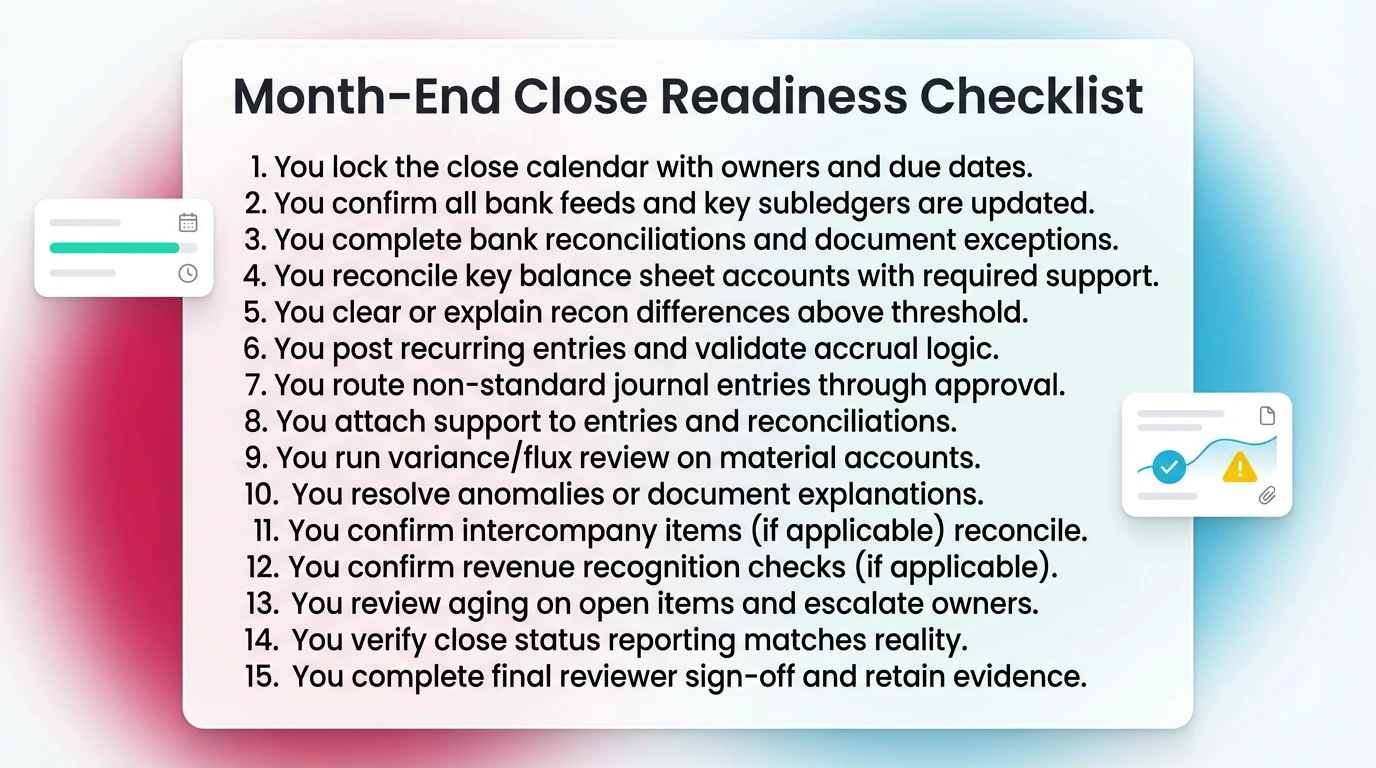
Use this as your "close readiness" baseline:
- You lock the close calendar with owners and due dates.
- You confirm all bank feeds and key subledgers are updated.
- You complete bank reconciliations and document exceptions.
- You reconcile key balance sheet accounts with required support.
- You clear or explain recon differences above threshold.
- You post recurring entries and validate accrual logic.
- You route non-standard journal entries through approval.
- You attach support to entries and reconciliations.
- You run variance/flux review on material accounts.
- You resolve anomalies or document explanations.
- You confirm intercompany items (if applicable) reconcile.
- You confirm revenue recognition checks (if applicable).
- You review aging on open items and escalate owners.
- You verify close status reporting matches reality.
- You complete final reviewer sign-off and retain evidence.
For a deeper month-end close checklist reference, see that guide.
What To Automate First (Fastest ROI)month-end close process.
Automate in this order if you want fast payoff:
- Reconciliations and exception handling (biggest time sink)
- Evidence collection (reduces rework and audit pain)
- Approvals and audit trail (reduces control risk)
- Close status reporting (reduces meetings and chase work)
You get the fastest ROI when you stop chasing support and start clearing exceptions systematically.
FAQs About Financial Close Software
What Is Financial Close Software?
Financial close software helps you complete period-end close work in a controlled, repeatable way. It centralizes close checklists, reconciliations, approvals, and supporting documentation. That makes issues easier to surface earlier, evidence easier to retrieve, and close timelines more predictable across periods and entities.
What's The Difference Between Financial Close Management Software And Financial Close Automation Software?
Financial close management software organizes the close with owners, due dates, approvals, audit trail, and status reporting. Financial close automation software reduces manual work through matching, exception workflows, reconciliation automation, and rule-based checks. Many tools blend both, but most are stronger in one direction.
Is Month-End Close Software The Same As Accounting Close Software?
In practice, yes. Month-end close software highlights the monthly workflow and coordination. Accounting close software often implies stronger controls, documentation, and reconciliation coverage. The name matters less than whether you get evidence management, approvals, reconciliation workflows, and auditability across every period.
What Features Matter Most When Choosing The Best Financial Close Software?
Prioritize reconciliation workflow and exception handling, close calendar and checklists, approvals with a clear audit trail, evidence and document management, role-based access and segregation of duties, and reliable integrations to your GL or ERP. If review issues recur, add flux analysis or anomaly detection.
How Do I Evaluate Financial Close Tools During A Pilot?
Run a 30-day pilot on a real close cycle. Test bank and balance sheet reconciliations, journal entry approvals, evidence collection, close status reporting, and integration reliability. Set success metrics upfront like fewer late adjustments, fewer reviewer escalations, and fewer hours spent chasing support.
How Long Does Financial Close Software Implementation Take?
Implementation depends on scope. Lightweight close management tools can go live in days or a few weeks. Enterprise financial close solutions often take months because integrations, controls, and change management take time. Start with one entity or client segment, standardize templates, then expand after a successful close.
What Should Buyers Expect From Financial Close Solutions In 2026?
In 2026, buyers should expect better reconciliation automation and exception workflows, stronger audit trails, and more flexible integrations. You should also expect AI-assisted review support that surfaces anomalies without replacing judgment. Security baselines are higher too, including MFA, encryption, retention controls, and detailed audit logs.
Final Guidance: What "Good" Looks Like In A Close Tool
A good close tool gives you control and clarity, not just more screens. You should feel the difference in two places: fewer late surprises and less time spent chasing evidence. If the tool cannot make those two things better, it will not change your close.
A Practical Shortlist Filter
Use this filter before you spend time on deep demos:
- Evidence is required and easy to retrieve by account and period
- Controls and approvals are role-based with a clear audit trail
- Reconciliation workflow supports exceptions, follow-up, and sign-off
- Integrations are reliable and traceable back to source
- Close visibility shows readiness, bottlenecks, and aging in one view
Conclusion
You can shortlist the right financial close tool without overcomplicating the process. Anchor on your real failure points, test tools against a real close cycle, and roll out in phases.
Use this approach:
- Map where your close actually breaks — reconciliations, approvals, evidence, or review discipline.
- Score tools using a weighted rubric against the 8 core close capabilities.
- Run a 30-day pilot on a real close cycle with defined success metrics.
- Assign one owner to maintain templates, governance, and evidence standards.
- Expand by entity or client segment only after the first cycle is stable.
If late review surprises keep showing up after close is called "done," your bottleneck is review discipline — not task volume. That is where close predictability comes from.
If you are evaluating Xenett specifically, start with a pilot and a rubric. That approach keeps the decision grounded.
Ready to close faster?
Try Xenett free →