.svg)

Close-to-Report Process: From Month-End Close to Financial Reporting

Ask questions, get summaries, or uncover key takeaways from this article.

Blog Summary / Key Takeaways
- The close to report process ends only when reporting goes out with sign-off.
- Most delays come from review and rework, not report formatting.
- A strong close to report workflow standardizes review at the account level.
- Close to report automation should automate detection and routing. Not judgment.
- Treat close-to-report as part of the financial reporting cycle. Improve it monthly.
Why “Close-to-Report” Breaks Down in Practice
The close to report process often “finishes” in the GL. However, confidence does not show up until days later. Leaders wait. Questions pile up. Adjustments keep coming.
This gap happens for one main reason. Teams close tasks. They do not close the review.
In this article, you will learn:
- How the close-to-report process works end to end.
- What “report-ready” should mean in real life.
- The controls that protect reporting quality.
- Where close to report automation delivers real ROI.
This guide fits:
- Controllers and accounting teams running recurring closes.
- Firms handling month-end close to reporting across many clients.
- Multi-entity teams that need consistency, not heroics.
What Is the Close-to-Report Process?
Close-to-report is the end-of-period workflow that turns recorded transactions into finalized financial statements and stakeholder-ready reporting through reconciliations, review, approval, and publication.
That definition matters because it includes the steps teams skip. Review. Sign-off. Publishing. Evidence. Those steps drive trust.
Close-to-report vs. record-to-report (R2R) often causes confusion. They overlap. Many teams use the terms as synonyms. However, they differ in scope.
- Record-to-report (R2R) often covers the full accounting cycle. It can include capturing entries, maintaining the GL, and reporting.
- Close-to-report focuses on the end-of-period push. It turns “posted” into “final.”
In practice, “done” should mean three things:
- Finalized balances with no open material issues.
- Reviewer sign-off on key accounts and estimates.
- Report-ready outputs packaged for decision makers.
What Are the Inputs and Outputs of Close-to-Report?
Close-to-report starts with inputs from many places. That mix creates risk. Therefore, teams need structure.
Inputs include:
- Subledgers (AR, AP, inventory, fixed assets).
- Bank feeds and cash activity.
- Accrual support from ops teams.
- Inventory and fixed asset schedules.
- Payroll summaries and benefit reports.
- Intercompany activity and allocations.
Outputs include:
- Finalized trial balance (TB).
- Financial statements (P&L, balance sheet, cash flow as needed).
- Flux or variance explanations.
- Management reporting pack and KPIs.
- Supporting schedules and close evidence.
Where Month-End Close Fits in the Financial Close Lifecycle
Month-end close is one phase in the financial close lifecycle. It is not the whole story. Close-to-report works like a lifecycle, too. It starts before day one. It ends after reports go out.
Think of financial close to report as a chain. Reporting does not “run late” on its own. Review runs late. Resolution runs late. Approvals run late. Therefore, reporting slips.
I have seen the pattern in both industry teams and firms. The close “hits day five.” Then the CFO asks two questions. The team reopens three accounts. The close was not closed.
The Financial Reporting Cycle: How Close Drives Reporting Quality
The financial reporting cycle runs as a loop: capture → close → review → report → learn → improve. If you break one link, you get the same issues every month.
Close timing affects three things that leaders feel fast.
- Decision latency. Old numbers create slow decisions.
- Credibility. Revisions and late reclasses reduce trust.
- Team load. Cleanup work burns more time than early detection.
A faster close helps only if it stays accurate. A faster close with rework just shifts pain to later in the month.
Month-End Close to Reporting: What “Report-Ready” Should Mean
“Report-ready” means the numbers can face questions. It also means you can defend material balances with support.
At minimum, month-end close to reporting should meet these conditions:
- Reconciled balance sheet accounts, with evidence.
- Stable revenue, COGS, and key expense classification.
- Documented accrual logic and key estimates.
- Clear flux explanations for material movements.
If you cannot explain a swing, you are not report-ready. If you can explain it but cannot support it, you are not report-ready.
Close-to-Report Workflow: The Core Stages
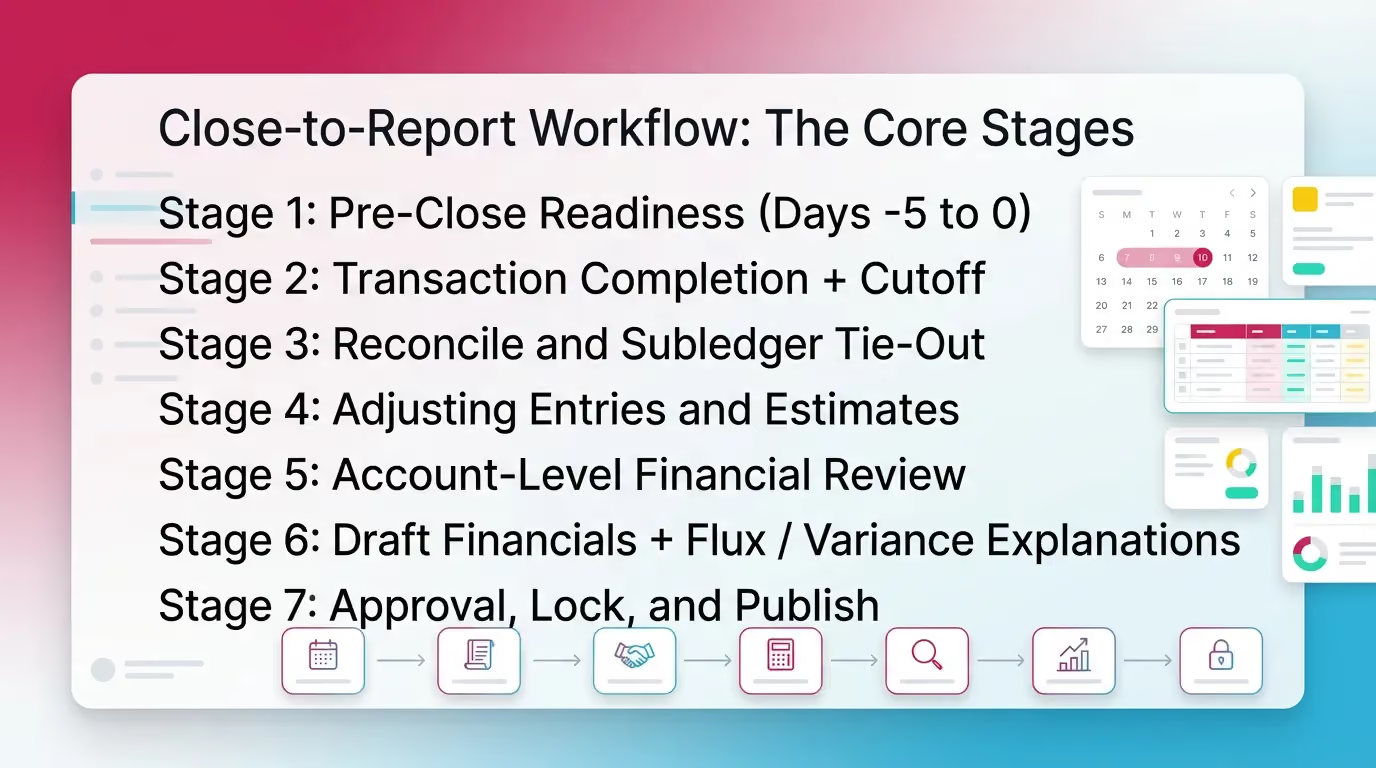
This close to report workflow breaks the work into stages. Each stage has a purpose. Each stage has risks if skipped. That clarity reduces chaos.
Teams often ask, “How do we shorten the close?” Start by making each stage explicit. Then automate handoffs and evidence capture.
Stage 1: Pre-Close Readiness (Days -5 to 0)
Pre-close readiness prevents surprises. It confirms the calendar, dependencies, and inputs before the clock starts.
Focus on:
- Close calendar and cutoffs.
- Data feeds and integrations.
- Recurring entries and allocations.
- Requests for accrual support.
Control focus: prevent late surprises. Missing bills and stale feeds cause most fire drills.
Checklist:
- Close calendar published
- Source systems synced
- Accrual inputs requested/received
- Recurring journals reviewed
- Materiality thresholds confirmed
Practical example from the field:
A multi-entity team I worked with ran payroll in two systems. One feed posted two days late. They moved the dependency deadline to day -2. Close time dropped by one day. No new software required.
Stage 2: Transaction Completion + Cutoff
Cutoff locks the period. It captures the last activity and prevents period drift.
Key actions:
- Close AP and AR windows.
- Confirm payroll timing and posting.
- Ensure revenue completeness and timing.
- Capture late expenses through accruals.
Control focus: completeness and consistency. You need the same rules every month.
Stage 3: Reconcile and Subledger Tie-Out
Reconciliations prove the balance sheet. Tie-outs confirm subledgers match the GL.
Typical accounts:
- Cash and credit cards.
- AR and allowance.
- AP and accrued expenses.
- Prepaids and other assets.
- Payroll liabilities.
- Inventory and COGS tie.
- Debt and interest.
- Intercompany and eliminations.
Control focus: evidence and reviewer sign-off. A reconciliation without review still carries risk.
For example, you can reconcile cash “to the bank” and still miss:
- Duplicate bank rules.
- Misposted refunds.
- Items stuck in clearing accounts.
Stage 4: Adjusting Entries and Estimates
Adjusting entries finalize the economics of the period. Estimates require consistency and support.
Common entries:
- Accruals and deferrals.
- Depreciation and amortization.
- Bonus and commission accruals.
- Reserves and allowances.
- Inventory adjustments.
Control focus:
- Approval paths by materiality.
- Clear support attached to the journal.
- Repeatable logic for estimates.
If you cannot repeat the estimate method next month, you will argue about it next month.
Stage 5: Account-Level Financial Review
Account-level review finds issues before reporting goes out. It also drives most rework.
Review should answer: “Do these balances make sense?” Fast.
Review both:
- P&L: classification drift, missing accruals, margin shifts.
- Balance sheet: unreconciled items, stale balances, rollforwards.
Control focus: standardized review criteria. Not reviewer memory.
In real life, the slow part often looks like this:
- Reviewer flags a large swing in travel.
- Staff searches emails for support.
- Staff realizes AP cutoff missed late expenses.
- Team posts a late accrual.
- Reviewer asks for re-review of related accounts.
That chain happens because detection came late. Therefore, “shift left” matters.
Stage 6: Draft Financials + Flux / Variance Explanations
Draft financials turn balances into a story. Flux explains the story with facts.
Build the pack:
- P&L and balance sheet.
- Cash flow, if needed.
- KPI page with definitions.
- Flux narrative tied to specific accounts.
Good flux commentary stays specific:
- “Gross margin decreased 220 bps due to mix shift in Product B.”
- “Payroll tax increased due to annual wage base reset.”
Weak commentary stays vague:
- “Expenses increased due to timing.”
Stage 7: Approval, Lock, and Publish
Approval closes the loop. Locking prevents version chaos. Publishing completes the process.
Steps:
- Route to controller or CFO for sign-off.
- Lock the period or restrict postings.
- Publish to stakeholders or clients.
- Store the reporting pack and support.
Control focus: one version of truth. One final sign-off.
Deliverables summary :
Close-to-Report Automation: What to Automate
Close to report automation should reduce repeat work without weakening controls. Automate the plumbing. Keep judgment with accountants.
A simple rule works well: don’t automate judgment.
Instead, automate detection, routing, evidence capture, and consistency.
High-ROI Automation Opportunities Across the Financial Close Lifecycle
Automate Data Collection and Standardization
Start with inputs. Most close delays start with missing support.
Automate:
- Auto-ingest support into a standard folder or system.
- Standard naming and period tagging.
- Integration checks for broken feeds.
- Alerts when data arrives late.
For example, if payroll posts late, automation should flag it. It should not “fix” payroll.
Automate Reconciliation Workflows
Reconciliation work repeats each month. The workflow should not.
Automate:
- Standard reconciliation templates by account type.
- Required fields for preparer and reviewer.
- Due dates based on close calendar.
- Exception queues for unmatched items.
- Evidence attachment and sign-off.
Do not automate the conclusion. A system can match items. It cannot decide if a recon proves the balance.
Automate Account-Level Review Checks
Review eats time when it relies on memory. Rules help.
Automate checks like:
- Flux thresholds by account.
- Unusual account combinations.
- Missing expected activity.
- Balance sheet accounts with no recon.
- Negative balances where they should not exist.
These checks work well across many entities. They also help firms train staff faster.
Automate Close Status Visibility and Bottleneck Detection
Status drives behavior. If nobody sees blockers, they grow.
Automate:
- Live dashboard by stage, account, and assignee.
- Dependency tracking across close tasks.
- Escalation when deadlines slip.
- Reporting readiness signals tied to review completion.
This is where many teams win back days. They stop asking, “Where are we?”
Automation Anti-Patterns
Avoid these mistakes. They create faster chaos.
- Automating task lists while leaving review unstructured.
- “Checklist theater.” People mark complete without evidence.
- Over-relying on variance explanations instead of fixing root cause.
- Treating reporting as the end, not the start of improvement.
Automation works only when it reinforces controls. Otherwise, it hides risk.
Controls and Reporting Accuracy: What Strong Close-to-Report Looks Like
Strong close-to-report controls create reliable reporting without slowing the team. They also support audit readiness, even if you never face an audit.
Controls that matter most:
- Standardized account-level review criteria.
- Separation of prep vs. review.
- Evidence retention for key balances and estimates.
- Change tracking on adjustments and reclasses.
If you want fewer post-close surprises, focus on the balance sheet first. Most reporting errors hide there.
Simple Control Framework for Close-to-Report (3 Layers)
Use three layers. Keep them simple.
- Prevent: pre-close readiness, cutoff discipline, completeness checks.
- Detect: flux detection, recon exceptions, missing-entry flags.
- Correct: resolution workflows, approvals, documentation, re-review.
This framework maps cleanly to the financial close lifecycle. It also scales across clients.
Month-End Close Checklist
A checklist should force the right order. Review should not sit at the end as a formality. It should drive what happens next.
Use this as a repeatable, review-first component for your CMS or close playbook.
Quick Month-End Close to Reporting Checklist
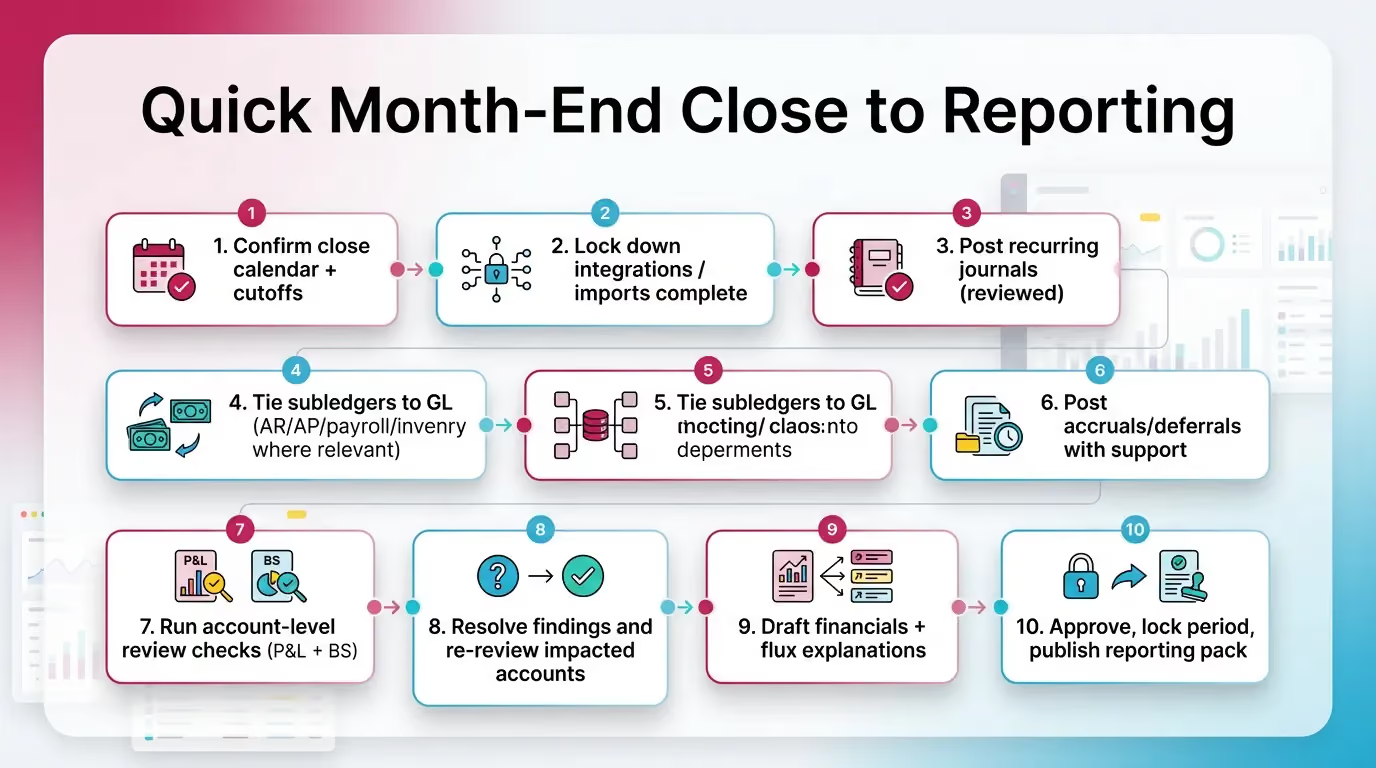
- Confirm close calendar + cutoffs
- Lock down integrations / imports complete
- Post recurring journals (reviewed)
- Reconcile cash and key clearing accounts
- Tie subledgers to GL (AR/AP/payroll/inventory where relevant)
- Post accruals/deferrals with support
- Run account-level review checks (P&L + BS)
- Resolve findings and re-review impacted accounts
- Draft financials + flux explanations
- Approve, lock period, publish reporting pack
This sequence protects month end close to reporting. It also reduces late questions.
Best Practices to Make Close-to-Report Faster Without Losing Confidence
Speed comes from fewer surprises and less rework. Not from rushing.
Use these practices:
- Standardize at the account level, not only by task.
- Define materiality and flux thresholds by entity type.
- Shift work left with pre-close readiness.
- Use exceptions-first reviews, not full manual scans.
- Enforce reviewer sign-off and evidence rules every month.
- Hold a post-close retro on the top 10 findings. Fix root causes.
A practical approach that works well in firms:
Create a “repeat offender” list by client. Track the top five issues.
Assign one owner to remove one issue each month. Close gets easier fast.
How Xenett Helps Operationalize a Review-First Close-to-Report
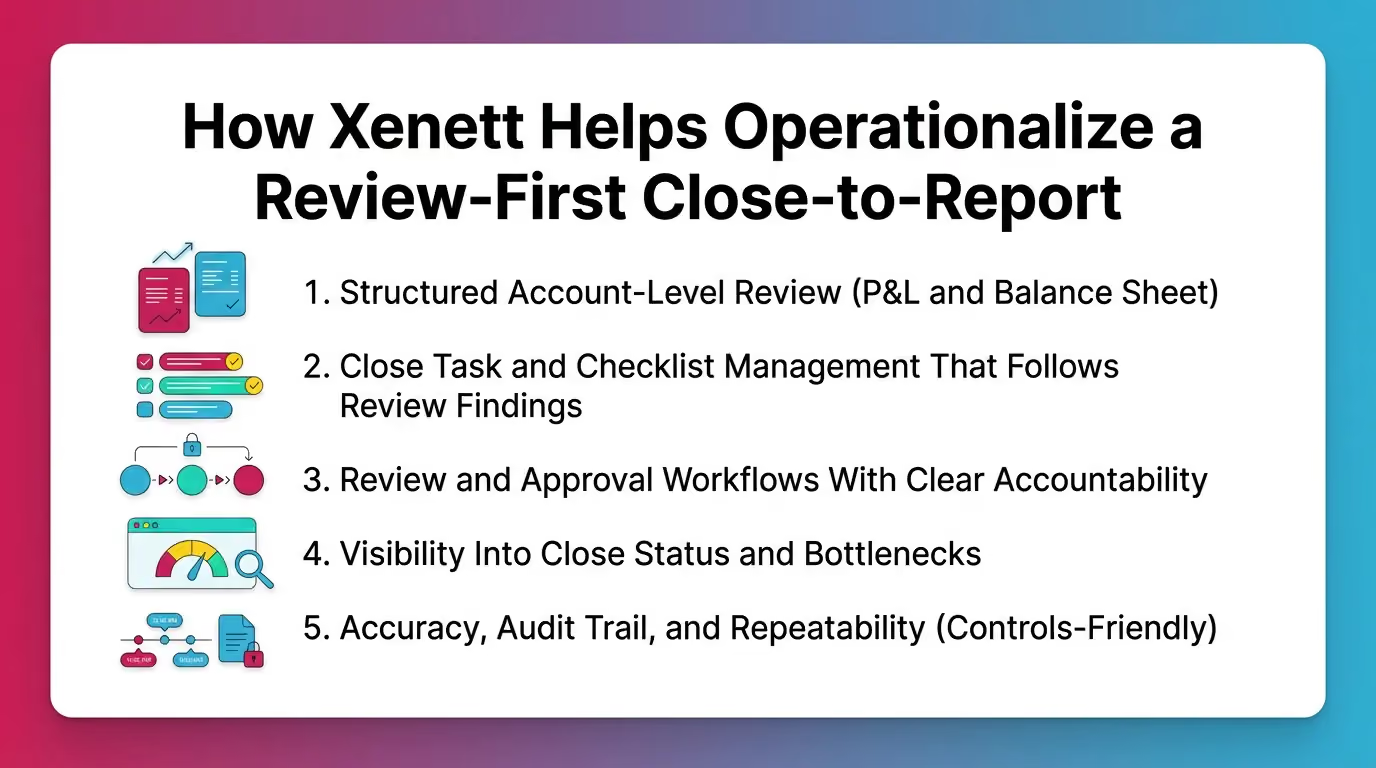
Xenett helps teams run a review-first financial close to report process. It supports consistent account review, clear ownership, and clean handoffs. It does not replace accounting judgment.
You can use Xenett as an operational layer across the close to report workflow. This matters most when you manage many entities or many clients.
Structured Account-Level Review (P&L and Balance Sheet)
Structured review standardizes quality. It reduces reviewer dependence on memory.
Xenett helps teams:
- Detect unexpected flux with consistent review logic.
- Flag missing entries and reconciliation gaps.
- Apply the same review approach across staff and entities.
This supports the financial reporting cycle because review quality drives reporting confidence.
Close Task and Checklist Management That Follows Review Findings
Teams often manage close with generic lists. However, real work starts when review finds issues.
Xenett helps by:
- Creating tasks based on review findings.
- Prioritizing work by impact and timing.
- Keeping the close calendar aligned to what remains open.
Therefore, your checklist reflects reality. Not hope.
Review and Approval Workflows With Clear Accountability
Approval should show who reviewed what, and when. It should also show what changed.
Xenett supports:
- Separation of preparation from review.
- Explicit sign-off points by account or area.
- A clearer trail of findings, resolutions, and re-review.
Important note: Xenett is not an audit tool. It does not provide audit services.
It supports accounting workflow, review, and close management.
Visibility Into Close Status and Bottlenecks
Visibility prevents last-minute pileups.
Xenett can help teams:
- See where the close is stuck by account and stage.
- Spot recurring bottlenecks across periods.
- Surface issues earlier in the close window.
This is a key lever for close to report automation. It automates awareness.
FAQ: Close-to-Report Process and Automation
What are the steps in the close-to-report process?
Close-to-report typically includes pre-close readiness, cutoff, reconciliations, adjusting entries, account-level review, drafting financials with flux explanations, and final approval/lock/publish.
These steps ensure the period ends with sign-off and report-ready outputs.
What is close-to-report automation?
Close-to-report automation uses systems to standardize and speed up close activities—like reconciliations, review checks, approvals, and status tracking—while keeping accounting judgment with the finance team.
Automation should strengthen controls, not bypass them.
How does month-end close feed into financial reporting?
Month-end close produces finalized, reviewed account balances. Financial reporting relies on those balances to generate accurate statements, variance explanations, and decision-ready reporting packs.
If review stays weak, reporting becomes guesswork.
How long should a month-end close take?
Many teams target 3–5 business days. Timing depends on volume and complexity.
However, review structure drives timing more than report formatting.
What’s the difference between a close process and a close-to-report workflow?
A close process finalizes the accounting records for the period. A close-to-report workflow includes that work plus review, approvals, documentation, and publishing the final reports.
Close-to-report ends only when stakeholders receive trusted reporting.
What are the biggest causes of reporting errors after close?
Common causes include unreconciled balance sheet accounts, late adjustments, inconsistent review standards, poor cutoff discipline, and missing documentation for estimates and accruals.
Most errors trace back to weak detection and late correction.
What should not be automated in close-to-report?
Don’t automate accounting judgment, like deciding the right accrual amount.
Automate detection, routing, evidence collection, and consistency. Then let pros decide.
Conclusion
The close to report process works best when you treat it as a system. Not a sprint.
Build the close to report workflow around account-level review. Then automate the repeat work.
If you want to tighten month end close to reporting, start with two moves.
Standardize review criteria. Then add close to report automation for routing and evidence.
Next step: map your last close to the seven stages above. Identify the longest wait.
Then redesign that stage first. You will feel the improvement in the next cycle.


.avif)