.svg)

Document Management Software for Accountants: Top Picks + Checklist (2026)
.jpg)
Ask questions, get summaries, or uncover key takeaways from this article.
Blog Summary / Key Takeaways
- Document management software for accountants goes beyond file storage — the right system enforces consistent structure, role-based permissions, audit trails, and retention controls so nothing gets lost, mishandled, or discovered too late.
- The most common source of document chaos is mixing source documents, workpapers, and deliverables in the same folders with inconsistent naming — a problem that compounds fast when multiple staff touch the same client files.
- Choosing the right tool depends on your primary pain point — portal-first tax intake, team collaboration, simple lightweight storage, or review evidence tied to close all point to different tools.
- Client portal adoption is the single biggest implementation risk — a portal that clients refuse to use breaks the entire intake workflow, so testing adoption early matters more than feature count.
- Xenett goes beyond document storage by tying supporting evidence directly to account-level review findings, so documents are organized around what needs to be resolved — not just where files happen to live.
Document Management Software for Accountants: Top Picks + Checklist (2026)
You know the scavenger hunt. A W-9 is in email. Bank statements are in a shared drive. The signed engagement letter is in a portal. And the "final" workpaper is labeled "FINAL_v7_reallyfinal.xlsx."
That mess costs you time. It also creates risk. You lose track of what's missing. You resend requests. You can't prove who changed what. And during close or tax season, small gaps turn into late nights.
This guide gives you a tight shortlist of document management software for accountants. It also gives you a buyer's checklist and an implementation plan you can use. So you can pick a system that makes client documents predictable, not stressful.
Quick Answer:
The best document management software for accountants combines secure storage with governance: role-based access, audit trails, OCR search, retention controls, and a client portal for uploads and e-sign. Cloud storage alone handles files, but it usually doesn't enforce consistent structure, permissions, and "who did what when" across clients, staff, and busy seasons.
Top Document Management Software for Accountants (Top Picks at a Glance)
The best tools for accountants are the ones that reduce document chasing and make review evidence easy to find. Start with a shortlist that matches your workflow, then validate security, portal usability, search, retention, and integrations.
Here are the top picks at a glance, with pricing models normalized so you can compare faster.
Pricing and features change. Confirm details on vendor sites. Pricing notes below reflect publicly available info as of March 2026.
Key takeaway: "Best" depends on whether your pain is intake, storage governance, or close evidence tied to review.
What Is Document Management Software for Accountants? (Definition + What It Replaces)
Document management software for accountants is the system you use to control, find, share, and retain client files without relying on inboxes and ad-hoc folder rules. It replaces the patchwork of shared drives, email attachments, and "ask Bob where he saved it."
Document management software for accountants is defined as a governed system that stores client documents in a consistent structure, controls access with permissions, tracks changes with audit history, and supports retention rules so you can prove what happened and find evidence fast.
Definition box:
- Stores and organizes client files in a consistent structure
- Controls access (roles and permissions) and secures sharing
- Tracks versions, audit history, and retention policies
What it replaces in real life:
- Email as a file cabinet (and the "resend it" loop)
- Shared drives with inconsistent client folders
- USB or desktop "temporary" folders that become permanent
- Manual trackers for "what's missing" during intake
DMS vs Cloud Storage vs Practice Tools (Where Each Fits)
A cloud drive like Google Drive or Dropbox can store and sync files well. However, most accounting firms need more than storage when multiple staff touch sensitive client docs.
Use this mental model:
- Cloud storage: great for collaboration and syncing.
- DMS: adds governance, auditability, and controlled sharing at scale.
- Practice tools: manage projects and communications. Some include doc features, but governance depth varies.
If you manage many clients, you want the "rules of the road" enforced by the system. You do not want them enforced by tribal knowledge.
Document Management for Accounting Firms: Buyer's Checklist (What Actually Matters)
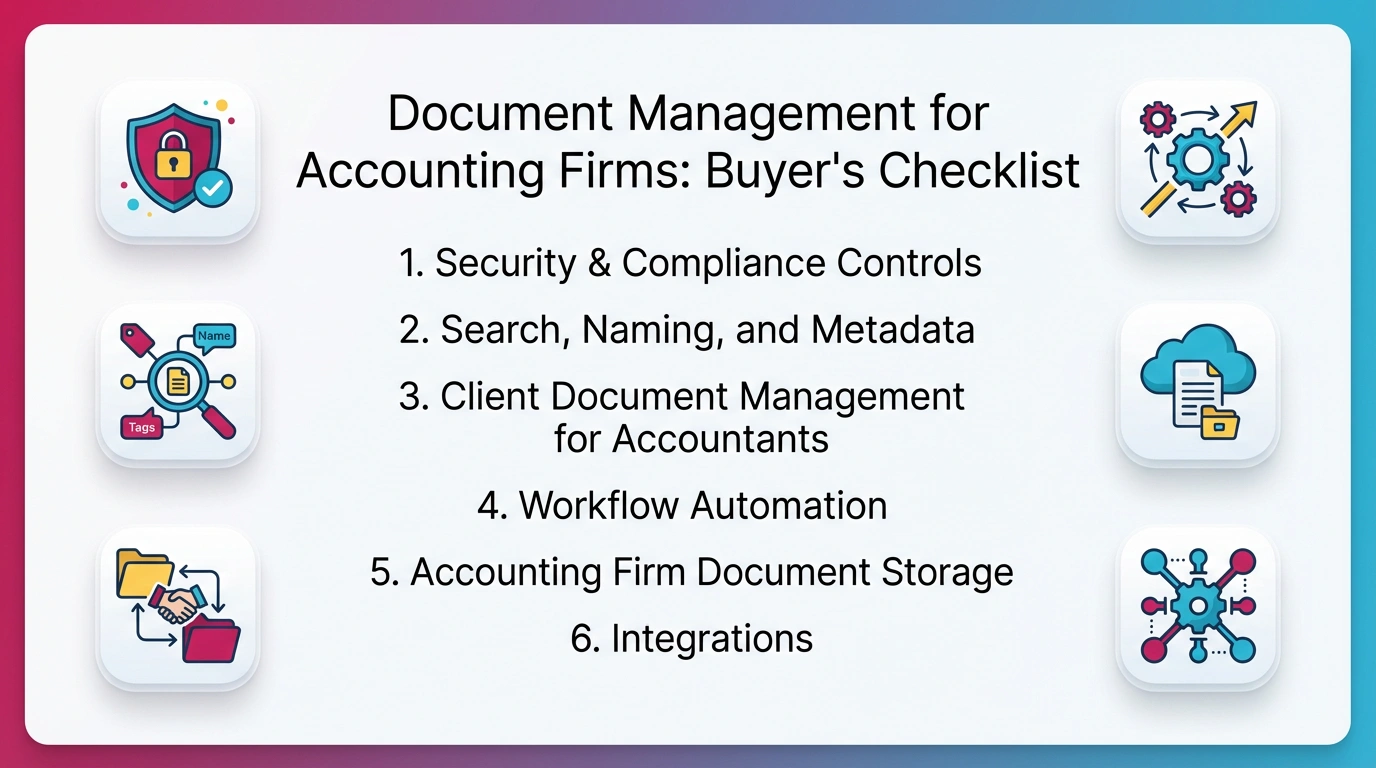
The right buying criteria are simple: security, fast retrieval, clean client intake, and retention. If a tool looks polished but fails on those basics, you will feel it in March and at every month-end close.
Use this checklist to evaluate document management for accounting firms. It focuses on what breaks in real workflows.
Security & Compliance Controls (Minimum Bar)
You need more than "secure cloud." You need controls you can explain to a client and defend in an incident review.
Minimum bar:
- MFA and ideally SSO for staff access
- Role-based access control (RBAC) by client and folder
- Encryption in transit and at rest
- Audit logs that show view, edit, download, and delete events
- Device and session controls (timeouts, IP restrictions if needed)
- Data residency options if you serve regulated or global clients
Also ask one question early: "Can we get a SOC 2 report or equivalent?" Many firms use SOC 2 as a baseline trust signal.
Search, Naming, and Metadata (Finding Files Under Pressure)
Search is what you feel when you are on a client call and need a document in 20 seconds.
Look for:
- OCR and full-text search for PDFs and scans
- Tags and metadata fields (client, year, entity, doc type)
- Saved searches for common requests (e.g., "2025 bank statements")
- Folder templates so every client looks the same
- Version history so you stop guessing which file is current
Client Document Management for Accountants (Portal + Intake)
A portal matters because email is the main source of leaks and mix-ups.
Portal checklist:
- Secure upload with clear file request lists
- Automated reminders and status tracking ("requested," "received," "needs review")
- E-sign support or easy integration with e-sign
- Mobile upload that clients actually use
- Client authentication and access expiration
- Audit detail: who uploaded what and when
Workflow Automation (Chasing Docs Without Email)
Automation should reduce follow-ups, not add complexity.
Look for:
- Request statuses and completeness checks
- Automatic reminders based on due dates
- Approvals and review steps for received docs
- Routing rules (for example, send bank statements to bookkeeping, send K-1s to tax)
If you want more context on workflow automation in accounting, see this guide.
Accounting Firm Document Storage (Structure + Retention)
A good system supports a structure you can repeat across every client.
You want:
- Client → Year → Entity structure
- Clear separation: source docs vs workpapers vs deliverables
- Retention schedules by doc type
- Legal hold basics if you deal with disputes or audits
- Deletion controls so docs do not vanish without a trace
Integrations (QBO/Xero + Drive/OneDrive + E-Sign)
Integrations prevent double work. They also reduce "shadow systems" that staff create to get work done.
Check fit with:
- QBO and Xero ecosystem needs
- Microsoft 365 or Google Workspace storage sync
- E-sign tools
- Email capture, if you need to retain client communications
If QuickBooks integrations are central to your stack, start here.
Copy/paste: Accounting DMS Requirements Checklist
- Security: MFA/SSO, RBAC, encryption, audit logs
- Portal: secure upload, requests, reminders, e-sign support
- Search/OCR: full-text search, tags, templates, version history
- Templates + retention: consistent folders, retention schedules
- Integrations: QBO/Xero, Drive/OneDrive, e-sign, email capture if needed
Tax Document Collection Workflow (Step-by-Step)
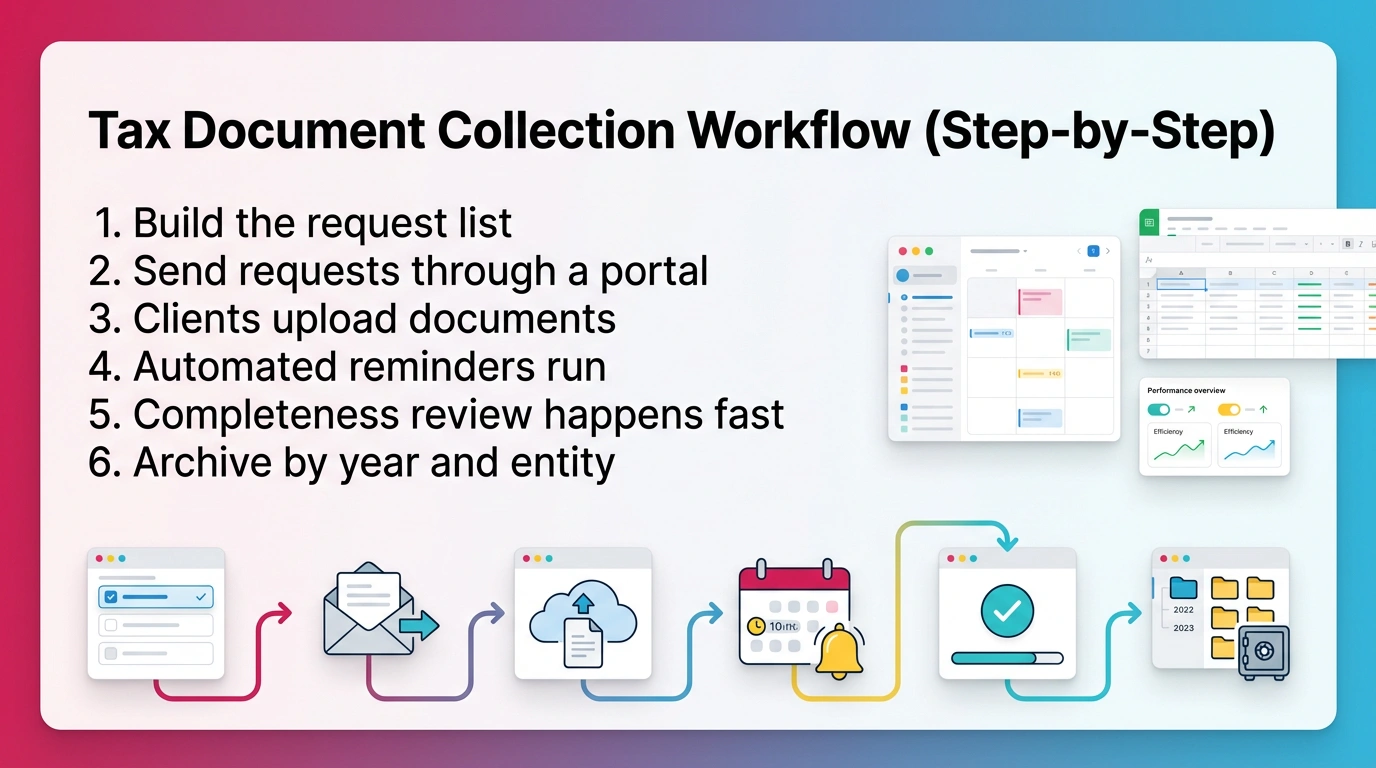
Tax document management software works best when it runs a predictable intake process. If your intake depends on "please email me everything," you will miss items and you will find out late.
Use this 6-step flow as your baseline. It works for individual and business returns, and it scales when you add staff.
The 6-Step Tax Intake Flow
- Build the request list
Include common items: W-2s, 1099s, K-1s, mortgage interest, charity receipts, organizers, prior-year return, and W-9s for vendors. - Send requests through a portal
Use structured requests, not a long email. Assign due dates. - Clients upload documents
Require portal upload for anything with SSNs or EINs. Reduce email attachments. - Automated reminders run
Set reminders at fixed intervals. Stop manually chasing. - Completeness review happens fast
Check what is missing before prep starts. Flag unreadable scans early. - Archive by year and entity
Store final deliverables and source docs separately. Lock retention rules.
Why this matters:
- You cut rework because you review completeness before prep.
- You reduce extensions caused by missing documents.
- You keep a clean audit trail of what the client provided and when.
If your firm is tax-heavy, you should weight portal adoption higher than almost any other feature. A portal that clients refuse to use will break the whole workflow.
How We Evaluated These Tools (Transparency for Buyers)
You should trust a comparison more when you can see the criteria. The tools below serve different needs, so we evaluated them using accounting-specific requirements, not generic DMS checklists.
We focused on five outcomes: secure handling of sensitive files, faster retrieval, fewer missing documents, clean audit history, and low-friction adoption for clients and staff.
Evaluation Criteria (Scoring Categories)
We used these categories to compare tools:
- Security and governance (RBAC, audit logs, SSO/MFA options)
- Portal usability (client adoption, upload friction, mobile experience)
- Automation (requests, reminders, routing, approvals)
- Search and OCR (full-text search, metadata, saved searches)
- Retention and versioning (history, retention rules, deletion controls)
- Integrations (QBO/Xero, Drive/OneDrive, e-sign, email capture)
- Admin controls (templates, permissions at scale, reporting)
- Onboarding and support (implementation help, documentation)
- Pricing clarity (predictability, add-ons, contract terms)
Pricing Notes (Date-Stamped)
Pricing reflects publicly available information as of March 2026. Vendors change packaging often. Confirm before you sign, especially for annual commitments and implementation fees.
If pricing feels hard to explain to your team, treat that as a signal. Complex pricing often predicts complex administration.
Reviews: Best Document Management Software for Bookkeepers & Accountants
The best document management for bookkeepers and accountants depends on whether you need intake, governance, collaboration, or review evidence for close. The reviews below follow the same format so you can scan for dealbreakers.
Xenett — Best for Review-Driven Close Discipline + Controlled Client Files
Xenett fits best when your core pain is review integrity during close, not just file storage. It is a financial review engine first, with supporting document handling tied to review findings and resolution.
Best for: Firms that need consistent account-level review and close evidence across many clients.
Standout: Review findings drive the work, and documents attach as evidence to close items.
Key document management features:
- Structured client file handling for close support
- Folder consistency across clients
- Evidence attachment to resolution work
Client portal & intake:
- Secure portal for exchanging client files
- Clear visibility into what was shared and received
Security & compliance notes:
- Governance features matter most when you standardize across staff
- Ask about audit history depth and access control options
Integrations:
- QuickBooks Online connectivity for review context
Read more on review discipline.
For more month-end close context, see this guide.
Limitations / dealbreakers to know:
- If you only need a basic drive replacement, you may not use the review depth.
- Setup takes time if you want custom review checks and consistent standards.
Pricing:
- Essentials: $6/month per client
- Comprehensive Close: $9/month per client
- Add-ons may apply for bulk data tools
Who should choose it:
- You manage 10–500+ clients and review quality varies by reviewer.
- You want evidence tied to findings, not scattered in folders.
Who shouldn't:
- You want a simple "drop files here" storage tool only.
- You are not ready to standardize review across clients.
Bottom line:
Xenett helps when a DMS solves storage but your review still breaks under volume. It makes findings visible and keeps supporting documents tied to resolution.
Canopy — Best for Firms Wanting Document Storage + Client Engagement Modules
Canopy fits firms that want document storage plus client engagement modules in one ecosystem. It can reduce tool sprawl, but it can also feel heavy if your needs are narrow.
Best for: Larger firms that want portal, e-sign, and engagement features with document storage.
Standout: Modular client engagement platform with document management add-on.
Key document management features:
- Document storage with audit trail support
- Permission controls by folder and user
- Desktop sync options (plan-dependent)
Client portal & intake:
- Secure portal for uploads and downloads
- E-sign capability in-platform
- Good for centralized client comms, if clients adopt it
Security & compliance notes:
- Confirm MFA, audit event depth, and admin controls
- Review contract terms for data retention and offboarding
Integrations:
- QuickBooks integration exists, but validate sync behavior for your workflow
- Common firm tools vary by module and plan
Limitations / dealbreakers to know:
- Complexity can slow onboarding for smaller teams.
- Pricing can become expensive as you add modules and users.
- Annual contracts can reduce flexibility.
Pricing:
- Base platform: $150/month (unlimited users)
- Document management module: $36/user/month
- Often sold with annual commitment
Who should choose it:
- You want a broad engagement platform, not just a DMS.
- You can commit to onboarding and training.
Who shouldn't:
- You want a lightweight tool with fast rollout.
- You dislike modular pricing and long contracts.
Bottom line:
Canopy can work well when you want a broad client engagement stack. Validate usability with real clients before committing.
Financial Cents — Best for Simple Ops + Lightweight Client Collaboration
Financial Cents fits small teams that want straightforward document handling and basic automation. It is often easier to roll out than heavier platforms.
Best for: Small to mid-sized firms that want simple workflows and client collaboration.
Standout: Clean interface and easy setup.
Key document management features:
- Central document storage tied to client work
- Simple organization and retrieval
- Basic workflow automation
Client portal & intake:
- Secure portal for uploads and downloads
- Useful for routine monthly items like statements and receipts
Security & compliance notes:
- Confirm RBAC options and audit trail depth
- Make sure permissions match your staff structure
Integrations:
- Some plans include integrations with common storage tools
- Validate your QBO/Xero needs during trial
Limitations / dealbreakers to know:
- Customization can feel limited if you run complex workflows.
- Portal design may feel basic for client-facing polish.
- No dedicated mobile app can reduce client upload ease.
Pricing:
- Solo: $9/month (annual) or $19/month (monthly)
- Team: $39/user/month (annual) or $49/month (monthly)
- Scale: $59/user/month (annual) or $69/month (monthly)
Who should choose it:
- You want a simple system and quick onboarding.
- You do not need deep governance controls.
Who shouldn't:
- You need advanced retention controls and complex permissions.
- You want a highly customizable portal experience.
Bottom line:
Financial Cents is a practical option when simplicity beats features. It can reduce chaos fast, but it may not scale for complex governance needs.
Karbon — Best for Team Collaboration (Document Storage as a Supporting Layer)
Karbon fits firms that run on team visibility and shared work. Document storage exists, but the core value is collaboration and workflow tracking.
Best for: Teams that need strong internal coordination and visibility across client work.
Standout: Email and work items linked in one place.
Key document management features:
- Document storage connected to work items
- Shared workspaces for team access
- Templates for recurring processes
Client portal & intake:
- Client interaction depends on your setup and workflows
- Evaluate how clients share files compared to portal-first tools
Security & compliance notes:
- Confirm how audit history applies to documents vs work items
- Review admin controls for permissions at scale
Integrations:
- Common firm tools can integrate, often plan-dependent
- Validate storage integrations if you rely on OneDrive or Dropbox
Limitations / dealbreakers to know:
- Setup can take time if you want a clean workflow model.
- If you need a specialized DMS, Karbon may feel limited without add-ons.
- Per-user pricing can add up.
Pricing:
- Team: $59/user/month billed annually ($79 monthly)
- Business: $89/user/month billed annually ($99 monthly)
- Enterprise: custom
Who should choose it:
- You run multi-person workflows and need strong internal clarity.
- Email-based work tracking is a major pain for you.
Who shouldn't:
- You want a portal-first intake system for tax.
- You want deep DMS governance as the primary focus.
Bottom line:
Karbon is strong when collaboration drives results. Treat document management as a supporting layer, not the main system.
TaxDome — Best for Tax Firms Centering Work Inside a Client Portal (Tax Document Management Software)
TaxDome fits portal-first tax and accounting firms that want intake, e-sign, and document exchange inside one client hub. It is often the first choice when tax document management software is the main need.
Best for: Tax-heavy firms that want clients working inside a portal.
Standout: Portal-centered intake with unlimited storage and e-sign.
Key document management features:
- Unlimited document storage
- Folder templates for consistent structure
- Built-in PDF editing for quick annotation
Client portal & intake:
- Strong portal for upload, download, and e-sign
- Automation supports routing and reminders
- Works best when clients commit to portal use
Security & compliance notes:
- Validate MFA options, audit trail depth, and permission structure
- Confirm offboarding and retention expectations
Integrations:
- Evaluate your existing stack and what you can replace
- Check how it fits with your tax software and bookkeeping tools
Limitations / dealbreakers to know:
- Setup takes time if you have many workflows.
- Automation may feel rigid if you want highly customized comms.
- Portal resistance from clients can slow adoption.
Pricing:
- 1-year: $800/user/year
- Multi-year discounts available
- Seasonal staff pricing available
Who should choose it:
- You need predictable tax intake and e-sign in one portal.
- You want to standardize how clients send documents.
Who shouldn't:
- Your clients refuse portals and insist on email.
- You want a lightweight add-on, not a full platform shift.
Bottom line:
TaxDome is a strong portal-first option. Your success depends on client adoption and clean setup.
Comparison Tables (Fast Shortlisting)
Comparison tables help you decide quickly, but only if the columns match accounting reality. The tables below focus on OCR/search, retention, security controls, portal adoption, and automation.
Feature Comparison (Accounting-Specific)
This table answers: "Will this tool still work when you have 50 clients and three staff touching the same files?"
Note: Always confirm OCR and audit trail details in a live demo. Many vendors use similar language but differ in "what events are logged."
Pricing Comparison (Normalize Units)
This table answers: "How does pricing scale when you add staff or clients?"
Best Fit by Firm Type (Decision Table)
This table answers: "What fits your firm size and service mix?"
Implementation Guide: Moving From Shared Drives to a DMS (What Breaks + How to Avoid It)
Most DMS migrations fail for one reason: firms move messy folders as-is and hope the tool fixes behavior. The tool will not fix behavior. A clean structure and permissions model fixes behavior.
Use this implementation plan to move from shared drives to a DMS without breaking client work.
Migration Checklist (90-Minute Planning Session)

Start with a short planning session before you migrate a single file.
- Inventory what you have
List current storage locations. Include drives, portals, and inboxes. - Define a folder template
Standardize client → year → entity. Add subfolders for source docs, workpapers, deliverables. - Set a permission model
Define staff roles. Decide who can share externally. Decide who can delete. - Define retention rules
Set retention by doc type. Decide how you handle deletions and legal holds. - Set naming conventions
Use Client–Year–Doc Type. Keep it boring and consistent. - Choose a pilot group
Pick 5–10 clients. Include one "messy" client on purpose. - Migrate forward, not backward
Import what you will govern. Do not move old clutter unless you have a reason.
If you want workflow context for accounting teams, see this guide.
Client Portal Rollout Plan (Reduce Pushback)
Clients push back when you surprise them. Roll out in phases.
- Start with new requests only
Do not force clients to re-upload old documents. - Send a one-page "how to upload" guide
Keep it short. Include screenshots. - Give a clear deadline
For example, "Upload by the 10th for month-end close." - Keep a fallback path for exceptions
Some clients will not comply at first. Plan for it without breaking the process. - Track adoption
If 20% of clients generate 80% of exceptions, focus there.
Ongoing Governance (Monthly/Quarterly)
Governance is a habit.
Monthly:
- Spot-check audit logs for unusual access patterns
- Review external shares and expire old links
Quarterly:
- Run an offboarding check for former staff
- Review permission groups
- Confirm retention rules still match your services
A DMS only stays clean if you maintain it. Otherwise, it becomes another messy drive.
Best Practices for Document Management in Accounting (That Reduce Rework)
Good document management reduces rework by making evidence easy to find and hard to misplace. You do not need a complex system. You need a consistent one that your team follows under pressure.
Standardize Naming Conventions (Client–Year–Doc Type)
Use a naming format that works for every service line.
Example:
- AcmeCo_2025_BankStmt_01.pdf
- AcmeCo_2025_W9_VendorName.pdf
- AcmeCo_2025_TaxOrganizer_Signed.pdf
Keep names short. Avoid personal initials. Avoid "final."
Separate Source Documents vs Workpapers vs Deliverables
Mixing these creates confusion and version problems.
Use three buckets:
- Source documents: what the client provides
- Workpapers: your internal support and analysis
- Deliverables: what you send back (returns, reports, summaries)
This separation makes reviews faster and reduces accidental sharing of internal files.
Build a Recurring "PBC + Close Evidence Pack" Each Period
A close evidence pack helps when you standardize it.
Each month, store:
- Bank statements and recs
- Key reconciliations and support
- Approval evidence if you require sign-off
- Notes tied to unusual account behavior
This matters because evidence packs only help if they support consistent review. If your team cannot find support for a balance sheet account quickly, close gets slower and risk rises.
How Xenett Can Help (When You Need More Review Discipline)
A DMS can fix storage. It cannot force consistent financial review across clients and reviewers. If your close still breaks because findings show up late or reviewers use different standards, you need review discipline, not another folder structure.
When a DMS Solves Storage, But Review Still Breaks
These are the common failure points:
- Support exists, but nobody can link it to the account question.
- Issues are discovered late, after work is "done."
- Reviewer standards vary by person, not by system.
- Reconciliations exist, but evidence is inconsistent across clients.
This is why "we have a portal" does not automatically mean "we have a controlled close."
What Xenett Adds (Review-First, Then Supporting Documents)
Xenett starts with account-level review across the P&L and balance sheet. It surfaces anomalies, missing entries, and reconciliation gaps as findings. Then you resolve those findings and attach supporting documents as evidence.
That ordering matters. You review first. You organize resolution work second. You keep documents tied to the specific finding.
Xenett is AI-assisted, not AI-led. It can help reduce setup friction and support interpretation. It does not replace accounting judgment.
If you want deeper detail on review workflows, see review discipline.
"QuickBooks-Only" Limitations (Where It Can Be Insufficient)
QuickBooks Online is the ledger. It does not enforce firm-wide review standards. It also does not guarantee consistent evidence handling across clients.
When you manage 10 to 500+ clients, review consistency becomes a system problem. You need a way to standardize what "reviewed" means and keep evidence tied to outcomes, not buried in folders.
Sign up for a 14-day free trial.
FAQ: Document Management Software for Accountants
What Is the Best Document Management Software for Accountants?
The best document management software for accountants depends on your workflow. Prioritize secure storage with audit trails, OCR search, retention controls, and a client portal for uploads and e-sign. For recurring close and tax intake, choose tools that reduce document chasing and show what's missing without email threads.
What Features Should Accounting Document Management Software Include?
Accounting document management software should include role-based access, MFA or SSO, encryption, audit trails, version history, and OCR or full-text search. If you work with clients, add a portal for secure uploads, document requests with reminders, and clear sharing permissions so staff can deliver files without downloading and re-sending attachments.
Is Google Drive or Dropbox Enough for Document Management for Accounting Firms?
Google Drive or Dropbox can work for storage and collaboration, but they are not full document management for accounting firms. A true DMS adds governance: structured permissions, audit logs, retention policies, consistent templates, and controlled client access. Those controls matter when multiple staff touch the same client files and you need proof of activity.
What Is Tax Document Management Software, and Who Needs It?
Tax document management software is built around collecting and organizing tax-season files like W-2s, 1099s, K-1s, receipts, and organizers. It uses secure requests, portal uploads, reminders, and e-sign to improve completeness. Tax-heavy firms benefit most because intake quality directly drives turnaround time, extensions, and client experience.
How Should an Accounting Firm Structure Client Document Storage?
A practical accounting firm document storage structure separates by client, then year, then entity. Within each, split into source documents, workpapers, and deliverables. Use consistent naming conventions and retention rules. This structure makes it easier to find evidence during close, respond to notices, and answer year-end questions without rework.
What Is the Best Document Management for Bookkeepers Managing Many Clients?
For bookkeepers, the best document management system makes monthly handling predictable. Look for standardized folder templates, fast search, and a client portal for statements and receipts. Integrations with your stack matter more than advanced features. Make sure the tool supports consistent permissions so staff can collaborate without creating duplicate files.
How Do Accountants Share Documents Securely With Clients?
Accountants should share documents through a secure client portal with authenticated access, clear upload and download permissions, and audit trails. Portals reduce the risk of mis-sent email attachments and create a record of who provided what and when. This matters most during tax season and when you need evidence tied to close review steps.
How Long Does It Take to Migrate From a Shared Drive to a DMS?
Most firms can plan a clean migration in 60–90 minutes, covering folder templates, permissions, naming conventions, and retention rules. Then run a pilot for 2–4 weeks before migrating all clients. The biggest mistake is migrating messy folders as-is. Standardize first, then import only what you will govern going forward.
Conclusion
Choose the System That Makes Client Docs Predictable.
The best document management software for accountants makes documents easy to request, easy to find, and hard to mishandle. It also fits how your firm actually works during close and tax season.
Use this simple starting point:
- If you run portal-first tax intake, start with TaxDome.
- If you want simple collaboration with basic governance, start with Financial Cents or Canopy (depending on scale).
- If your main issue is review-driven close discipline across many clients, start with Xenett.
You do not need more tools. You need fewer surprises.
Ready to close faster?
Try Xenett free →


