
.svg)

The Best Accounting Automation Software in 2026
.jpg)
Ask questions, get summaries, or uncover key takeaways from this article.
Blog Summary / Key Takeaways
- Accounting automation software reduces manual work in bookkeeping, close, review, billing, and client communication
- The market splits into two categories: GL-level automation (transaction coding, bank feeds) and workflow automation (task routing, handoffs, status tracking)
- Most firms need both layers, often from different tools
- The right choice depends on which part of your workflow is costing you the most time
- Xenett covers the workflow automation layer with purpose-built tools for bookkeeping and CAS firms
"Accounting automation software" means different things depending on who is saying it.
To a software vendor, it means their product. To a bookkeeper, it might mean auto-categorization in QuickBooks. To a firm owner, it probably means not spending three hours a month chasing clients for bank statements.
All of those are real problems. Not all automation tools solve all of them.
This guide breaks down the accounting automation software market by what each tool actually automates, who it is for, and what it does not cover.
What Does Accounting Automation Software Actually Automate?
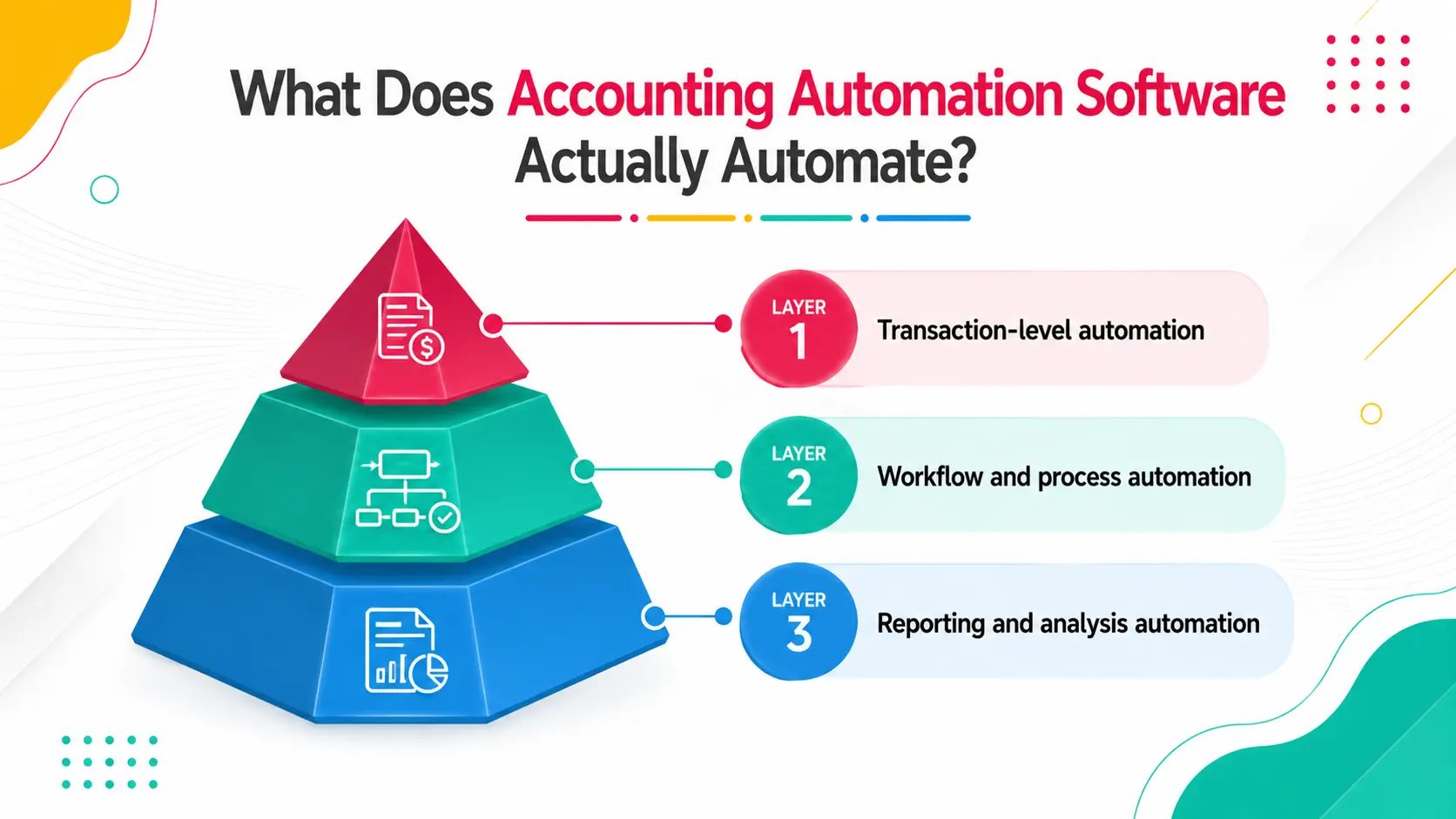
The term is broad. Here is how to think about it in layers.
Layer 1: Transaction-level automation. This is what QBO, Xero, and tools like Botkeeper and AutoEntry do. Bank feeds pull transactions automatically. Rules categorize recurring transactions. AI suggests coding for uncategorized items. This layer automates the data entry side of bookkeeping.
Layer 2: Workflow and process automation. This is what practice management and workflow tools do. Recurring tasks generate on schedule. Review handoffs trigger automatically. Document requests go out to clients and remind them. Status is tracked without manual check-ins. This layer automates the coordination side of running the firm.
Layer 3: Reporting and analysis automation. This is what tools like Fathom, LiveFlow, and Syft automate. Financial reports are generated and formatted automatically from the GL. Management reporting packages are built without manual spreadsheet work.
Most firms need automation across all three layers. The tools that cover each layer are mostly different. The mistake is expecting one tool to do everything.
The Accounting Automation Software Landscape in 2026
Here is a breakdown of the leading tools by category.
Here is a breakdown of the leading tools by category.No single tool covers all three layers. A typical well-automated bookkeeping firm runs QBO or Xero at the GL layer, Xenett at the workflow layer, and a reporting tool like Fathom or LiveFlow at the reporting layer.
GL-Level Automation vs. Workflow Automation
This is the distinction that most firm owners miss when evaluating tools.
If your biggest time loss is transaction coding and data entry, GL automation is where to invest first.
If your biggest time loss is review lag, document chasing, and status tracking, workflow automation is where to invest.
Most established firms have already addressed the GL layer through QBO or Xero. The workflow layer is where the remaining inefficiency lives.
Tool-by-Tool Breakdown
Xenett
Xenett is purpose-built for bookkeeping and CAS firm workflow automation. The core product is organized around how accounting work flows through a firm from recurring task creation through close, review, and delivery.
Standout features are the Bookkeeping Dashboard and Close Dashboard: firm-level views that give partners and managers real-time visibility across all clients without manual check-ins. Review workflows are structured with preparer, reviewer, and partner stages and comments tied to work items.
Firms using Xenett consolidate from an average of four tools to one and report 70% less review time and 3x faster close cycles.
Best for: Bookkeeping firms, CAS practices, and small-to-mid CPA firms with recurring client work.
What it does not do: GL transaction automation, reporting and analysis.
QuickBooks Online with Automation Features
QBO's automation capabilities have expanded significantly. Bank feeds, auto-categorization rules, recurring transactions, automatic payment reminders, and smart invoicing all reduce manual entry time.
For firms managing QBO-based clients, these features are table stakes. The limitation is that QBO automates at the transaction level it does not automate the workflow of the firm that manages those transactions.
Best for: Any firm managing clients on QBO.
What it does not do: Review workflows, recurring task management, close dashboards, or status tracking.
Botkeeper
Botkeeper uses AI and machine learning to automate bookkeeping categorization and review at scale. It pulls transactions, applies coding, flags exceptions for human review, and produces reconciliation-ready books.
It is designed for high-volume bookkeeping firms handling large numbers of clients with similar transaction types. The setup and implementation is more complex than a standard workflow tool.
Best for: Bookkeeping firms with high transaction volume and standardized client profiles.
What it does not do: Workflow automation, review handoffs, close dashboards, or client portals.
Karbon
Karbon is a practice management and workflow tool built around email threading. Its differentiator is a shared team inbox that connects client emails to work items. It also has solid recurring task management and a well-designed timeline view.
It is better suited to mid-size and larger CPA firms with high email volume and complex multi-service workflows. It is more expensive and has a steeper learning curve than most alternatives.
Best for: Mid-size to large CPA firms with multiple service lines and significant email-based client communication.
What it does not do: GL automation, close dashboards, bookkeeping-specific dashboards.
Fathom
Fathom automates financial reporting and analysis. It connects to QBO or Xero and builds management reporting packages, KPI dashboards, and variance analysis automatically. For firms offering advisory or CFO services, it eliminates the manual spreadsheet work of building monthly reports.
Best for: Firms offering advisory, fractional CFO, or management reporting services.
What it does not do: Transaction coding, workflow automation, or close management.
How to Choose the Right Accounting Automation Software
Use this decision framework before you start demos.
What to Ask During a Software Demo
Most demos show best-case scenarios. These questions reveal the edges.
How does recurring task creation actually work? Ask them to show you a client with 12 monthly tasks auto-generating on the 1st of each month.
What happens when a reviewer needs to send work back? The rework loop is where most review tools break down.
How does the status dashboard work with 40 clients? Open the dashboard with a realistic number of clients and navigate it.
What integrations exist and how deep are they? A native QBO sync is different from a Zapier connection.
What does implementation look like for a firm migrating from spreadsheets? Ask for a realistic timeline and what migration support looks like.
Real Scenario: A CAS Firm That Ran Four Tools and Still Had Gaps
A nine-person CAS firm was running Asana for tasks, Google Drive for documents, QuickBooks for client work, and a separate billing tool. Each tool did its job. But the four-tool stack required constant manual coordination: moving information between systems, updating statuses in multiple places, following up on items that fell through.
Busy season exposed every gap. Partners could not see which clients were behind without asking. Review comments lived in Drive and email simultaneously with no clear version. Invoices were built manually at the end of each month.
After consolidating onto Xenett for the workflow layer and keeping QBO for GL work, the firm ran all task management, review, client communication, and billing from one platform. The coordination that had required four systems now required one.
They added six new clients in the following quarter with no additional hiring. The capacity came from the time they were spending on coordination.
How Xenett Can Help
Xenett is the workflow automation layer that accounting and bookkeeping firms need alongside their GL software.
Key capabilities:
- Recurring task automation - Tasks auto-generate on schedule for every client. No monthly setup.
- Structured review workflows - Preparer, reviewer, and partner stages with tied comments and automatic handoffs.
- Bookkeeping Dashboard - Real-time view of every bookkeeping client's status, outstanding items, and review stage.
- Close Dashboard - Firm-level close progress across all clients in one screen.
- Client portal - Document requests, submissions, and client communication in one place.
- Tool consolidation - Replaces task tools, document tools, and client communication tools with one platform.
1,000+ firms. 4 tools to 1. 70% less review time. 3x faster close.
Book a 15-minute demo or start a free trial.
FAQs
What is accounting automation software?
Accounting automation software reduces manual work in accounting firm operations. It covers two main layers: GL-level automation (transaction coding, bank feeds, auto-categorization) and workflow automation (recurring task creation, review handoffs, document requests, status tracking). Most firms need both layers, typically from different tools.
What accounting tasks can be automated?
At the GL level: transaction categorization, bank reconciliation matching, recurring invoices, and payment reminders. At the workflow level: recurring task generation, review and approval handoffs, client document requests with reminders, status tracking, and billing triggers.
Is QuickBooks an automation tool?
QuickBooks automates at the transaction level bank feeds, auto-categorization rules, recurring transactions. It does not automate firm workflow task management, review handoffs, or close tracking. Firms that need workflow automation use QBO alongside a tool like Xenett.
What is the difference between accounting software and accounting automation software?
Accounting software (QBO, Xero) manages financial records transactions, reconciliations, reports. Accounting automation software reduces the manual effort involved in running the firm that uses that accounting software coordination, review, task management, client communication. They solve different problems and are typically used together.
How much does accounting automation software cost?
GL-level tools like QBO start at $30 to $200 per month depending on the plan. Workflow automation tools range from $40 to $300 per month for small firms depending on the platform and firm size. Xenett uses firm-based pricing rather than per-user pricing, which can be more economical for growing teams.
Can small accounting firms use automation software?
Yes, and smaller firms often see proportionally higher returns because coordination overhead represents a larger share of their total work time. A three-person bookkeeping firm recovering two hours per client per month across 20 clients gains significant capacity.
What is the best accounting automation software for bookkeeping firms?
For the workflow automation layer, task management, review, close tracking, and client communication, Xenett is purpose-built for bookkeeping and CAS firms. For the GL layer, QBO or Xero remain the standard depending on client preference.
Conclusion
The accounting automation market is not one thing. It is a stack.
GL automation handles the data layer. Workflow automation handles the coordination layer. Reporting automation handles the delivery layer.
Most firms have invested in the GL layer QBO or Xero is already running. The workflow layer is where most of the remaining inefficiency lives, and it is where the firms growing efficiently are investing.
The right tool is the one that addresses the part of your workflow that is costing you the most time right now.
Book a 15-minute demo with Xenett to see how the workflow automation layer changes what your team can handle.
Accounting automation software reduces manual work in accounting firm operations. It covers two main layers: GL-level automation (transaction coding, bank feeds, auto-categorization) and workflow automation (recurring task creation, review handoffs, document requests, status tracking). Most firms need both layers, typically from different tools.
At the GL level: transaction categorization, bank reconciliation matching, recurring invoices, and payment reminders. At the workflow level: recurring task generation, review and approval handoffs, client document requests with reminders, status tracking, and billing triggers.
QuickBooks automates at the transaction level -- bank feeds, auto-categorization rules, recurring transactions. It does not automate firm workflow, task management, review handoffs, or close tracking. Firms that need workflow automation use QBO alongside a tool like Xenett.
Accounting software (QBO, Xero) manages financial records transactions, reconciliations, reports. Accounting automation software reduces the manual effort involved in running the firm that uses that accounting software, coordination, review, task management, client communication. They solve different problems and are typically used together.
GL-level tools like QBO start at $30 to $200 per month depending on the plan. Workflow automation tools range from $40 to $300 per month for small firms depending on the platform and firm size. Xenett uses firm-based pricing rather than per-user pricing, which can be more economical for growing teams.


