.svg)

How to Automate Recurring Journal Entries

Ask questions, get summaries, or uncover key takeaways from this article.

Blog Summary / Key Takeaways
- Recurring journal entries are transactions that should appear every month, quarter, or year, and they are one of the most common sources of close errors.
- Most firms track them manually through spreadsheets or prior-period comparisons, both of which are reactive and dependent on individual knowledge.
- Missing accruals understate expenses, create period-over-period inconsistencies, and generate rework during manager review.
- Xenett's Entries Checklist scans the general ledger automatically, identifies vendor patterns, and builds a checklist of expected recurring entries without manual configuration.
- Each checklist item shows expected vs. actual entries, flagging mismatches as Unmatched so your team knows exactly where to act.
- Accrual entries can be created with a single click, with vendor, account, date, and amount pre-filled from historical data.
- The Entry Trend Analysis report gives visibility into vendor consistency across periods, making checklist setup faster for new clients.
- The feature is built natively into the Xenett close process, so it lives alongside reconciliation, review points, and team collaboration in one place.
How to Automate Recurring Journal Entries and Accruals During Month-End Close
Every accounting firm has the same problem at month-end.
Someone checks the general ledger, notices a recurring vendor entry is missing, and then spends 20 minutes tracing back through emails, spreadsheets, and prior periods to figure out what happened.
Multiply that across 10 clients, and you have a meaningful chunk of your close time gone to a problem that should not exist.
This post covers how recurring journal entries work, why they get missed, and how to automate the entire tracking and accrual process so your team stops catching these manually.
What Are Recurring Journal Entries (And Why They Keep Getting Missed)
Recurring journal entries are transactions that appear on a predictable schedule. Think rent, utilities, insurance premiums, SaaS subscriptions, and payroll-related accruals. They happen monthly, quarterly, or annually, and they need to show up in the right account every single period.
The problem is not that accountants do not know about them. The problem is that most firms track them manually.
A spreadsheet gets updated when someone remembers to update it. A new bookkeeper takes over a client and does not have full context on what should appear every month. An entry gets posted to the wrong account in October, and by December nobody connects it to the recurring pattern.
These are process failures, not human errors. The system has no memory. You do.
Why Missing Accruals Hurt Your Close
Missing accruals create a chain reaction in your close process.
When a recurring expense is not accrued, your P&L is understated for the period. That means the financial statements you send to the client are wrong before the review even starts.
Then the manager review catches it. Or the client catches it. Either way, you are now in a correction loop that adds time to a close that was already running behind.
Missed accruals also create inconsistency across periods. A client's rent expense looks fine in September, disappears in October, and reappears in November. That pattern triggers questions from reviewers, auditors, and the clients themselves.
The downstream cost of a single missed accrual is almost always larger than the entry itself.
Who Is Responsible for Recurring Entries in an Accounting Firm
In most firms, the answer is "whoever is working on that client."
That ambiguity is the root cause of most recurring entry failures. Bookkeepers handle the data entry. Senior accountants handle the review. But nobody owns the checklist of what should appear each period.
When a bookkeeper is on leave, their institutional knowledge about a client's recurring expenses does not transfer automatically. The reviewer may catch a missing entry during the final review pass, but that is after the close process has already moved forward.
Firms that have solved this problem have one thing in common: they have taken responsibility off individuals and put it into the system.
When Recurring Entries Should Be Reviewed in the Close Process
The right time to check recurring entries is before the final review, not during it.
Catching a missing accrual during manager review means rework. Catching it before the GL is finalized means a 60-second correction.
For monthly entries, the check should happen in the first pass of the close, immediately after transaction import and categorization. For quarterly and annual entries, the timing depends on the client's fiscal calendar, but they should still be flagged early in the relevant period.
The close process works best when recurring entry review is a defined step, not a mental note.
Recurring Entry Types by Frequency
How Accounting Firms Currently Track Recurring Entries (And Where the Process Breaks)
Most firms use one of three approaches: a shared spreadsheet, a mental checklist, or a prior-period comparison in the GL.
All three work until they do not.
Spreadsheets require manual updates and rely on whoever maintains them. Mental checklists disappear the moment the accountant who built them goes on leave. Prior-period comparisons are reactive: you only catch the missing entry after you go looking for it, which assumes someone knew to look.
The deeper issue is that none of these methods create an alert. They require someone to notice something is wrong. In a firm managing 30 or 50 or 100 clients, "someone notices" is not a reliable control.
Real Scenario:
A three-partner CPA firm in the Midwest manages monthly bookkeeping and close for 45 business clients. Their process for recurring entries: a shared Google Sheet with a tab per client, listing expected monthly transactions.
In March, a senior bookkeeper transitions off three clients to onboard new ones. The incoming bookkeeper is not briefed on the recurring entry list for those clients. One client, a mid-sized retail business, has a monthly insurance accrual of $2,400 that does not come through as a vendor bill. It lives only in the Google Sheet.
The accrual is missed in March. It is missed again in April. By the time the manager reviews the Q1 financials in early May, the insurance expense account is $4,800 understated. Correcting two periods requires restated financials, an explanation to the client, and two hours of additional review time that was not budgeted.
The error was not a knowledge problem. The firm knew about the accrual. The process had no mechanism to flag its absence automatically.
How Xenett's Entries Checklist Automates the Entire Process
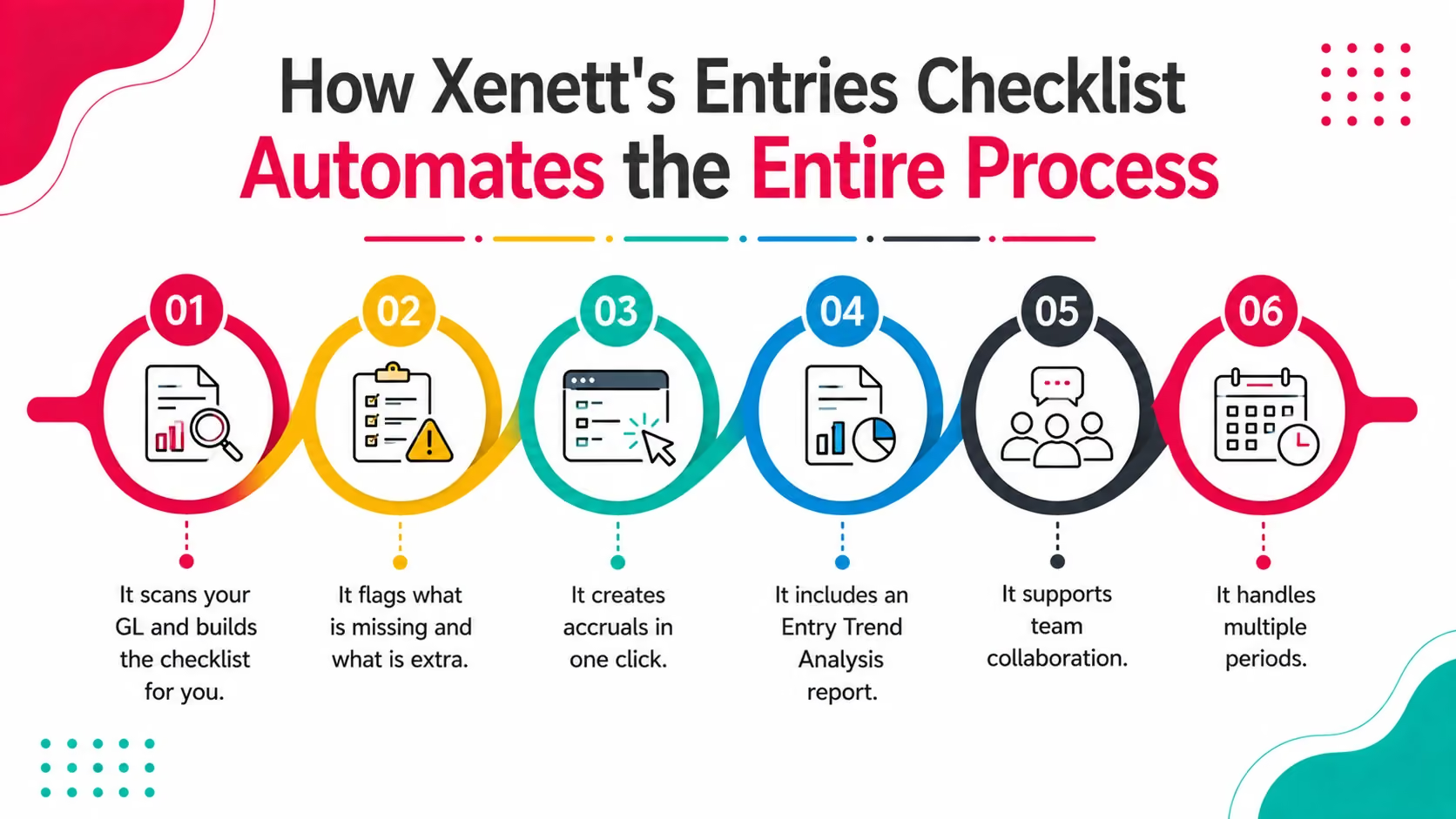
Xenett's Entries Checklist is a review point that sits inside your close process and does the tracking work automatically.
Here is how it works in practice.
It scans your GL and builds the checklist for you.
When you add the Entries Checklist review point for a client, Xenett immediately analyzes the historical general ledger data. It identifies vendor patterns: which vendors appear consistently, in which accounts, and at what frequency.
If a client pays a SaaS subscription every month, Xenett learns that pattern and expects it. You do not have to configure it manually unless you want to add something Xenett has not yet seen in the history.
It flags what is missing and what is extra.
Each checklist entry shows two numbers: expected entries for the period and actual entries found in the GL.
If they match, the status shows as Matched. No action needed.
If they do not match, the status shows as Unmatched. That could mean a missing entry, an extra entry, or a timing issue. You click through to see the underlying transactions and make a call.
It creates accruals in one click.
For unmatched items that need an accrual, you click Create Accrual. Xenett pre-fills the vendor, the account, the accrued expense account, the date, and the amount based on historical data.
You review, adjust if needed, and save. The accrual is created directly in the accounting system. No separate journal entry screen, no copying amounts from a prior period.
If you need a reversal entry, you can enable that option at the same time.
It includes an Entry Trend Analysis report.
The trend report shows vendor transactions across months, broken down by account. If you want to add a checklist for a vendor you have not configured yet, you can review their consistency in the report and add the checklist from there. Xenett auto-fills the configuration based on what it sees.
It supports team collaboration.
Your team can add internal comments on any checklist item, which is useful when a question needs to be escalated before the accrual is created.
It handles multiple periods.
The checklist defaults to the current close period, but you can switch to prior months to review historical data or verify that a correction was posted correctly.
Xenett Entries Checklist vs. Manual Tracking vs. Competitors
How Xenett Can Help
The Entries Checklist is one part of Xenett's broader financial close platform, which is trusted by 1,000+ accounting firms.
The same platform that automates recurring entry detection also handles prepaid expense amortization, payroll accrual automation, and GL consistency review. These features work together inside a single close workflow, so your team is not switching between tools to get through a period.
Firms using Xenett report 70% less review time and a close that runs 3x faster. A large part of that comes from removing the manual checking work that currently sits between data import and final review, which is exactly what the Entries Checklist addresses.
For firms that have consolidated from multiple point tools into Xenett, the average is 4 tools replaced by 1. The Entries Checklist is one of several features that makes that consolidation possible without losing functionality.
FAQs
How do you automate recurring journal entries in accounting?
Automating recurring journal entries requires a tool that can read your general ledger history, identify vendor patterns, and flag when an expected entry is missing. Xenett does this automatically when you add the Entries Checklist review point to a client's close process. It removes the manual tracking step entirely.
What is an entries checklist in accounting software?
An entries checklist is a structured list of recurring transactions that should appear in the general ledger each period. It shows whether each expected entry has been posted or is missing. Xenett builds this checklist automatically from GL data, so you do not need to create or maintain it manually.
What causes missing accrual entries at month-end?
Missing accruals usually happen because the tracking method relies on human memory or a manually maintained spreadsheet. When staff change, workloads increase, or a client's recurring pattern is not well documented, entries get missed. Automated detection removes that dependency.
How do accounting firms manage recurring expenses across multiple clients?
Most firms use a combination of spreadsheets and prior-period comparisons, which works at small volume but breaks down as client count grows. Firms that manage 30 or more clients need a system that flags missing entries automatically rather than relying on reviewers to catch them.
Can accrual entries be created automatically from historical data?
Yes. Xenett's Entries Checklist pre-fills accrual entries using historical GL data, pulling in the vendor, account, amount, and date from prior periods. You review and confirm, but the data entry work is done for you.
What is the difference between a matched and unmatched recurring entry?
A matched entry means the expected number of transactions for that vendor and account equals the actual number found in the GL for that period. An unmatched entry means there is a discrepancy: either a transaction is missing, there are more entries than expected, or the frequency does not align with the configured pattern.
When should recurring entries be reviewed in the month-end close process?
Recurring entry review should happen early in the close, after transaction import and categorization but before final review. Catching a missing accrual at this stage takes minutes to fix. Catching it during manager review creates rework and delays the close.
Conclusion
Recurring journal entries are predictable. Missing them should not be.
The problem most firms have is not that their accountants are careless. It is that the process for catching missing accruals depends on someone knowing to look, having the right spreadsheet open, and having enough context about the client to recognize that something is absent.
That is not a sustainable control at any firm with more than a handful of clients.
Automating recurring entry detection removes the knowledge dependency. When Xenett scans the GL, identifies vendor patterns, and flags what is missing, your team spends time on the exception, not the search. The close moves faster, the review is cleaner, and the risk of a period-end error reaching the client is significantly lower.
If your current process for recurring entries involves any version of "someone checks the spreadsheet," it is worth looking at what a checklist that runs itself actually looks like in practice.
Automating recurring journal entries requires a tool that can read your general ledger history, identify vendor patterns, and flag when an expected entry is missing. Xenett does this automatically when you add the Entries Checklist review point to a client's close process. It removes the manual tracking step entirely.
An entries checklist is a structured list of recurring transactions that should appear in the general ledger each period. It shows whether each expected entry has been posted or is missing. Xenett builds this checklist automatically from GL data, so you do not need to create or maintain it manually.
Missing accruals usually happen because the tracking method relies on human memory or a manually maintained spreadsheet. When staff change, workloads increase, or a client's recurring pattern is not well documented, entries get missed. Automated detection removes that dependency.
Most firms use a combination of spreadsheets and prior-period comparisons, which works at small volume but breaks down as client count grows. Firms that manage 30 or more clients need a system that flags missing entries automatically rather than relying on reviewers to catch them.
Yes. Xenett's Entries Checklist pre-fills accrual entries using historical GL data, pulling in the vendor, account, amount, and date from prior periods. You review and confirm, but the data entry work is done for you.