.svg)

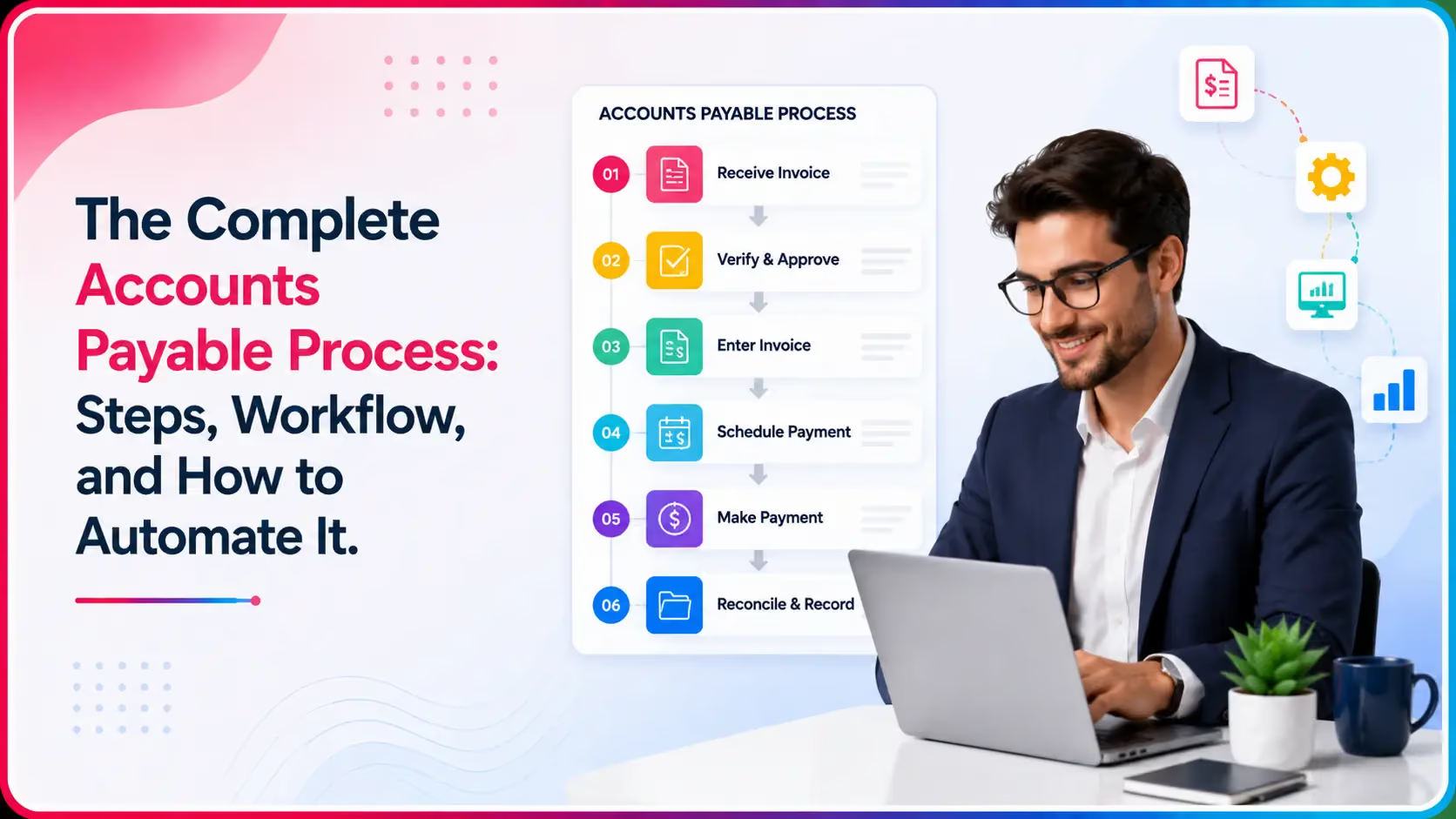
The Complete Accounts Payable Process: Steps, Workflow, and How to Automate It

Ask questions, get summaries, or uncover key takeaways from this article.
Blog Summary / Key Takeaways
• The accounts payable process covers every step from receiving a vendor invoice to making payment and recording it correctly
• A structured AP workflow reduces duplicate payments, late fees, and missed early payment discounts
• The highest-risk steps are invoice approval and payment authorization both need clear ownership and documented sign-off
• AP automation reduces manual data entry, speeds up approvals, and improves cash flow visibility
• Most small business AP processes break down at invoice capture and approval routing are fixable without complex software
• Xenett tracks AP reconciliation status as part of the month-end close workflow across all clients
A vendor sends an invoice. Someone receives it -- maybe in email, maybe in the mail, maybe through a portal. From there, it needs to be verified, approved, coded, recorded, and paid. On the right date, to the right account, for the right amount.
In a small business with five vendors, that is manageable in someone's head. At 50 vendors across 30 clients, it is a workflow that needs structure.
This guide covers every step of the accounts payable process, how to build a workflow that reduces errors and late payments, and where automation delivers the most value.
What Is the Accounts Payable Process?
The accounts payable process is the end-to-end workflow for managing a company's short-term payment obligations to vendors and suppliers -- from receiving an invoice to making payment and reconciling the account.
It encompasses invoice capture, verification, approval, coding, recording in the GL, payment, and reconciliation. In larger organizations, each step is a formal function. In small businesses, most steps are handled by one or two people -- which is where errors accumulate.
The Complete Accounts Payable Process: Step by Step
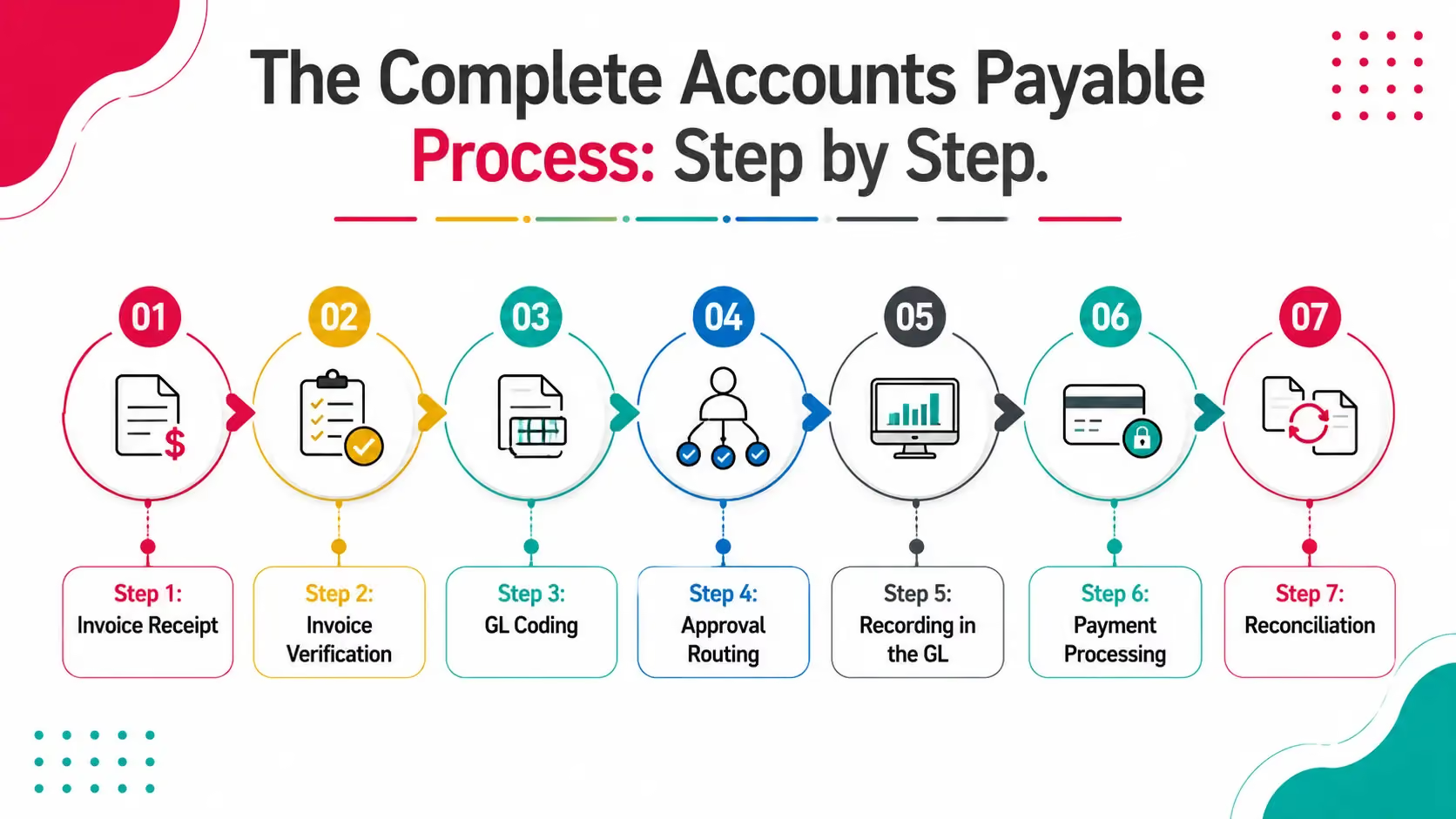
Step 1: Invoice Receipt
The process starts when a vendor invoice arrives. The invoice can come via email, mail, vendor portal, or integrated directly through accounting software.
The first risk point is here: invoices that arrive informally -- forwarded emails, attachments buried in threads, paper invoices on someone's desk -- have a high chance of being lost, duplicated, or processed late.
Best practice: all vendor invoices should go to a single, designated email address or intake point. Never to an individual's personal inbox.
Step 2: Invoice Verification (Three-Way Match)
Before an invoice is approved for payment, it should be verified against the original purchase order and the receiving documentation. This is called a three-way match.
If all three match, the invoice proceeds to approval. If there is a discrepancy -- wrong quantity, different price, duplicate invoice -- it is flagged and the vendor is contacted before any payment is made.
Step 3: GL Coding
The invoice is assigned to the correct GL expense account, cost center, and project (if applicable). Correct coding at this step ensures the P&L reflects expenses in the right categories.
Common coding errors: rent coded to utilities, software subscriptions coded to office supplies, contractor payments coded to salaries. These are usually harmless individually but compound into material misstatements over time.
Step 4: Approval Routing
Before payment is authorized, the invoice needs approval from the appropriate person. Most businesses have tiered approval thresholds.
Approval bottlenecks are the most common cause of late payments. When approvals require back-and-forth email chains or chasing a specific person, invoices sit idle. Clear routing rules and a defined turnaround time fix this.
Step 5: Recording in the GL
Once approved, the invoice is posted to the GL. In an accrual-based system, the entry is: debit the expense account (or asset account if applicable), credit Accounts Payable.
This creates the liability on the balance sheet. The cash has not moved yet -- the business owes money but has not paid it.
Step 6: Payment Processing
Payment is scheduled based on the invoice due date, payment terms, and cash flow. The most common payment terms are Net 30, Net 60, and 2/10 Net 30 (2% discount if paid within 10 days).
Payment methods: ACH/bank transfer (most common), check, credit card, and wire transfer for international vendors.
The entry at payment: debit Accounts Payable, credit Cash.
Step 7: Reconciliation
The Accounts Payable subledger must be reconciled to the GL AP balance monthly. The subledger shows every open invoice and its amount. The GL shows the total AP liability. They must match.
Any discrepancy means an invoice was posted to the wrong account, a payment was not recorded, or a credit was not applied correctly.
Full AP Process
Where AP Processes Break Down
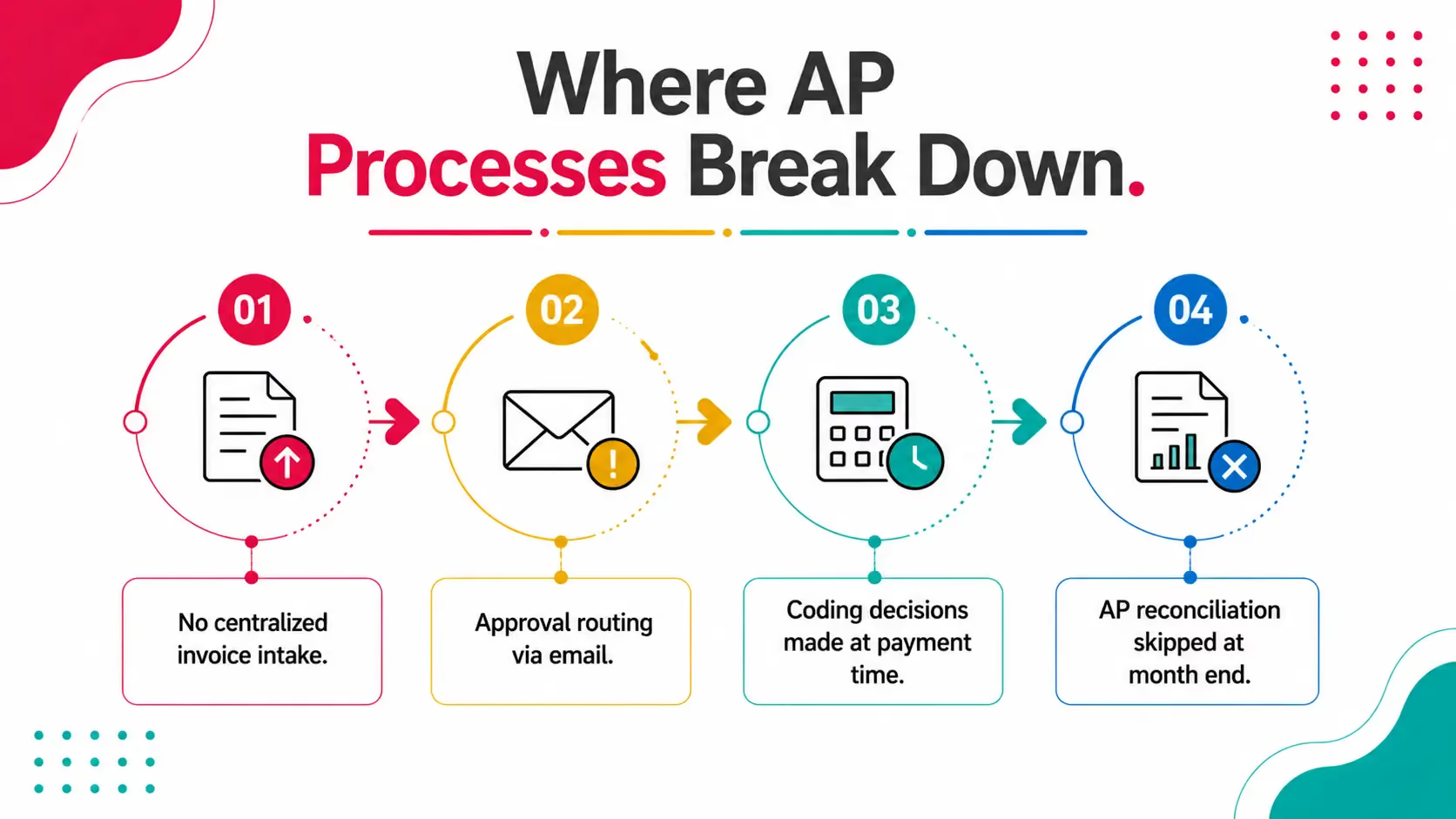
The failure points are consistent across organizations of all sizes.
No centralized invoice intake.
Invoices arriving in multiple places -- individual emails, shared inboxes, physical mail -- inevitably get lost or duplicated. A single intake point with a defined process prevents this.
Approval routing via email.
Email-based approvals have no enforcement mechanism. Invoices sit in an inbox waiting for a response that never comes. A defined approval workflow with escalation rules removes this bottleneck.
Coding decisions made at payment time.
When GL coding is deferred to the payment step, it is rushed and error-prone. Code at invoice receipt when the context is fresh.
AP reconciliation skipped at month end.
An unreconciled AP account is a balance sheet that does not reflect reality. Monthly reconciliation catches payment errors, duplicate entries, and missing credits before they compound.
Real Scenario: A Duplicate Payment Caught at Reconciliation
A manufacturing client received the same invoice from a vendor twice -- once via email and once mailed. Two different staff members processed both invoices. Neither checked for duplicates.
The firm's bookkeeper caught the duplicate during the monthly AP reconciliation -- the subledger showed two open invoices from the same vendor for the same amount, but only one purchase order.
The $4,200 duplicate payment was caught before it was made. Without monthly reconciliation, both would have been paid and recovering the amount from the vendor would have taken weeks.
This is a routine finding at firms with structured reconciliation processes. At firms without it, these errors become past-due vendor disputes.
AP Automation: Where It Saves the Most Time
Full AP automation (tools like Bill.com or Tipalti) is most valuable for businesses processing 50+ invoices per month. For smaller businesses, the highest-value step is automating approval routing -- even a simple shared inbox with defined routing rules is significantly better than ad hoc email chains.
How Xenett Can Help
Xenett tracks AP reconciliation as part of the month-end close workflow. For accounting firms managing clients with accounts payable, Xenett's Close Dashboard shows which clients have reconciled their AP subledger and which have open items.
• Close Dashboard: AP reconciliation status visible across all clients in one screen
• Recurring task automation: monthly AP reconciliation tasks auto-generate for every client
• Structured review: AP reconciliation moves from bookkeeper to reviewer to partner with comments tied to the work
• Document management: vendor invoices and reconciliation documentation stored alongside the close workpapers
Book a 15-minute demo at xenett.com/demo to see how Xenett supports AP reconciliation across your client base.
FAQs
What is the accounts payable process?
The accounts payable process is the workflow for managing a company's vendor payment obligations from invoice receipt through payment and reconciliation. It includes invoice capture, verification, GL coding, approval, recording, payment, and monthly reconciliation.
What are the steps in the AP process?
The seven core steps are: (1) invoice receipt, (2) invoice verification (three-way match), (3) GL coding, (4) approval routing, (5) recording in the GL, (6) payment processing, and (7) AP subledger reconciliation.
What is a three-way match in accounts payable?
A three-way match compares the vendor invoice against the original purchase order and the receiving report to confirm that what was ordered, received, and billed all match before payment is approved.
How do you reconcile accounts payable?
AP reconciliation compares the total of all open invoices in the AP subledger to the Accounts Payable balance on the GL. Any difference indicates a posting error, missing payment, or unapplied credit that needs to be investigated and resolved.
What causes errors in the accounts payable process?
The most common causes are: duplicate invoices processed from multiple sources, incorrect GL coding, approval delays that lead to late payments, and failure to post payments correctly in the GL. A structured process with centralized intake and monthly reconciliation catches most of these.
How does AP automation work?
AP automation tools use OCR to extract invoice data, match it against POs and receiving records automatically, route invoices to the correct approver based on predefined rules, and schedule payments based on due dates and cash flow. Tools like Bill.com and Tipalti cover this workflow for most business sizes.
What is the difference between accounts payable and accounts receivable?
Accounts payable represents money your business owes to vendors -- a liability. Accounts receivable represents money owed to your business by customers -- an asset. Both require regular reconciliation as part of the month-end close process.
Conclusion
A well-structured accounts payable process is not complex. Centralized intake, defined approval thresholds, consistent GL coding, and monthly reconciliation are the four things that eliminate most AP problems.
The firms that get this right for their clients deliver cleaner books, catch errors before they compound, and save their clients from late payment penalties and vendor disputes.
The firms that do not are spending time on year-end cleanup that should have been caught in month three.
See how Xenett supports AP reconciliation as part of the month-end close workflow: xenett.com/demo
The accounts payable process is the workflow for managing a company's vendor payment obligations from invoice receipt through payment and reconciliation. It includes invoice capture, verification, GL coding, approval, recording, payment, and monthly reconciliation.
The seven core steps are: (1) invoice receipt, (2) invoice verification (three-way match), (3) GL coding, (4) approval routing, (5) recording in the GL, (6) payment processing, and (7) AP subledger reconciliation.
A three-way match compares the vendor invoice against the original purchase order and the receiving report to confirm that what was ordered, received, and billed all match before payment is approved.
AP reconciliation compares the total of all open invoices in the AP subledger to the Accounts Payable balance on the GL. Any difference indicates a posting error, missing payment, or unapplied credit that needs to be investigated and resolved.
The most common causes are: duplicate invoices processed from multiple sources, incorrect GL coding, approval delays that lead to late payments, and failure to post payments correctly in the GL. A structured process with centralized intake and monthly reconciliation catches most of these.
AP automation tools use OCR to extract invoice data, match it against POs and receiving records automatically, route invoices to the correct approver based on predefined rules, and schedule payments based on due dates and cash flow. Tools like Bill.com and Tipalti cover this workflow for most business sizes.


.avif)