.svg)

Accounting Workflow Automation: How to Build a Firm That Runs Itself

Ask questions, get summaries, or uncover key takeaways from this article.

Blog Summary / Key Takeaways
- Accounting workflow automation replaces manual coordination task creation, handoffs, reminders, document requests with triggered, system-driven actions
- The highest-value automations are recurring task generation, review handoffs, and client document requests
- Firms that automate workflow report 70% less review time and close 3x faster
- Automation does not replace accountants it removes the coordination work that takes time away from actual accounting
- Xenett is built around accounting-specific workflow automation for bookkeeping and CAS firms
There is a version of your firm where the monthly bookkeeping cycle starts automatically on the 1st.
Tasks are already assigned. Document requests have already gone to clients. When the bookkeeper finishes, the reviewer is notified without anyone sending a message. When review is done, the partner sees it in their queue. The invoice generates when the close is marked complete.
Nobody set any of that up this month. It ran because it ran last month. And the month before.
That is what accounting workflow automation looks like when it is working. This guide explains how to get there.
What Is Accounting Workflow Automation?
Accounting workflow automation is the use of software to trigger, route, and track accounting work automatically removing manual steps from recurring processes like monthly close, client onboarding, tax prep, and review workflows.
It is not robotic process automation or AI. It does not do the accounting.
What it does is handle the coordination layer: creating tasks on schedule, moving work from one stage to the next when conditions are met, sending reminders to clients, and making sure nothing sits idle waiting for someone to notice it.
The accounting still requires human judgment. The routing, scheduling, and handoff mechanics do not.
What Can Be Automated in an Accounting Firm?
Most firms underestimate how much of their workflow is coordination rather than actual accounting work. Here is a breakdown of what automation covers.
Most of these feel small individually. Together they represent two to four hours per client per month of coordination time that your team currently spends and clients do not pay for.
The 5 Highest-Value Automations for Accounting Firms
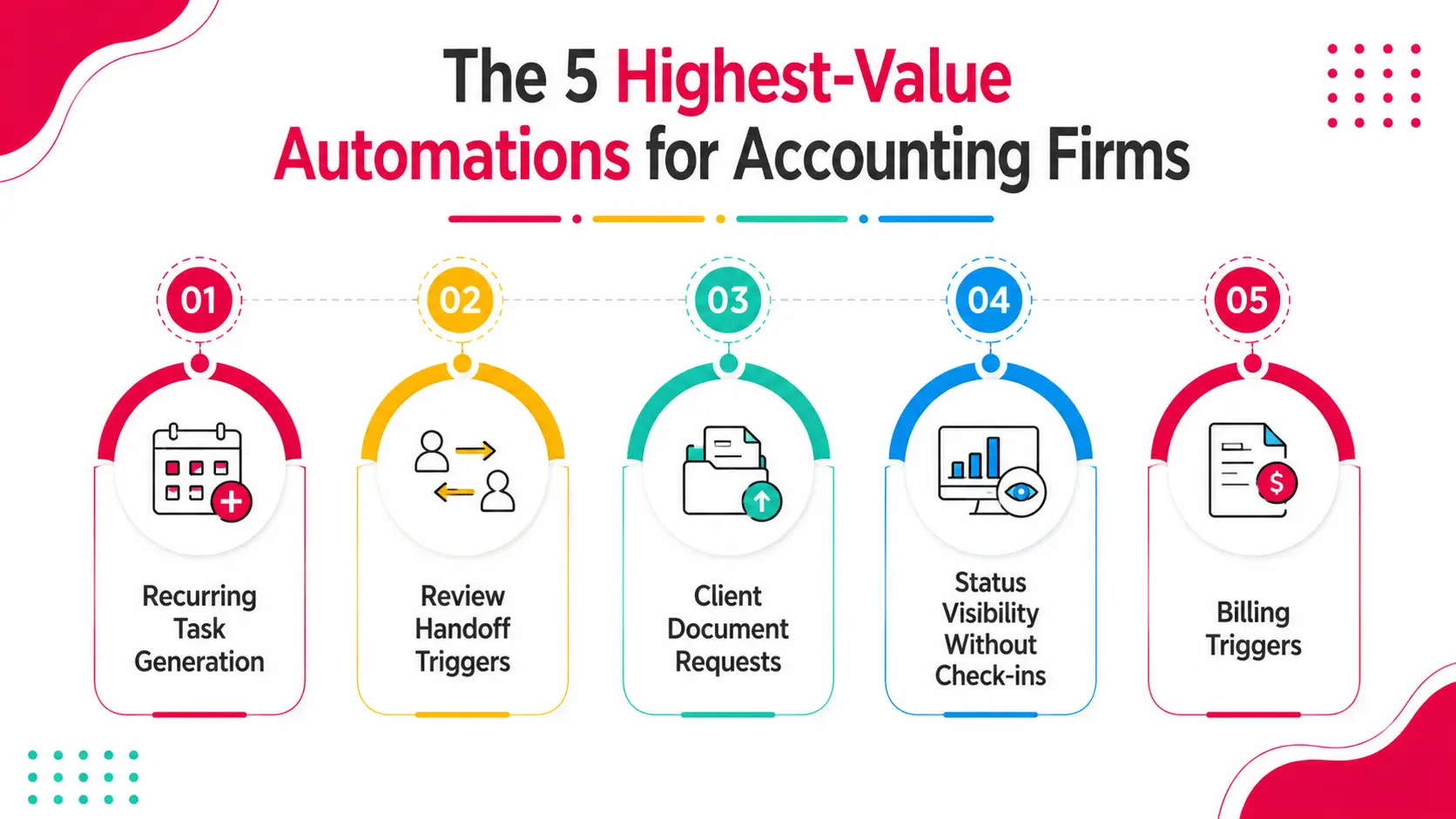
Not all automation delivers equal return. These five produce the most measurable impact.
1. Recurring Task Generation
Monthly bookkeeping, quarterly reviews, year end closes your work repeats on a schedule. Automation means those tasks generate themselves on the right date, assigned to the right person, with the right due dates, for every client.
Without this, someone manually creates or copies tasks at the start of each cycle. At 40 clients, that is meaningful setup time. More importantly, it introduces error tasks get missed, deadlines get set wrong, clients get skipped.
2. Review Handoff Triggers
When a bookkeeper marks work complete, the reviewer should be notified immediately not when the bookkeeper remembers to send a message.
Automated handoffs remove the gap between "work is done" and "reviewer knows it is done." That gap is where most close delays happen. At a typical firm managing 30 clients, those gaps add up to days of lost time per month.
3. Client Document Requests
Waiting for client documents is the number one reason closes run late. Automation sends document requests on schedule at the start of each cycle, tracks what has been received, and sends reminders automatically until everything is in.
This removes the manual follow-up loop entirely. The bookkeeper does not need to chase. The system chases.
4. Status Visibility Without Check-ins
Without automation, finding out where things stand requires asking people. Status meetings, Slack messages, email check-ins -- all of this is overhead that compounds when you have 30 or 40 clients.
Automated status tracking means a partner can open a dashboard and see every client's close status, what is in review, what is overdue, and what is blocked -- without asking anyone.
5. Billing Triggers
Time gets logged throughout the close cycle. When the close is marked complete, the invoice should generate automatically from that time. Manual invoicing is a step that gets delayed, forgotten, or done inconsistently.
Automating the billing trigger means invoices go out consistently and on time.
What Automation Does Not Do
This matters because the expectation needs to be calibrated correctly.
Automation does not replace the judgment in accounting. It does not categorize transactions, detect fraud, assess whether a journal entry is correct, or identify a balance sheet discrepancy. Those require an accountant.
What automation removes is the overhead around the accounting work: the scheduling, the chasing, the routing, the reminding, the tracking. That overhead is real and measurable. But the core service accurate, reliable financial work still requires human expertise.
The goal of workflow automation is not to reduce headcount. It is to allow your existing team to handle more clients with the same or less coordination effort. Growth without proportional hiring is the outcome most firms report.
Manual Workflow vs. Automated Workflow: What Changes
How to Implement Workflow Automation at Your Firm
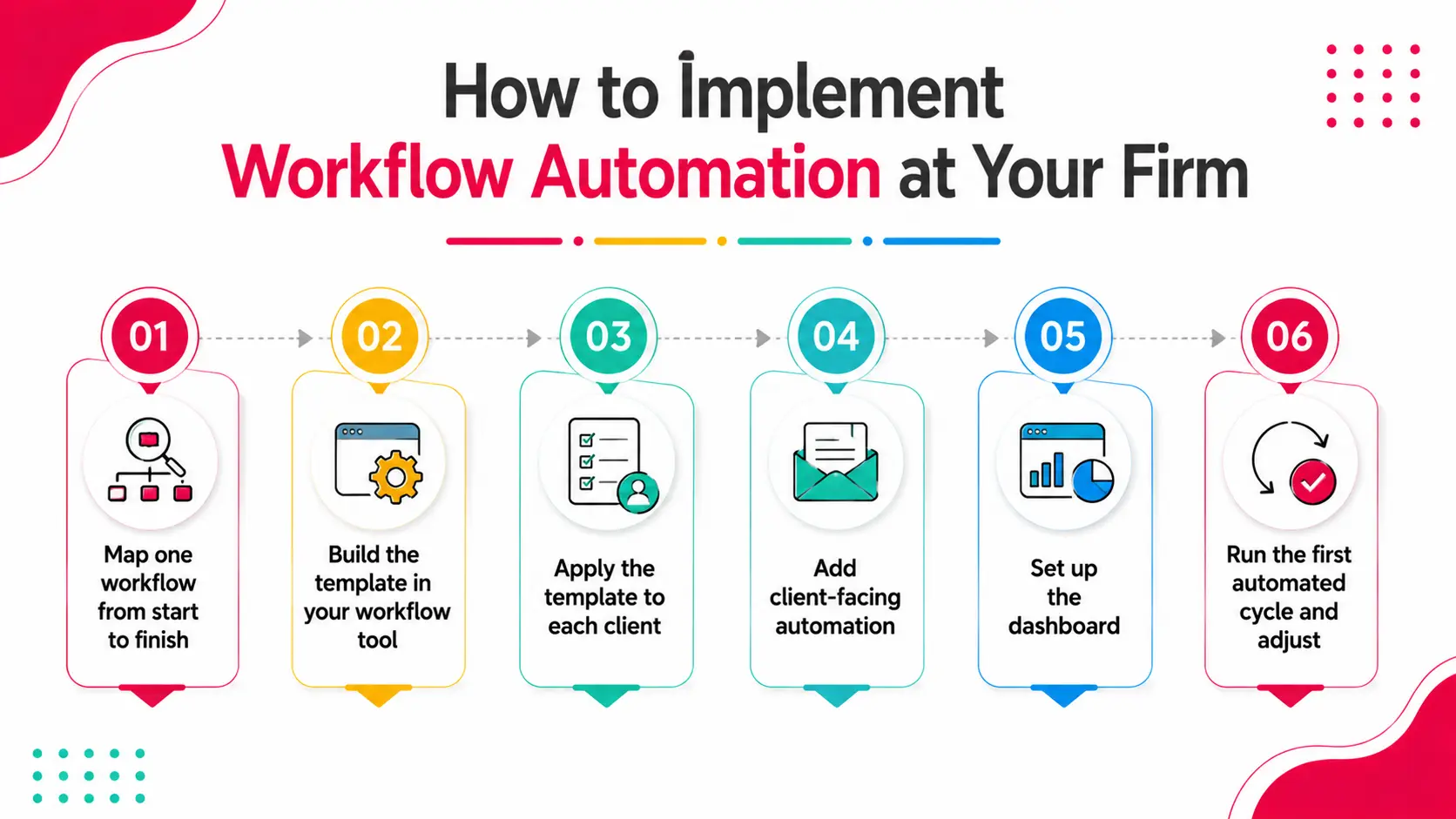
Implementation does not need to be a project. Most firms are operational in one to two weeks.
Step 1: Map one workflow from start to finish. Pick your most common service monthly bookkeeping is the clearest starting point. Write down every step from task creation to client delivery. Who does each step? What triggers the next step? What documents are needed?
Step 2: Build the template in your workflow tool. Create the task sequence as a template. Set the recurring schedule. Define the handoff triggers. This becomes the master template for that service.
Step 3: Apply the template to each client. Assign the template to every client that receives that service. The first cycle will require some adjustment as edge cases surface. That is normal.
Step 4: Add client-facing automation. Set up automated document requests through the client portal. Configure the request schedule and reminder cadence.
Step 5: Set up the dashboard. Configure the status dashboard so the team leads and partners can see all client statuses in real time.
Step 6: Run the first automated cycle and adjust. The first month will surface anything the template missed. Adjust, document, and the second month runs cleaner.
Most firms report that by month three, the automated workflow is running without any manual setup each cycle.
Real Scenario: A 12-Person Firm That Stopped Hiring to Keep Up
A twelve-person bookkeeping firm was adding one new staff member every time they added roughly eight clients. The math on growth was unsustainable headcount was scaling proportionally with client volume.
After analyzing their workflow, the problem was clear: each new client added roughly 90 minutes per month of coordination overhead document chasing, status check-ins, review routing, invoice follow-up on top of the actual bookkeeping work. That coordination could not be delegated easily because it required knowing the status of each client.
After implementing automated workflow through Xenett, that coordination overhead dropped to near zero per client. Document requests went out automatically. Handoffs triggered automatically. The dashboard replaced status check-ins.
They added 14 new clients over the next six months. They hired one new bookkeeper. Not three.
The accounting work scaled proportionally. The coordination overhead did not.
How Xenett Can Help
Xenett is built specifically for accounting and bookkeeping firms that want workflow automation without the complexity of configuring a generic tool.
Key capabilities:
- Recurring task automation - Monthly, quarterly, and annual tasks auto-generate on schedule for every client. No manual setup each cycle.
- Automated handoffs - Work moves from bookkeeper to reviewer to partner automatically when each stage is complete.
- Client portal with automated requests - Document requests go out on schedule. Reminders send automatically. Received documents are tracked and visible.
- Close Dashboard - Real-time status view for every client's close progress across the firm.
- Bookkeeping Dashboard - Firm-level view of every bookkeeping client's status, outstanding items, and review stage.
- Billing triggers - Invoice generation linked to close completion and logged time.
1,000+ accounting and bookkeeping firms use Xenett. Firms report 70% less review time, 3x faster close, and consolidation from four tools to one.
Start your free trial or book a 15-minute demo.
FAQs
What is accounting workflow automation?
Accounting workflow automation uses software to trigger, route, and track accounting work automatically. It handles the coordination layer of a firm's operations recurring task creation, review handoffs, document requests, deadline tracking, and billing triggers without manual intervention.
What accounting tasks can be automated?
Tasks that can be automated include: recurring task generation on a schedule, review and approval handoffs, client document request reminders, status tracking and visibility, invoice creation from logged time, and client onboarding sequences. The actual accounting work reconciliations, journal entries, analysis still requires human judgment.
Does workflow automation replace accountants?
No. Workflow automation removes coordination overhead the scheduling, routing, chasing, and tracking that surrounds the accounting work. The accounting itself still requires trained professionals. The outcome is that accountants spend more of their time on actual accounting and less on coordination.
How much time does workflow automation save?
Firms using structured workflow automation typically report 70% reduction in review cycle time and close cycles that are two to three times faster. The coordination overhead that automation removes typically represents two to four hours per client per month at a typical bookkeeping firm.
What is the best accounting workflow automation software?
For bookkeeping and CAS firms, Xenett is purpose-built for accounting workflow automation with dedicated bookkeeping and close dashboards. Other options include Karbon, Financial Cents, and Jetpack Workflow. The best tool depends on firm size and the complexity of workflows you need to automate.
How long does it take to implement workflow automation?
Most firms are operational within one to two weeks. The first step is mapping your most common workflow, building the template, and applying it to existing clients. The first automated cycle surfaces any gaps, and by month two or three the system is running cleanly.
Is workflow automation only for large firms?
No. Smaller firms often see the fastest return because the coordination overhead represents a higher percentage of their total time. A five-person bookkeeping firm managing 25 clients can recover significant hours per month from automating recurring tasks, document requests, and review handoffs.
Conclusion
Workflow automation does not change the accounting. It changes the environment the accounting happens in.
When tasks create themselves, handoffs happen automatically, clients are chased by the system instead of by your staff, and the partner can see everything without asking the firm operates differently.
Less overhead per client means more capacity. More capacity means growth without proportional hiring. That is the business case for automation.
The technology exists. The firms doing this are not larger or more sophisticated. They just built the structure first.
Book a 15-minute demo with Xenett and see what your firm's workflow looks like when the coordination runs itself.
Accounting workflow automation uses software to trigger, route, and track accounting work automatically. It handles the coordination layer of a firm's operations recurring task creation, review handoffs, document requests, deadline tracking, and billing triggers without manual intervention.
Tasks that can be automated include: recurring task generation on a schedule, review and approval handoffs, client document request reminders, status tracking and visibility, invoice creation from logged time, and client onboarding sequences. The actual accounting work reconciliations, journal entries, analysis still requires human judgment.
No. Workflow automation removes coordination overhead the scheduling, routing, chasing, and tracking that surrounds the accounting work. The accounting itself still requires trained professionals. The outcome is that accountants spend more of their time on actual accounting and less on coordination.
Firms using structured workflow automation typically report 70% reduction in review cycle time and close cycles that are two to three times faster. The coordination overhead that automation removes typically represents two to four hours per client per month at a typical bookkeeping firm.
For bookkeeping and CAS firms, Xenett is purpose-built for accounting workflow automation with dedicated bookkeeping and close dashboards. Other options include Karbon, Financial Cents, and Jetpack Workflow. The best tool depends on firm size and the complexity of workflows you need to automate.